
Google Analytics 4 (GA4) is free, and for a local contractor it answers one question: which of your marketing efforts make the phone ring and the forms fill. Out of the box it counts visits. To make it count leads, you have to tell it which actions matter (a tap on your phone number, a submitted estimate form, a booking), and you have to pair it with a record of which calls turned into paid jobs. This guide walks through that setup for a plumbing, HVAC, roofing, electrical or landscaping website.
TL;DR
- GA4 is the only current version of Google Analytics, and the standard version costs nothing. Its paid tier is aimed at enterprises.
- Setup takes four moves: create a property, add a web data stream, install the Google tag, then confirm data in the Realtime report.
- Mark phone taps, confirmed form submissions and bookings as key events. A page view is not a lead.
- GA4 shows where leads come from. It cannot tell you which ones became paid jobs, so call tracking and a CRM close the loop.
- Review one short report every month and move budget toward the channels that book jobs.
Table of Contents
- What GA4 is and what it costs
- Setting up GA4 on a contractor website
- What to track: the events that matter to the trades
- The reports that show where jobs come from
- What GA4 cannot tell you
- A monthly routine that takes 30 minutes
- Where Coastal Connect fits
- Our perspective
- FAQ
- Sources
What GA4 is and what it costs
GA4 is the current generation of Google Analytics. The older Universal Analytics stopped processing new data on July 1, 2023, so anyone who wants to measure website traffic with Google’s tool has to use GA4. If a tutorial from before that date tells you to look for “bounce rate” and “goals,” it is describing the old system.
The biggest change for a contractor is how GA4 counts. Instead of grouping activity into sessions and page views first, it records individual events: a click, a scroll, a form submission. Search Engine Land’s GA4 guide describes this event-based model. That suits a service business well, because what you care about is an action: someone called, someone asked for a quote.
Is GA4 free?
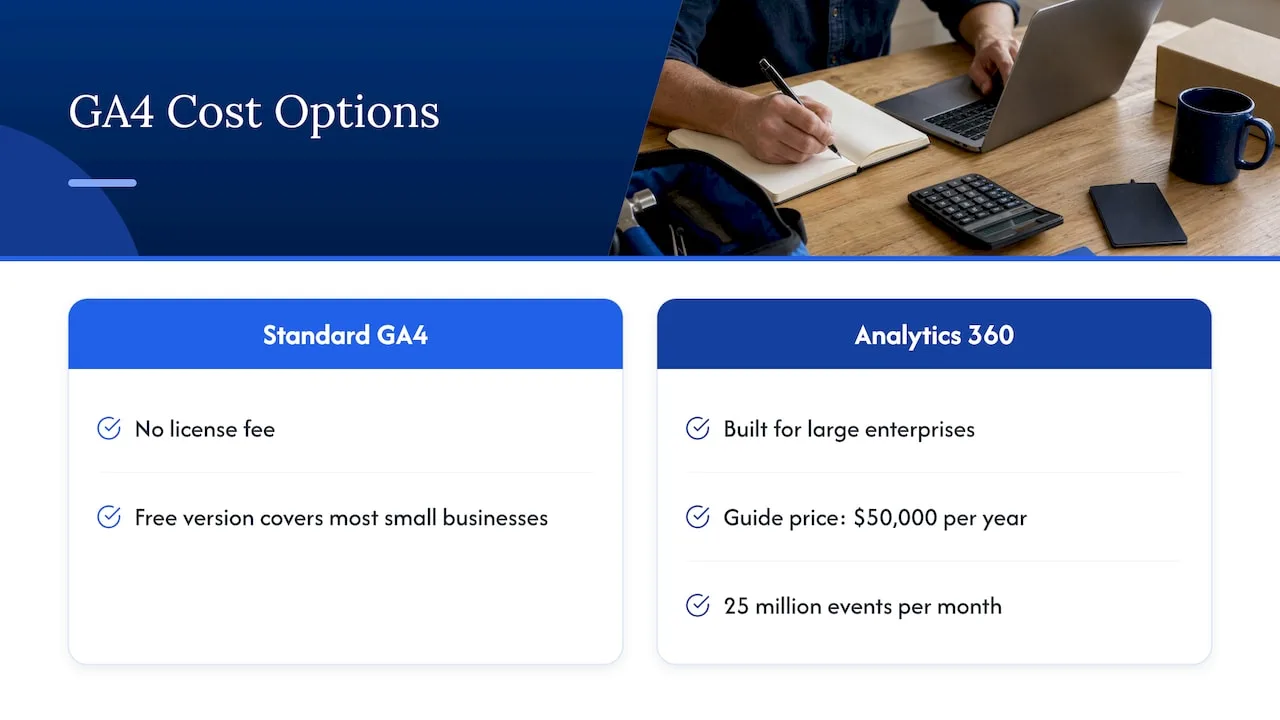
Yes. Standard GA4 has no license fee, and that covers a one-truck shop or a 30-person roofing company. The paid product, Analytics 360, is built for large enterprises. One small-business guide puts its subscription at $50,000 per year for 25 million events per month, and says the free version covers most small and midsize businesses.
The real cost of GA4 is the time it takes to set up correctly and read regularly, or the fee for someone who does it for you. If you are weighing what that kind of help costs, a breakdown of what AI automation costs a small business gives useful reference numbers for the wider set of tools around analytics.
Setting up GA4 on a contractor website
Google’s own setup guide for websites lays out the path. Here it is, with the places contractors usually go wrong.
Step 1: Create the property
Sign in with a Google account that you, the owner, control. Do not let a web designer or past agency create the property under their login, because you could lose your history if the relationship ends. In the property setup you choose a reporting time zone and currency (Eastern time and US dollars for Rhode Island and Massachusetts), an industry category and a business size. You also choose how you intend to use Analytics. Google says that picking “Generate more leads” surfaces the lead-generation reports, which is the right choice for a service business.
Step 2: Add a web data stream
A data stream is the connection between your website and the property. Enter your site’s URL and leave enhanced measurement on. Enhanced measurement records common interactions such as scrolls and outbound clicks without any extra code.
Step 3: Install the Google tag
The Google tag is a snippet of code that sends visits to GA4. Most website platforms have a field for it, or your developer can paste it in the site header. If the site is built on a custom platform, make sure the tag loads on every page, including the thank-you page after a form and any booking page.
Step 4: Confirm data is arriving
Open the Realtime report, then visit your own site from a phone that is not on your office Wi-Fi. If you appear in Realtime within a minute or two, the tag works. Click your phone number and submit a test form while you are watching, so you know exactly what gets recorded and what does not.
Step 5: Limit access and link your tools
Add your office manager or marketing partner as a user with only the permission they need. Google’s beginner guide also suggests linking Google Ads if you run paid search or Local Services Ads campaigns, so you can see the full path from click to inquiry.
What to track: the events that matter to the trades
A contractor website does a small number of jobs. It makes the phone ring, collects a request, and sometimes books an appointment. Track those, and ignore the rest until they matter.
| What happened | What to record | Why it matters |
|---|---|---|
| Visitor taps your phone number on mobile | A click-to-call event on tel: links | Homeowners with a burst pipe or a dead furnace call, they do not fill out forms |
| Visitor submits a quote or estimate form | A lead event fired only after a confirmed submission | Counts real requests, not button presses |
| Visitor books through a scheduler or chat | A booking or chat-start event | Shows which pages move people to commit |
| Visitor starts a financing or estimate calculator | A custom event, if you have one | An early signal of a serious buyer |
Mark these as key events
In GA4, an event becomes a “key event” when you flag it as one of your business goals. Key events feed the conversion columns in your reports, so only the actions that mean a lead belong on the list. Keep the list short: phone tap, confirmed form submission, booking. Eight or ten key events make the reports unreadable.
Fire the lead event at the right moment
The most common contractor mistake is counting a form lead when the visitor clicks “Submit,” even if the form then shows an error. The cleaner approach is to fire the event on the thank-you page or the success message. Then every lead in GA4 matches a real message in your inbox, and you can compare the two numbers at month end to prove the tracking is clean.
Phone taps are not phone calls
A tap on a number means someone intended to call. It does not mean the call connected, lasted longer than ten seconds or reached a person. Treat the tap as a signal and the call record as the fact. This is where call tracking comes in, and we cover it below.
Decide what counts as a lead
Write down, in one paragraph, what a real lead is for your company. A homeowner inside your service area asking for a panel upgrade or a roof replacement is a lead. A supplier pitching you, a job applicant or a request from three counties away is not. Without that rule, your GA4 numbers will look good while your schedule stays empty.
The reports that show where jobs come from
GA4 has dozens of reports. A contractor needs about three.
Traffic acquisition: which channel sent the visitor
Google’s Traffic acquisition report shows where new and returning visitors come from, broken down by session source, medium, campaign and default channel grouping. In plain terms: organic search, paid search, direct, referral, social. Add your key events as columns and you see which channel produces leads, not just visits.
Landing pages: which pages produce inquiries
The landing page report shows the first page people saw. Local SEO practitioners filter it to organic traffic and to location or service pages to see which pages earn visits and then leads, as Search Engine Land’s local dashboards walkthrough describes. For a plumber, that might show that “water heater replacement in Warwick” brings four inquiries a month while a generic “services” page brings none.
A page that gets impressions and no leads is not a success. It is a test. Look at what the page offers, whether the phone number is visible without scrolling on a phone and whether the form is short enough to finish with a thumb.
Location: which towns the traffic comes from
The demographic details report can be switched from country to region or city. That tells you whether your visitors come from Providence, Cranston and Worcester, or from places you do not serve. If you run service area pages, this is your check that they pull in the towns you built them for. Our guide to service area pages that avoid doorway penalties explains how to build those pages so they earn visits and not penalties.
Tag your Google Business Profile link
For many local businesses, the Google Business Profile (the listing that appears in the map results) is the main source of calls. By default, visits from that listing can blend into general organic traffic. Add UTM parameters, short tags appended to a web address, to the website link on your profile, such as a source of google, a medium of organic and a campaign of gbp. Then GA4 can tell you how many visitors came from the profile versus a normal search result. If your profile needs work first, our guides to a plumber Google Business Profile and an HVAC Google Business Profile cover the basics.
What GA4 cannot tell you
GA4 records what happens on your website. It does not see what happens on the phone, in the truck or on the invoice. That leaves three gaps a contractor needs to close.
- Whether a call connected. A tracking number, assigned to each marketing source, shows which ad, listing or page caused each call, and logs the length of the call. Many owners treat a call over 60 to 90 seconds as a real inquiry and review the shorter ones by hand. Duration is a filter, not proof, so mark the outcome in your CRM. Our guide on call tracking that keeps SEO safe lists six checks so that extra numbers do not harm your local listings.
- Whether the lead became a job. GA4 cannot know that the Tuesday caller from a Google search signed a $9,400 roofing estimate. Only your CRM or job records hold that. Offline conversion tracking feeds those sold jobs back to your marketing reports, so you stop paying for leads that never convert.
- What a job was worth. Knowing that one channel brings ten leads and another brings four means nothing until you see that the four averaged larger jobs. Revenue by lead source is the number that decides budget.
Keep customer names, phone numbers and addresses in your CRM, not in GA4. Google’s terms restrict sending personally identifiable information to Analytics, and the CRM is the right home for it anyway.
A worked example
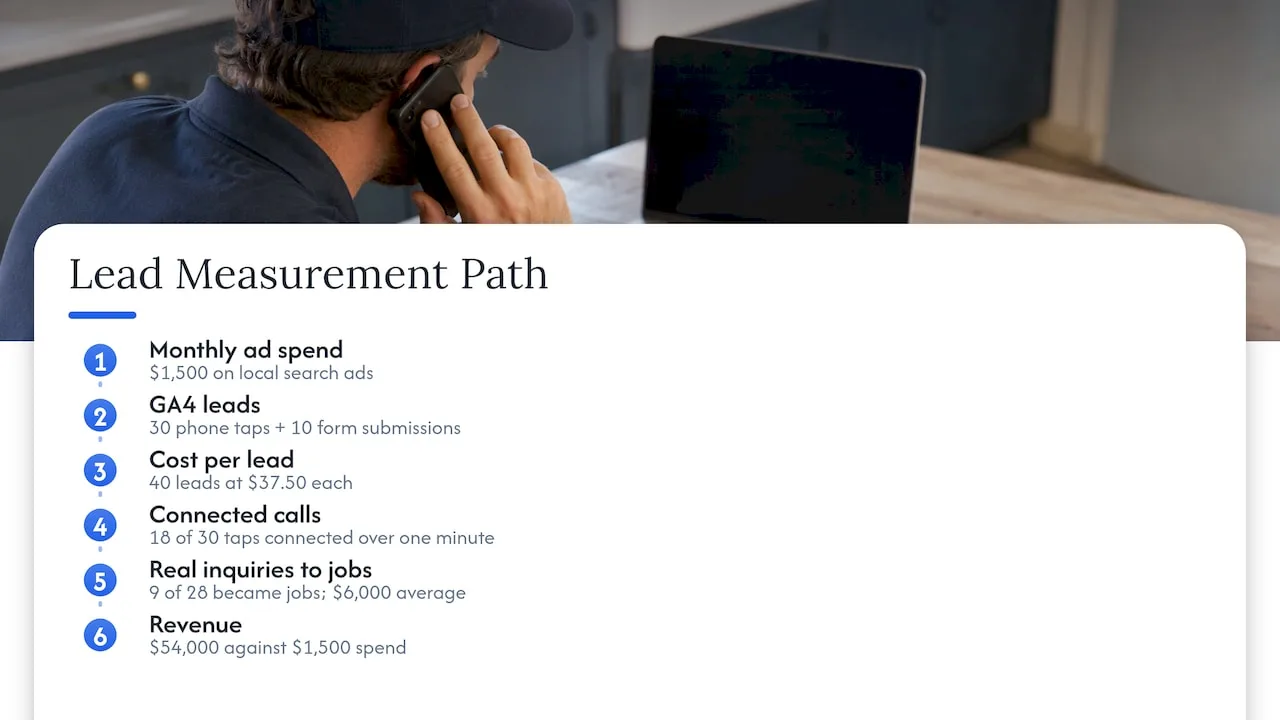
Say an HVAC company spends $1,500 a month on local search ads and gets 30 phone taps and 10 form submissions from them. GA4 says 40 leads, so $37.50 each. Call tracking shows that only 18 of the 30 taps connected for over a minute, and the CRM shows 9 of the 28 real inquiries became jobs averaging $6,000. That is $54,000 in revenue against $1,500 in spend. Without the second and third layers, the owner sees only the first number and may cut a channel that works, or keep one that does not.
A monthly routine that takes 30 minutes
The aim is a short, repeatable review, not a dashboard you open once a year.
- Open the Traffic acquisition report for the last full month and note leads by channel.
- Check your top five landing pages and the leads each produced.
- Compare GA4 form leads with the messages in your inbox. They should match.
- Compare tracked calls with your call log and your answered-call rate.
- In the CRM, mark which leads became booked jobs and what they paid.
- Move budget, time or content toward the channels with the best booked-job rate, not the most clicks.
If you cannot answer the phone every time, step 4 will hurt. Every missed call is a lead you paid to earn and did not get. That is why many contractors pair analytics with after hours answering and a text-back for missed calls.
Where Coastal Connect fits
Analytics tells you what happened. It does not answer the phone, follow up with the homeowner who did not book or ask for the review after a finished job. We build websites, local SEO, call handling and follow-up as one system for contractors in Rhode Island and Massachusetts, so the leads you measure in GA4 are leads you actually capture.
Our websites that book jobs are designed to work as lead generation engines. Local SEO and Google Business Profile work brings the right local searchers to them, and our 24/7 AI voice agent handles inbound calls so they are not lost after hours. Plans start with Foundation at $597 per month, Growth is $1,297 per month and Scale is $2,497 per month, all listed on our pricing page.
If you would rather spend your time on jobs than reports, start with the Coastal Connect overview and see which plan matches how many trucks you run.
Our perspective
Most contractors we talk to do not have a traffic problem. They have a capture problem. The website gets visits, the phone rings during a job, nobody calls back, and the lead goes to the next company on the map.
GA4 is worth setting up because it makes that visible: which pages bring leads, which towns they come from, which channel is worth the budget. But the report is only half of the answer. The other half is what happens to the lead in the first five minutes, and whether the job gets booked.
That is why we work on the whole chain for contractors in Rhode Island and Massachusetts: a site built to convert, local search that fits how homeowners in your towns look for a plumber or roofer, calls answered around the clock, follow-up that runs on its own and reviews requested after the job. When those pieces connect, the numbers in your analytics start to mean booked work.
Our advice: set up GA4 once, set it up correctly, and review it monthly. Then put your effort into the steps that follow the click.
Tyson
FAQ
Is Google Analytics being discontinued?
No. Universal Analytics, the older version, stopped processing new data on July 1, 2023, and GA4 replaced it. If your site still has an old tracking code, it is collecting nothing and needs a GA4 property.
How much does GA4 cost for a small contractor?
Standard GA4 is free. The paid Analytics 360 product is aimed at large enterprises, with one small-business guide listing a starting fee of $50,000 per year. A contractor’s real cost is the setup and review time, or the monthly fee for someone to manage it.
How do I know GA4 is working?
Open the Realtime report and visit your site from your phone. You should appear within a minute or two, as Google’s setup guide describes. Then tap your phone number and send a test form, and confirm both show up as events.
Does GA4 track phone calls?
Only the taps on your number, and only after you set up an event for them. It does not know whether the call connected or turned into a job. Tracking numbers and a CRM fill that gap.
Which GA4 reports should I check each month?
Start with Traffic acquisition for leads by channel, the landing page report for which pages bring inquiries, and the location view for which towns send visitors. Add your CRM’s booked-job data to see which sources pay.
Sources
- What’s happening with Google Analytics? (Google Analytics Help)
- Set up Analytics for a website and/or app (Google Analytics Help)
- Analytics for beginners and small businesses (Google for Developers)
- Traffic acquisition report (Google Analytics Help)
- Google Analytics 4 (GA4): The ultimate guide (Search Engine Land)
- 5 useful GA4 dashboards for local SEO (Search Engine Land)
- Google Analytics for Small Businesses: Metrics and Set-Up (Business.com)
- What AI Automation Actually Costs a Small Business (Krastor)