Offline conversion tracking is the process of matching a sale that happens off your website (a phone call, a store visit, a signed contract) back to the ad click that started it. The immediate action that makes everything else possible is simple: start capturing click IDs on landing and persist that data, along with hashed first-party contact info, in your CRM. Do that first, and every bidding algorithm you run gets smarter because it can finally see which clicks turned into revenue, not just form fills.
TL;DR:
- Effective offline conversion tracking requires capturing and persisting click IDs or hashed contact info on landing pages to enable accurate sale attribution.
- Timing is critical, as click IDs like GCLID expire quickly within platform-specific upload windows, making prompt data upload essential for accurate match rates.
- Combining GCLID uploads with enhanced conversions using hashed PII offers the most reliable method, especially for long sales cycles and complex customer journeys.
- Platform-specific rules vary, with Google favoring GCLID and Data Manager API, Meta relying on fbclid and hashed PII, and Microsoft using MSCLKID, requiring tailored configurations.
- Contractors benefit most from call tracking and CRM automation, which deliver higher return on investment by automating ID collection and reducing missed leads without manual data exports.
Table of Contents
- What Are Offline Conversions and Why Do They Matter?
- How Does Offline Conversion Matching Actually Work?
- A Step-by-Step Offline Conversion Tracking Checklist
- What Are the Platform Rules for Google, Meta, and Microsoft?
- How Should You Handle PII and Hashing Safely?
- How Do You Test and Troubleshoot Offline Conversions?
- How Contractors Put This Into Practice
- What I’ve Learned Watching This Break Down
- Get Offline Conversion Tracking Built Into Your Website From Day One
- Where to Go Deeper on Offline Conversion Setup
- Sources
- FAQ
What Are Offline Conversions and Why Do They Matter?
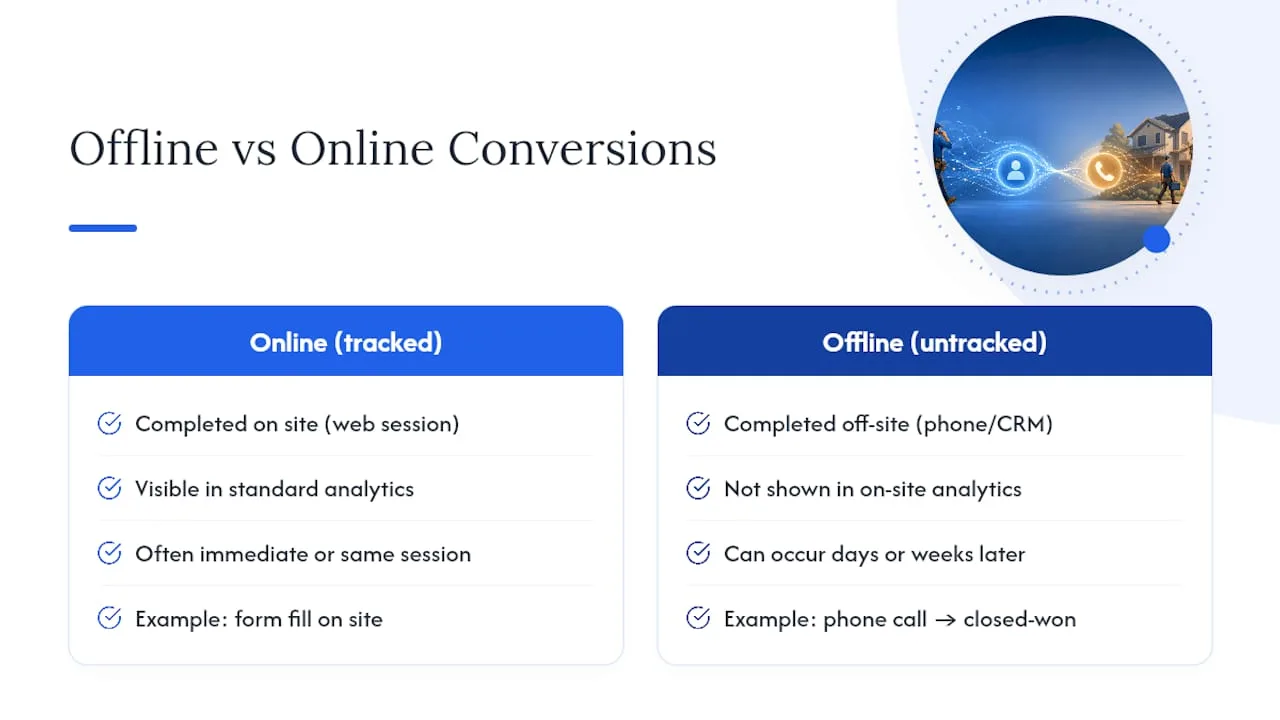
Most of the real money in home services, B2B, and high-ticket retail closes away from a screen. A homeowner clicks a Google ad, calls three days later, and books a $9,000 roof replacement. A CRM shows a deal moving to “closed-won” two weeks after someone filled out a contact form. None of that shows up in standard on-site analytics, which only sees the click and maybe a lead form submission.
That gap matters because ad platforms optimize toward whatever signal you feed them. If Google Ads or Meta only sees form fills, it will chase more form fills, even the low-quality ones that never turn into paying customers. Feed it actual revenue data instead, and Smart Bidding starts favoring the keywords, audiences, and placements that produce closed deals.
Offline conversions differ from delayed online conversions in one key way: the completing action happens outside any tracked digital surface entirely, not just later inside the same web session.
How Does Offline Conversion Matching Actually Work?
Every offline tracking method comes down to answering one question: how do you connect an anonymous ad click to a person who later bought something in a completely different channel? There are four main approaches, and they are not interchangeable.
- GCLID and click ID uploads. When someone clicks a Google ad, the URL carries a unique Google Click ID. Capture that string on landing and you have a deterministic match, meaning the platform knows with certainty which click led to the sale, once you upload it later.
- Enhanced conversions with hashed PII. When you don’t have a click ID (long sales cycles cause GCLIDs to expire, for instance), you fall back to hashed email and phone number matching. Google explicitly recommends running enhanced conversions for leads alongside GCLID uploads rather than choosing one or the other.
- Call tracking. Dynamic phone numbers assigned per ad session let call-tracking providers stamp incoming calls with the originating click ID, so a 90-second qualifying call can be uploaded as a conversion event.
- POS and CRM server-to-server postbacks. Point-of-sale systems and CRMs can fire a webhook the moment a deal closes, pushing the event to an ad platform’s API automatically instead of waiting for someone to export a spreadsheet.
Timing matters more than most advertisers realize. GCLIDs have a limited shelf life, and every platform enforces an upload window. Miss it, and that conversion is gone for good, no matter how good your record-keeping was.
A Step-by-Step Offline Conversion Tracking Checklist
Building this pipeline in the right order prevents the most common failure: doing steps two and three before step one is solid, then wondering why match rates are terrible.
- Capture the click ID on landing. Read the gclid, fbclid, or ttclid URL parameter the instant a visitor lands, and store it in a cookie or a hidden form field so it survives to the contact form submission.
- Persist the click ID on both the contact and the opportunity record. This is the step almost every team skips. If the click ID lives only on the contact, many CRM workflows silently drop it the moment a new deal or opportunity is created downstream.
- Configure qualification triggers. Decide what counts as a real conversion: a call over 60 seconds, a deal moving to a specific pipeline stage, a payment clearing at the register. Vague triggers produce noisy data.
- Choose your push method and format. A CSV upload works for low volume. An API connection through Google’s uploadClickConversions or a direct CRM integration works better at scale, since it removes the manual export step entirely, following the same capture, persist, trigger, push structure most reliable pipelines use.
- Test with a small batch, deduplicate, and monitor match rates before rolling out fully. Use a stable order ID or event ID as your deduplication key across every platform you push to, so the same sale never gets counted twice.
Pro Tip: Run GCLID uploads and enhanced conversions in parallel from day one, not as a fallback you build later. Long sales cycles will expire some GCLIDs before the deal closes, and hashed PII catches what the click ID misses.
What Are the Platform Rules for Google, Meta, and Microsoft?
Each ad platform has its own match keys, upload mechanics, and windows, and they are not interchangeable in practice, even though the underlying idea is identical.
- Google Ads prefers the GCLID as its deterministic match key and supports it through uploadClickConversions, with enhanced conversions for leads as the hashed-PII safety net. Google is migrating offline conversion uploads to its Data Manager API, so anyone building a new pipeline should build against that path rather than a legacy one. Upload windows are time-limited; verify current policy before assuming an old lead is still eligible.
- Meta uses the Conversions API for offline events, matching on fbclid or the fbc cookie value along with hashed PII. Click-based attribution windows on Meta are shorter than many advertisers expect, so a sale that closes weeks after the click leans more heavily on hashed email and phone matching than on the click ID itself.
- Microsoft Ads uses its own MSCLKID parameter, with upload pathways that mirror the Google model closely enough that teams already running Google offline conversions can usually extend the same capture logic.
When a click ID is missing entirely, whether from an expired session or a stripped URL parameter, hashed PII becomes your only option, and match rates drop accordingly. That is the trade-off: click IDs are precise but fragile, hashed PII is durable but fuzzier.
How Should You Handle PII and Hashing Safely?
Hash every piece of personal data with SHA-256, the format platforms expect, before it ever leaves your system. Never send raw email addresses or phone numbers to any ad platform, even over an encrypted connection. Treat hashed PII as your fallback path, not your primary method. GCLID and other click IDs are deterministic and should be your first choice whenever they’re available.
Limit how long you retain raw contact data before hashing, and restrict who inside your organization can access it. Keep your consent language aligned with each platform’s terms, since Google and Meta both require that offline conversion data come from customers who agreed to marketing communication or data processing in the first place.
How Do You Test and Troubleshoot Offline Conversions?
The single most useful diagnostic is a reconciliation test: pull your CRM’s closed-won deals for a given period and compare that count against what the ad platform reports as offline conversions for the same window. A healthy pipeline lands within roughly 10% variance between the two. Anything wider than that means something in the pipeline is broken.
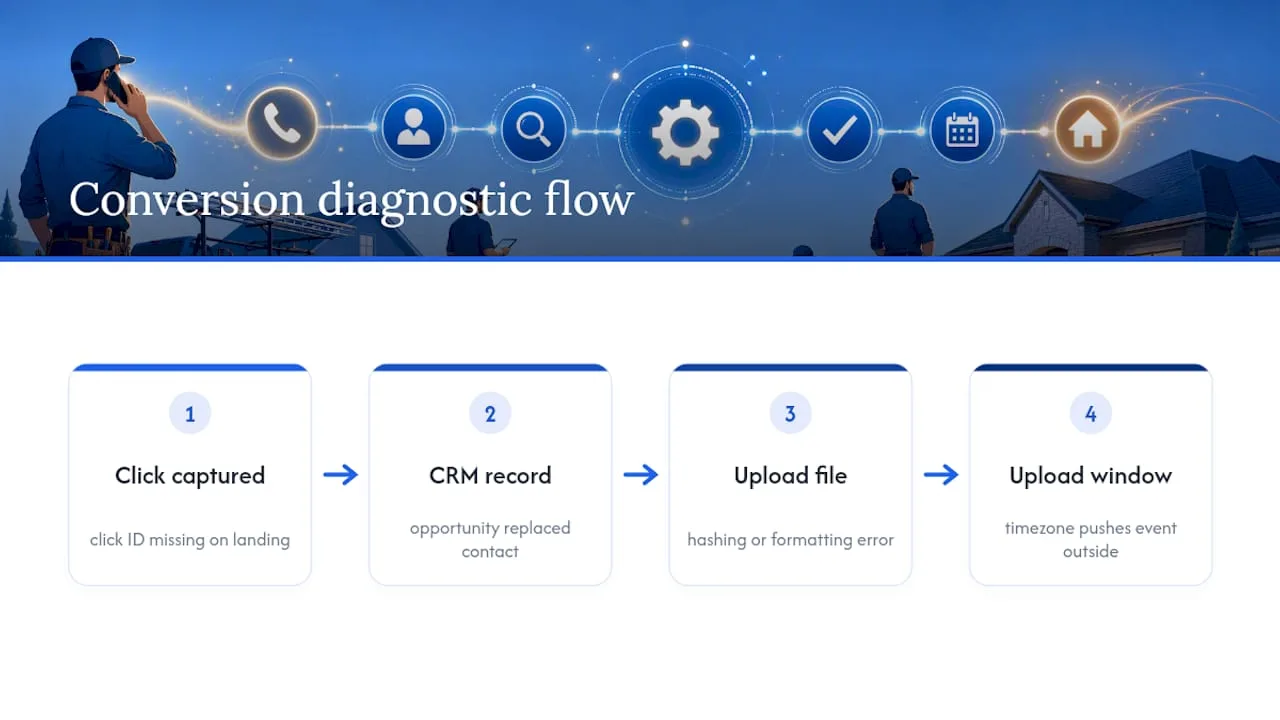
The usual suspects, in order of frequency: a missing click ID because it was never captured on landing, a click ID that got lost when a new opportunity record replaced the original contact record, a hashing or formatting error in the upload file, or a timezone mismatch that pushes an event outside the eligible upload window.
Google’s enhanced conversions diagnostics and Meta’s Events Manager both surface match-rate and formatting issues directly, and checking them should be a standing step in any rollout, not a last resort. Run small test batches, compare against your CRM, isolate the root cause, fix it, then scale up.
How Contractors Put This Into Practice
For phone-driven trades like plumbing, HVAC, electrical, and roofing, call tracking and CRM disposition data typically deliver the highest return of any tracking investment a contractor can make, since so much of the buying decision happens on a phone call rather than a web form. Coastal Connect builds this into contractor websites directly: click IDs get captured at landing, persisted across contact and opportunity records, and pushed back to ad platforms through automated postbacks instead of manual spreadsheet exports.
The operational payoff is fewer missed leads and cleaner match rates, since missed-call text-back workflows catch calls that would otherwise vanish with no record at all.
What I’ve Learned Watching This Break Down
A CSV upload is fine for a contractor testing the waters with a handful of monthly leads. It falls apart the moment volume grows or a sales cycle stretches past 30 days, because nobody remembers to keep exporting it. The real question isn’t whether to build a webhook pipeline. It’s how much manual reporting you’re willing to tolerate before the missed revenue signal costs more than the engineering did.
— Tyson
Get Offline Conversion Tracking Built Into Your Website From Day One
Coastal Connect is the alternative to hiring a marketing agency and a developer separately to solve this. Contractors in Rhode Island and Massachusetts get websites that book jobs with click ID capture built into the landing pages themselves, paired with missed-call text-back and CRM automation that persists those IDs through to the closed deal, plus 24/7 call handling through an AI voice agent so qualifying calls never go unlogged.
That means you stop manually exporting spreadsheets and start feeding your ad platforms real revenue signals automatically. Plans start with Foundation at $597 per month, scaling up to Growth and Scale for contractors ready to automate more of the pipeline. Check the pricing page and see which plan fits your call volume.
Where to Go Deeper on Offline Conversion Setup
Google’s own offline conversion import documentation covers the Data Manager API migration in detail and should be your first stop for exact upload specs. For verifying server-side postbacks before they hit production, a tool like NatProxies helps confirm ad delivery and testing accuracy from clean environments. Meta’s Conversions API documentation covers the offline events endpoint for anyone building a Meta-side pipeline in parallel.
Sources
- About offline conversion imports - Google Ads Help
- How to Track Offline Conversions from Online Ads (Hyros)
- Offline Conversion Tracking: Complete Guide to Tracking Offline Conversions (SignalBridge)
FAQ
Can I Run Google Ads Without Conversion Tracking?
Yes, technically, but Smart Bidding has nothing to optimize toward beyond clicks and impressions, so performance tends to plateau or drift toward low-value traffic. Without conversion data of any kind, you’re bidding blind on which keywords actually produce revenue.
How Do You Set Up Offline Conversion Tracking in Google Ads?
Capture the GCLID at landing, persist it in your CRM on both the contact and opportunity records, then upload it back to Google through uploadClickConversions or the Data Manager API once the sale closes. Run enhanced conversions for leads alongside it as a hashed-PII backup for cases where the GCLID expires.
How Do You Track Conversions From Offline Sales?
You match the offline event, a phone sale, an in-store purchase, or a CRM closed-won deal, back to its originating ad click using either a persisted click ID or hashed contact information. A pipeline like Coastal Connect builds handles this automatically through CRM automation and call tracking rather than manual spreadsheet uploads.
When Should I Use Offline Conversions Instead of Standard Tracking?
Use offline conversion tracking whenever the actual sale happens somewhere your website analytics can’t see it, a phone call, a showroom visit, a signed contract weeks after the initial form fill. If your buying process closes entirely online in one session, standard on-site conversion tracking is usually sufficient on its own.
What Does Offline Conversion Tracking Setup Cost With Coastal Connect?
Pricing depends on which plan fits your lead volume and automation needs, starting at $597 per month for Foundation and scaling up through Growth and Scale. Current plan details and add-ons are listed on the pricing page.