Local Services Ads are pay-per-lead ads that put your business profile in front of nearby customers searching for your trade, and you pay for the calls, messages, and bookings they generate rather than for clicks. They work best for contractors who can answer fast, handle bookings without delay, and meet Google’s verification requirements. If your intake is slow or inconsistent, fix that first.
TL;DR:
- Effective LSAs require a fast, reliable intake process, with response times under five minutes for calls and fifteen for messages, to maximize lead conversion.
- Proper verification, including licenses, insurance, and background checks, must be maintained as ongoing requirements, not one-time hurdles, or ads will stop serving.
- Lead costs vary significantly based on location, trade, and lead type, with message leads typically costing less than phone calls, allowing for budget stretching.
- Combining LSAs with Search Ads for more complex projects offers better control and higher-quality prospects, especially for high-margin jobs.
- Regularly reviewing and updating your profile with fresh photos, accurate service areas, and solicited reviews boosts ranking and lead quality over time.
Table of Contents
- What Local Services Ads are and how they work
- Eligibility and screening: verification steps, documents, and common pitfalls
- Step-by-step setup: creating an LSA profile and going live
- Budgeting, bidding, and billing: how lead charges work
- Manage leads and inbox: routing, response time, and disputes
- Optimization tactics that improve LSA performance
- When to use Local Services Ads versus Google Search Ads
- Operational playbook: turning LSA leads into booked jobs
- Legal considerations and compliance beyond basic verification
- How to measure and analyze Local Services Ads performance
- Comparing Local Services Ads with other local advertising platforms
- Common pitfalls and troubleshooting tips for Local Services Ads
- Author perspective: practical priorities for contractors running LSAs
- How we help contractors get more from Local Services Ads
- FAQ
- Sources
What Local Services Ads are and how they work
Local Services Ads (LSAs) are profile-based local lead ads. Instead of bidding on keywords and sending searchers to a landing page, your business profile appears directly in search results when someone nearby looks for your trade, and Google handles the matching. According to Google’s own explanation of the product, these ads can appear prominently for relevant searches, and customers can call, message, or book directly from the listing.
Your profile carries the weight that a landing page would in a traditional campaign. It displays your services, service area, hours, photos, customer reviews, a short business bio, your phone number, and, where applicable, a Google Verified badge. That badge signals to searchers that your license, insurance, and background check have cleared Google’s review.
Three lead types drive the channel:
- Phone leads, where Google forwards the call through a tracking number so you can confirm it came from the ad.
- Message leads, where a customer texts through your profile instead of calling.
- Booking leads, available in the US and Canada, where a customer schedules a job directly without a conversation first.
You pay for qualifying leads, not impressions or clicks, and Google runs an initial validation on each lead before it bills you. A call that disconnects in two seconds or a spam message typically does not count, though you still need to review every lead against the dispute criteria to catch ones that slip through. The model rewards contractors who can act on a lead within minutes, because LSA leads tend to be shopping multiple providers at once.
Eligibility and screening: verification steps, documents, and common pitfalls
Before you can run LSAs, Google checks whether your trade and service area are supported, since categories and coverage vary by region. The getting started and eligibility guide walks through the process, and it starts with confirming eligibility before you invest time in a profile.
Once you confirm eligibility, expect to submit:
- Business registration details, including your legal business name and address.
- Trade-specific licenses that match the categories you want to advertise under.
- A certificate of insurance showing active coverage at the levels your category requires.
- Identity and background-check documentation for the business owner and, in many trades, individual technicians.
- A D-U-N-S number in categories where Google requires business identity verification through Dun & Bradstreet.
Background checks are not a one-time hurdle. Google treats verification as ongoing account hygiene, which means your account can be re-evaluated later and you may be asked for updated documents, especially if your insurance lapses or a license renews. Letting paperwork expire is one of the most common reasons an otherwise healthy account suddenly stops serving ads.
While you’re completing onboarding, Google may let you run pre-badge ads, which display without the verified badge while your documents are under review. This keeps leads flowing during the screening window, but pre-badge availability depends on category and location and is not unlimited.
Pro Tip: Set a recurring calendar reminder to check insurance expiration dates and license renewal windows well before they lapse, since an expired document can pause your ads with little warning.
Step-by-step setup: creating an LSA profile and going live
Setting up Local Services Ads is sequential. Skipping a step usually means backtracking later, so work through it in order.
- Confirm your trade category and service area are eligible under Google’s getting started guide, then sign in with the Google account you want tied to the business.
- Claim or link your Google Business Profile so your business information, hours, and reviews stay consistent across both products.
- Fill in your profile fields: the specific services you offer (not just your trade category), your service area by city or zip code, business hours, photos of completed work, and a headshot or team photo if the interface requests one.
- Submit your licenses, insurance certificate, and any identity or background-check materials your category requires.
- Complete the business verification and, where applicable, individual worker background checks.
- Set your average weekly budget and lead preferences, including which lead types (phone, message, booking) you want to accept.
- Review your profile once more for accuracy, then go live, watching for the pre-badge status to confirm your ads are serving.
Photos matter more than most contractors expect. A profile with recent job photos and a filled-out bio reads as more credible to a searcher comparing three or four providers at once, and it gives Google more signal about the kind of work you actually do. Leave a field blank and you are leaving ranking signal on the table along with it.
Budgeting, bidding, and billing: how lead charges work
LSAs run on an average weekly budget rather than a fixed daily spend. Google calculates a monthly max from that weekly average, which means spending can run higher than your average in a busy week and lower in a slow one, but your total for the month will not exceed the calculated cap.
Google does not publish a universal lead price: costs vary by location, job category, lead type, and the bidding mode you choose, according to Google’s leads documentation. A plumbing emergency call in a dense metro area will cost differently than a landscaping estimate request in a rural service area.
Two bidding modes control how your budget gets spent:
- Maximize Leads aims to generate as many qualifying leads as possible within your budget, which suits contractors who want volume and can staff up to handle it.
- Max Per Lead lets you set a ceiling on what you’ll pay for an individual lead, trading some volume for cost control.
A few factors push lead prices up or down: how competitive your trade is in your area, how narrow or broad your service area is, and which lead type a customer chooses. Message leads typically cost less than phone leads, per Google’s optimization guidance, so testing message leads can stretch a tight budget further. Check your spend weekly rather than monthly so a sudden spike in lead price does not blow through your cap before you notice.
Manage leads and inbox: routing, response time, and disputes
Every lead lands in your LSA inbox with a timestamp, the lead type, and in the US, a call recording you can review for quality. Notifications can route to email, the Local Services app, or both, so pick whichever channel your team actually checks in real time.
- Phone leads arrive through a Google forwarding number, which lets the system attribute the call and lets you confirm it came from the ad before you bill time against it.
- Message leads show the full text thread, and your displayed response time can affect how often customers choose to message you versus a competitor, according to Google’s lead management guidance.
- The dispute workflow lets you flag a lead as a wrong number, outside your service area, or a duplicate, and Google reassesses it against the lead inbox record.
- Automated credits can apply after a successful dispute, often within 30 days, though some verticals are excluded from automated credits and need manual review instead.
- Pause and scheduling controls let you stop serving ads temporarily when your crew is fully booked, which protects your ranking better than letting calls go unanswered.
Disputing every mediocre lead is a mistake. Reserve disputes for leads that clearly fail the criteria: wrong number, outside your area, or an obvious duplicate. Disputing a legitimate lead that simply didn’t convert into a job wastes your time and doesn’t result in a credit.
Optimization tactics that improve LSA performance
Ranking in LSAs responds to signals you can actually influence, not just budget. Reviews carry real weight: Google’s reviews and ratings documentation notes that both star rating and review count factor into how often your profile surfaces, which means review generation belongs in your ad management routine, not as an afterthought.
A short list of adjustments tends to move performance:
- Request a review within 24 hours of job completion, while the work is still fresh in the customer’s mind.
- List your actual services individually rather than relying on a broad trade category, so your profile matches specific searches.
- Set your service area to match where you can realistically arrive within your normal response window, not your full theoretical coverage radius.
- Turn on message leads and test them against phone-only leads for a few weeks to compare cost and conversion.
- Upload new job photos monthly instead of leaving the same five photos from your initial setup.
Response speed is the single biggest lever most contractors under-invest in. Google states directly that failing to answer calls or respond to messages regularly can affect your ad ranking, which means a slow intake process doesn’t just lose the job in front of you, it quietly throttles every future lead too.
Pro Tip: Run message leads and phone leads side by side for a month before deciding which to prioritize, since the right mix depends on how fast your team can realistically respond to each.
When to use Local Services Ads versus Google Search Ads
LSAs and Search Ads solve different problems, and most established contractors eventually run both.
LSAs fit immediate, simple requests: a clogged drain, a broken AC unit in July, a leaking roof after a storm. The customer wants someone now, and a profile with reviews and a verified badge closes that decision faster than a landing page would. Per Google’s own comparison of the two formats, LSAs are pay-per-lead and profile-based with less control over messaging, while Search Ads are pay-per-click and give you full control over ad copy, keywords, and the landing page a customer sees.
Search Ads fit complex or high-ticket jobs where you want to control the pitch: a full kitchen remodel, a solar installation, a commercial HVAC replacement. You can tailor the landing page to the specific service, qualify the lead with form fields before they ever call, and retarget visitors who didn’t convert.
- Use LSAs for emergency and single-visit service calls.
- Use Search Ads for estimates, installations, and multi-day projects.
- Run both when budget allows, directing LSA spend toward urgent categories and Search Ads toward higher-margin project work.
Operational playbook: turning LSA leads into booked jobs
Generating leads is the easy half. Google’s own guidance is explicit that operational capacity, not just ad spend, determines whether a lead becomes a customer. We built our contractor playbook around that reality.
Start with a response SLA: every phone lead gets answered live or called back within five minutes, every message lead gets a reply within fifteen. Assign one person as the primary responder during business hours and a backup for after-hours overflow, with a short qualification script (service needed, location, urgency, timeframe) so nothing gets missed on the first touch.
- Route missed calls into an automated text-back so a customer who couldn’t reach anyone still gets a response within seconds.
- Log every lead into a CRM automatically so follow-up tasks don’t rely on memory.
- Trigger an automated review request the moment a job is marked complete.
- Send a booking confirmation text before the appointment to cut down no-shows.
For contractors running LSAs across multiple locations, Google’s Local Services Ads API supports programmatic account management once your intake process is stable, though automation never substitutes for an accurate service area and a human who answers the phone.
Pro Tip: Pause your campaign the moment your crew’s schedule fills past your comfortable response window, rather than letting unanswered leads quietly damage your ranking.
Legal considerations and compliance beyond basic verification
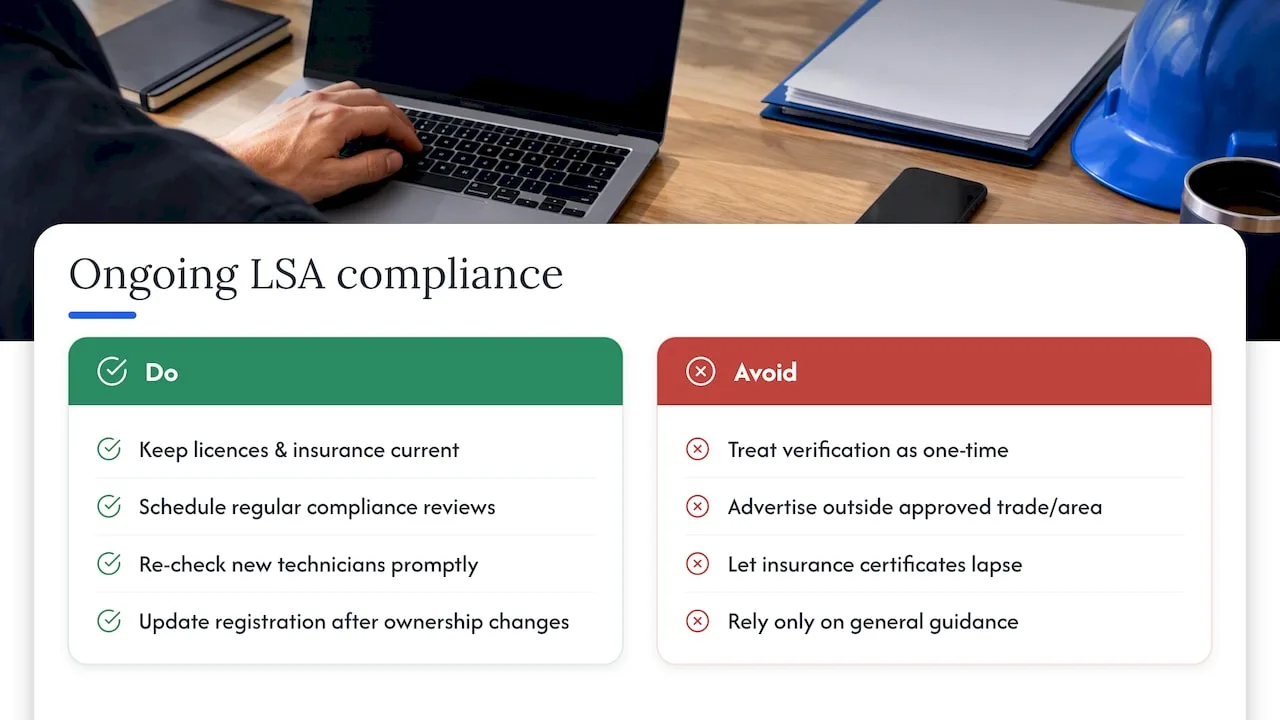
Verification is not a one-time gate. Google treats licensing, insurance, and background checks as conditions you maintain for as long as your ads run, and the screening and verification process explicitly allows for re-evaluation and requests for updated documentation at any point.
Advertising restrictions apply on top of verification. Categories and eligible service areas are set by Google, and running ads outside your approved trade category or beyond your documented service area risks suspension. If you add a new technician, that person may need their own background check before they can field calls under your account, depending on category. If your business structure changes, such as adding an entity or changing ownership, your business registration documents need to reflect that promptly.
Insurance lapses are the most common compliance failure we see. A certificate that expires mid-campaign can pause your ads without much warning, and reinstating service takes longer than renewing the policy itself. Treat your LSA compliance folder the way you’d treat a permit file: checked on a schedule, not only when something breaks.
None of this is legal advice specific to your state or trade. Confirm your licensing and insurance obligations with your insurer, your licensing board, or an attorney familiar with contractor regulations in your area, since requirements differ by category and location.
How to measure and analyze Local Services Ads performance
The core metrics worth tracking weekly are lead volume, lead cost, and booking rate, the percentage of leads that actually turn into paid jobs. Lead volume and cost live directly in your LSA dashboard, but booking rate requires connecting your CRM or job records back to each lead, since Google can tell you a call came through the ad, not whether it became a signed job.
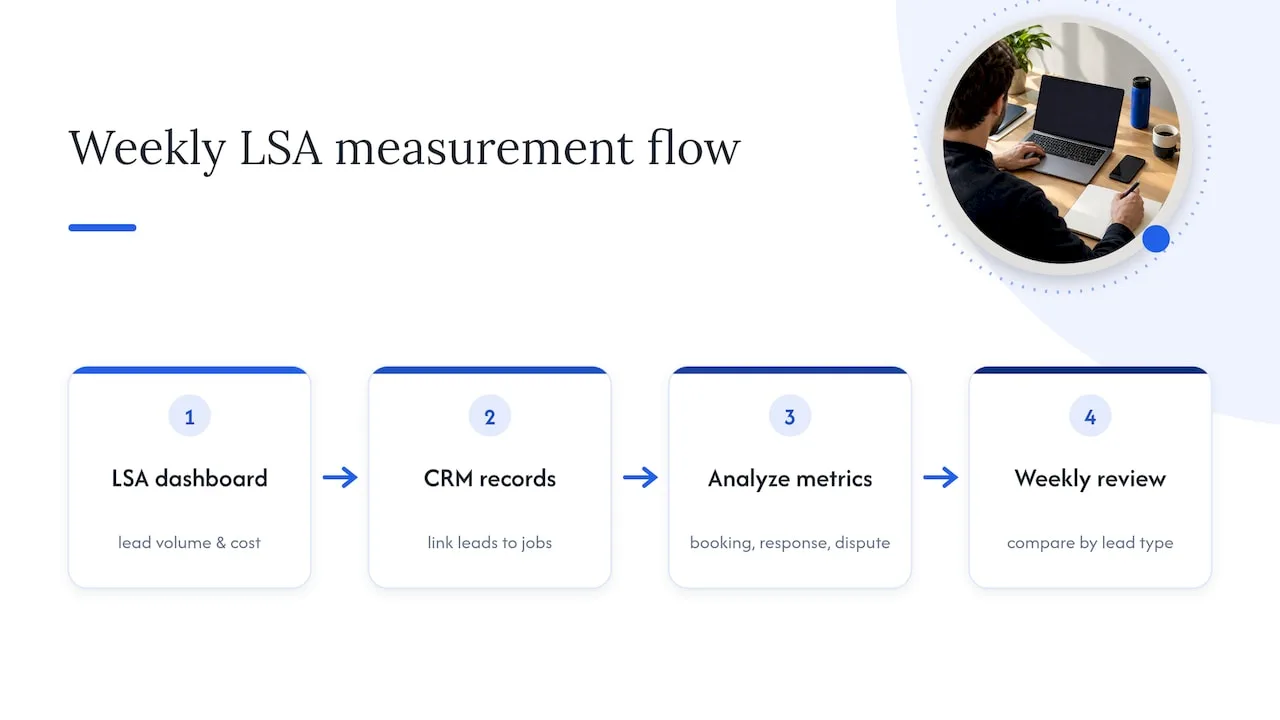
Response time is worth watching as its own metric, separate from booking rate. If your average response time creeps past your target SLA, expect both ranking and conversion to soften before cost-per-lead even moves, since Google ties serving frequency partly to how reliably you answer.
Dispute rate deserves a monthly review too. A rising share of disputed leads can mean your service area is set too broad, pulling in requests you can’t actually serve, or that your category settings don’t match what you’re being contacted about. Compare booking rate by lead type, phone against message against booking, since the mix that performs best often differs by trade and shifts as your review count grows.
Comparing Local Services Ads with other local advertising platforms
LSAs sit alongside several other ways to reach local customers, and each has a different mechanism. Traditional Google Search Ads, covered earlier, charge per click and give you full control over copy and landing pages, trading some of the “appear automatically” convenience of LSAs for more control over message and targeting.
Organic Google Business Profile visibility costs nothing per lead but takes longer to build and depends heavily on the same review signals that influence LSA ranking, which means investment in one tends to support the other. Directory and marketplace listings, such as general contractor directories, charge flat subscription or referral fees rather than per-lead pricing, which can be cheaper for low-volume trades but offers less control over which jobs you’re matched to. Social media ads on platforms like Facebook or Instagram work well for project-based and visual trades like landscaping or remodeling, but they lack the “ready to call now” intent that drives LSA leads.
For a service business weighing where to start, Local Growth Direct’s work managing Google Business Profiles illustrates how closely organic profile management and paid LSA performance are linked, since both draw on the same reviews and business information.
Common pitfalls and troubleshooting tips for Local Services Ads
The most frequent mistake is treating LSAs as a lead source you don’t have to staff for. Leads arrive fast, often within the hour, and a contractor who checks the inbox once a day will lose most of them to a competitor who answered first.
A second common pitfall is an inaccurate service area. Setting your radius too wide pulls in leads you can’t reach on schedule, driving up your dispute rate and wasting budget on calls you have to turn down. A third is letting your profile go stale: outdated photos, a thin review count, or a service list that doesn’t match what you actually do all suppress ranking quietly, without any error message telling you why leads slowed down.
If your ads suddenly stop serving, check three things first: whether your insurance or license documents have expired, whether your average weekly budget was recently lowered, and whether your response time has drifted past what Google considers reliable. Most serving interruptions trace back to one of those three, and fixing the root cause typically restores service faster than contacting support.
Finally, don’t confuse a slow month with a broken campaign. Seasonal categories like HVAC see real swings, heavy in July and January, lighter in spring and fall, so compare performance against the same month last year rather than against last month.
Author perspective: practical priorities for contractors running LSAs
Most contractors ask the wrong first question about Local Services Ads. They ask how to spend more before they’ve proven they can answer what they’re already getting. Fix intake first: a fast, consistent responder and a review-request habit will outperform a bigger budget every time. Treat your verification documents as ongoing maintenance, not a one-time setup task, since a lapsed certificate can quietly shut off leads you’re counting on. And never turn ads on without someone reliably on the other end of the phone. Volume without conversion is just an expensive inbox.
— Tyson
How we help contractors get more from Local Services Ads
Getting leads from Local Services Ads is only valuable if someone picks up, follows up, and books the job, and that’s the piece most contractors are missing when a campaign underperforms. We build the operational layer around LSAs for contractors: the intake, the follow-up, and the systems that turn a lead into a signed job instead of a missed call.
- Our websites that book jobs give your LSA traffic a destination built to convert, not just a digital brochure.
- Our missed-call text-back and CRM catches every lead that slips past a busy phone line and logs it automatically.
- Our review automation keeps your star rating and review count climbing, which feeds directly into LSA ranking.
- Our paid ads management can take the budgeting and bidding decisions off your plate entirely.
Plans run from Foundation through Growth and Scale tiers, detailed on our pricing page. If your LSA leads are coming in but your booking rate isn’t where it should be, that’s exactly the gap we close. Reach out through our pricing page to talk through what your intake process is missing.
FAQ
Are Local Services Ads still a thing?
Yes, LSAs remain an active Google ad product for local service businesses, and Google continues to publish setup and optimization guidance for the format. They work well for contractors who can respond quickly and meet the verification requirements.
How do I do Local Services Ads?
Start by confirming your trade and service area are eligible, then link your Google Business Profile, complete your service and hours details, and submit the licenses, insurance, and background-check documents your category requires, following Google’s getting started guide. Once verified, set your average weekly budget and go live, with pre-badge ads often available while final review completes.
Are Local Services Ads worth it?
They’re worth it for contractors who can answer calls and messages quickly and handle a steady lead flow, since you pay per qualifying lead rather than per click. If your team can’t respond within minutes, Google notes that ranking can suffer, which makes the leads you do pay for less likely to convert.
What’s the best way to advertise locally?
There’s no single best channel: LSAs suit urgent, simple service calls, Search Ads suit complex projects needing controlled messaging, and organic Google Business Profile visibility supports both over time. Most contractors see the strongest results from combining at least two of these rather than relying on one alone.
How much do Local Services Ads cost?
Google doesn’t publish a universal lead price, since cost varies by location, trade category, lead type, and bidding mode, according to Google’s leads documentation. You set an average weekly budget, and Google calculates a monthly max from that average so your total spend stays capped.