

Call tracking does not inherently harm SEO when you preserve the canonical phone number in the page HTML and use dynamic number insertion (DNI). The risk comes from implementation, not the practice itself. Get the setup wrong and you can create NAP inconsistencies that confuse search engines; get it right and you gain attribution data without losing local rankings. The safeguards that matter most are keeping a stable number in your HTML source, handling your Google Business Profile correctly, and connecting your tracking data to analytics the right way.
TL;DR:
- Keep the real local number in page HTML and structured data; use JavaScript to change only the number visitors see.
- On Google Business Profile, retain the real local number as primary and add a tracking number only as a secondary number when needed.
- Start with roughly one tracking number per 20 daily visitors for each source, and avoid assigning separate numbers to every minor channel.
- Connect dynamic number insertion to analytics and CRM with UTM parameters, session stitching, and dedicated fields so calls can be tied to campaigns.
- For multiple locations, give every location page its own canonical local number and schema markup, then scope number swaps by location and traffic source.
Table of Contents
- Why marketers worry about call tracking and NAP consistency
- Dynamic number insertion vs. static number replacement
- Google Business Profile, ads, and call assets: special cases
- When call tracking can actually hurt SEO
- Step-by-step checklist for SEO-safe call tracking
- Call tracking for multi-location businesses
- Our perspective on implementing call tracking for contractor websites
- How we help contractors add call tracking without the risk
- FAQ
- Sources
- Selected authoritative resources
Why marketers worry about call tracking and NAP consistency
The concern is rooted in how search engines verify local businesses. Google and other engines cross-reference your Name, Address, and Phone number (NAP) across your website, directory listings, and Google Business Profile to confirm you are a real, consistent entity at a given location. When those details match everywhere, search engines trust the listing more.
Call tracking introduces risk because it means showing a different phone number to different visitors depending on where they came from. If that process replaces the number visible in your page’s raw HTML, or if different tracking numbers end up published across directories, the result looks inconsistent to a crawler even though it is intentional on your end.
Three things actually matter to crawlers:
- Site HTML: the phone number embedded in the page source code, not just what renders visually
- Structured data: the schema.org markup that explicitly tells search engines your business phone number
- Google Business Profile: the number tied to your verified listing
Get these three aligned and the surface-level number swapping for attribution purposes becomes a non-issue.
Dynamic number insertion vs. static number replacement
Dynamic number insertion works through JavaScript that swaps the displayed phone number based on traffic source, after the page has already loaded. The canonical number stays untouched in the HTML; only what the visitor sees in their browser changes. According to Sterling Sky’s analysis of call tracking myths, this is exactly why DNI avoids the local SEO problems that static replacement can cause: crawlers read the source code, not the rendered JavaScript output, so they still see your consistent business number.
Static number replacement is riskier. This happens when a tracking number is hardcoded directly into the HTML, or worse, published across directory listings and citation sites in place of your real number.
Here is the practical difference:
- DNI: JavaScript swaps the visible number per visitor; HTML source stays canonical
- Static replacement: tracking number is written directly into the page code or listings; crawlers see the tracking number instead of your real one
Pro Tip: Right-click any page and select “View Page Source” to confirm which number actually sits in your HTML, not just what displays on screen.
Google Business Profile, ads, and call assets: special cases
Google Business Profile and Google Ads each handle phone numbers with their own rules, and conflating the two causes avoidable mistakes. GBP works best with a primary-secondary pattern: your real local number stays associated with the listing, and a tracking number can be added as a secondary field rather than replacing the primary entry, according to Sterling Sky’s guidance on call tracking myths.
Google Ads call assets operate under different requirements entirely. Google Ads’ own documentation on call assets specifies formatting and visibility rules for forwarding numbers, including proper number formatting so Google can verify and report on calls correctly.
Keep these distinctions in mind:
- GBP: keep your real local number as primary; add a tracking number as secondary only if needed
- Google Ads: use a forwarding number formatted per Google’s call asset requirements
- Website: never let an ad-specific forwarding number replace the canonical number in your site’s HTML
When call tracking can actually hurt SEO
Most SEO problems blamed on call tracking trace back to a handful of specific mistakes, not the technology itself.
- Replacing the canonical phone number in your site’s HTML or in directory and citation listings
- Publishing a tracking number as your primary Google Business Profile number without keeping the real number attached as secondary
- Assigning too many tracking numbers, one per minor traffic source, which scatters your business phone number across the web
- Misconfigured canonical tags, structured data, or server-side redirects that let a tracking number leak into what crawlers actually read
Guidance from Search Engine Journal confirms that keeping the canonical number in site source and structured data is what protects NAP consistency, while directory-level number swapping is the more common culprit behind ranking complaints. The fix in every case above is the same: control where tracking numbers appear and never let them override the number tied to your verified business identity.
Step-by-step checklist for SEO-safe call tracking
A working call tracking setup follows a consistent order of operations. Walk through these steps before and after launch:
- Keep one canonical phone number in your page HTML and in your schema.org structured data, unchanged by any tracking system
- Deploy DNI through a JavaScript snippet that swaps the displayed number by source, while the HTML underneath stays fixed
- Limit tracking numbers in public directory listings; keep your real number in citations and add a tracking number as secondary only when the directory specifically supports call analytics
- Integrate DNI with your analytics and CRM using UTM parameters, session stitching, and dedicated CRM fields so calls tie back to the campaign that generated them
- Size your tracking number pool conservatively, a reasonable starting point is one number per roughly 20 daily visitors for a given source, and rotate numbers cautiously rather than assigning a new one to every small channel
- Audit on a schedule: crawl your site the way Google does, load key pages with JavaScript disabled to confirm the canonical number still shows, and verify your structured data and GBP listing match
Pro Tip: Run your homepage and top service pages through a JavaScript-disabled browser test quarterly. If the number you see matches your canonical listing, your DNI setup is holding steady.
This sequence protects your NAP consistency while still giving you source-level attribution on every call that comes in.
Call tracking for multi-location businesses
Multi-location contractors need a tighter version of the same discipline. Each location page should have its own canonical local phone number written directly into the HTML source and the location’s schema markup, never a shared sitewide tracking number.
Scope your DNI by both location and traffic source, so a visitor landing on your Providence page sees a Providence-area tracking number, not one tied to a different service area. Reserve tracking numbers for marketing channels and ad campaigns rather than assigning one to every directory listing; your citations should stay anchored to the real local number.
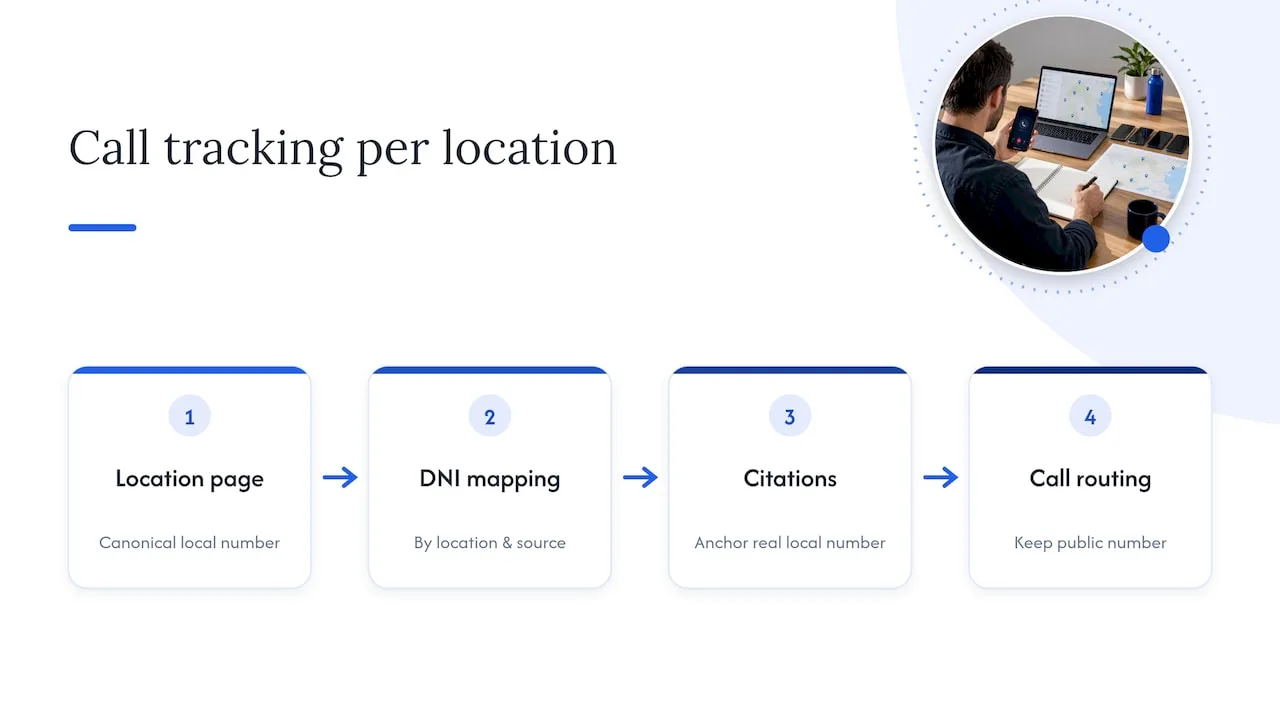
If you run a central call center behind multiple local lines, route calls transparently so the public-facing number per location never changes, keeping GBP and directory listings clean regardless of how calls are answered internally.
Our perspective on implementing call tracking for contractor websites
We build and manage websites for plumbers, electricians, HVAC companies, and roofers across Rhode Island and Massachusetts, which means NAP consistency is not an abstract concern for us. It is the difference between a client’s phone ringing or not.
Our approach pairs DNI with CRM integration and automation so every tracked call becomes a logged, followed-up lead rather than a data point that dies in a spreadsheet. Before any full rollout, we recommend a smoke test: a small pilot on one or two pages with DNI and CRM tied together, checked against a JavaScript-disabled crawl. Clients who’ve implemented automation report a positive ROI impact within the first 90 days, though exact figures vary and are not independently verified.
— Tyson
How we help contractors add call tracking without the risk
We build websites that book jobs with canonical phone numbers baked into the template from day one, so DNI never has a chance to collide with your HTML source. Pair that with our local SEO and Google Business Profile management and a missed-call text-back and CRM setup, and every tracked call gets logged, followed up, and tied to the channel that produced it.
If you want a second opinion on your current setup, start with an audit: we’ll check your HTML source, your GBP listing, and your number pool, then map a pilot before touching your whole site. See current plans on our pricing page or explore our AI voice agent for always-on call handling.
FAQ
What is the best call tracking software?
There is no single best option; the right call tracking software depends on whether you need DNI, CRM integration, or Google Ads call conversion imports. Look for a platform that preserves your canonical phone number in HTML and supports UTM-based source attribution, since those two features matter more than any single brand name.
What is the 80/20 rule in SEO?
The rule in SEO generally refers to the idea that a small share of pages, keywords, or fixes drive most of your organic results, so prioritizing high-impact issues like NAP consistency and page structure tends to outperform spreading effort evenly across every page. It is a prioritization heuristic, not a fixed ratio documented by Google.
What is SEO tracking?
SEO tracking means monitoring how your site performs in search results over time, including rankings, organic traffic, and conversions like calls or form fills. When call tracking is integrated with your analytics, phone calls become part of that same SEO performance picture rather than a separate, disconnected metric.
How does call tracking work in marketing?
Call tracking assigns unique or dynamically inserted phone numbers to different marketing sources so you can see which channel, ad, or page generated each phone call. Combined with Google Ads call conversion imports, this data lets you connect phone leads back to the keywords and campaigns that drove them.
Sources
- Call Tracking and Local SEO - 5 Myths Busted - Sterling Sky Inc
- About call assets - Google Ads Help
- Import call conversions | Google Ads API | Google for Developers
- The truth about SEO and call tracking - Search Engine Journal
Selected authoritative resources
For deeper technical detail, Google’s own documentation covers call asset requirements and importing call conversions. For local SEO specifics, Sterling Sky’s breakdown of call tracking myths and Search Engine Journal’s explainer remain solid references.