
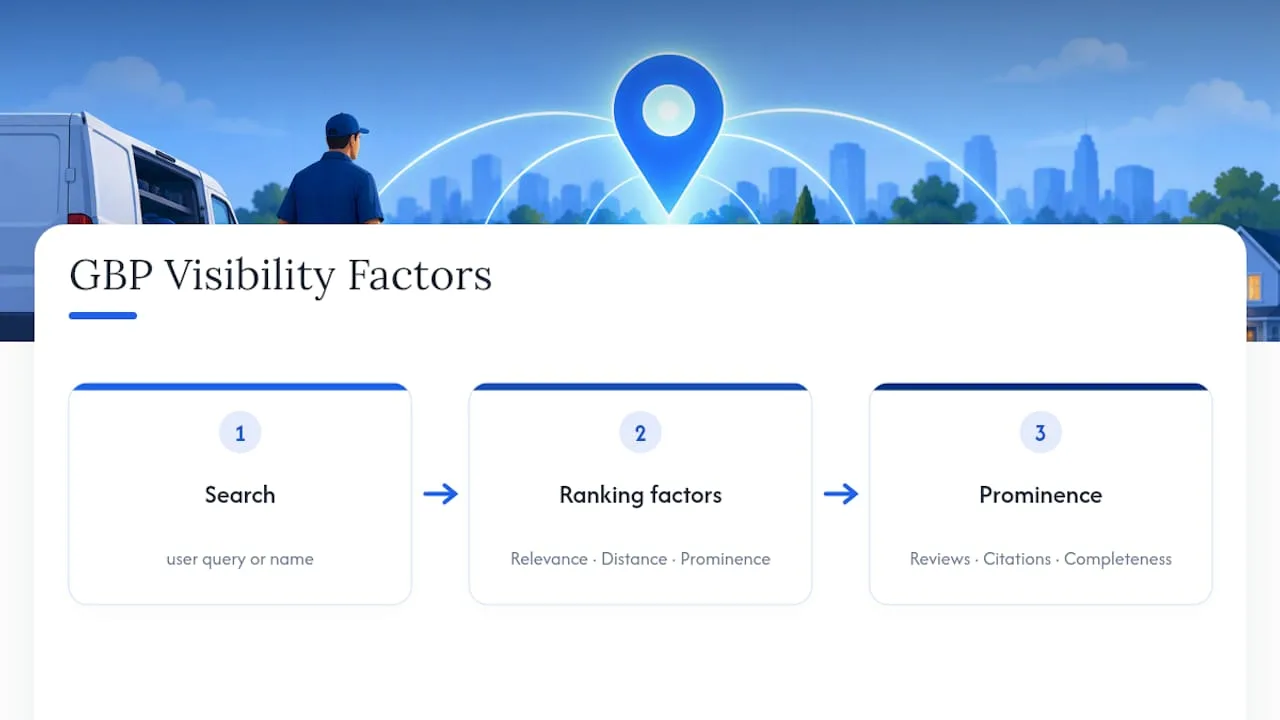
A complete, verified Google Business Profile is the fastest lever an HVAC company has for winning local calls. Create and verify the listing first, then lock in accurate categories, service areas, and photos. Google ranks profiles on relevance, distance, and prominence, and a fully built-out profile wins more of the “furnace repair near me” searches than a half-finished one ever will.
TL;DR:
- Fully verifying and optimizing your Google Business Profile, including consistent NAP data and accurate service areas, significantly improves local search visibility.
- Regularly collecting and responding to reviews, especially promptly after service, boosts your profile’s prominence and ranking in local results.
- Detailed service descriptions, industry-specific categories, and seasonal posts tailored to current demand drive more customer engagement and leads.
- Avoiding duplicate profiles and ensuring your profile aligns with your website content prevents suspension and loss of visibility.
Table of Contents
- What Is a Google Business Profile for HVAC Companies?
- How to Create, Claim, and Verify Your HVAC Listing
- Building Out the Profile: Fields That Actually Drive Calls
- Optimization Tactics That Move the Needle on Local Rank
- Advanced Features Worth Turning On
- Avoiding Suspension and Recovering If It Happens
- Tracking Performance and Knowing When to Change Course
- What Actually Moves an HVAC Profile Forward
- Get Your HVAC Profile Built by People Who Only Work With Trades
- Where to Verify the Official Rules
- Sources
- FAQ
What Is a Google Business Profile for HVAC Companies?
A Google Business Profile is the free listing that shows up when someone searches “AC repair near me” or looks up your company by name. It shows your hours, phone number, reviews, photos, and a map pin, and for HVAC companies it’s often the first thing a homeowner sees before they ever visit your website.
The standard industry term is “Google Business Profile,” or GBP for short. You’ll still hear the older name, Google My Business, tossed around by contractors and even some marketing agencies, but Google retired that branding years ago. The mechanics are the same: verify your business, fill out your fields, keep it active, and Google decides how visible you are based on relevance, distance, and prominence. Prominence is largely built from reviews, citations, and how complete your profile is, which is why an HVAC business with 40 detailed reviews and full service listings routinely outranks a competitor with a bare-bones profile and a better location.
How to Create, Claim, and Verify Your HVAC Listing
Before you build anything, check whether a profile already exists. Duplicate listings are common in HVAC because past employees, old franchise agreements, or data aggregators sometimes create profiles without the owner knowing. Search your business name plus city in Google Maps first.
- Search for an existing listing. If one shows up unclaimed, request ownership through the “Claim this business” prompt instead of creating a new one.
- Sign in with a Google account you control (ideally a business email, not a personal one an employee might leave with).
- Enter your exact legal business name. Don’t stuff it with keywords like “Best HVAC Repair Providence RI Heating Cooling.” Google’s guidelines require your name to match how you present yourself in the real world, and keyword-stuffed names are one of the most common reasons profiles get suppressed.
- Pick the most specific category available. “HVAC Contractor” beats generic options like “Contractor.” You can add secondary categories later, but the primary one carries the most ranking weight.
- Set your service area correctly. If you don’t take walk-in customers, hide your address and list service areas by city or ZIP code instead. Google is explicit that service-area boundaries should be entered by named area, not by radius, and coverage claims stretching much past a two-hour drive from your base tend to look unrealistic to Google’s systems.
- Add your local phone number and website, matching what’s printed on your trucks and invoices exactly.
- Choose a verification method. Options include postcard by mail, phone, email, video verification, or, for companies with 10 or more locations, bulk verification.
Verification is where most HVAC owners get stuck. Postcards can take one to two weeks and go missing if your mailbox isn’t clearly labeled. Video verification, when offered, is faster but requires showing signage, tools, and proof you operate from that address. If verification stalls past two weeks, don’t create a second profile. Duplicate profiles are a suspension trigger, and fixing that mess later costs more time than waiting out the original verification.
Building Out the Profile: Fields That Actually Drive Calls
Once verified, the fields you fill in next decide whether Google shows you for the searches that pay your bills. Consistency matters more than volume here. Your business name, address, and phone number (your NAP) need to match across your website, your profile, and every directory you appear in, because mismatched NAP data is one of the most common reasons profiles fail to surface in the local pack.
Focus your setup time on these areas:
- Categories: Set one precise primary category (HVAC Contractor) and add relevant secondary ones like Air Conditioning Repair Service or Furnace Repair Service if they apply.
- Services: List individual services the way customers search for them. “AC installation,” “emergency furnace repair,” and “ductless mini-split service” perform better than a single vague “HVAC services” line.
- Short description: Use your 750 characters to mention your service area, specialties, and licensing without cramming in every keyword you can think of.
- Photos and video: Upload branded trucks, technicians on the job, before-and-after shots of installed equipment, and your storefront if you have one. Profiles with photos consistently pull more direction requests and clicks than text-only listings.
- Hours and special hours: Set holiday hours manually. An HVAC company that shows “closed” during a July heat wave because nobody updated hours loses emergency calls to a competitor.
- Booking links: If your website or CRM supports online scheduling, add that link so customers can book without calling.
A profile mirroring your actual website content (the same service names, the same service area language) reinforces relevance signals on both ends. Looking at how an established residential HVAC company like Caledonian Mechanical structures its service pages is a useful gut check for whether your own listing and site are saying the same thing.
Optimization Tactics That Move the Needle on Local Rank
Building the profile gets you in the game. Optimizing it is what wins the local pack. Prioritize these five moves in order:
- Generate reviews systematically, not sporadically. Ask at the point of service, right after the technician finishes the job, when satisfaction is highest. A QR code on the invoice or a text link sent through an automated review request tool converts far better than a generic “please review us” email sent days later.
- Respond to every review, especially the negative ones. A short, specific reply (“Thanks for the feedback, Mike. We’ve flagged the delay with our dispatch team and would like to make it right.”) signals to future customers, and to Google, that you’re active and accountable. Never copy-paste the same three-sentence response across dozens of reviews.
- Place keywords where they belong: services, description, and posts. Write “24-hour emergency AC repair” as a service name, not five times in your business description. Google’s guidelines treat repeated keyword insertion as a policy risk, and stuffed listings get flagged more often than owners expect.
- Post weekly, tied to season and demand. A “spring AC tune-up special” post in April and an “emergency furnace repair, we’re on call” post in January both perform better than generic company updates, because they match what people are actively searching for that month.
- Audit your NAP across directories quarterly. Pull your listing on Yelp, Angi, and any HVAC-specific directories and confirm the name, address, and phone number match your GBP exactly. Inconsistencies here quietly erode the prominence signal that drives local ranking.
Pro Tip: Set a recurring calendar reminder to check your GBP messaging inbox and Q&A section weekly. Unanswered questions sitting on your profile for weeks look worse to a homeowner than a bad review would.
Advanced Features Worth Turning On
Beyond the basics, a handful of GBP features are built for exactly the kind of business HVAC companies run: appointment-driven, urgent, and local.
- Reserve with Google works well if your booking system supports real-time slots, but for most HVAC companies, a simpler “Request Service” or booking-link widget captures the lead without the technical overhead of syncing live technician availability.
- Google Messaging lets customers text your business directly from the listing. Set expectations for response time, and if you can’t staff it constantly, pair it with an auto-reply or route it into your CRM so a missed message doesn’t become a missed job.
- Attributes let you flag specifics that filter searches in your favor: emergency service available, veteran-owned, bilingual staff. These small checkboxes matter more than owners assume, since Google surfaces attribute-based filters directly in some search results.
- Bulk verification applies once you’re running 10 or more locations. It saves time, but uploads commonly stall on formatting errors like inconsistent phone formats or mismatched postal codes across your spreadsheet. Validate every row before uploading, not after.
Avoiding Suspension and Recovering If It Happens
Google suspends or restricts HVAC profiles more often than owners expect, usually for reasons that are entirely preventable. The core requirement is simple: your profile has to represent your business accurately and consistently in the real world, with one profile per business and no shortcuts on address or category count.
The most common triggers for trades businesses include:
- Using a virtual office or UPS box as a physical address when you’re actually a service-area business.
- Running multiple profiles for one legal business, often left over from a rebrand or ownership change.
- Review patterns that look manufactured (a burst of five-star reviews with no photos or detail, all posted the same week).
- Service area claims that stretch far beyond a realistic drive time from your base.
If your profile gets suspended, don’t panic and don’t create a new one. File an appeal through the Business Profile policy support channel and gather proof before you submit: photos of branded trucks, invoices showing service addresses within your claimed area, and any lease or ownership documentation. Appeals with clear evidence attached typically resolve faster than a bare reinstatement request.
Tracking Performance and Knowing When to Change Course
Your GBP dashboard tells you what’s actually working, not what you assume is working. Check these metrics monthly at minimum:
- Search queries: the actual phrases customers typed before finding you, which tell you whether your service names match real demand.
- Profile views and website clicks: a proxy for how visible you are becoming over time.
- Calls and direction requests: the metrics that most directly track to booked revenue.
- Photo and post performance: which images get views and which post types generate clicks, so you stop guessing what content to publish next.
Google’s own product framing confirms that profile insights exist specifically to show businesses how customers found them, which makes those metrics the closest thing to a feedback loop you’ll get for free. Run simple tests: swap your primary photo for a season, change a post’s call-to-action, or test a new service title for a month and compare direction requests before and after. Four weeks is usually enough to see a meaningful shift. Connect calls and form fills back to call-tracking software or your CRM so you know which GBP activity is actually turning into a signed work order, not just a click.
What Actually Moves an HVAC Profile Forward
Most advice on this topic treats every business the same, and that’s where it falls apart for HVAC specifically. A boutique or a law firm can survive with a static profile updated twice a year. An HVAC company can’t, because demand is seasonal, urgent, and won by whoever answers first.
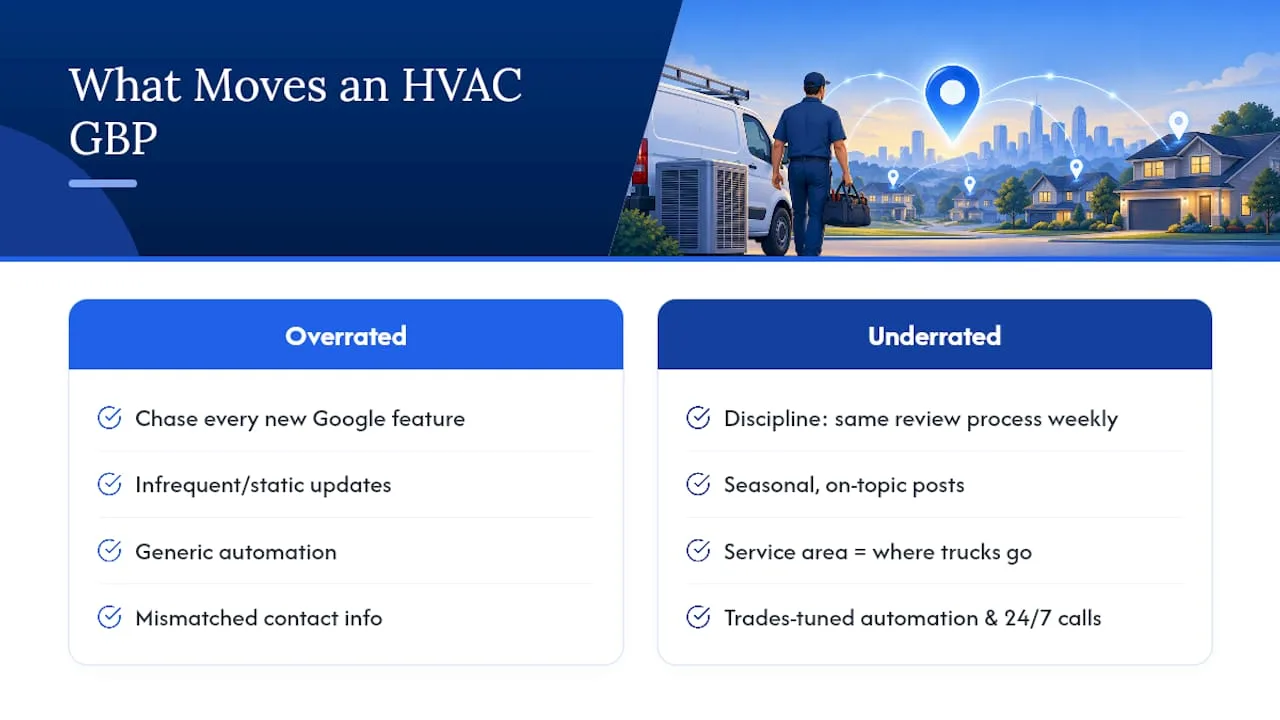
The overrated tactic is chasing every feature Google rolls out. The underrated one is discipline: reviews collected the same way every week, posts that match the actual season, and a service area that reflects where your trucks really go. Coastal Connect works with contractors and other local businesses across Rhode Island and Massachusetts, and sets up the automation, review requests, and 24/7 call handling around how each trade actually books work.
If you take one thing from this guide, prioritize verification and consistent NAP data before you touch anything else. A gorgeous profile with mismatched contact information underperforms a plain one that Google trusts.
— Tyson
Get Your HVAC Profile Built by People Who Only Work With Trades
A generic marketing agency treats your Google Business Profile like a checklist item. Coastal Connect treats it like the front door to your business, because for an HVAC company, it usually is. We handle the setup, the category strategy, the service listings, and the ongoing review flow so you’re not the one checking your dashboard at 9 p.m. after a full day of service calls.
A typical engagement starts with an audit of your current profile and website, moves into prioritized fixes (categories, service areas, missing photos, review gaps), then layers in automated review requests and a booking-enabled website that actually captures the leads your improved visibility generates. Our Local SEO & Google Business Profile service is built specifically for contractors in Rhode Island and Massachusetts, so the categories, seasonal posting cadence, and review strategy are already calibrated for HVAC demand instead of generic small-business advice. Plans start at $597 a month with the Foundation plan, scaling up as your call volume grows. Visit the pricing page or request a profile audit to see exactly what’s costing you calls right now.
Where to Verify the Official Rules
For the exact policies behind everything in this guide, go straight to the source. Google’s local ranking guidance covers relevance, distance, and prominence. The representation guidelines explain what triggers suspensions. The service-area help page covers boundary rules, and the bulk verification page covers multi-location uploads.
Sources
- Tips to improve your local ranking on Google - Google Business Profile Help
- Get listed on Google - Google Business Profile
FAQ
How Do I Find My Company’s Google Business Profile?
Search your business name plus city directly in Google Maps or Google Search. If a listing exists but you don’t recognize the login tied to it, use the “Claim this business” option to request ownership rather than building a new one.
How Do I Get More Leads for My HVAC Business?
A verified, fully completed Google Business Profile is the single fastest lever, since complete profiles rank better in local results. Pair it with consistent reviews, a booking-enabled website, and fast follow-up on missed calls, which is exactly the combination Coastal Connect’s Local SEO & Google Business Profile service is built around.
Do I Really Need a Google Business Profile?
Yes, if you want to show up when someone searches for HVAC service near them. It’s free, and Google’s own product description confirms it comes with photos, posts, and performance insights that most HVAC companies otherwise pay for separately.
Do You Need an LLC to Have a Google Business Profile?
No. Google doesn’t require a specific business entity type to create or verify a profile, only proof that you’re a real, operating business at the address or service area you claim. Sole proprietors, LLCs, and corporations all go through the same verification process.
What Does Coastal Connect Charge for GBP Optimization?
Local SEO and Google Business Profile work is included as part of Coastal Connect’s plans, with the Foundation plan starting at $597 per month. Full pricing details for every plan, including Growth and Scale, are listed on the pricing page.