A complete Google Business Profile means every relevant field is filled out accurately: claim and verify the listing, then lock in core facts, photos, services, and an active flow of reviews and posts. Start by verifying ownership, confirming your name, address, and hours, uploading real photos, and listing your actual services. Those five moves cover most of what separates a thin listing from one that shows up when it matters.
TL;DR:
- Unverified edits often remain pending, so confirm ownership before major changes; if a listing already exists, request access instead of creating a duplicate.
- Choose the narrowest accurate primary category, add secondary categories only for real services, and keep your business name identical to signage and legal records.
- Use authentic photos across exterior, team, product, and work in progress; Google recommends at least three product photos and three work photos where relevant.
- Ask for reviews after completed jobs, respond to every review within a few days, and monitor Questions & Answers so unanswered queries do not linger.
- Audit the profile quarterly and review search queries, calls, and website clicks in Insights; sudden drops can point to verification, category, or service area changes.
Table of Contents
- What “complete” actually means for a Business Profile
- Claiming and verifying your Business Profile step by step
- Choosing the right primary and secondary categories
- Business name, contact info, hours, and service attributes
- Business description, services, and product listings
- Photos and video: counts, types, and quality standards
- Managing reviews, Q&A, and other trust signals
- Posts, offers, and keeping your profile active
- Tracking, auditing, and maintaining your profile over time
- Common mistakes that keep a profile from being truly complete
- A contractor’s practical checklist for a profile that works
- Integrating your Business Profile with CRM and marketing automation
- Using advanced features like products, menus, and health and safety attributes
- Setting up messaging and booking for direct customer contact
- Using Business Profile insights to guide ongoing improvements
- How we help contractors keep a profile complete and active
- Where to focus first if you only do three things
- FAQ
- Sources
What “complete” actually means for a Business Profile
Google uses three signals to decide which businesses to show for a search: relevance, distance, and prominence. A complete profile feeds all three. Accurate categories and services help Google match you to the right search; a verified address and service area set your distance signal; photos, reviews, and posts build prominence over time. Google’s own guidance confirms that complete, accurate information helps the algorithm understand what your business does, where it operates, and when customers can reach you.
A profile counts as complete when these fields are filled in and accurate:
- Business name, address, and service area
- Primary phone number and verified website
- Operating hours, including holiday and special hours
- The most specific primary category available
- Relevant attributes, photos, and a list of services or products
- Recent posts and responses to reviews and questions
Accuracy matters as much as completeness. If your business name, address, and phone number (your NAP) do not match across your website, directories, and the profile itself, Google has a harder time trusting any single version of that data.
Claiming and verifying your Business Profile step by step
Before you can edit a single field, you need ownership confirmed. Search Google Maps or Search for your business name; if a listing already exists, click “Claim this business” and follow the prompts. If nothing comes up, create a new profile at Business, which also lets you manage photos, reviews, bookings, and performance insights once verified.
- Search for your business name on Google Maps or Search.
- Claim an existing listing, or start a new one if none exists.
- Choose a verification method: postcard by mail, phone, email, or instant verification for eligible accounts.
- Complete verification before publishing major edits; unverified changes often sit pending review.
- If ownership is contested, request access through Google’s ownership-transfer process rather than creating a duplicate listing.
- For a verification that seems stuck, double-check your business address matches public records exactly, since mismatches are a common cause of delay.
Most edits you make before verification will not go live on Search or Maps, so treat verification as the real starting line, not a formality to finish later.
Choosing the right primary and secondary categories
Your primary category carries more weight than any other single field for matching searches to your business. Google’s category guidance notes that broader categories are implicitly included once you pick a specific one, so there is little benefit to choosing something generic.
- Pick the most specific primary category your trade actually matches.
- Add secondary categories only when they describe real services you offer.
- Avoid stacking categories just to appear in more searches; it can dilute relevance instead of improving it.
For an HVAC company, “HVAC contractor” as the primary category outperforms a generic choice like “home services,” since the specific term already implies the broader one and matches tighter search intent.
Pro Tip: Review your categories every few months. Google periodically adds new, more specific category options, and switching to a newer match can sharpen your relevance without any other changes.
Business name, contact info, hours, and service attributes
Your listed business name should match your real-world signage and legal name exactly. Google’s editing guidelines are specific here: no appended keywords, locations, or taglines, since that can trigger suspension rather than help rankings.
Beyond the name, a handful of fields do most of the work:
- Use a direct phone line answered during listed hours, not a generic call center number.
- Link your actual website, not a third-party directory page or social profile.
- Set a physical address for storefronts, or a defined service area for mobile trades that don’t take walk-ins.
- Add special hours for holidays so customers don’t show up to a closed location.
- Fill in attributes like wheelchair accessibility or on-site parking where they genuinely apply.
Attributes matter more than they look. Google can use them to include your listing in filtered searches, so a roofer who skips the “free estimates” attribute may simply be invisible to someone searching for exactly that.
Business description, services, and product listings
Your business description should state, in plain language, what you do and for whom, without keyword repetition or marketing fluff. Think of it as answering “what does this business do” for someone who has never heard of you.
Services and products deserve their own structured entries rather than being buried in the description:
- Name each service clearly (for example, “Tankless water heater installation” rather than just “plumbing”).
- Group related services so customers can scan a logical list instead of a wall of text.
- Add prices or price ranges where you’re comfortable sharing them; Google displays these directly in the listing.
- Use product listings for anything customers might search by name, like a specific equipment brand you install.
Update your description when your core offering changes. Add or edit a service entry whenever you start or stop offering something specific, since that’s the field Google matches against narrower searches.
Photos and video: counts, types, and quality standards
Photos do double duty: they build trust with customers scanning search results and they can qualify your listing for filtered, image-driven searches. Google’s photo guidance recommends multiple images across several categories, including exterior, interior, product, “at work,” and team photos, and recommends at least three photos each for product shots and at-work shots where those categories apply.
- Exterior shots that make your location or vehicles recognizable.
- Interior or work-site photos that show your typical job environment.
- Team photos that put a face to the business.
- Product photos of equipment, materials, or finished work.
- “At work” photos showing the job actually being done.
Google recommends multiple product photos and “at work” photos per category where relevant, which means a one-photo profile is leaving an entire trust signal unused. source
On the technical side, Google accepts JPG or PNG files between 10 KB and 5 MB, with 720x720 pixels as a recommended resolution. Use real, in-focus photos of your own work, order them with your best exterior or team shot first, and add short captions describing the job or location shown.
Managing reviews, Q&A, and other trust signals
Reviews and Q&A sit right next to your business name in search results, so an unanswered question or a review with no response reads as neglect even when the underlying service was fine.
- Ask for reviews right after a completed job, when the experience is freshest.
- Respond to every review, positive or negative, within a few days.
- Monitor the Questions & Answers section and answer new questions before a stranger does.
- Flag reviews that violate Google’s policies rather than trying to argue them down in public.
Pro Tip: Keep a short template for review responses that thanks the customer by first name and references the specific job, then personalize one line. It reads as genuine instead of copy-pasted.
Automated review requests, sent by text or email shortly after job completion, keep this flow consistent without relying on staff remembering to ask every time.
Posts, offers, and keeping your profile active
Static fields establish what your business is; posts show that it’s actually running. Google Business Profile supports several post types, including standard updates, special offers, and event announcements, each appearing in a visible feed on your listing.
- Publish a standard update when you complete a notable job or add a new service.
- Use an offer post for seasonal promotions, like a discounted tune-up before winter.
- Create an event post for anything with a specific date, such as a open house or community sponsorship.
- Post on a simple cadence, roughly weekly or every other week, so the feed never looks abandoned.
- Check your Insights dashboard to see which posts drove calls or website clicks, and lean into whatever format performs.
Posts won’t rescue a profile with missing core fields, but paired with accurate basics, they’re one of the few signals you control on a weekly basis.
Tracking, auditing, and maintaining your profile over time
A profile that was complete at setup can drift out of date within months as hours change, photos age, or a competitor’s listing edges ahead. A quarterly audit catches this before it costs you visibility.
- Reconfirm hours, phone number, and service area are still accurate.
- Check that your category selections still match your current services.
- Review your most recent photos and swap out anything outdated or low quality.
- Scan for unanswered reviews or questions.
- Watch your Insights for search queries, profile views, calls, and booking clicks, and note any sudden drop.
Quarterly audits matter because Google regularly adds new attributes and features, and a profile that was complete last year may be missing a field that didn’t exist then. Watch also for edits suggested by other users or pulled in from data aggregators; review and correct them promptly, since an unverified third-party edit can quietly reintroduce an old address or phone number.
Common mistakes that keep a profile from being truly complete
Most incomplete profiles share the same handful of problems, and all of them are fixable in an afternoon.
- Keyword-stuffed business names, which risk suspension rather than better rankings.
- Inconsistent NAP data across the website, directories, and the profile itself.
- Missing or low-quality photos, especially no recent “at work” shots.
- Unanswered reviews or Q&A sitting untouched for weeks.
- Treating the profile-strength meter as the finish line instead of a rough internal checklist.
On that last point, Google itself notes that the profile strength indicator is an internal guide, not a guaranteed ranking factor, and some users have reported it sticking at an incomplete percentage even after every real field is filled in. Trust the actual fields over the meter.
A contractor’s practical checklist for a profile that works
For a contractor, completeness means a profile that gets the phone ringing. Keep a running checklist: at-work photos from your last three jobs, services named by what customers actually search (not internal trade jargon), and a phone number connected to something that captures a lead even after hours.
That last piece matters more than it looks. A profile that drives calls to voicemail at 7 p.m. is still losing jobs, even if every field is filled in correctly. Pairing an accurate profile with missed-call text-back and automated review requests keeps the listing both correct and visibly active, which is the combination Google’s signals reward over time.
Integrating your Business Profile with CRM and marketing automation
A Business Profile that lives in isolation from your other systems creates extra work and missed follow-up. When a call, message, or booking request comes through your profile, that lead should land directly in your CRM rather than sitting in a notification you might miss between job sites.
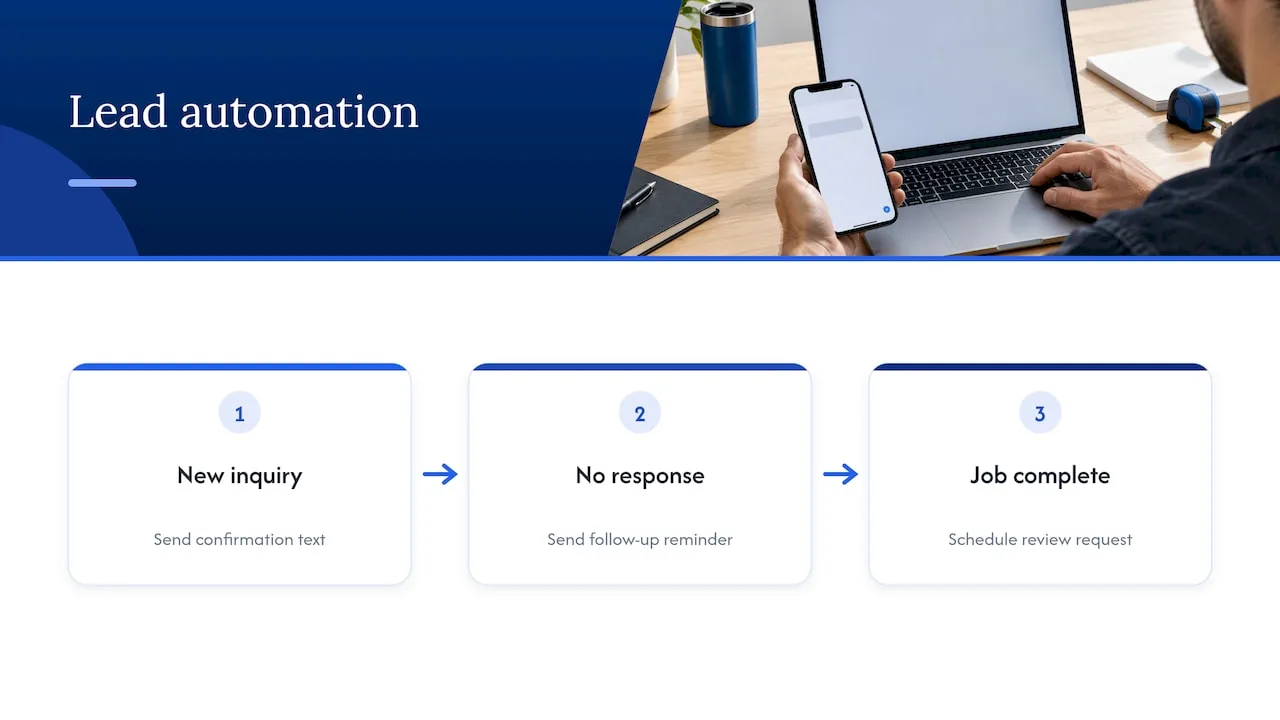
Most CRM and marketing automation platforms built for local service businesses can connect to your Business Profile through lead forms, call tracking numbers, or booking integrations. Once connected, a new inquiry can trigger an automatic text confirming receipt, a follow-up reminder if no one responds within a set window, and a scheduled review request once the job is marked complete. This matters because the gap between a customer reaching out and someone on your team responding is often the difference between winning and losing that job.
Integration also solves a data problem. When your profile, website forms, and phone system all feed the same CRM, you get one accurate record of where leads originate, instead of guessing whether a customer found you through a search, a referral, or a repeat visit. That record also helps you spot which categories, services, or posts are actually generating booked jobs rather than just profile views.
For contractors juggling multiple job sites and a small office staff, this kind of integration turns a profile from a static listing into an active intake system, catching leads at the moment they’re most likely to convert instead of hours later when the chance has cooled off.
Using advanced features like products, menus, and health and safety attributes
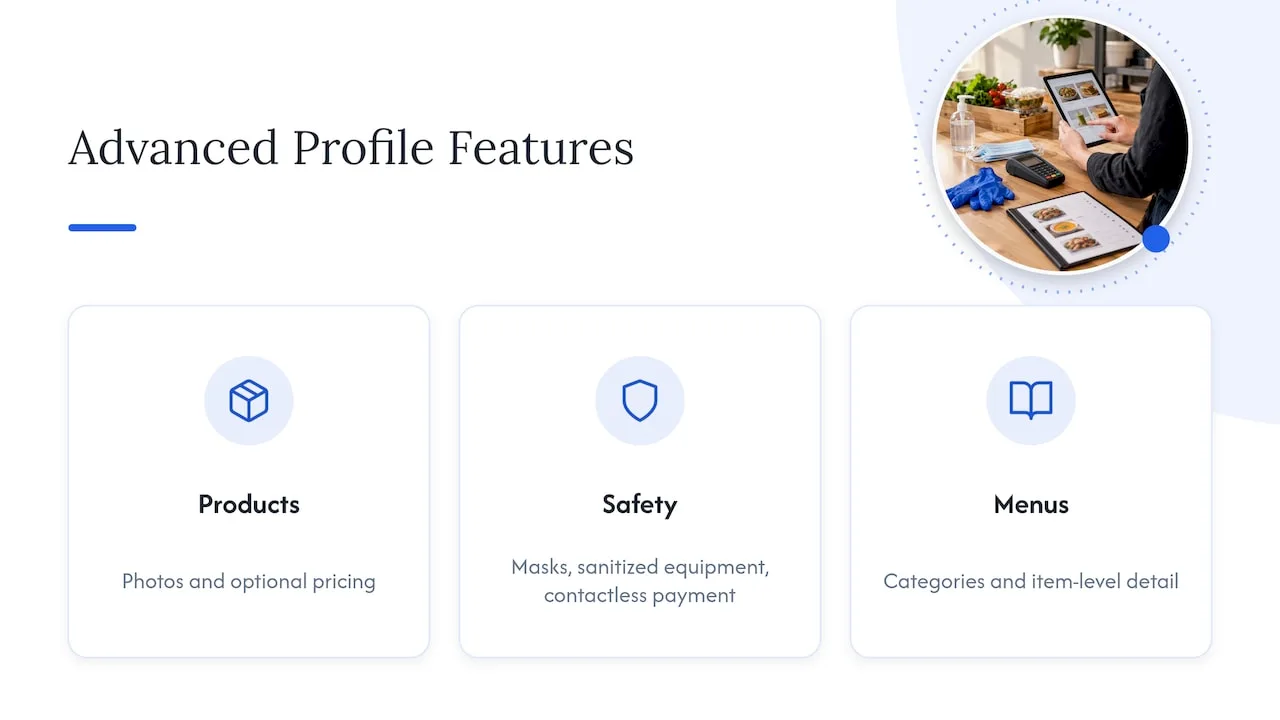
Beyond the core fields, Google Business Profile includes a set of advanced features that many owners skip, even though they’re often what separates a thin listing from a genuinely useful one. Google’s Business Profile platform supports structured product listings, health and safety attributes, and in some categories, menu-style entries, all managed from the same dashboard used for your core profile edits.
Product listings let you showcase specific items customers search for by name, such as a particular water heater brand you install or a specific roofing material you specialize in, complete with photos and optional pricing. This gives Google more specific text to match against narrow searches, and gives customers a reason to trust that you stock or handle exactly what they need.
Health and safety attributes, originally added for pandemic-era transparency, still matter for service businesses that enter customers’ homes. Attributes confirming mask policies, sanitized equipment, or contactless payment options reassure a customer deciding between you and a competitor with a thinner listing.
For businesses with a physical storefront offering food or retail alongside services, menu-style listings let you structure offerings the same way a restaurant would, with categories and item-level detail. Few contractors need this specific feature, but the broader lesson holds: these advanced fields exist because Google keeps expanding what a profile can communicate, and a quarterly audit is the only reliable way to catch a new one before a competitor does.
Setting up messaging and booking for direct customer contact
Two of the most underused features on a Business Profile are direct messaging and booking links, both of which let a customer take action without ever leaving the search results page. Google’s guidance on local ranking confirms that verified businesses can enable chat and add booking links directly through their profile, giving customers an immediate way to engage beyond a phone call.
Messaging, once turned on, lets a customer send a question straight from your listing. This works best when someone is actually monitoring it, since a message that sits unanswered for days undermines the trust a complete profile is meant to build. Many contractors route these messages into the same system that handles missed calls, so a question at 9 p.m. gets an automatic acknowledgment and a same-day follow-up instead of silence.
Booking links work especially well for service types with predictable appointment slots, like HVAC tune-ups or routine inspections. Instead of a customer calling to check availability, they see open slots and book directly, which removes a step that often causes people to simply search for the next listing instead of waiting on hold.
Together, messaging and booking close a gap that core fields alone can’t: they turn a profile from a reference page into something closer to a transaction point. A customer who’s ready to act gets to act immediately, rather than being asked to wait for a callback that might come after they’ve already hired someone else.
Using Business Profile insights to guide ongoing improvements
Every verified profile includes an Insights dashboard, and it’s the clearest signal of whether your completeness work is actually paying off. Google’s Business Profile tools include performance data covering how customers find your listing, what they do once they land on it, and how that behavior changes over time.
The metrics worth checking regularly include the specific search queries that surfaced your profile, the split between direct and discovery searches, total profile views, and the count of calls, direction requests, and website clicks generated. A sudden drop in any of these is often the first sign that something has changed, whether that’s a category edit, a lapsed verification, or a stronger competitor listing.
Insights also show which photos and posts get the most engagement, which makes it possible to stop guessing about what resonates and instead repeat what already works. If posts featuring finished jobs consistently outperform generic update posts, that’s a cue to lean into job-completion photos going forward rather than splitting attention evenly across every post type.
The real value of Insights isn’t the dashboard itself, it’s using that data to decide where your next round of edits should go. A profile that tracked a drop in calls after a service area change, for example, tells you exactly where to look first, rather than re-auditing every field from scratch.
How we help contractors keep a profile complete and active
We build and manage Local SEO & Google Business Profile work specifically for contractors, which means the audit, setup, and ongoing maintenance described above is work we handle rather than something added to your evening after a full day of jobs. We pair that with websites that book jobs so your profile and your site reinforce the same services and photos, and with automated review requests that keep fresh, verified feedback coming in without manual follow-up.
A typical engagement starts with an audit of your current profile, moves into setup of the fields and photos that are missing or outdated, then layers in automation like missed-call text-back so the profile stays active between our check-ins.
- Audit: a full review of categories, fields, and photos against what’s actually missing.
- Setup: filling in services, attributes, and a working photo library.
- Automation: review requests and call capture that keep the profile active.
- Maintenance: a recurring check so new fields and attributes don’t slip through.
See current plans on our pricing page, or start with the local SEO service page to see what a managed profile looks like for your trade.
Where to focus first if you only do three things
If I had to rank the work in this guide, verification comes first, since nothing else publishes without it. Core facts come second: name, address, phone, hours, and category drive more matching than anything else on the page. Photos and services come third, and reviews and posts last, not because they don’t matter, but because they compound on top of an accurate foundation rather than replacing one. Run the checklist in that order, and reach out if a step gets stuck.
— Tyson
FAQ
How can I optimize my Google My Business listing?
Claim and verify the listing first, then fill in accurate core fields: name, address or service area, phone, hours, and the most specific primary category available. From there, add real photos, list your actual services, and keep reviews and posts active, since Google’s own guidance ties completeness directly to relevance in local search results.
Is SEO still worth it in 2026?
Local search remains one of the main ways customers find service businesses, and a complete, accurate Business Profile is a core part of that visibility. Rather than a one-time project, ongoing optimization, including regular audits and fresh activity, tends to matter more as Google adds new profile features over time.
Is Google Optimize still available?
Google Optimize, a separate website testing tool, was shut down by Google and is unrelated to Google Business Profile. If you’re looking to improve your business listing specifically, the relevant tool is the Business Profile dashboard at business.google.com, not Optimize.
How do I find my company’s Google Business Profile?
Search your exact business name on Google Search or Google Maps; an existing listing will typically appear with an option to claim it if you haven’t already. If nothing appears, you can create a new profile directly through Google’s Business Profile platform.
What does the profile strength indicator actually measure?
The profile strength indicator is an internal checklist in your dashboard, not a guaranteed ranking factor, and Google itself describes it as a rough guide rather than a complete measure. Some users have reported it stuck at an incomplete percentage even after filling in every real field, so it’s worth treating actual field accuracy as the real target.