

Local business schema is a block of JSON-LD code you add to your website so search engines and AI systems can read your business facts directly instead of guessing at them from page text. The single highest-leverage move is to publish a complete LocalBusiness JSON-LD block on your homepage that matches your Google Business Profile exactly, then validate it. Do that first, and every other optimization you make gets easier to trust.
TL;DR:
- Using the most specific LocalBusiness subtype, such as Plumber or HVACBusiness, provides search engines with clearer business categorization and relevant properties.
- Including at least name, address, telephone, geo coordinates, and hours in your schema boosts search confidence and AI citation accuracy, especially with five decimal places in geo data.
- Always mirror your Google Business Profile details in schema, and update the markup immediately when business information changes to prevent mismatches and errors.
- For multi-location businesses, create a separate schema block per location with a unique @id, and link each to the parent organization; for service-area businesses, focus on a narrowed address and areaServed.
- Validate schema with Google’s Rich Results Test and Schema.org validator regularly, and verify the script appears correctly in live source to prevent silent breaks or misconfigurations.
Table of Contents
- What LocalBusiness is and how to pick the right subtype
- Required vs recommended properties and exact formatting rules
- How to implement LocalBusiness JSON-LD step by step
- Multi-location and service-area business rules
- Validation, troubleshooting, and common errors to fix
- Best practices and policy pitfalls to avoid
- Impact of local business schema on rankings and traffic
- Using structured data to strengthen reviews and ratings
- Testing schema across platforms and devices
- Optimizing local business schema for voice search and AI assistants
- Keeping local business schema current as your business changes
- Integrating local business schema with other schema types
- How schema fits into a contractor’s lead-capture system
- Get help implementing schema that matches your Google Business Profile
- FAQ
- Sources
What LocalBusiness is and how to pick the right subtype
Schema as the type for a physical business or branch, distinct from the broader Organization type, which covers any company whether or not it has a public storefront or service area. LocalBusiness carries a long list of properties built specifically for brick-and-mortar and service-based operations: address, geo coordinates, opening hours, telephone, and price range among them. Organization, by contrast, fits entities like software companies or associations that don’t serve walk-in or on-site customers tied to a location.
Schema.org also lists dozens of LocalBusiness subtypes, and picking the most specific one matters more than most webmasters assume. A plumbing company marked up as generic LocalBusiness gives search engines a vague signal. The same company marked up as Plumber, which is a recognized subtype, tells search engines exactly what kind of business they’re looking at and what properties to expect.
A few examples of where this plays out:
- A roofing contractor should use
RoofingContractor, not the genericLocalBusinesstype. - An HVAC company should use
HVACBusinessto align with how Google categorizes the trade. - A dental practice should use
Dentist, which inherits LocalBusiness properties plus medical-specific ones. - A restaurant should use
Restaurant, which supports menu and cuisine properties that generic LocalBusiness doesn’t.
When no subtype fits cleanly, falling back to LocalBusiness itself is acceptable and still better than using Organization for a business tied to a physical location or defined service area. The rule of thumb: pick the narrowest type that accurately describes what you do, and only widen it when nothing fits.
Required vs recommended properties and exact formatting rules
Google’s Search Central documentation is blunt about the floor: name and address are the only properties Google requires for LocalBusiness markup to be considered valid. Everything else is recommended, which sounds optional until you realize that skipping the recommended fields is one of the most common reasons local businesses underperform in search and in AI-generated answers.
Google recommends including telephone, url, geo, openingHoursSpecification, image, priceRange, areaServed, and sameAs. Treating the required minimum as a target rather than a floor is a mistake: search engines and AI systems build fuller Knowledge Graph entries and generate more confident AI citations when they have hours, phone, geo, and service area to work with, not just a name and a street address.
At least five decimal places in your geo coordinates is the precision Google’s documentation points toward for anchoring a business accurately on maps, since rounding to two or three decimals can place a pin blocks away from the real address.
A few formatting rules that trip up webmasters constantly:
- Telephone numbers should be formatted in E.164 (for example,
+14015551234), not local formatting with dashes or parentheses. - Opening hours use the
openingHoursSpecificationobject withopensandclosesvalues inhh:mm:ssformat, such as09:00:00. - Geo coordinates should carry five or more decimal places for both latitude and longitude.
priceRangeshould stay under 100 characters and use simple notation like$$or$100-$300.- Every value in the schema block has to match what’s visibly printed on the page and in your Google Business Profile.
On the policy side, Google is specific about review markup: aggregateRating and Review properties are only valid when the actual reviews are visible on the same page. Google’s structured data policies treat hidden or fabricated review data as a violation that can trigger a manual action and strip rich result eligibility across the site, not just on the offending page. If you haven’t published visible reviews on the page carrying the schema, leave the rating properties out entirely.
How to implement LocalBusiness JSON-LD step by step
Before writing a line of code, pull your canonical values from one place: your Google Business Profile. Your business name, address, phone number, and hours in the schema should mirror what’s listed there, field for field. Mismatches between your GBP listing and your on-page schema are one of the most common reasons local entities get flagged or simply ignored by search engines trying to reconcile conflicting signals.
Once you have canonical values, follow this workflow:
- Choose the most specific LocalBusiness subtype for your trade or service.
- Assign a unique
@idto the business (a stable URL fragment likehttps://example.com/#business). - Fill in required properties first:
nameandaddress. - Add recommended properties:
telephone,url,geo,openingHoursSpecification,image,priceRange,areaServed,sameAs. - Paste the completed JSON-LD inside a
<script type="application/ld+json">tag in the page<head>. - View the live page source (not just the CMS editor) to confirm the script renders exactly as written.
- Run the markup through Google’s Rich Results Test and the Schema.org validator before publishing.
- Repeat the process with location-specific values for any additional location pages.
Here’s a simplified example for a single-location storefront, such as a plumbing company with a public address:
{
  "@context": "https://schema.org",
  "@type": "Plumber",
  "@id": "https://example.com/#business",
  "name": "Example Plumbing Co.",
  "address": {
    "@type": "PostalAddress",
    "streetAddress": "123 Main Street",
    "addressLocality": "Providence",
    "addressRegion": "RI",
    "postalCode": "02903",
    "addressCountry": "US"
  },
  "telephone": "+14015551234",
  "url": "https://example.com",
  "geo": {
    "@type": "GeoCoordinates",
    "latitude": 41.82399,
    "longitude": -71.41283
  },
  "openingHoursSpecification": [
    {
      "@type": "OpeningHoursSpecification",
      "dayOfWeek": ["Monday", "Tuesday", "Wednesday", "Thursday", "Friday"],
      "opens": "08:00:00",
      "closes": "17:00:00"
    }
  ],
  "image": "https://example.com/images/storefront.jpg",
  "priceRange": "$$"
}
For a service-area business with no public storefront, the address field narrows to city and region only, and areaServed carries the real detail:
{
  "@context": "https://schema.org",
  "@type": "HVACBusiness",
  "@id": "https://example.com/#business",
  "name": "Example HVAC Services",
  "address": {
    "@type": "PostalAddress",
    "addressLocality": "Worcester",
    "addressRegion": "MA",
    "addressCountry": "US"
  },
  "telephone": "+15085559876",
  "url": "https://example.com",
  "areaServed": ["Worcester, MA", "Shrewsbury, MA", "Auburn, MA"],
  "priceRange": "$$$"
}
A short checklist keeps deployment clean across CMS platforms:
| Check | Why it matters |
|---|---|
JSON-LD appears in page <head> |
Keeps the block parseable before body content loads |
| Live view-source shows the script | CMS editors sometimes render previews that differ from what ships |
| No curly or smart quotes in the code | Curly quotes silently break JSON parsing |
| Values match Google Business Profile | Mismatches undermine entity confidence |
| Cache cleared after publishing | Stale cached pages can serve outdated schema for days |
For WordPress and similar CMS platforms, a structured data plugin can generate the base block, but always verify the plugin’s output in live view-source rather than trusting the plugin’s preview screen, since some plugins inject JSON-LD via JavaScript after page load, which some crawlers may not execute.
Multi-location and service-area business rules
Businesses with more than one physical location need one page and one LocalBusiness block per location, not a single block listing multiple addresses crammed together. Schema.org’s guidance on unique identifiers calls for a distinct @id value per location, with each location’s block referencing a parent Organization entity through that @id. This structure lets search engines understand that five branches belong to one company without merging them into a single confused entity record.
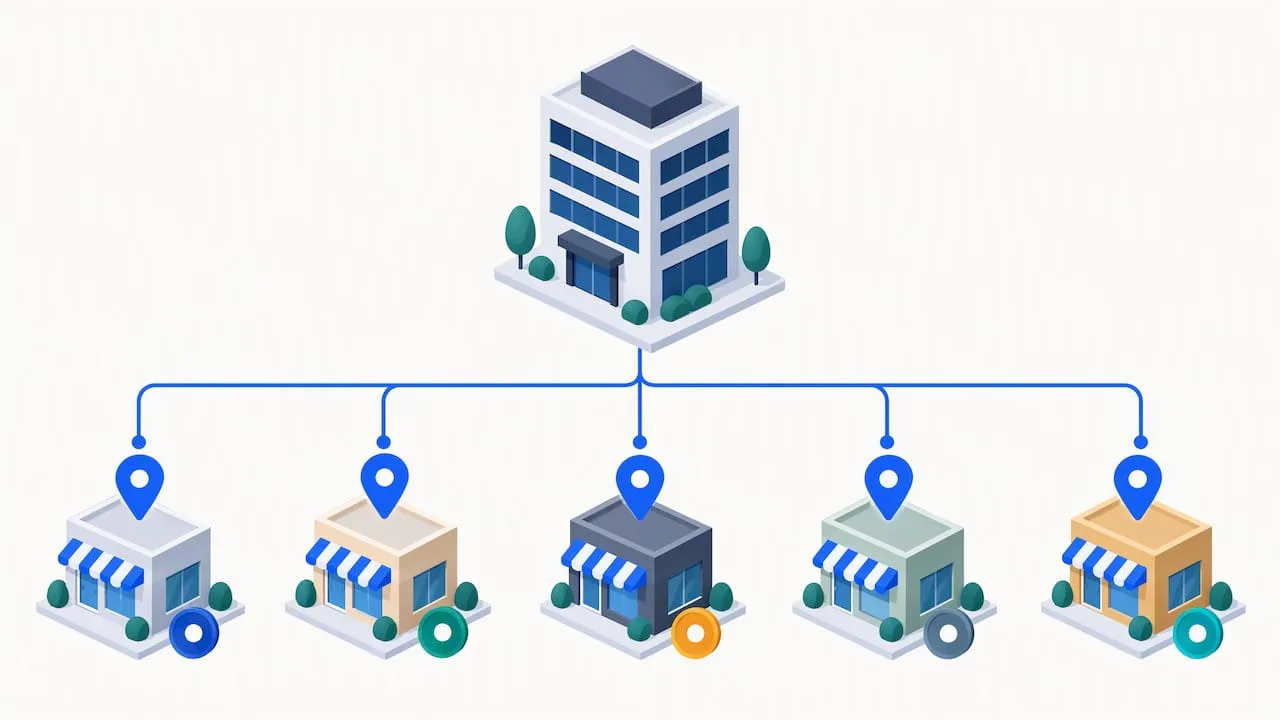
For a chain or franchise, the parent Organization object typically sits on the homepage or an “about” page, and each location page carries its own LocalBusiness block with a department or branchOf relationship pointing back to the parent’s @id.
Service-area businesses, those that travel to customers rather than operating from a public storefront, follow a different pattern. Instead of listing a private home address, the address field should narrow to city and region, and the areaServed property should carry the full list of towns or counties served. This is a deliberate trade-off: a narrowed address can reduce precision for local pack ranking in some cases, but publishing a private residential address publicly creates its own problems, from privacy concerns to Google Business Profile suspensions for unverifiable addresses.
A few rules worth keeping fixed in your process:
- Never bundle two or more physical addresses into a single LocalBusiness block.
- Never reuse the same
@idacross two different locations or pages. - Always link child location entities back to a parent Organization when the sites share ownership.
- Choose the narrowed-address-plus-areaServed pattern deliberately for service-area businesses, not as a default shortcut.
Validation, troubleshooting, and common errors to fix
Two tools do the actual checking: Google’s Rich Results Test and the Schema.org validator. They serve different purposes. The Rich Results Test tells you whether your markup is eligible for specific Google search features, while the Schema.org validator checks whether your code follows the vocabulary correctly, regardless of whether Google displays anything from it. Running both catches different classes of problems.
The errors that show up most often aren’t exotic. They’re small mismatches that break trust or parsing:
- Phone number or address in the schema doesn’t match what’s printed on the page or listed in Google Business Profile.
- Review or rating values are marked up without any visible reviews on the same page, which violates Google’s structured data policies.
- JSON syntax errors caused by curly quotes pasted in from a word processor, which look fine visually but break the parser.
- Opening hours written in the wrong format, like “9am-5pm” instead of
09:00:00to17:00:00. - Geo coordinates rounded to two or three decimal places instead of five or more.
Pro Tip: After fixing any schema error, re-run both validators and check Search Console’s structured data reports a few days later, since Google’s recrawl and reprocessing isn’t instant.
Search Console’s structured data section flags errors and warnings across your site over time, which makes it a better long-term monitor than a one-time validator check. Schedule a recheck any time you update hours, add a location, or redesign a template, since template changes are a frequent, silent cause of schema disappearing from a page entirely.
Best practices and policy pitfalls to avoid
Keeping schema accurate is less about writing it once and more about treating it as a living part of your site that needs the same upkeep as your Google Business Profile.
- Match every schema value to your Google Business Profile and visible on-page content, every time one changes.
- Include the recommended properties, not just the required ones, since hours, geo, image, and areaServed strengthen entity signals meaningfully.
- Never add aggregateRating or Review markup unless actual reviews are displayed on the same page.
- Update your schema immediately when hours, address, or phone numbers change, rather than waiting for a scheduled site refresh.
- Assign a stable, unique
@idto every location so search engines can track the same entity across page updates.
Impact of local business schema on rankings and traffic
Schema markup doesn’t directly move rankings the way backlinks or page speed do. What it does is remove ambiguity, giving search engines a clean, structured version of facts they’d otherwise have to infer from unstructured text, phone numbers in footers, and hours buried in a contact page. That clarity influences two things that do affect visibility: eligibility for rich results like star ratings or business panels, and the confidence with which AI systems cite your business when answering local queries.
A business with a complete, accurate LocalBusiness block is more likely to show up correctly in Knowledge Graph panels and AI-generated local answers than one relying on search engines to piece together the same facts from plain text. The traffic effect tends to show up indirectly, through higher click-through rates on rich results and more accurate representation in voice and AI search, rather than as a direct ranking boost. Schema is a trust and clarity layer sitting underneath your existing local SEO work, not a replacement for it.
Using structured data to strengthen reviews and ratings
Review and rating markup can make star ratings eligible to display in search results, but the policy constraint is strict: Google only allows aggregateRating or Review markup on pages where the actual reviews are visible to visitors. Marking up ratings pulled from a third-party platform but not displayed on the page itself risks a manual action.
The practical approach is to build the page first: display real customer reviews visibly, whether pulled from Google, a testimonials widget, or a dedicated reviews page, then add the matching schema on top of that visible content. The schema should never be the source of the rating claim. It should describe what’s already there.
For trade businesses collecting reviews across Google, Facebook, and industry-specific platforms, consolidating a handful of genuine, visible reviews onto a page before marking them up with schema tends to work better than trying to aggregate scores from platforms where the reviews themselves never appear on your own site.
Testing schema across platforms and devices
Schema doesn’t render visually, so testing it isn’t about checking how it looks. It’s about confirming the same clean JSON-LD ships regardless of how the page is requested.
A few checks worth running across your site:
- Load the page on both desktop and mobile user agents, since some templates serve different markup conditionally.
- Check live view-source, not the CMS preview, on every platform your site runs through (staging, production, CDN-cached versions).
- Re-test after any plugin, theme, or template update, since these frequently reset or duplicate structured data blocks.
- Confirm the schema persists after cache clears and CDN propagation, which can take longer on some hosts than others.
Testing once at launch and never again is how schema quietly breaks. A theme update eight months later can strip a script tag from the head without anyone noticing until a validator run catches it.
Optimizing local business schema for voice search and AI assistants
Voice assistants and AI chat tools don’t browse a page the way a person does. They pull from structured signals, cached Knowledge Graph entries, and whatever clean data they can extract fastest. A LocalBusiness block with complete hours, phone number, and address gives these systems a direct, unambiguous answer to questions like “is this plumber open now” or “what’s the phone number for this HVAC company.”
The properties that matter most for voice and AI discovery are the ones phrased as direct questions: openingHoursSpecification for “are they open,” telephone for “what’s the number,” and address plus geo for “how far away is it.” Incomplete schema forces these systems to fall back on less reliable sources, like outdated directory listings or scraped text, which increases the odds of a wrong answer being read aloud to a potential customer.
Keeping hours and contact details in schema synchronized with your Google Business Profile matters even more for voice and AI contexts, since these systems often pull from whichever source appears most current and consistent across the web.
Keeping local business schema current as your business changes
Schema markup isn’t a set-and-forget asset. Every time your hours change for a season, your phone number changes, or you open a second location, the schema block has to be updated at the same time as your Google Business Profile, not weeks later.
A simple habit covers most of this: whenever you update your Google Business Profile, update your site’s schema in the same sitting. Build a short internal checklist tied to any operational change, hours, address, service area, or price range, that includes a schema update step alongside the website update.
For businesses running seasonal hours, such as landscapers scaling back in winter, the openingHoursSpecification array should reflect the current season’s hours, not a static year-round schedule that quietly goes stale. Re-validating after each update catches syntax issues before they sit live for months.
Integrating local business schema with other schema types
LocalBusiness schema works best as one piece of a connected structured data setup rather than an isolated block. A roofing company might pair LocalBusiness with Service schema describing specific offerings like roof replacement or storm damage repair. A contractor running seasonal promotions might add Event schema for a limited-time offer. A business with visible customer feedback can layer in Review and aggregateRating, provided the underlying reviews are shown on the page.
The connecting thread across all of these is the @id reference. Linking a Service or Review object back to the same LocalBusiness @id tells search engines these pieces describe the same entity, rather than leaving them as disconnected fragments. For most contractors, the highest-value pairing beyond the core LocalBusiness block is Service schema for what you offer and Review schema for visible feedback, layered in only after the foundational LocalBusiness block is accurate and validated.
How schema fits into a contractor’s lead-capture system
Schema markup earns its place next to Google Business Profile optimization, automated review collection, and a website built to convert, not as a separate technical task. We build full LocalBusiness JSON-LD into the websites we design for contractors across Rhode Island and Massachusetts because a clean schema block only pays off when the page around it is already set up to turn a visitor into a booked job. Accurate schema, accurate GBP data, and visible reviews work as one system.
— Tyson
Get help implementing schema that matches your Google Business Profile
Writing a validated LocalBusiness JSON-LD block by hand is manageable for a single location. Keeping it accurate across multiple pages, seasonal hours changes, and a growing review count is where most contractors run out of time. We handle that work directly as part of Local SEO & Google Business Profile, where schema implementation sits alongside GBP optimization so the two never drift out of sync.
For contractors who need the underlying site rebuilt around conversion first, our websites that book jobs carry schema as a built-in part of the template, not an afterthought bolted on later. And since review markup only works when real reviews are visible on the page, our reviews that keep coming service keeps that content flowing so the schema has something true to describe.
What this looks like in practice:
- An audit of your current schema, GBP listing, and on-page facts for mismatches.
- Implementation of a full LocalBusiness block matched exactly to your verified business details.
- Validation through Google’s Rich Results Test and ongoing monitoring as hours or locations change.
For technical builds that need deeper structured-data engineering, SetWorks offers development-led support worth knowing about. If Google Business Profile management and review strategy are your main gap, Local Growth Direct focuses specifically on that layer.
See current plans on our pricing page and start with an audit of where your schema stands today.
FAQ
What is a local business schema?
Local business schema is structured JSON-LD code added to a webpage that tells search engines facts about a physical business, such as its name, address, phone number, and hours, in a format machines can read directly. Schema.org’s LocalBusiness type defines the full set of available properties and subtypes for this purpose.
Can you give me an example of a local business schema?
A basic example includes the @type set to a specific subtype like Plumber or HVACBusiness, along with name, address, telephone, and openingHoursSpecification properties wrapped in a JSON-LD script tag. The storefront and service-area examples earlier in this article show the full structure for both common cases.
How do I add a local business schema to my website?
Collect your canonical business details from your Google Business Profile, write a JSON-LD block using the most specific LocalBusiness subtype, and paste it inside a <script type="application/ld+json"> tag in your page’s <head>. Confirm it renders correctly in live view-source, then validate it with Google’s Rich Results Test and the Schema.org validator before publishing.
What is a business schema?
Business schema generally refers to any schema.org markup describing a company, with Organization covering companies broadly and LocalBusiness covering businesses tied to a physical location or defined service area. The right choice depends on whether the business operates from or serves a specific place, which most contractors and local service providers do.