
Your Local Services Ads (LSA) reviews strategy is a Google Business Profile reviews strategy. Google manages reviews for LSA through Google Business Profile, not the LSA account, so every review you earn there feeds your ad rank, your lead volume and the trust of the homeowner choosing between three plumbers at 9 p.m. The contractors who win are the ones who ask every happy customer the same way, answer every lead fast and read the numbers by booked job. We built our review and follow-up systems around that routine for Rhode Island and Massachusetts trades.
TL;DR
- LSA reviews live in your Google Business Profile. Rating and review count are ranking inputs, alongside responsiveness, proximity and profile quality.
- Ask every customer, with a direct Google review link, and never offer incentives or ask only happy customers.
- Missed calls hurt your responsiveness. Answer fast, and turn on message and booking leads for nights and weekends.
- Answer reviews briefly and specifically, and report only the ones that break Google’s policies.
- Judge the strategy by cost per booked job, not cost per lead.
Table of Contents
- How LSA and reviews connect today
- Build a review engine, not a review push
- What reviews can and cannot do: the lead-volume picture
- Responsiveness: the other half of your rank
- Responding to reviews
- Measure by booked job, not by lead
- Your first 30 days
- Perspective: why reviews and response belong together
- How we help contractors run this
- FAQ
- Sources
How LSA and reviews connect today
Local Services Ads are the pay-per-lead listings at the top of Google for searches like “emergency plumber near me.” You pay for a lead (a call, message or booking request), not a click. Google ranks these listings in an auction, and its ad rankings page says the auction weighs your bid and your overall profile quality. Profile quality includes rating, number of reviews, average response time, high-quality images and completed verification checks. Higher-quality profiles may rank higher and pay less per lead.
Google’s own LSA reviews help page adds that providers with higher ratings and more reviews stand out and typically book more jobs. Its August 2025 guide to growing with LSA lists the visibility factors: proximity, review score and count, responsiveness, profile quality, bid mode and budget.
Two things follow for a contractor:
- Reviews are not a side project. They are one of the few ranking inputs you control directly, and they get cheaper every month you keep them flowing.
- Reviews are not the whole story. A 4.9 rating with a phone nobody answers still loses to a slightly lower rating with a fast reply.
The move into Google Ads
Google is also folding LSA into Google Ads. According to Search Engine Journal’s July 2026 report, migrated campaigns keep the same reach and pay-per-lead billing for calls, messages and bookings. They move from weekly to daily budgets, use one campaign-level Target CPA (the cost per lead you aim for) in place of manual bidding, and lose access to the old LSA dashboard and its historical reports. The same report says to download your historical reports before migration, because they will not transfer. Account admins get notice 14 days before migration and a 7-day reminder. After the move, it advises checking your daily budget, Target CPA, service categories, ad schedule, lead-routing number and photos, and allowing up to two weeks for performance to settle.
None of that changes where reviews come from. They stay on your Google Business Profile, and Google’s best practices for pay-per-lead campaigns still advise holding consistent positive reviews above four stars.
Build a review engine, not a review push
Most contractors treat reviews as a push: a burst of requests after a bad month, then nothing. Ranking rewards the opposite, a steady stream of recent, specific reviews tied to real jobs. The routine has four parts.
1. Ask at the moment of the finished job
The best time is right after the customer has seen the result: the water is running, the AC is cold, the roof is dry. Create a direct link or QR code in your Business Profile. Google’s help page says you can share a review link or QR code on receipts, in thank-you emails or at the end of a chat. The QR code can only be created on a desktop browser, so set it up once in the office and give the crew a text template with the link.
For LSA specifically, a personalized review link sent to customers who booked through your ad is the cleanest path, because the review lands where the next searcher will see it.
2. Ask everyone, not just the happy ones
Google’s content policy allows you to ask for genuine reviews. It prohibits:
- incentives for reviews, edits or removals (no discounts, gift cards or free tune-ups)
- soliciting only positive reviews
- pressuring customers to review on the premises
- asking for specific content
The second item matters most. Software that screens customers by satisfaction and sends only the happy ones to Google is called review gating, and it is the setup that gets contractors into trouble. If you use any vendor for requests, our review gating audit shows which settings to check and fix. Asking every customer also gives you a natural mix of ratings, which reads as credible to homeowners.
3. Make asking automatic
The reason review programs fade is that they depend on a tech remembering to ask while driving to the next call. Automation fixes that. Our Reviews that keep coming service is built around automated review requests, and our write-up on compliance-first automated review requests walks through a contractor example. The point is a consistent trigger, a closed job, with the same neutral wording every time.
4. Write requests that earn specific reviews
You cannot script the content, but you can make a specific review easier to write by keeping the request neutral and personal: the tech’s name, the job type and the link. Google’s Business Profile also lets customers rate specific aspects of service businesses, and job types come from your service list, website or standard task lists. A complete, accurate service list helps your reviews and your listing line up with the jobs people actually search for.
What reviews can and cannot do: the lead-volume picture
One analysis from an LSA management firm grouped clients by review count and found more leads at higher tiers, roughly 5 per month under 100 reviews and more beyond that. That is one company’s client data, so treat it as direction, not a promise. The sourced rule is Google’s own: rating and count affect rank, and higher-rated, more-reviewed providers typically book more jobs.
A practical target is not a magic number. It is to be visibly stronger than the two or three contractors who show up beside you in your towns. Check them in Providence, Worcester or Warwick the way a homeowner would, and set your monthly review goal from the gap.
Responsiveness: the other half of your rank
Reviews get you chosen. Speed keeps the lead. Google’s Manage leads and jobs page says to respond as soon as leads arrive, and that consistently fast response can improve ad ranking and lead volume. The ad rankings page warns that missed calls may hurt your responsiveness, and that enabling message and booking leads increases your chances of leads at nights and weekends. If you have two or more message leads in the last 90 days, a response-time estimate, from a few minutes to one day, may show in your ad.
For a one- or two-truck shop, this is where LSA money leaks. The phone rings while you are under a sink or on a roof. Here is what to put in place:
- Text back instantly. A missed-call text-back keeps the lead warm until you can call. See our missed-call text-back and CRM service.
- Cover nights and weekends. Our AI voice agent handles inbound calls around the clock, and the after-hours answering steps show how to set that up.
- Return every missed connection. Google’s pay-per-lead guidance says to answer promptly and return missed connections immediately. It also advises keeping your service area within two hours’ driving time of your location.
- Follow a five-minute rule. Our guide on converting LSA leads in five minutes lays out the sequence.
Because you pay per lead, a lead you do not answer is spent money. Answering fast protects both ranking and budget.
Responding to reviews
Replies are public, and the next homeowner reads them. Google’s tips for review replies say to be professional and polite, keep replies short, and personalize them instead of sending the same thank-you to everyone. For negative reviews it suggests addressing the reviewer by name and acknowledging their specific feedback. Replies must follow Google’s content policies too.
A workable pattern for each trade:
| Situation | What a good reply does |
|---|---|
| Positive review after a repair | Names the job and the tech, thanks them in one or two sentences |
| Negative review about scheduling | Acknowledges the specific delay, states what you changed, offers a phone number |
| Negative review about price | Explains briefly how the quote was built and invites a call, without arguing |
| Review for a job you never did | Reply once that you cannot find the job, then report it |
Keep tone steady. A calm answer to a rough review often does more for the next reader than five glowing ones.
Fake and policy-violating reviews
Google removes reviews that break its policies, and a review you disagree with is not automatically one of them. Reviews by competitors, reviews for another business, spam and reviews with no connection to a customer experience are the cases worth reporting. Report from the profile, keep the job records, and keep your own replies free of anything that could look like a threat or an offer. Our guide to building an evidence folder for fake review removal covers what to collect. If reviews you know are real have disappeared, see our steps for missing GBP reviews.
Measure by booked job, not by lead
A lead is a ring or a message. A booked job is revenue. Track four numbers for each trade you advertise, monthly:
- Leads by type: calls, messages, bookings.
- Booking rate: booked jobs divided by leads you answered.
- Cost per booked job: total LSA spend divided by booked jobs.
- Average job value: so a drain clearing and a full panel upgrade are not blended together.
Search Engine Journal’s migration advice makes the same point for contractors with several services: compare each category’s lead volume, acquisition cost, close rate and customer value before splitting into separate campaigns. Separate campaigns give more bidding control but less conversion data for Google’s optimizer.
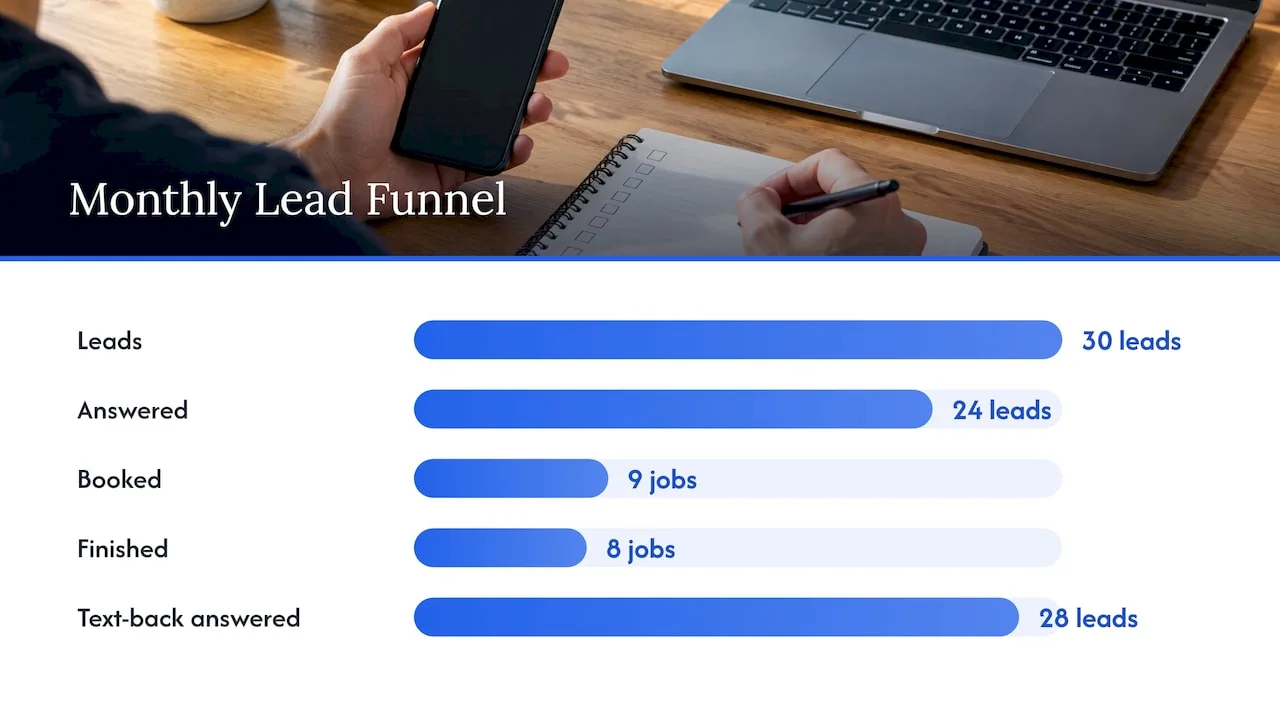
A worked example with invented numbers for illustration: you spend $1,500 in a month and get 30 leads, so $50 per lead. You answer 24, book 9 and finish 8. Cost per booked job is $166.67. If the average job is $900, the channel works. Now suppose a text-back system lifts answered leads from 24 to 28 at the same spend. Booked jobs rise with it and cost per booked job falls, with no change to the ad. That is why responsiveness belongs in the review strategy.
Watch billing too. One industry write-up of the pay-per-lead terms says Google charges for answered calls, for missed calls or voicemails over 20 seconds during business hours, and for texts, emails and booking requests. Review your lead list weekly and use Google’s lead-quality review for jobs that were not a fit.
Your first 30 days
- Week 1: Download any historical LSA reports. Confirm your Business Profile service list, hours, photos and service area are complete and accurate.
- Week 2: Create the review link and QR code. Write one neutral request text. Set an automatic trigger on job close.
- Week 3: Turn on message and booking leads. Set up missed-call text-back and after-hours coverage.
- Week 4: Reply to every review from the past 90 days. Build your booked-job tracking sheet.
If your Business Profile has been suspended, fix that first; our suspended profile appeal guide shows how.
Perspective: why reviews and response belong together
We work only with contractors in Rhode Island and Massachusetts, and the same pattern shows up in the logic of how LSA is ranked. Google weighs reviews and responsiveness together, so a shop that fixes only one leaves money on the table.
Our approach is to treat the review request, the missed-call text, the after-hours answer and the Business Profile as one system for the trades: plumbing, HVAC, electrical, roofing and landscaping. A job closes, a request goes out, the review lands, the profile gets stronger, and the next lead is answered whether you are on a ladder or asleep.
That is what we mean by a website and a set of tools that work as a lead engine. A local team that knows the towns and the trades can set it up around how your customers actually call and search.
Tyson
How we help contractors run this
We build the pieces of this routine for contractors in Rhode Island and Massachusetts: Local SEO and Google Business Profile work, automated review requests, missed-call text-back and CRM, and 24/7 AI call handling. Our pricing page lists three plans: Foundation at $597 per month, Growth at $1,297 per month and Scale at $2,497 per month, plus add-ons such as an AI employee on Growth at $199 per month.
If missed calls and thin reviews are what is holding your LSA results back, start on our site and tell us which trade and towns you cover.
FAQ
Did Google remove LSA reviews?
Reviews for Local Services Ads are managed through your Google Business Profile, not the LSA account, and they follow Google’s Maps content policies. Google states that star rating and review count affect LSA ranking. Your job is to build the reviews on the Business Profile.
Can I offer a discount for a Google review?
No. Google’s policies prohibit incentives for reviews, edits or removals, and prohibit asking only happy customers. Ask every customer with a neutral request and a direct review link.
How fast should I answer an LSA lead?
Google recommends responding as soon as the lead arrives, and says consistently fast response can improve ad ranking and lead volume. Missed calls may hurt your responsiveness, so set up text-back and after-hours coverage.
How do I know if my LSA strategy is working?
Track cost per booked job, not just cost per lead. Divide total spend by jobs actually booked, and compare by service type, since average job value differs between trades.
Sources
- Reviews and Ratings on Local Services Ads, Google Local Services Help
- About ad rankings, Google Local Services Help
- How to grow your business with Local Services Ads, Google
- Manage leads and jobs, Google Local Services Help
- Best practices for pay-per-lead goals, Google Ads Help
- Google Is Bringing Local Services Ads Into Google Ads, Search Engine Journal
- Create a Google link or QR code to request reviews, Google Business Profile Help
- Prohibited and restricted content, Google Maps User Contributed Content Policy
- About reviews for service businesses, Google Business Profile Help
- Tips to get more reviews, Google Business Profile Help