You can no longer dispute a Local Services Ads lead the old way. Google replaced the manual dispute form with a “Rate this lead” survey, and its automated system decides whether a credit is issued. For a Rhode Island plumber or a Massachusetts HVAC shop, that means two jobs: rate every lead accurately, and fix the settings and phone handling that produce bad leads in the first place.
Most of the guides still ranking for this topic describe the old process, and some forum threads from 2023 read as if disputes are still a normal part of the workflow. They aren’t. Below is how the current system works, what Google says it will and won’t credit, and a weekly routine that keeps your cost per booked job honest.
TL;DR
- Manual disputes are gone. You now open the lead, choose “Rate this lead,” and submit the survey. Google’s models decide on a credit, and feedback does not guarantee a refund.
- A lead that doesn’t book is not automatically an invalid lead. Cancellations, price shoppers and unanswered callbacks are valid leads in Google’s eyes.
- Credits are no longer supported for “job type not serviced” or “geo not serviced,” so fix your service categories and service area instead of relying on refunds.
- Credits usually land in your account balance within 30 days, and the original charge can still show on the invoice. Track both.
- Answering calls fast protects both conversion and ad ranking, which is where most contractors lose the most money.
Table of Contents
- What changed: from disputes to automated credits
- How to dispute an LSA lead now: rating a lead step by step
- What Google will not credit
- A lead that didn’t book is not an invalid lead
- What counts as an LSA lead, and what you pay
- Why missed calls cost more than disputes ever saved
- A weekly routine for LSA lead hygiene
- Our perspective on LSA leads for Rhode Island and Massachusetts contractors
- Where Coastal Connect fits
- Common mistakes with LSA credits
- FAQ
- Sources
What changed: from disputes to automated credits
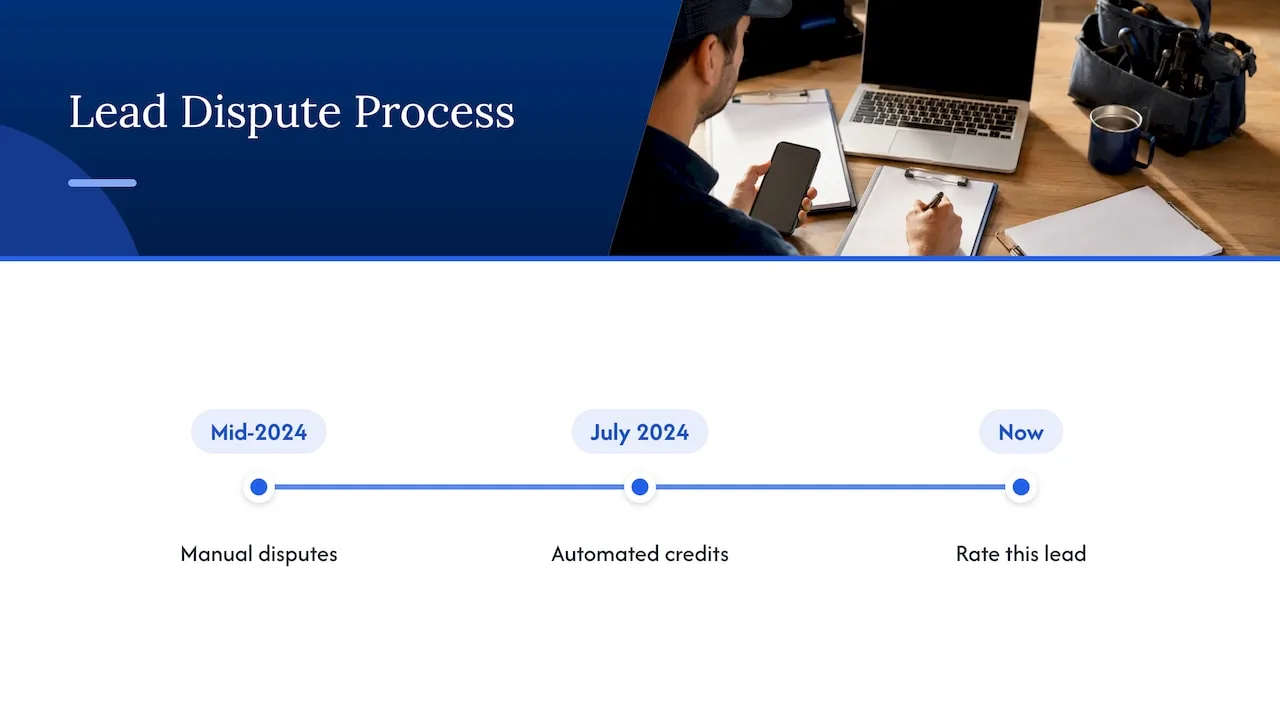
Until mid-2024, an LSA advertiser could open a lead and dispute it with a reason. In July 2024, Google introduced an automated lead crediting process and removed manual disputing. The dashboard button that said “Dispute” was replaced with “Rate this lead”, and the ratings are meant to help Google’s system learn what a qualified lead looks like versus an unqualified one.
That is why you still see old advice and old complaints. A forum thread about disputes being denied even with recordings of customers calling back is describing a system that has since changed. Google’s own help documentation controls the present process, not a 2024 blog post or a screenshot from a community thread.
One scope note: automatic lead credits are documented for the United States and Canada, and Google excludes health care verticals, tax specialists and advertisers in EMEA. Contractors in Rhode Island and Massachusetts are covered.
How to dispute an LSA lead now: rating a lead step by step
The path in the US is short:
- Sign in to your Local Services Ads account and open Leads.
- Select the lead you want to flag.
- Click Rate this lead in the upper-right corner.
- Complete the survey, choosing the reason that most accurately describes the lead.
- Submit, then watch the billing status over the following weeks.
Two expectations matter here. First, Google’s documentation does not promise that feedback produces a credit. It says Google may credit leads reported as poor quality. Think of the survey as “possible credit after review,” not “dispute approved.” Second, some poor-quality leads are handled automatically. Google says its system can identify some low-quality leads before charging and reassess charged leads afterward, and some are credited within the first 24 hours without you doing anything.
Reading the lead statuses
Your lead list uses four statuses worth knowing:
| Status | What it means for you |
|---|---|
| Not charged | Google decided not to bill the lead. |
| Charged | The lead was billed. It can still be reassessed later. |
| In review | Google is evaluating the lead or your feedback. |
| Credited | A credit was issued, usually applied to your account balance within 30 days. |
The original charge may still appear on the invoice even after the balance reflects the credit. If your bookkeeper sees a charge and no matching refund, check the account balance before assuming Google ignored you.
What Google will not credit
This is where contractors get frustrated, so be clear-eyed. Google lists situations that generally will not be credited, and many of them feel like wasted money. According to Google’s lead credit documentation, typical non-credit examples include:
- A valid lead that arrives outside your business hours.
- A customer who is researching prices or planning a project.
- A canceled booking.
- A customer who doesn’t respond to your return call or message.
- A broad service category that covers a specific service you don’t perform.
- A temporary inability to take the job.
- A quote followed by a promised callback.
- A customer you referred elsewhere.
The principle underneath is simple: Google separates lead validity from business success. A homeowner who calls your plumbing company at 9 p.m., asks what a water heater replacement costs, and never picks up when you call back is, in Google’s model, still a valid lead. Your job is to win more of those, not to bill them back.
Wrong service and wrong area are no longer refund reasons
Google’s help page states that credits are no longer supported for “job type not serviced” and “geo not serviced” leads. If you’re a roofer in Warwick getting calls for gutter cleaning you don’t offer, or an electrician in Worcester fielding requests from forty minutes outside your range, rating each lead won’t fix it. The fix is upstream:
- Audit the job types you’ve enabled in your LSA profile and turn off anything you won’t do.
- Tighten your service area to the cities and ZIP codes you can actually dispatch to on a normal day.
- Check that your business hours and scheduling availability match reality.
Do this before you raise your weekly budget. Spending more on a loose profile just buys more mismatches.
A lead that didn’t book is not an invalid lead
The most expensive habit we see is labeling every non-booking as a bad lead. There are two problems with it. Google may deny the credit, and if you routinely mark genuine plumbing, HVAC, roofing, electrical or landscaping inquiries as invalid, you’re feeding the system poor training data about your own business. That can work against you later.
A cleaner way to sort every lead:
| What happened | Likely category | What to do |
|---|---|---|
| Robocall, sales pitch, vendor solicitation | Not a real customer inquiry | Rate it accurately |
| Wrong number or someone who wanted a different business | Not related to your business | Rate it accurately |
| Same person calling twice about the same job | Duplicate | Rate it accurately |
| Real homeowner, wanted a quote, didn’t book | Valid, lost | Improve follow-up |
| Real customer, you missed the call | Valid, lost to you | Fix call handling |
| Request for a service you don’t offer | Profile problem | Fix categories |
| Outside your service area | Profile problem | Fix service area |
Train whoever answers your phones, whether that’s your office manager, your spouse or an answering service, to log the difference between “did not book” and “was not a valid lead.” That one distinction saves arguments and keeps your numbers believable.
What counts as an LSA lead, and what you pay
As Google describes it, you pay for valid leads related to your business and the services you offer. A lead can be a phone call, a text or email message, a voicemail with meaningful engagement, a booking request, or a returned missed call that reaches the customer or leaves a voicemail. Prices vary by location, job type, lead type and bidding mode. Message leads are typically cheaper than phone leads, though Google says that isn’t always so.
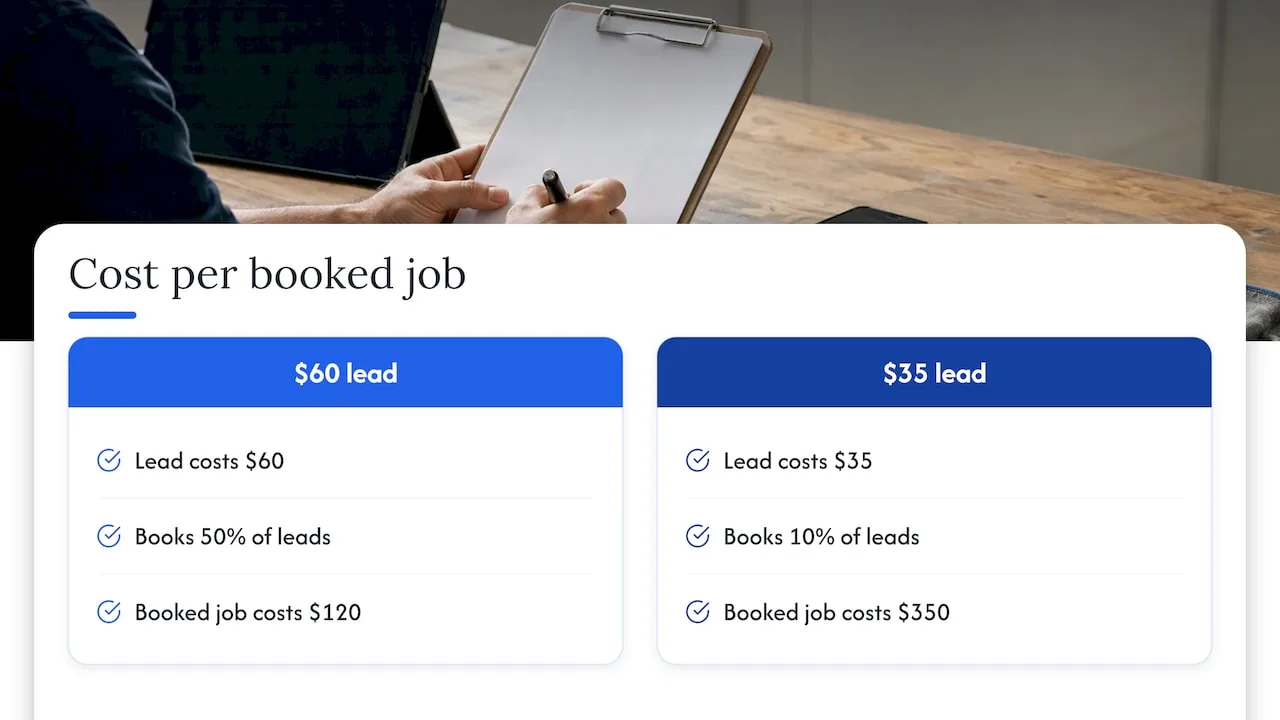
Because pricing differs by trade and market, the useful number is never the cost per lead alone. It’s cost per booked job. A $60 lead that books 50% of the time is a better deal than a $35 lead that books 10% of the time. Rating leads helps with credits, but conversion decides whether the channel makes money.
Why missed calls cost more than disputes ever saved
Contractors spend hours on dispute requests while ignoring the bigger leak: unanswered calls. Google advises responding to as many calls and messages as you can, and says regularly failing to respond may affect your ad ranking. A missed call is a charged lead with zero chance of becoming a job, and it can lower how often you appear next time.
If you’re on a roof, under a sink or in a crawl space, you can’t pick up. So build a process that doesn’t depend on you:
- Route LSA calls to a staffed line or a reliable after-hours process.
- Send an instant text when a call goes unanswered so the customer knows you saw it.
- Call back quickly. A homeowner with a burst pipe is calling three companies, and the one that answers wins.
- Record the booking outcome in the LSA lead inbox so your reports show how many charged leads turned into booked jobs.
LSA reports can break charged leads and spend down by call, message and booking, and show lead credits for the period you select. Use that view monthly to see whether your problem is lead quality or lead handling. They are different problems with different fixes.
A weekly routine for LSA lead hygiene
Keep this short enough that you’ll actually do it. Once a week, ideally Monday morning:
- Review every new lead. Listen to the recording or read the message.
- Classify it. Spam, wrong number, solicitation, duplicate, valid-but-lost, or profile mismatch.
- Submit the most accurate feedback through Rate this lead for the ones that genuinely aren’t valid.
- Log it in a simple sheet: lead ID, recording or message, charge status, invoice line, feedback submitted, credit status, booking outcome.
- Check older entries. A lead can show as charged first and credited later, so monitor status for up to 30 days.
- Fix one profile issue. Remove a job type, trim a ZIP code, update hours.
Track lead quality, booking rate and credit eligibility as three separate metrics. When they blur together, you end up blaming Google for what is really a phone-answering problem, or blaming your staff for what is really a service-area setting.
Our perspective on LSA leads for Rhode Island and Massachusetts contractors
We work only with contractors in Rhode Island and Massachusetts, and the pattern is consistent: owners treat LSA as a lottery they can win back with disputes. That was never a strategy, and now it isn’t even an option.
What we’d tell a plumbing or HVAC owner is to stop asking how much you can get credited and start asking how many valid leads you turned into jobs. Local geography matters here more than in most places. A service area that spans Providence, Cranston and Warwick can be tight and profitable, while one that stretches from Worcester to Boston invites calls you can’t run profitably. Decide where your trucks really go, and make the profile say exactly that.
Then close the gap between ringing and booking. Automated missed-call text-back, a staffed or AI-handled line after hours, and a clean review flow after each job do more for your LSA return than any rating survey. A strong review profile feeds your ranking, and fast response keeps that ranking from slipping.
LSA is one channel. Your website and Google Business Profile should convert the people who don’t click the ad, and the follow-up system should work the same way on every lead source.
— Tyson
Where Coastal Connect fits
If your lead data shows that valid leads are slipping through, the fix is usually operational, and that’s what we build. Our missed-call text-back and CRM setup responds to unanswered calls automatically, our AI voice agent handles inbound calls around the clock, and our review system asks for reviews after completed jobs. For the profile side, see our local SEO and Google Business Profile work.
Plans are published on our pricing page: Foundation is $597 per month, Growth is $1,297 per month, and Scale is $2,497 per month. An AI employee on the Growth plan is an additional $199 per month. Pick based on how many calls you handle and how many locations you serve, not on how many leads you hope to dispute.
Common mistakes with LSA credits
- Rating every non-booking as invalid. It rarely gets credited and muddies your data.
- Relying on old advice. Articles written under the manual dispute model are historical context, not instructions.
- Ignoring the 30-day window. Credits appear in the balance, not necessarily as an invoice change.
- Leaving service categories broad. Google won’t credit a specific job you don’t do if it falls under a category you enabled.
- Raising budget before fixing the profile. More spend means more mismatched leads.
- Skipping the follow-up. A callback that never happens turns a valid lead into a wasted charge.
FAQ
How do I dispute a lead on LSA now?
You don’t file a dispute anymore. Open the lead in your Local Services Ads account, click “Rate this lead” in the upper-right, complete the survey and submit it. Google’s system then decides whether to issue a credit, which usually shows up in your account balance within 30 days.
Will Google refund a lead from a customer who canceled or never called back?
Generally no. Google treats canceled bookings, price research and customers who don’t answer your return call as valid leads. Improving your response speed and follow-up is the better lever.
Can I get credit for calls outside my service area or for jobs I don’t do?
Not reliably. Google’s help documentation says credits are no longer supported for “job type not serviced” or “geo not serviced” leads. Correct your service categories, cities and ZIP codes so those calls stop arriving.
How long do LSA credits take?
Most credits are applied to your account balance within 30 days, and some poor-quality leads are credited automatically within the first 24 hours. The original charge can still appear on your invoice, so compare it with your balance.
Does rating leads help even when I don’t get a credit?
It can. Google says ratings help its system learn what a qualified lead looks like for your business. That only works if your ratings are accurate, which is another reason not to mark real inquiries as invalid.