Yes, Google will remove reviews that violate its policies, and fake reviews tied to extortion get their own dedicated channel. Start now by logging into your Business Profile, flagging the review under the most accurate policy reason, and opening a folder to collect evidence. That folder, more than anything else, decides whether your report turns into a removal.
TL;DR:
- Reporting fake reviews is most effective when the evidence file clearly links the review to policy violations and is meticulously organized.
- The review process involves multiple steps: flagging, automated review, appeal, and escalation, with each step requiring specific evidence like screenshots, timestamps, and message threads.
- Google processes straightforward policy violations quickly, usually within a few days, but longer waits occur during manual escalation or complex extortion cases.
- Building a steady flow of authentic reviews and monitoring profiles helps dilute the impact of fake reviews while your reports are under review.
- Buying or creating fake reviews carries legal risks under the FTC final rule, and Google can connect fake reviews to review accounts for potential profile restrictions or penalties.
Table of Contents
- How to spot fake Google reviews before you report them
- Removing a fake review: flag, appeal, and escalate in order
- Building the evidence file that actually gets reviews removed
- What happens after you report a fake review
- Reducing the damage while you wait for a resolution
- What we’ve seen: the patterns behind most fake review cases
- Coastal Connect: help with review generation and ongoing monitoring
- Sources
- FAQ
How to spot fake Google reviews before you report them
Not every one-star review is fake, and reporting a review just because you disagree with it usually goes nowhere. Google’s own guidance is clear that reports only succeed when they point to a real policy violation, not a bad customer experience you wish had gone differently.
A handful of signals separate a genuinely fake review from a legitimate complaint you simply don’t like:
- Reviewer profile is brand new or has one review total, often posted the same week as a batch of other one-star reviews.
- The text repeats phrasing you can find, word for word, on other businesses’ profiles in a quick search.
- Details don’t match reality, such as a service you don’t offer, a location you don’t have, or a date you were closed.
- Reviews cluster in a short window, five or six posted within hours, usually right after a dispute, a bad hire’s exit, or a competitor’s launch.
- The reviewer has no connection to your business, no booking record, no name in your customer database, no matching contact.
Each of these maps to a specific Google policy category, and picking the right one matters more than most business owners realize. A pile of near-identical reviews posted in a burst usually falls under spam or fake engagement. A review from a former employee or a rival contractor fits conflict of interest. A review that uses your business name to promote another company, or impersonates a real customer, falls under impersonation or off-topic content. Google’s own documentation on reporting inappropriate reviews treats these as distinct categories, and product experts reviewing your flag will weigh the category you chose against the evidence you submit.
Pro Tip: Don’t default to “Spam” for everything. If the review reads like a personal attack from someone you recognize, flag it as “Conflict of interest” instead: correct categorization is one of the biggest levers you have over whether a report succeeds.
Removing a fake review: flag, appeal, and escalate in order
Google’s system is built around a specific sequence, and skipping steps rarely speeds things up. Working through it in order gives each stage the evidence it needs before you ask a human to look at your case.
- Flag the review inside your Business Profile. Open Google Maps or Search, find your profile, locate the review, and select the three-dot menu to report it under the most accurate policy category, not just “Spam” by default.
- Wait for automated review. Google’s Business Profile Help center describes an initial automated pass that catches obvious spam and policy violations, typically resolving within a few days.
- File a one-time appeal if you get a “no violation found” result. This is your one shot to add context Google’s automated system may have missed, so make it count with specifics, not frustration.
- If the review is tied to extortion, threats, or a demand for payment, use the dedicated portal. The Report negative review extortion scams page exists precisely for cases where someone threatens a bad review unless you pay them, gives them free work, or meets some other demand.
- Escalate to Business Profile support for manual review when the automated and appeal steps stall, requesting that a product expert personally examine the case.
For the extortion path specifically, Google’s guidance lists exactly what strengthens a claim:
- Screenshots of the threat or demand, ideally with visible timestamps and the sender’s handle.
- A direct link to the review in question, not just a description of it.
- Any message thread, whether WhatsApp, Telegram, email, or Google Maps messaging, that shows the extortion attempt.
- Google explicitly warns against paying or negotiating with anyone threatening a bad review, since that rarely stops the behavior and can invite repeat attempts.
Community threads from business owners working through this process describe a consistent pattern: cases that stalled for weeks moved forward once the merchant consolidated scattered screenshots into a single, clearly labeled Drive folder or PDF before resubmitting. One Google Business Profile Community thread on a stalled extortion report captures this exact frustration and the escalation tactics owners used to get a product expert to look again.
Legal escalation belongs at the end of this sequence, not the start. Practitioner guidance from the Maryland State Bar Association walks through how lawyers handle these cases: they document the violation, run it through Google’s flagging and Business Support channels first, and only pursue a legal remedy, such as a defamation claim or a subpoena to identify an anonymous reviewer, when the review causes real, provable harm and the platform process has been exhausted. Section 230 protections generally shield Google from liability for third-party content, which is why the review itself, not the platform, is usually the legal target.
Building the evidence file that actually gets reviews removed
The single biggest difference between a report that works and one that disappears into a queue is how the evidence is packaged. Google’s product experts see hundreds of vague complaints; a clean, organized file stands out.
A solid evidence file includes:
- The exact review URL, not a screenshot alone, since Google needs to locate the specific review.
- A screenshot of the reviewer’s profile, showing review count, join date, and any other reviews they’ve posted.
- Full message threads from WhatsApp, Telegram, email, or text if the review involves a threat or demand.
- Booking or customer database records proving the reviewer never did business with you, when that’s the issue.
- Timestamps on every screenshot, since a claim without a date is easy to dismiss.
- A simple review-linkage table that pairs each threatening message with the specific review link and reviewer handle it corresponds to, so a product expert isn’t left guessing which message goes with which review.
Once you’ve gathered all of it, consolidate everything into one PDF or a single labeled Google Drive folder, organized by date and named so a stranger could understand it in thirty seconds: “Review_1_ScreenshotProfile,” “Review_1_ThreatMessage,” “Review_1_Timestamp.” The merchant extortion reporting guidance specifically calls out linking each piece of evidence to a review, and community escalation threads back this up: cases that dragged for weeks often moved once the owner resubmitted with a single organized folder instead of a scattered email chain.
Pro Tip: Preserve evidence the moment you spot it. Reviewers delete accounts, edit reviews, or unsend messages, and a screenshot taken an hour too late is often the difference between a strong case and no case at all.

The most common mistake is submitting frustration instead of proof, a long explanation of why the review feels unfair with no linked evidence attached. Google’s system responds to documentation, not tone.
What happens after you report a fake review
Timelines vary depending on which path you use and how strong the evidence is. Automated moderation, the first pass Google runs on every flagged review, typically resolves within a few days for obvious spam or policy violations. Manual escalation, which kicks in after an appeal or a stalled extortion report, can take longer and depends on how quickly a product expert picks up the case.
Expect one of a few outcomes:
- Removal: the review violated policy and Google took it down, the outcome most reports are aiming for.
- “No policy violation found”: Google reviewed it and disagreed with your assessment, which is when the one-time appeal becomes your next move.
- Profile-level action: in cases of detected fake engagement, Google may apply restrictions or public warning banners to a profile, though this is aimed at the offending account, not typically the business being targeted.
It’s worth separating Google’s moderation process from the FTC’s final rule banning fake reviews, announced in August 2024. The rule gives the agency authority to seek civil penalties against those who knowingly buy, sell, or create fake reviews, which raises the legal stakes for review brokers and bad actors. It doesn’t change how fast Google itself processes a takedown request, but it does mean documenting who orchestrated a fake review campaign has value beyond just getting the review removed.
Reducing the damage while you wait for a resolution
Removal takes time, so the smartest move is shrinking the fake review’s weight on your profile while your report works through the system. The most reliable lever is volume: a steady stream of genuine reviews dilutes the visibility and impact of one or two bad ones sitting at the top.
- Automate review requests after every completed job so real customers leave feedback without you having to remember to ask.
- Set up monitoring alerts so new reviews reach you or a designated team member the moment they post, not weeks later.
- Assign one internal owner responsible for responding to reviews and filing reports, so nothing falls through the cracks between staff.
- Weigh vendor help against doing it yourself: a remediation service can save time on escalation and monitoring, but internal systems keep you in control of tone and timing when you respond publicly.
When you do respond publicly to a suspected fake review, keep it factual and calm: state plainly that you have no record of this customer or transaction, and invite them to contact you directly. Avoid arguing in the replies, since prospective customers read those exchanges too, and a defensive tone often does more damage than the original review.
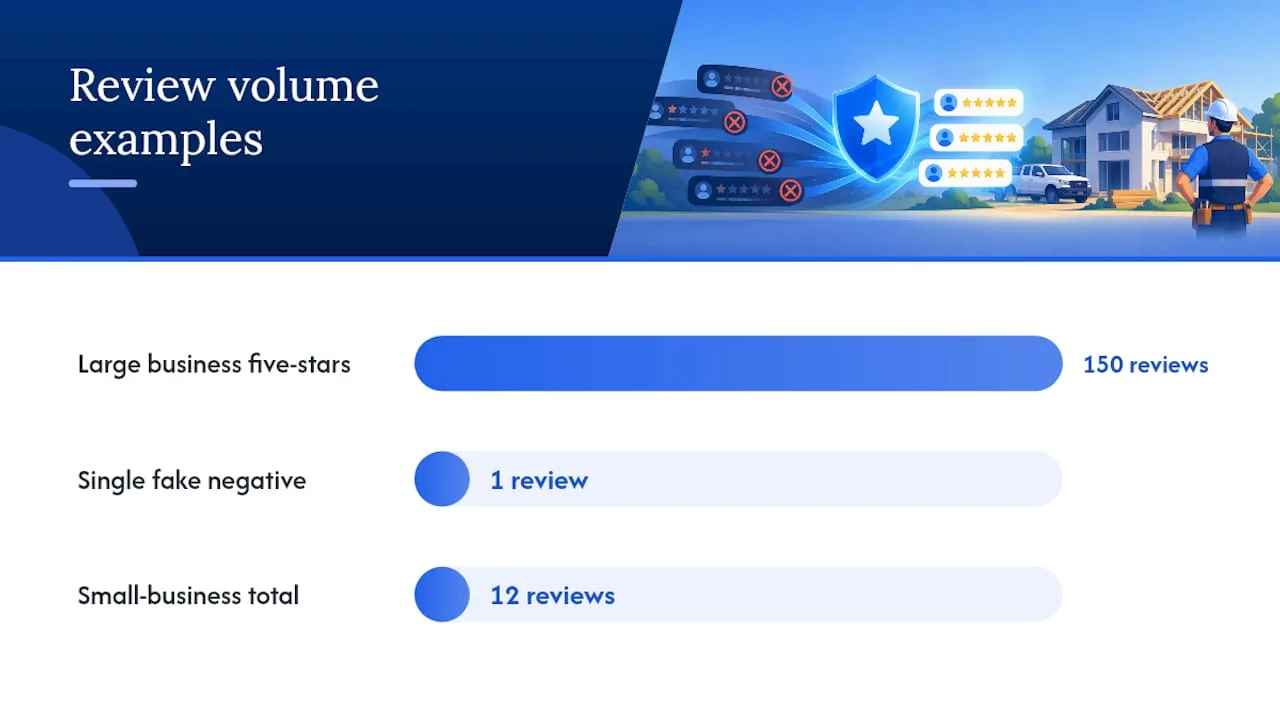
Pro Tip: A business with 150 recent five-star reviews barely notices one fake one-star review; a business with twelve total reviews gets hit hard by the same thing. Volume is the cheapest insurance you have.
Partner resources on building consistent review flows, like the frameworks described by Happy Client Flow, offer a useful model for how automated requests and follow-up sequences keep authentic reviews coming in without extra manual work.
What we’ve seen: the patterns behind most fake review cases
Most fake review clusters we’ve come across follow one of two shapes: a burst of near-identical one-star reviews right after a staff departure, or a slower drip tied to a competitor. In both cases, the businesses that got reviews removed fastest were the ones who had a review-linkage table ready before they even opened the report form.
The businesses that recovered fastest afterward weren’t the ones who won the appeal. They were the ones who already had an automated review request system running, so the fake review got buried under real ones within weeks instead of sitting alone at the top of the profile for months.
— Tyson
Coastal Connect: help with review generation and ongoing monitoring
Reporting a fake review is a one-time fight. Keeping your profile strong afterward is an ongoing job, and that’s where most contractors run out of time. Coastal Connect builds automated review request systems, Google Business Profile monitoring, and escalation support tailored for contractors, helping ensure fake reviews don’t sit unanswered for weeks while you’re on a job site.
| Service | What it covers |
|---|---|
| Reviews that keep coming | Automated review requests and follow-up sequences after every completed job |
| Local SEO & Google Business Profile | Profile optimization and ongoing monitoring for new reviews and ranking changes |
| Missed-call text-back & CRM | Automated follow-up so leads and customer records stay organized for evidence purposes |
| AI voice agent | Inbound call handling so no customer inquiry, including a review dispute, goes unanswered |
If you want a managed system instead of handling monitoring and review requests yourself, take a look at Coastal Connect’s pricing plans, starting with Foundation at $597 per month, or explore the review generation service directly to see how it fits your business.
This article is general information, not a substitute for advice from a qualified lawyer. Consult a qualified legal professional about your own circumstances before acting on anything here.
Sources
- Federal Trade Commission Announces Final Rule Banning Fake Reviews and Testimonials | Federal Trade Commission
- Report inappropriate reviews on your Business Profile - Google Business Profile Help
- Report negative review extortion scams on your Business Profile - Google Business Profile Help
- A Lawyer’s Guide to Removing False Google Reviews | Maryland State Bar Association
FAQ
Is faking Google reviews illegal?
Buying, selling, or knowingly creating fake reviews can trigger civil penalties under the FTC’s final rule banning fake reviews, which took effect in 2024. The rule targets businesses and brokers who knowingly procure or disseminate fake reviews, not the platform hosting them.
Can fake Google reviews be traced?
Google can often connect a fake review to a reviewer’s account activity, IP patterns, and posting behavior during its internal review, though it does not typically share those details publicly. In extortion cases, message threads and threats collected by the business owner, paired with the review link, give Google’s merchant extortion team a much clearer trail to follow.
How long does it take for Google to remove fake reviews?
Automated moderation on an initial flag often resolves within a few days, according to Google’s Business Profile Help. Manual escalation, used for appeals or extortion cases, can take longer and depends on the strength and organization of the evidence submitted.
Does Google punish fake reviews?
Google can apply profile-level restrictions or public warning banners when it detects fake engagement tied to a specific account or business. These actions target the violating profile or reviewer, and are separate from any civil penalties the FTC can pursue against a business that knowingly bought or orchestrated fake reviews.