Compliance First Automated Review Requests for SMBs: Contractor Example
Coastal Connect
Automated review requests are scheduled messages, usually SMS or email, that fire off after a purchase, job, or appointment and ask the customer to leave a public review without anyone on your team lifting a finger. The immediate payoff is volume: businesses that used to collect a handful of reviews a month start seeing a steady stream, because the ask happens every time instead of only when someone remembers. What follows covers exactly how to build that system, from triggers and timing to compliant templates and the KPIs that tell you it’s working.
TL;DR:
- Sending review requests within two hours for in-person services and after 24 to 48 hours for eCommerce deliveries maximizes response rates and relevance.
- SMS reviews outperform emails in high-volume, immediate-work environments due to higher open and reply rates, especially within the first few minutes after service completion.
- Always use a universal, neutral message path for all customers, routing unhappy clients to private feedback channels to avoid review gating violations.
- Automations should be triggered by reliable events like shipment scans or payment confirmations and connected via native integrations or APIs depending on the existing software stack.
- Monitoring response rates, review volumes, star ratings, and channel performance over time helps optimize the system’s effectiveness and identify underperforming templates or timing.
Table of Contents
- How Automated Review Requests Work: Triggers and Integrations
- When Should You Send SMS vs. Email Review Requests?
- Is Review Gating Illegal or Against Platform Rules?
- How Do You Set Up Automated Review Requests?
- What Should an Automated Review Request Say?
- How Do You Measure If Review Automation Is Working?
- Coastal Connect’s Results With Automated Review Requests for Contractors
- When Automation Beats a Personal Ask
- How Coastal Connect Handles Review Automation for You
- Sources
- FAQ
How Automated Review Requests Work: Triggers and Integrations
Every automated review system runs on a trigger, a piece of software watching for a specific event and firing a message the moment it happens. Get the trigger right and the rest is plumbing.
Common triggers include an order marked shipped, an appointment marked complete in a booking calendar, an invoice paid in your accounting software, or a customer clearing a set threshold on an internal satisfaction survey. How you connect that trigger to your messaging tool depends on what you’re already running:
- Native integrations link directly to platforms like Shopify, QuickBooks, or Jobber with no custom setup.
- Zapier or webhooks bridge tools that don’t talk to each other natively.
- API connections suit businesses with custom software or higher message volume.
- CSV import works as a manual fallback when nothing else connects.
The typical flow looks like this: trigger fires, an optional private feedback gate checks satisfaction, then a public review prompt goes out, followed by a scheduled follow-up if there’s no response. A plumber’s job-complete signal in a field service app and an eCommerce shipment scan trigger the same basic sequence, just through different pipes.
When Should You Send SMS vs. Email Review Requests?
Channel choice comes down to speed and context. SMS wins for immediate, in-person service work because SMS marketing in home services and construction produces very high open and response rates, and customers tend to reply within minutes of a job finishing. Email works better for eCommerce, where there’s a natural gap between delivery and when someone has actually used the product.
Statistic Callout: SMS review requests in home-service settings routinely outperform email on response rate, largely because texts get read within minutes rather than sitting in an inbox for days, according to Contractor Magazine’s analysis of SMS marketing.
Timing rules that hold up across most businesses:
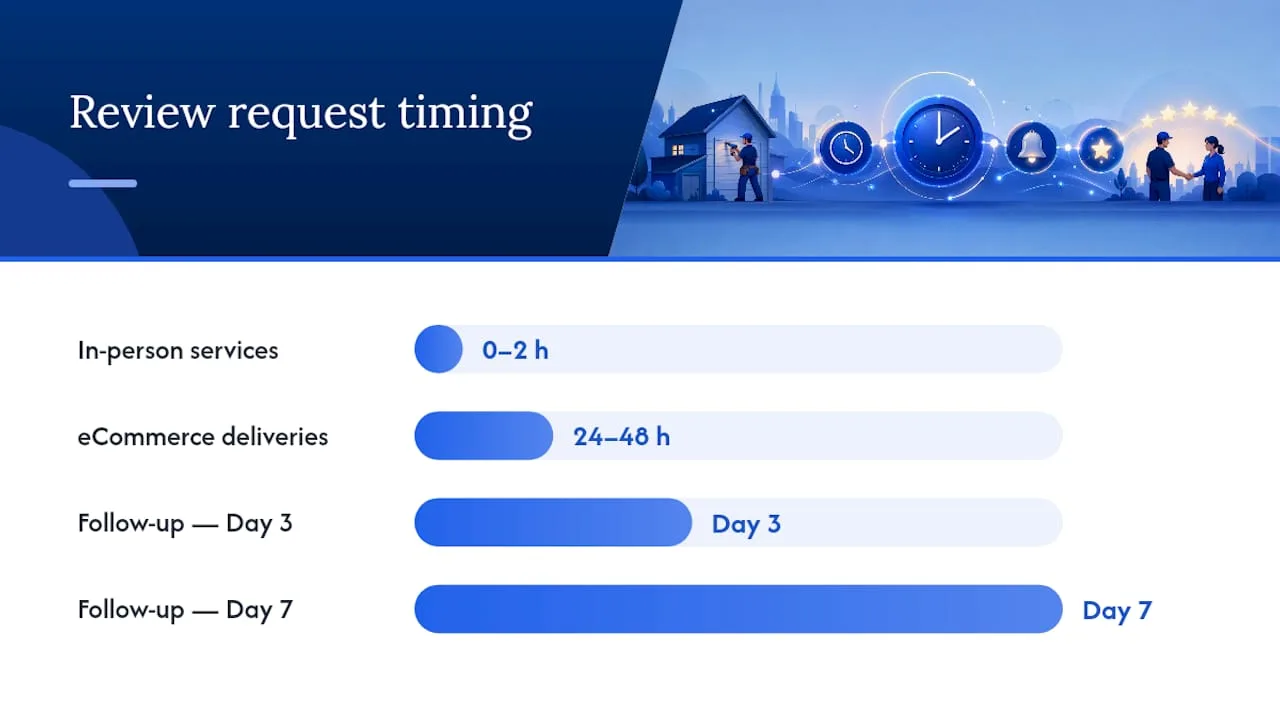
- In-person services: send within 0 to 2 hours of job completion, while the experience is fresh.
- eCommerce deliveries: wait 24 to 48 hours so the customer has actually opened the box.
- Follow-up cadence: a second touch at day 3, a final nudge at day 7, then stop.
- Multi-channel sequencing: lead with SMS, fall back to email if there’s no SMS consent or no response.
Stick to business hours when sending texts, and register your sending number under A2P 10DLC so carriers don’t flag your messages as spam before they ever reach a phone.
Is Review Gating Illegal or Against Platform Rules?
Review gating means only inviting happy customers to leave a public review while quietly filtering out anyone who might leave a negative one. Most major platforms treat this as a policy violation, and Google’s guidance on review gating makes clear that selectively soliciting reviews based on anticipated sentiment can get your listing penalized.
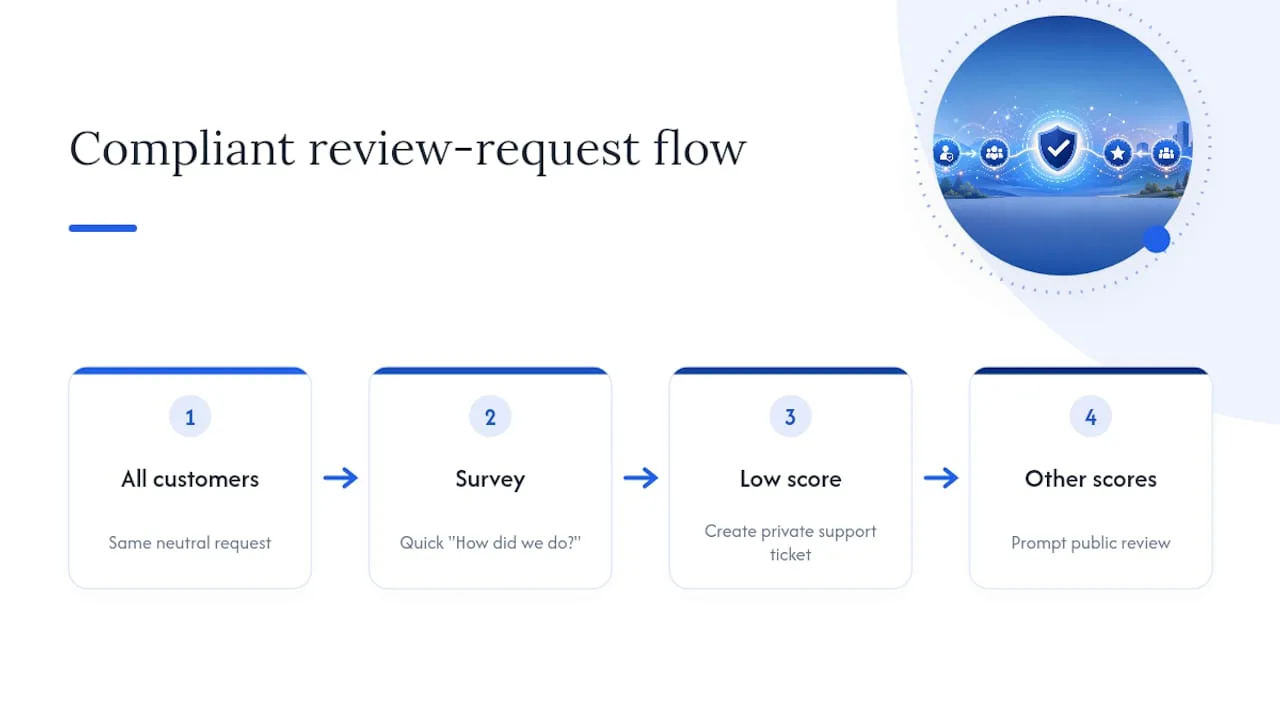
The compliant version is simple: send every customer the same public review request, but route dissatisfied ones toward a private feedback channel first. A quick “How did we do?” survey with a low score can trigger a private support ticket instead of a public review prompt, while everyone else still gets the same public ask.
Keep the wording neutral: “We’d love your honest feedback” beats “Loved our service? Leave us 5 stars!” Never offer a discount, refund, or freebie in exchange for a positive review; that crosses into incentivized review territory, which most platforms explicitly ban.
Pro Tip: Run one universal review-request path for every customer, and use a separate, private “Tell us more” link only for follow-up on low scores. Never let the public ask depend on how someone answered.
How Do You Set Up Automated Review Requests?
- Audit your contact list. Confirm you have accurate phone numbers and emails, and check that you have SMS consent on file where your platform requires it.
- Pick your triggers. Decide whether job completion, shipment, or invoice payment kicks off the sequence, and map each one to the tool that already tracks it.
- Choose your integration method. Use a native connection if your CRM or booking software supports it; otherwise set up Zapier, an API call, or a simple CSV upload.
- Build the sequence. Draft an initial ask plus two follow-ups, spaced a few days apart, and test the whole flow on a small batch of real customers before rolling it out.
- Lock down deliverability. Register a dedicated number under A2P 10DLC, build in automatic STOP handling, and check weekly for bounce or opt-out spikes that signal a problem.
Run this checklist once, then revisit it every few months as your contact volume grows or you add a new channel.
What Should an Automated Review Request Say?
Short and specific beats clever every time. BrightLocal’s guidance on asking for reviews points to personalized, brief messages as the consistent winner over generic blasts.
Three SMS templates worth stealing:
- Immediate ask (in-person service): “Hi [First Name], thanks for choosing [Business Name] today! Mind sharing a quick review? [Link]”
- Delivery follow-up (eCommerce): “Hope you’re loving your [Product Name]! Got 30 seconds to leave a review? [Link]”
- Second-touch nudge: “Just checking in, [First Name]. If you have a minute, we’d really appreciate your feedback: [Link]”
Three email angles:
- Subject: “How did we do, [First Name]?” First line asks directly, no preamble.
- Subject: “Quick favor?” Opens with a one-line thank-you, then the ask.
- Subject: “We’d love your feedback on [Product/Service]” Leads with specificity about what was purchased or done.
Use tokens like first name, service type, and product name to personalize, and keep every call-to-action to a single tap or click. Space follow-ups a few days apart and stop after the second nudge; a third message reads as nagging.
How Do You Measure If Review Automation Is Working?
Track four numbers: review response rate (percentage of requests that result in any review), conversion-to-review (percentage that convert to a public post), average star rating over time, and channel-level performance comparing SMS against email.
Statistic Callout: Review signals carry real weight with buyers. Statista’s research on how consumers find local businesses shows recommendations and review signals are a dominant factor in local purchase decisions, which is exactly why volume matters as much as star rating.
In month one, a working system should show a noticeable jump in raw review count compared to your pre-automation baseline. By month three, you’re refining: if SMS response rate outpaces email by a wide margin, shift more of your sequence weight there. If a specific template underperforms, rewrite it before you touch the timing.
Coastal Connect’s Results With Automated Review Requests for Contractors
Coastal Connect built its automation stack specifically for contractors, pairing review-request sequences with 24/7 inbound call handling and AI-powered SEO so that jobs completed in the field turn into both reviews and repeat bookings. Clients using this combined system have seen an average ROI increase of 327% within the first 90 days, a figure that reflects the full stack working together, not review requests alone.
The setup typically pairs a job-complete trigger from field service software with an immediate SMS ask, a private feedback gate for anything below a strong rating, and a follow-up email 48 to 72 hours later for anyone who hasn’t responded. For a plumbing or HVAC company running a dozen jobs a day, that’s a dozen chances at a new review, automatically, without a technician ever having to remember to ask.
When Automation Beats a Personal Ask
Automate when you run repeat transactions or high job volume, that’s where the ROI shows up fastest. Very small, relationship-driven shops sometimes do better with a personal ask. Blend both: automate the trigger, keep the wording human.
— Tyson
How Coastal Connect Handles Review Automation for You
If you’d rather not build sequences, connect integrations, and test templates yourself, Coastal Connect installs the entire system for you: trigger mapping, SMS and email sequences, 24/7 inbound call handling, and AI-powered SEO tuned specifically for plumbing, HVAC, electrical, roofing, and landscaping businesses in Rhode Island and Massachusetts.
What makes this different from piecing it together yourself is that the review-request automation isn’t standalone. It’s wired into the same system that answers your phone after hours and captures leads your website would otherwise lose, so a completed job doesn’t just generate a review, it generates the next booking too. That’s the gap most DIY setups never close.
If you’re running a trade business in Rhode Island or Massachusetts and want this installed rather than built from scratch, see how Coastal Connect sets up automated review requests and get a walkthrough of what a managed system looks like for your trade.
Sources
- Review gating explained: Google’s policy and how to stay compliant — Sira.ai blog
- How to ask for reviews — BrightLocal
- SMS compliance: opt-in and opt-out best practices — Twilio blog
- How to use Amazon’s Request a Review (eDesk)
FAQ
What Are Automated Reviews?
Automated reviews are customer reviews generated through a scheduled request system, typically an SMS or email triggered by an order, appointment, or invoice event, rather than a manual ask from staff.
Is Review Gating Illegal?
Review gating isn’t a criminal offense, but it violates the terms of service of most major review platforms, and Google explicitly discourages the practice because it filters out negative feedback before it goes public.
Does Amazon Send Review Requests Automatically?
Amazon offers a built-in “Request a Review” action in Seller Central that sellers or approved third-party tools can trigger once per order, but Amazon doesn’t send these automatically without that action being invoked.
What Companies Pay You to Write Reviews?
Legitimate businesses never pay customers for reviews, since incentivized reviews violate the terms of virtually every major review platform; any offer to pay for a review, positive or otherwise, is a compliance red flag worth avoiding entirely.
How Fast Should I Send a Review Request After Service?
For in-person service work, send within 0 to 2 hours of job completion; for eCommerce, wait 24 to 48 hours after delivery so the customer has had time to use the product.
Recommended
Want this done for your business?
Get a free audit. We'll look at your site, your Google profile, and your phones, and send you a checklist of exactly what to fix.