A contractor’s website is fast enough when the main part of the page appears within 2.5 seconds on a phone, taps respond right away, and nothing jumps around while someone is trying to hit the call button. Those are Google’s own targets, and they are the right ones for a plumber, roofer, electrician or HVAC company, because your customer is usually on a phone, in a hurry, with a problem. A slow page loses that person to the next result.
This guide covers how to test your site, what usually slows down a trade website, what to fix first, and the accessibility basics that belong in the same project.
TL;DR
- Google’s targets for a “good” page: Largest Contentful Paint within 2.5 seconds, Interaction to Next Paint under 200 milliseconds, Cumulative Layout Shift under 0.1.
- Test your site on a phone, using real-visitor data first and lab scores second.
- On contractor sites, oversized photos, heavy sliders, stacked plugins and third-party scripts cause most of the slowdown.
- A fast page only pays off if the call button, form and text-back work the moment the page loads.
- Accessibility fixes (contrast, alt text, labeled forms, keyboard use) are cheap to do during a speed cleanup.
Table of Contents
- Why speed matters more for a contractor than for most businesses
- The three numbers to know
- How to test your site in 10 minutes
- What slows down contractor websites
- A fix order that works
- What speed work costs
- Speed is only half of a page that books jobs
- Accessibility belongs in the same cleanup
- Our view
- How Coastal Connect fits
- FAQ
- Sources
Why speed matters more for a contractor than for most businesses
Most of your searches are urgent. A burst pipe, a dead furnace in January, a roof leaking after a nor’easter. The homeowner opens two or three results, and the first page that works gets the call. Nobody reads a slow page to the end.
Google describes Core Web Vitals as real-world measures of loading, interactivity and visual stability. It recommends good scores for success in Search, and says they align with what its core ranking systems look to reward, according to its Search documentation. Speed is not a magic ranking switch. Relevance, your Google Business Profile and reviews still carry most of the weight in local results. But speed is the part of your site you control completely, and it decides whether the visitor you already paid for or earned turns into a call.
The three numbers to know
Google’s documentation defines “good” for each of the three Core Web Vitals:
| Metric | What it measures | Good score |
|---|---|---|
| Largest Contentful Paint (LCP) | How long until the biggest thing on screen, usually your hero photo or headline, is visible | 2.5 seconds or less |
| Interaction to Next Paint (INP) | How quickly the page reacts when someone taps a button or opens a menu | Under 200 milliseconds |
| Cumulative Layout Shift (CLS) | How much the layout jumps while loading | Under 0.1 |
The thresholds come from Google’s Core Web Vitals documentation. In plain terms: the page shows up fast, answers your tap fast, and holds still.
CLS is the one that costs contractors calls without anyone noticing. A visitor reaches for the “Call Now” button, a banner loads above it, the page shifts, and they tap the wrong thing or give up.
The LCP target applies to the visits your site actually gets, not a single test. web.dev says sites should aim for 2.5 seconds or less for at least 75% of page visits. A page that is quick on your office wifi and slow on a customer’s LTE connection in a basement does not pass.
How to test your site in 10 minutes
- Test on your phone, off wifi. Open your homepage and your top service page (say, “water heater replacement”) on cellular data. If you are waiting, so is the customer.
- Run the page through PageSpeed Insights. Google’s free tool takes a URL and returns two kinds of results. Field data comes from real visitors. Lab data is a simulated test. Read the field data first when it is shown, because it reflects what customers experience.
- Check Search Console. If your site is verified, the Core Web Vitals report under Experience groups your pages into good, needs improvement and poor, based on real-user data. It shows which page types share a problem, so you fix a template once instead of fifty pages one by one.
- Test the pages that earn money. Your homepage, your top two or three service pages and your contact page matter most. A blog post that loads slowly is a smaller problem than a slow “Request service” page.
- Retest after every change. Write down the three numbers before you touch anything, then compare. Lab scores swing a little between runs, so look for clear movement, not one-point changes.
Small sites with little traffic may show no field data. In that case rely on the lab results and your own phone test, and recheck after the site has had more visitors.
What slows down contractor websites
The same problems show up again and again on trade sites. Here they are in the order they usually cost you the most.
Oversized photos
A crew photo straight off a phone can be several megabytes. Put it at the top of the page and your LCP suffers immediately. Resize images to the size they display at, and save them in a modern format. web.dev notes that formats such as AVIF or WebP shrink the file, though it also explains that a smaller file helps LCP only if the other stages of loading are not the real bottleneck. So measure after the change.
Lazy-loading the wrong image
Lazy loading tells the browser to wait on images below the screen, which is good for long pages. web.dev warns that you should never lazy-load your LCP image, because it delays the most important picture on the page. Lazy-load the gallery at the bottom. Load the hero image first.
Sliders, autoplay video and animation
A rotating banner of five job photos or a background video looks polished and loads like a truck with a flat tire. A single strong photo and a clear headline with a phone number does more work and loads in a fraction of the time.
Plugin and widget pile-up
Sites built over the years often carry a plugin for each feature: a gallery, a popup, a review widget, a chat bubble, a form tool, a booking tool. Each one adds code the phone has to download and run, and several can slow the page’s response to taps (INP). Remove what you do not use, and combine what overlaps.
Third-party scripts
Analytics, ad pixels, call tracking and chat tools each load from someone else’s server. They are worth having when they earn their keep, but audit them. A tag left over from an ad campaign two years ago is pure drag. If you use call tracking, set it up so it protects your local listing data and does not bloat the page; our call tracking checks for contractors cover that.
Cheap hosting and no caching
When the server itself is slow to respond, no amount of image work fully fixes the page. Shared hosting packed with hundreds of sites is a common cause on older contractor sites.
Layout jumps
Images without set dimensions, late-loading banners and fonts that swap after loading push content around. Giving every image and banner a reserved space fixes most CLS problems.
A fix order that works
Do not start with a score. Start with the pages that bring in calls, and work in this order:
- Compress and resize the hero image on your homepage and top service pages.
- Remove unused plugins, sliders and widgets. If you cannot say what a tool earns you, it is a candidate.
- Reserve space for images, banners and the header so the layout stays still.
- Trim third-party scripts to the ones tied to a number you track: calls, forms, bookings.
- Check hosting if the first step in loading is still slow after the above.
- Retest on a phone and compare with the numbers you wrote down.
The first three steps are doable by a careful owner or office manager in an afternoon. Steps four and five touch how the site is built and hosted, which is where a mistake can break a form or tracking. If you do not have someone who can safely edit the site, hand it to the people who maintain it.
What speed work costs
There is no standard price. A cleanup of images and plugins on a healthy site is a small job. Rebuilding a site whose theme and plugins are the problem is a larger one. That is why most contractors fold speed into a website project or a monthly plan instead of buying it alone: a rebuilt site starts fast and stays fast when the person who edits it knows the limits.
Our plans are published at coastalconnect.ai/pricing: Foundation is $597 per month, Growth is $1,297 per month and Scale is $2,497 per month.
Speed is only half of a page that books jobs
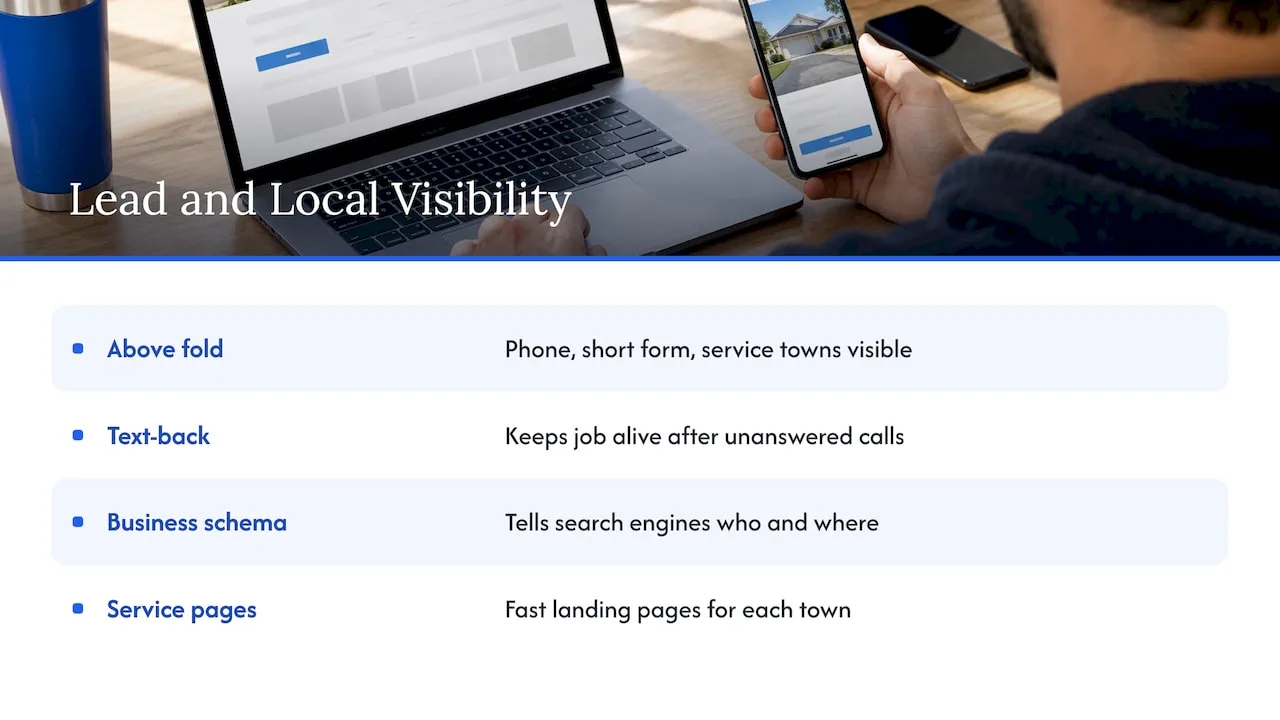
A fast page that does not capture the lead is still a missed call. Once the page loads, the visitor should see, without scrolling, your phone number as a tap-to-call button, a short form, and the towns you serve. After that, the follow-up matters: if they call at 9 p.m. and nobody answers, a text-back keeps the job alive, and our guide to after-hours answering for contractors shows how to set that up.
Speed also supports the technical side of local visibility. Clean structured data for your business, such as local business schema, tells search engines who you are and where you work, and a clear set of service area pages gives each town you serve a fast, useful landing page instead of a thin copy.
Accessibility belongs in the same cleanup
People also ask about website accessibility, and it pairs naturally with speed. Both come down to a site that works for everyone who lands on it, on any device.
The U.S. Department of Justice explains that web accessibility means people with disabilities can use a site as equally as others, and that inaccessible web content can exclude people the way physical steps can. The same guidance lists the common barriers, and every one of them is something you can check on your own site:
- Poor color contrast. Light gray text on a white background, or white text over a busy job photo, is hard to read, especially outdoors in sun.
- Color alone carrying meaning. A form that marks errors only in red leaves some visitors guessing.
- Missing alt text. Photos need a short description so screen readers can say what they show: “Roofer installing architectural shingles on a Cape-style home in Warwick.”
- Videos without captions.
- Forms without labels. Each field needs a label a screen reader can read, plus clear instructions and error messages.
- Mouse-only navigation. Menus, buttons and forms should work with a keyboard alone.
These are the barriers named in the DOJ’s web accessibility guidance.
For most private contractors, the practical reason to care is simple: a contact form that a customer cannot complete is a lost job, whether the cause is a slow script or a missing label.
If you work on public projects, the rules are more specific. The DOJ’s Title II rule, effective June 24, 2024, adopts WCAG 2.1 Level AA, a widely used technical standard for accessible web content, for state and local government web content and mobile apps. A 2026 DOJ interim final rule moved the compliance date for larger public entities from April 24, 2026 to April 26, 2027. The DOJ’s fact sheet adds that governments which contract with other entities to provide public services must ensure those contractors follow the requirements. If you bid on municipal or state work, confirm the exact requirements with the contracting agency or your attorney.
Our view
We work only with contractors in Rhode Island and Massachusetts, and the pattern is consistent: the website is treated as a brochure, when it should work like a dispatcher.
A brochure can be slow and pretty. A dispatcher cannot. It has to load on a phone in a driveway, show the number, take the request and trigger a follow-up. That is why we build custom websites to function as lead generation engines, and why we pair them with 24/7 inbound call handling, missed-call text-back and automated review requests.
Speed, accessibility and follow-up are one job. A page that loads in two seconds and then sends the form to an inbox nobody checks has only moved the problem. We would rather you spend your budget on one system where the page, the phone and the follow-up are built together, by a team that knows the towns and trades you serve.
Tyson
How Coastal Connect fits
If your site is slow, cluttered or not producing calls, our websites that book jobs are built for plumbers, HVAC companies, electricians, roofers and landscapers in Rhode Island and Massachusetts. They connect to missed-call text-back and CRM, so the lead is captured and followed up once the page has done its job. See the plans and pricing at coastalconnect.ai/pricing.
FAQ
What is a good load time for a contractor website?
Google’s target is a Largest Contentful Paint of 2.5 seconds or less, measured on real visits. That is when the biggest element on the screen, usually your hero image or headline, appears. Test on a phone with cellular data, since that is where most urgent searches happen.
How do I test my website speed for free?
Run your homepage and top service pages through Google’s PageSpeed Insights, which shows real-visitor data when it is available and a lab test either way. If your site is verified in Search Console, its Core Web Vitals report shows which groups of pages pass or fail. Retest after each change.
Can I fix website speed myself?
Yes for the basics: resizing images, deleting unused plugins and sliders, and giving images and banners fixed space. Changes to hosting, scripts and the site’s code are riskier, because a wrong edit can break forms or call tracking. For those, work with the team that builds and maintains your site.
Does website speed affect my Google rankings?
Google says good Core Web Vitals align with what its core ranking systems seek to reward. Speed works alongside relevance, your Google Business Profile and reviews, not in place of them. Its clearer payoff is that more visitors stay long enough to call you.
Do contractors need an accessible website?
An accessible site is easier for every customer to use, and it protects the forms and phone buttons that bring in jobs. Check contrast, alt text, form labels and keyboard use first. If you bid on government work, ask the contracting agency which accessibility requirements apply to you.
Sources
- Understanding Core Web Vitals and Google search results (Google Search Central)
- Optimize Largest Contentful Paint (web.dev)
- Guidance on Web Accessibility and the ADA (ADA.gov)
- Nondiscrimination on the Basis of Disability; Accessibility of Web Information and Services (ADA.gov, final rule)
- Extension of Compliance Dates for Title II web rule (ADA.gov, 2026)
- Fact Sheet: New Rule on the Accessibility of Web Content (ADA.gov)