A good contractor contact page does one job: it gets a homeowner with a problem to you in the fewest taps possible, and it makes sure someone answers. Below are six layouts we would build for a plumber, HVAC company, roofer, electrician or landscaper, what goes on each, and what has to happen after the visitor reaches out. The page itself is only half of it. The other half is what happens in the minutes afterward.
TL;DR
- Put a tap-to-call button and your real phone number at the top. Most urgent jobs (burst pipe, no heat, leak in the ceiling) start with a call, not a form.
- Keep the form to five or six fields: name, phone, town or ZIP, service needed, a short description, and a preferred time.
- Say what happens next and when. “We’ll be in touch soon” gives a homeowner no reason to wait for you.
- Show proof next to the form: reviews, your license or registration, service towns, photos of real crews.
- A contact page is only as good as your response. Missed-call text-back, chat and call answering decide who gets the job.
Table of Contents
- What a contractor contact page has to do
- Six contractor contact page layouts, and who they suit
- The elements every contractor contact page needs
- Mistakes we see on contractor contact pages
- The page is the easy part: what happens after the click
- Our perspective on contractor contact pages
- How to audit your own contact page in 20 minutes
- Where we can help
- Frequently asked questions
- Sources
What a contractor contact page has to do
A contact page for a software company handles support tickets and sales demos. A contractor’s page handles a stressed homeowner on a phone, often at night, comparing three companies in three browser tabs. That changes the design.
The homeowner wants to know four things within a few seconds: do you work in my town, can you do this job, can I trust you, and how fast can I reach a person. Everything on the page should answer one of those.
Research on general contact pages points the same way. Nielsen Norman Group found that users still expect to see addresses, phone numbers and email addresses on contact pages, and advises against hiding them behind forms or chat. For a trade business, that means the form is an option, never a wall. The U.S. government’s own web standards say the contact page should list all contact options and that every page should link to it. Both are good rules for a plumbing site as much as a federal agency.
Webflow’s guide lists a contact form among the basic elements of a successful contact page. We agree, with one condition: the form should sit beside a phone number, not instead of one.
Six contractor contact page layouts, and who they suit
These are layouts, not screenshots of other companies’ sites. We describe each one so you can hand it to a designer or check your current page against it.
1. The emergency plumber: call first, form second
Best for: plumbing, drain, water heater, emergency HVAC repair.
What it looks like on a phone:
- A full-width tap-to-call button in the top third of the screen, with the number written out as text underneath.
- One line of reassurance: hours, and whether a human answers after hours.
- A short form below the button, labeled for people who would rather text or schedule.
- Service towns listed as plain text, such as Warwick, Cranston, Providence and Pawtucket, so a homeowner in Cranston sees their town.
Why it works: someone with water on the floor is not going to read a paragraph. They need the number. The form is there for the 2 a.m. visitor who does not want to call but will leave details.
What to watch: if the number rings and no one picks up, this layout makes things worse, because you have sent your best leads straight to voicemail. More on that below.
2. The HVAC quote page: season-aware and specific
Best for: system replacements, installs, maintenance plans.
HVAC buyers are often researching a big-ticket decision, so they have time to fill in a few more fields. This layout asks:
- Name, phone, email
- ZIP code (placed first or near the top, so you know quickly whether you serve the area)
- What they need: repair, replacement, new install, maintenance plan
- Type of system, if known: furnace, heat pump, central air, ductless mini-split
- Best time to reach them
A dropdown for the service need does two things. It speeds up the form and it lets your office route the request to the right person before anyone picks up the phone.
A short line under the button helps: say what happens after they submit. “A comfort advisor will call you within one business hour to set a time for a home visit” is a concrete promise. Only write it if you can keep it.
3. The roofing page: photos in, trust beside the form
Best for: roof repair, storm damage, replacement estimates.
Roofing is a trust purchase. Homeowners worry about storm chasers and about being talked into a full replacement they do not need. The layout leans on proof:
- The form on the left, three or four recent reviews on the right
- Your license or registration number, shown in the footer or beside the form
- A photo upload field, optional, for damage pictures
- A line stating whether the estimate is free and how long it takes
On licensing, state rules differ. In Rhode Island, the Contractors’ Registration and Licensing Board is the state body that handles contractor registration, and Massachusetts has its own home improvement contractor and construction supervisor requirements. Check your board’s current rules on how a number must appear in advertising, then put it where a homeowner can see it.
4. The electrician page: separate urgent from scheduled
Best for: panel upgrades, EV charger installs, generator hookups, repairs.
Electrical work splits into two kinds of visitor. One has sparks or a dead outlet and needs help now. The other wants a quote for an EV charger next month. Give them two paths:
- “I need help now”: big call button, plus a text option.
- “I’m planning a project”: the longer form, with fields for project type, building age, and a preferred week.
Splitting them keeps the urgent caller from wading through a project questionnaire, and keeps the planner from feeling rushed.
5. The landscaper: seasonal and visual
Best for: lawn care contracts, hardscaping, spring cleanups.
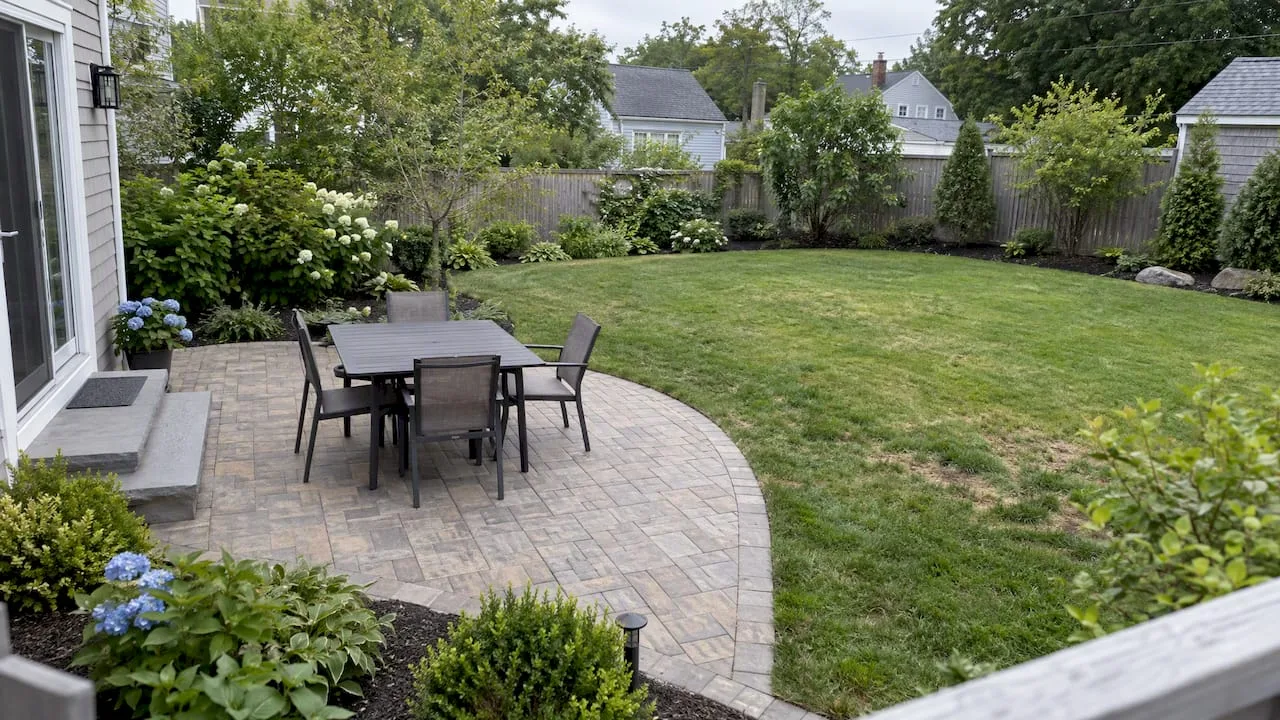
Landscaping demand is seasonal and driven by images. Pair the form with a small gallery of finished yards. Ask for property size or a rough scope (“patio, about 400 sq ft”) and let people upload a photo of the space. Add a clear line on how you schedule: a site visit, then a written quote.
6. The multi-location or two-state shop
Best for: companies serving several towns, or both Rhode Island and Massachusetts.
If you operate in more than one area, avoid one generic page with a single phone number and an address nobody can place. Use a short list of service areas, each with its own phone number or at least its own line of text, and a ZIP field that confirms coverage. Give each major town its own page too, so the contact options match the search.
A simple comparison of the six:
| Layout | Main action | Form length | Proof to show |
|---|---|---|---|
| Emergency plumber | Tap to call | 4 fields | Hours, service towns |
| HVAC quote | Request a quote | 6 to 7 fields | Reviews, maintenance plan details |
| Roofing | Free estimate | 5 fields plus photos | Reviews, license number, photos |
| Electrician | Two paths | 3 or 6 fields | License, safety credentials |
| Landscaper | Site visit | 5 fields plus photos | Project gallery |
| Multi-location | Pick your area | 5 fields | Area list, local numbers |
The elements every contractor contact page needs
Whatever the layout, these are the parts we check on every page.
A phone number that is text, not just an image
Put the number in real text and make it a tap-to-call link. On a phone, that is one tap. On a desktop, people copy it. If the number is baked into a graphic, you lose both.
A short form
Every extra field costs you submissions. A workable set for most trades:
- Name
- Mobile phone
- ZIP or town
- Service needed (dropdown)
- A sentence or two about the problem
- Preferred time (optional)
Email can be optional. Many homeowners would rather get a text or a call, and a required email field is one more reason to quit.
Putting ZIP first has a practical benefit: you find out early whether the person is in your area. If you only work in parts of Rhode Island and Massachusetts, you can show a polite message to someone outside it instead of letting them fill out a form you will never act on.
A promise about timing
This is the line most contractor sites skip. After submitting, the homeowner sees either a blank “Thank you” or a vague one. Better:
- State a real time window, such as “We call back within 15 minutes during business hours.”
- Send a confirmation text right away that repeats it.
- Offer a way to book a time on the spot if your calendar is connected.
A promise you cannot keep is worse than none. Set the window your office can actually meet, then build the system to meet it.
Proof, close to the action
Place two or three real reviews, your star rating, and your license or registration next to the form. A visitor deciding whether to hand over a phone number is looking for reasons to trust you, and the contact page is where that decision happens.
Service area, in plain words
List the towns you serve. “Serving Rhode Island and Massachusetts” is vague. A list of towns tells the homeowner in Fall River or Medford that you come to them, and it gives search engines a clear signal about where you work.
Address and hours, if you have a storefront or office
If customers can visit, include the address, a map, and hours. If you work from a truck and a home office, say “service-area business” and skip the map pin, and keep the details consistent with your Google Business Profile.
A mobile-first layout
Most homeowner searches for a plumber or roofer happen on a phone. Test your page with one thumb: can you reach the call button, fill the form, and submit without pinching or zooming? If not, fix that before anything cosmetic.
Mistakes we see on contractor contact pages
- Form-only pages. No visible number, just a form. Urgent callers leave.
- Too many fields. Asking for a full address, budget, timeline and how they heard about you in one go.
- A generic “Thank you” page. It wastes the moment of highest interest. Use it to confirm timing and offer a booking link.
- Stock photos of smiling models. Real crews and real trucks do more for trust.
- A form that emails one inbox nobody checks. The most common leak. See the next section.
- No mention of towns. The visitor cannot tell if you serve them.
- Buried page. The contact page should be one tap from every other page, a standard that federal web guidance states outright.
The page is the easy part: what happens after the click
You can build a beautiful page and still lose the job. The usual failure is slow or missing follow-up. A form submission lands in an inbox, the crew is on a roof, and the homeowner has already called the next company on the list.
This matters beyond your own site, too. Google’s Local Services Ads, the “Google Guaranteed” listings at the top of many home service searches, factor responsiveness into ranking, according to one agency’s 2026 breakdown of LSA that lists review profile and response rate and time among the main factors. Treat that as a practitioner’s view rather than an official Google statement, but the direction is clear: answering fast helps you in more places than just your own website.
Three fixes cover most of the gap:
- Missed-call text-back. When a call goes unanswered, the caller gets a text within seconds: “Sorry we missed you, what do you need help with?” The conversation continues by text, and the lead is not lost.
- Instant form confirmation. The moment someone submits, they get a text and an email confirming receipt, with your promised window and a booking link.
- After-hours coverage. A person, or an AI voice agent, that answers at night and on weekends, collects details, and books or escalates emergencies.
None of that requires a bigger crew. It requires the right tools set up once and monitored.
Our perspective on contractor contact pages
We build and manage websites and lead-capture systems only for contractors in Rhode Island and Massachusetts, so we see the same pattern in a lot of trade businesses: the owner spends money to get a visitor to the site, and the site ends in a form that goes nowhere fast.
Our view is that a contact page is a handoff point, not a design exercise. The test is simple. If a homeowner in Warwick reaches out at 7 p.m. on a Sunday, what happens in the next five minutes? If the honest answer is “nothing until Monday”, then the page is not finished, however good it looks.
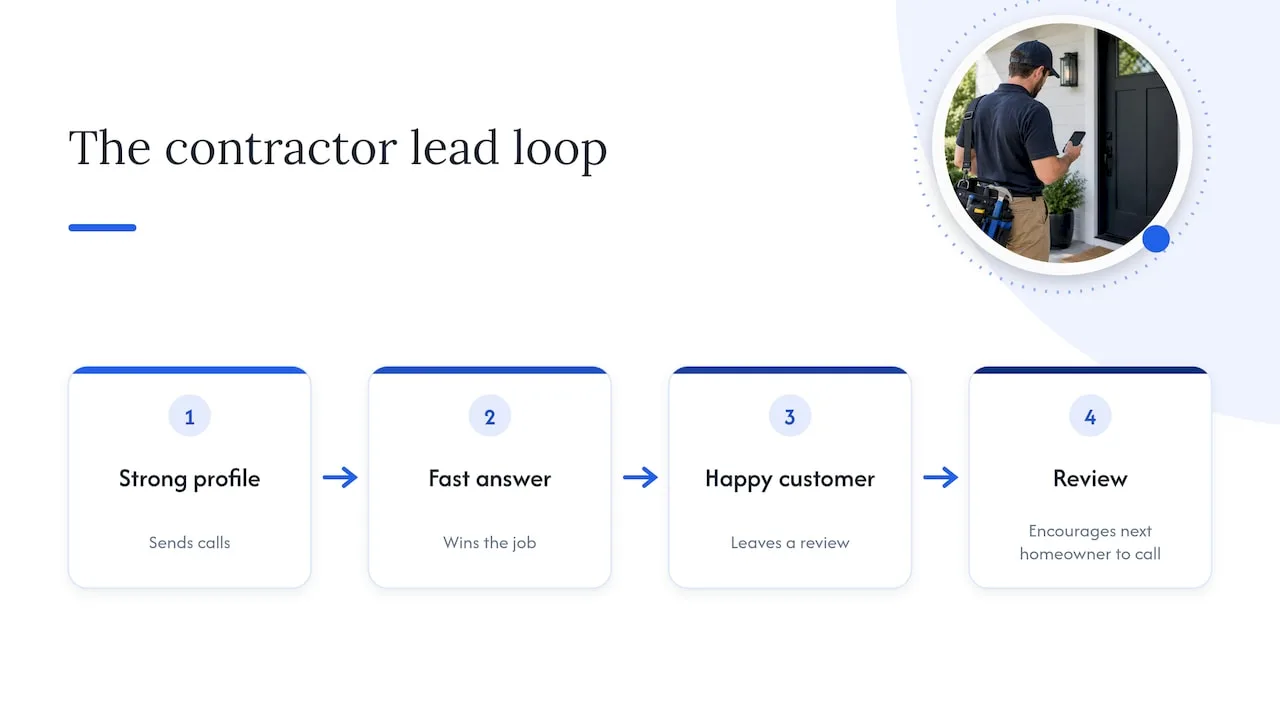
That is why we do not treat the website, the Google Business Profile, call handling and review requests as separate projects. They feed each other. A strong profile sends calls, a fast answer wins the job, a happy customer leaves a review, and the review makes the next homeowner more willing to call. The contact page sits in the middle of that loop, and it should be built with the rest of the loop in mind.
Our advice to any owner: before you redesign anything, call your own number at an awkward hour, submit your own form, and time what happens. Then fix the slowest step first.
— Tyson
How to audit your own contact page in 20 minutes
You can do this today without a developer.
- Open the page on your phone. Can you tap the number and call? Does the form fit the screen?
- Count the fields. Remove anything you do not use to decide whether to take the job.
- Submit a test inquiry. Note how long until you, and then the customer, get any response. Check the spam folder too.
- Call after hours. Does it go to voicemail, a service, or a live answer? Does it say what to do in an emergency?
- Read the confirmation page. Does it state a time window and the next step?
- Check proof. Are reviews, your license or registration, and your towns visible without scrolling far?
- Compare with your Google Business Profile. Same phone number, hours and service area on both?
- Ask a friend outside the trade. Hand them your phone and ask them to book a visit. Watch where they hesitate.
Write down what you find. Most owners discover two or three fixes that take an afternoon.
Where we can help
If you would rather not build this yourself, we do it for contractors in Rhode Island and Massachusetts. Our websites that book jobs are designed around the contact paths described above. Missed-call text-back and CRM handle the instant follow-up, an AI voice agent can answer when your crew cannot, and AI website chat catches visitors who will not call. Our Local SEO and Google Business Profile work makes sure the details on your page match what Google shows.
Plans are published on our pricing page: Foundation is $597 per month, Growth is $1,297 per month, and Scale is $2,497 per month. An AI employee on the Growth plan is an add-on at $199 per month. Not sure which fits? Start from the Coastal Connect home page and tell us what your calls and leads look like today.
Frequently asked questions
Should a contractor contact page have a form or just a phone number?
Both. Many homeowners, especially in urgent jobs, prefer to call, and research on contact pages finds that people still expect to see phone numbers and addresses. A short form serves people who are browsing at night or planning a project. Make sure whoever receives the form can respond quickly.
How many fields should a contractor contact form have?
Five or six is a good ceiling for most trades: name, phone, ZIP or town, service needed, a short description, and an optional preferred time. Add fields only if you use the answer to decide whether and how to take the job. Roofers and landscapers can add an optional photo upload.
Do I need a separate contact page for each town I serve?
You do not need a separate contact form, but separate service-area pages help. Each one can name the town, list the services you offer there, show local reviews, and link to the same call button and form. This helps homeowners see you work nearby, and it gives your site a clearer local signal.
What should happen right after someone submits the form?
Three things: a thank-you screen that states when you will call, an instant text and email confirming the request, and a notification to a person who can act on it. If no one can respond for a few hours, an automated text that asks a first question or offers a booking link keeps the conversation alive.
Should I show my license number on the contact page?
Yes, if you hold one, and it is often required to appear in advertising. Rules differ by state and trade, so check with your licensing body, such as the Rhode Island Contractors’ Registration and Licensing Board or the equivalent Massachusetts office, for how it must be displayed. Placing it near the form also builds trust.