
A landscaping website has one job in the first five seconds: prove you can do the work. Every design choice after that either builds trust or gets in the way of a phone call. Coastal Connect has seen the pattern hold across dozens of contractor sites, and with about half or more of all traffic now landing on mobile screens, the checklist below starts with photos, moves through structure, and ends at the “click to call” button.
TL;DR:
- Mobile load times must stay under three seconds, with compressed images and a visually compelling hero image to capture visitors immediately.
- Service pages should feature filterable galleries, testimonials, and badges to build credibility, with contact information and call-to-action buttons placed above the fold.
- Including a booking or scheduling tool on every service page significantly increases the chance of capturing evening or weekend leads before competitors respond.
- A website’s structure should follow a clear hierarchy: homepage, dedicated service pages, portfolio, about, and contact, guiding visitors toward quote requests efficiently.
- Building a content strategy that targets seasonal and local-specific landscaping questions enhances search visibility and positions the business as a trusted local expert.
Table of Contents
- What Landscaping Website Design Principles Actually Convert Visitors?
- The Landscaping Website Checklist Every Owner Should Run
- How To Structure Each Page On A Landscaping Site
- What Does A Landscaping Website Cost, And How Long Does It Take?
- Where To Find Landscaping Website Inspiration (Without Copying It)
- Does Your Landscaping Site Need Online Booking?
- Building A Content Strategy Around Landscaping Services
- Should Your Landscaping Site Include Video?
- Turning Social Media Into Website Traffic
- What We Prioritize When Designing Contractor Sites
- How Coastal Connect Builds Landscaping Sites That Book Jobs
- Sources
- FAQ
What Landscaping Website Design Principles Actually Convert Visitors?
Homeowners shopping for landscapers are visual first, price second. They want proof, not paragraphs, which is why a visual-first layout beats a text-heavy one every time. A full-width hero image of a finished patio or a freshly graded lawn answers “can they do a good job?” before the visitor reads a single word, echoing what SiteBuilderReport found across 41 landscaping sites: the strongest performers lean on project imagery and before/after galleries rather than stock photography or marketing copy.
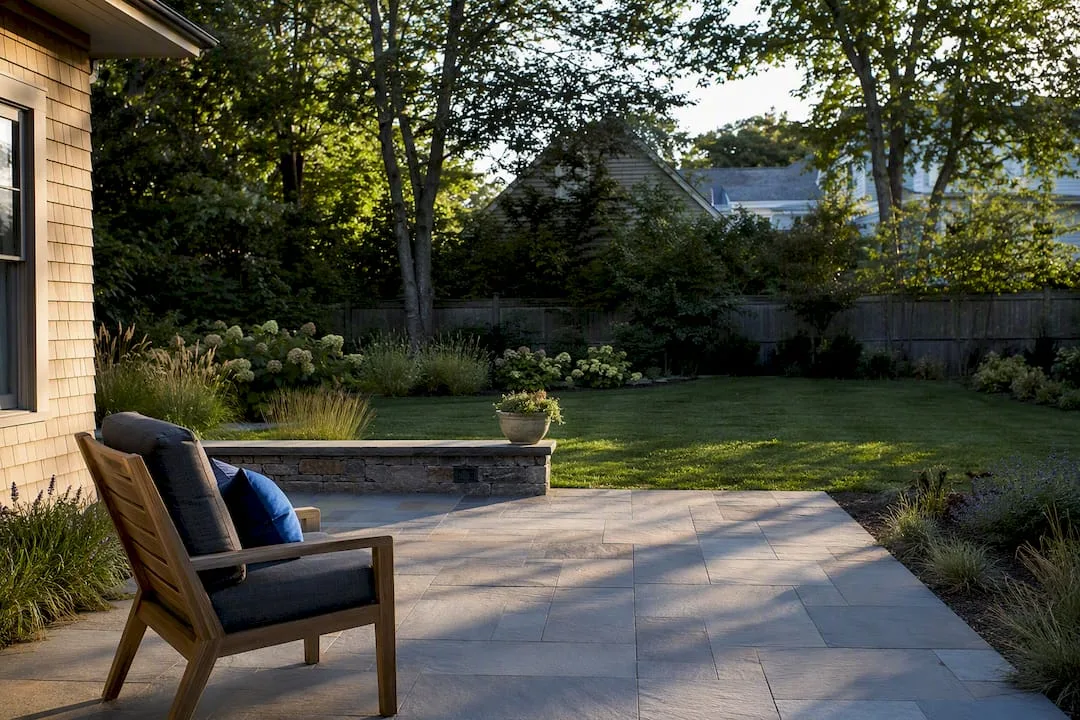
Visual hierarchy does the rest of the work, exemplifying how to present guarantees and testimonials as seen on Durfmakers’ website development approach. Bigger elements get seen first, so the click-to-call button and quote form need to sit above the fold, not buried under three paragraphs about company values. Color and font choices should match the customer you’re chasing: a high-end design/build firm targeting $50,000 backyard renovations looks different from a mow-and-blow operation competing on speed and price. Muted greens, serif fonts, and generous white space read upscale. Bright colors, bold sans-serif type, and tighter layouts read fast and affordable.
None of it matters if the site loads slowly on a phone. Slow mobile pages lose leads before the hero image even renders.
- Lead with a full-bleed photo of your best completed project, not a logo or a stock graphic.
- Put the phone number and a quote button in the header on every single page.
- Compress images so mobile load time stays under three seconds.
- Match color palette and typography to the customer tier you actually want.
Pro Tip: Take several strong project photos and build the homepage hero rotation around them before you write a word of copy. The visuals sell the service; the text just supports it.
The Landscaping Website Checklist Every Owner Should Run
Before you approve a design or hire a developer, run the site against this list. Skip an item and you’re leaving leads on the table.
- A hero section with a one-line value proposition, a click-to-call number, and a visible “Get a Quote” button.
- Individual service pages for each major offering (hardscaping, lawn maintenance, irrigation, design/build) with a short scope description and its own CTA.
- A project gallery with before/after pairs, filterable by service type or project size.
- Testimonials or a review widget, license and insurance badges, and real photos of the owner or crew.
- Compressed, lazy-loaded images plus local business schema markup so search engines understand your service area.
The gallery carries more weight than most owners assume. RealGreen’s roundup of lawn care design best practices puts visible testimonials and mobile optimization near the top of the list, right alongside clear service pages, because visitors decide credibility from proof, not promises. When you brief a designer, hand over at least five strong project photos, including two before/after pairs, and a prioritized list of services. That single step prevents the scope creep that turns a four-week build into a three-month one.
How To Structure Each Page On A Landscaping Site
Page order and content priority matter as much as the visuals sitting on top of them. Here’s the sequence that keeps visitors moving toward a quote request instead of bouncing.
- Homepage — hero image and value prop, a summary of core services, three to five featured projects, a testimonial strip, and a closing CTA banner.
- Service pages — one per offering, following a problem, approach, sample outcome, then CTA formula so each page reads like a mini pitch.
- Portfolio or case study pages — project overview, before/after photos, a few lines on the process, and any outcome detail worth sharing (square footage transformed, timeline, materials used).
- About page — the owner’s story, years in business, licenses and certifications, and real team photos. This is where skeptical homeowners get convinced fast.
- Contact or estimate page — a short form (name, phone, service needed, zip code), a click-to-call button, and a note on which towns or counties you actually serve.
HousecallPro’s guide to landscaping site content makes the same case for keeping contact forms short and service-area details visible. The fewer fields a homeowner has to fill out, the more quotes you get. A five-field form beats a twelve-field form nearly every time.
What Does A Landscaping Website Cost, And How Long Does It Take?
Pricing splits into three rough tiers. A templated site with light customization runs cheapest and fastest to launch. A small custom build, with a real portfolio system and branded design, sits in the middle. A full custom site paired with automation, like booking tools and lead follow-up, costs the most upfront but tends to pay back faster through captured leads.
- Templates and small custom sites launch in roughly two to four weeks; full custom builds with automation often take six to ten.
- Costs climb with filterable galleries, CRM or booking integrations, custom photography, and ongoing SEO work.
- Common delays: waiting on client photos, slow content approval, and last minute service-list changes.
- Automation and 24/7 call handling raise the upfront number but usually justify themselves once you count the after-hours leads a static site simply drops.
Where To Find Landscaping Website Inspiration (Without Copying It)
Good inspiration comes from studying structure, not stealing sentences. Browse the Webflow made-in gallery for landscaping for clonable layouts, scan Pinterest boards built specifically around landscaping site ideas, and look at design community showcases for photography and color trends. The goal is pattern recognition: notice how often the strongest sites put a gallery link in the main navigation, or how they group services into three or four clear categories instead of ten vague ones.
- Save five to ten reference sites and note what each one does with its hero section, not just its overall look.
- Translate a layout you like into your own content plan; don’t copy headlines or claims verbatim.
- Decide upfront whether you’re hiring a photographer, staging smartphone shots yourself, or supplementing with curated stock. Real project photos consistently outperform stock images for trust.
- Keep accessibility basics in mind: readable contrast, legible font sizes, and alt text on every gallery image.
Webflow’s own gallery notes that cloning a template speeds up prototyping, but the brand voice and photography still need to be yours. A site that looks identical to three competitors in your county does nothing for you.
Does Your Landscaping Site Need Online Booking?
A contact form that just says “we’ll call you back” loses to a competitor’s site that lets a homeowner grab a consultation slot in ten seconds. Booking or scheduling integration turns your website from a brochure into a working front desk.
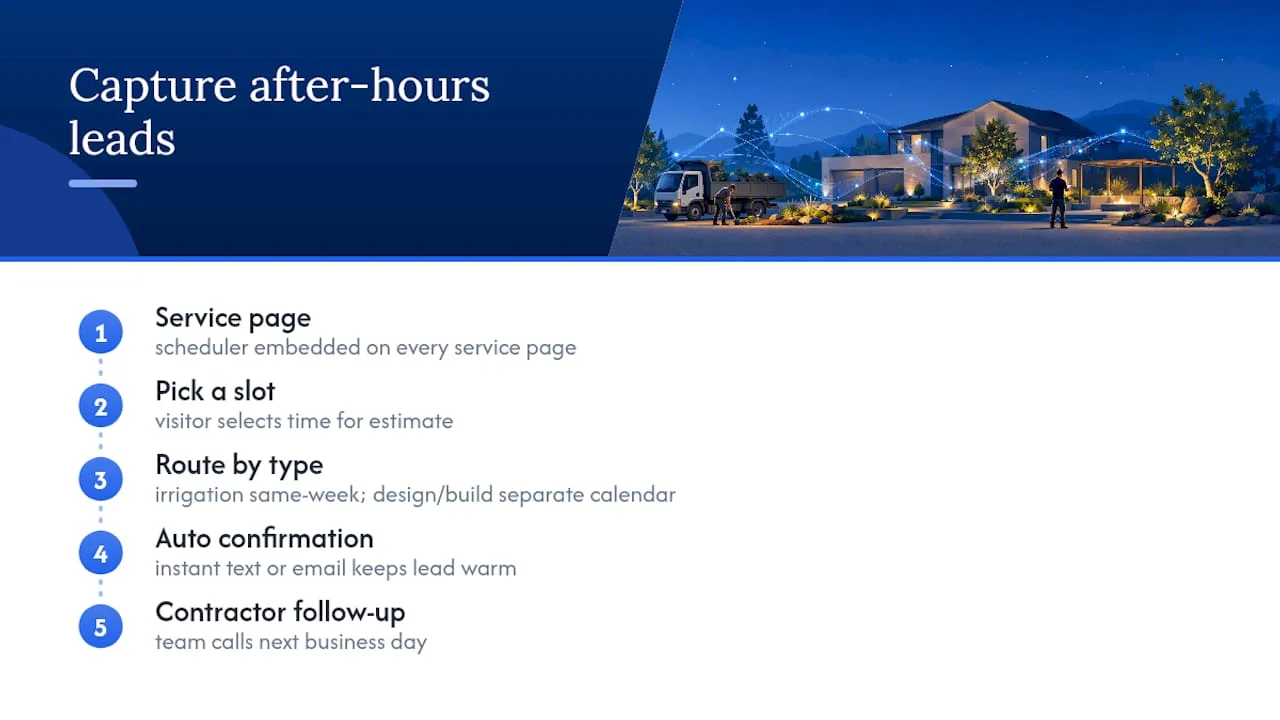
The simplest version links a scheduling tool directly to your quote button, so a visitor picks a time for an in-person estimate without a back-and-forth phone tag. More advanced setups route different service types to different calendars: irrigation repairs to same-week openings, full design/build consultations to a separate slower-moving calendar. Either way, the scheduling tool should live on every service page, not just the contact page, since visitors often decide to book while reading about a specific service rather than after browsing the whole site.
The bigger opportunity sits after hours. Most quote requests for outdoor projects come in evenings and weekends, exactly when a landscaping crew is out in the field or home for the night. A site with no way to capture that intent loses the lead to whichever competitor answers first the next morning. Pairing your booking tool with automated confirmation texts or emails keeps that lead warm until your team can follow up personally. Even a basic calendar embed beats a phone-tag voicemail system, and it costs far less than the leads it saves.
Building A Content Strategy Around Landscaping Services
A blog isn’t decoration, it’s how you show up when someone searches “when to aerate a lawn” or “best mulch for New England gardens” months before they’re ready to hire anyone. Seasonal maintenance guides, planting calendars specific to your climate zone, and simple how-to posts on watering schedules or fall cleanup all build search visibility while positioning you as the local expert.
The format matters less than the consistency. A short post published every two or three weeks beats a 3,000 word guide published once a year and forgotten. Cover the questions your own customers ask on the phone: how often to fertilize, what to do about grubs, when to schedule spring cleanup. Each post is also a natural place to link back to a relevant service page, which helps both visitors and search engines connect your expertise to the service you’re selling.
Local specificity beats generic advice every time. A post about “drought-tolerant landscaping for Rhode Island yards” will outperform a broad national guide because it speaks directly to the soil, climate, and municipal watering rules your actual customers deal with. Pair that with basic on-page SEO, service-area pages for each town you cover, and clean meta descriptions, and the blog starts pulling in search traffic that a portfolio page alone never will.
Should Your Landscaping Site Include Video?
Photos prove a finished project looks good. Video proves the process is professional, which matters more than owners usually expect. A sixty-second walkthrough of a hard scape installation, from excavation to finished patio, tells a homeowner more about your crew’s competence than any amount of written copy.
Video works best embedded directly on the relevant service page or project case study, not buried on a separate “media” page nobody visits. A drone shot of a completed landscape, a time-lapse of a multi-day build, or a short clip of the owner explaining a maintenance plan all give visitors a reason to trust the operation behind the photos. Even simple, unedited footage shot on a phone outperforms no video at all, since it signals that real work happens on real properties, not just in a portfolio gallery.
Keep clips short. Thirty to ninety seconds holds attention; anything longer needs to be genuinely compelling to keep a mobile visitor watching. Host video through YouTube or Vimeo embeds rather than large uploaded files, since native video hosting can slow page load times exactly where mobile performance matters most.
Turning Social Media Into Website Traffic
Instagram and Facebook are where landscaping work actually gets discovered before someone ever types a search query. A finished backyard transformation posted with location tags and a link to the matching portfolio page pulls warm traffic straight to your site. The reverse matters too: every service and portfolio page should carry visible social icons, not buried in a footer nobody scrolls to.
Consistency beats polish here. A weekly post of a completed project, a quick before/after carousel, or a short client walkthrough keeps your audience warm between projects. Link each post back to a specific portfolio page rather than just your homepage, so the traffic lands on the exact proof point that got someone interested in the first place. Embedding a live Instagram feed on your homepage or portfolio page also keeps the site looking active, which matters to a visitor deciding whether a business is still operating and taking new clients.
What We Prioritize When Designing Contractor Sites
Design gets a landscaping business noticed. Automation is what keeps a lead from slipping away at 9 p.m. on a Saturday. Coastal Connect builds both into every site because a beautiful portfolio with no follow-up system still loses jobs to whoever calls back first. Before you hire a designer, gather your best project photos and write down every service you actually want leads for. That single step saves weeks of back-and-forth later.
— Tyson
How Coastal Connect Builds Landscaping Sites That Book Jobs
Some web design agencies for landscaping contractors offer not only a finished site but also the follow-up system that helps keep leads from going cold. This approach can include SEO tuned for local search terms, automated review requests that build a testimonial base without manual asking, and inbound call handling so quote requests during off-hours do not go unanswered.
This fits best if you’re a landscaping contractor who wants a done-for-you website built as a lead generation engine, not a static brochure you’ll revisit in three years. It also fits owners tired of chasing missed calls or losing quote requests in an unmonitored inbox. If that describes your business, start a discovery call with Coastal Connect and walk through what a converting site looks like for your service area.
Sources
- Share of website traffic coming from mobile devices | Statista
- 41 Inspiring Landscaping Website Examples | SiteBuilderReport
- 10 Best Lawn Care Website Design Ideas | RealGreen
- Made in Webflow — Landscaping
FAQ
How Do I Make A Website For Landscaping?
Start with five to ten strong project photos, a prioritized service list, and a clear idea of your target customer before writing any content. Build the homepage around a hero image, a short value statement, and a visible quote button, then add individual service pages and a filterable project gallery.
What Are The Best Websites For Landscaping Design?
The strongest examples share the same traits: large project photography, before/after galleries, and fast mobile load times, as shown across the 41 landscaping sites SiteBuilderReport reviewed. Look at the Webflow made-in gallery for clonable layout examples rather than copying any single site outright.
How Much Does A Landscaping Website Cost?
Costs vary by scope, with basic templated sites landing cheapest and full custom builds with automation costing the most upfront. Coastal Connect’s current pricing for custom, lead-focused landscaping sites is listed directly on the Coastal Connect site rather than a fixed public rate.
Can ChatGPT Do Landscape Design?
ChatGPT can help brainstorm plant lists, draft service page copy, or outline a content calendar for blog posts, but it can’t generate the project photography or portfolio proof that actually convinces homeowners. Design tools and AI assistants work best as a starting point for text, not as a replacement for real before/after images of your own work.
Does My Landscaping Site Need Online Booking?
A scheduling tool linked to your quote button lets homeowners book a consultation without waiting for a callback, which matters most for after-hours requests. Pairing that with automated follow-up, the kind Coastal Connect builds into its sites, keeps leads warm until your team can respond personally.