Call routing automation sends every inbound call to the right place without anyone deciding in the moment: a person, a team, an after-hours path, or an AI voice agent. For a plumbing, HVAC, roofing or electrical shop, the point is simple. A caller with a burst pipe or a dead furnace should never reach a dead end. We build these systems for contractors in Rhode Island and Massachusetts, and the contractors who get the most from them treat routing as a booking tool first and a phone feature second.
TL;DR
- Automated routing applies rules you set (time of day, job type, caller, who is free) to send each call somewhere useful, with no manual transfer.
- Start with three paths: business hours, after hours, and emergencies. Add skill-based rules once those work.
- Every route needs a fallback. A call that rings out should end in a live answer, an AI agent, or an instant text-back, never plain voicemail.
- Test with real calls, then track answered calls and booked jobs, not just call volume.
- Recording and greeting wording have legal rules in some states. Massachusetts requires all-party consent to record.
Table of Contents
- What call routing automation actually does
- Why routing matters more for the trades
- Choosing routing rules for your trade
- Step by step: setting up automated call routing
- Where routing goes wrong
- Measuring whether routing works
- Perspective
- How Coastal Connect fits in
- Connecting routing to the rest of your marketing
- FAQ
- Sources
What call routing automation actually does
Call routing is the process of directing an incoming call to the right person or department. It is automatic when the phone system applies your configured rules on its own, in real time, without someone picking up and transferring the call by hand. Business phone providers describe the same basic building blocks: an automatic menu or greeting, rules, queues, and ring groups.
For a contractor, translate that into plain shop terms:
- The greeting tells the caller they reached the right business and what to do next.
- The rules decide where the call goes: by hour, by the number dialed, by the button pressed, or by the caller.
- The destinations are your office staff, a dispatcher, a tech’s cell, an on-call rotation, an AI agent, or a text-back.
- The fallback is what happens when nobody answers.
Large call centers use this to match callers to agents. You do not need a call center. You need a small number of rules that match how your jobs actually come in.
Why routing matters more for the trades
Your callers are usually mid-problem. Nobody calls a roofer to chat and nobody leaves a long voicemail about a flooded basement. They call the next company on the map. Your techs are also on roofs, under sinks and in attics, so the phone is answered by whoever has a free hand, if anyone does.
Routing fixes that in two ways. It makes sure the first available person gets the call, and it makes sure the right kind of call reaches the right kind of person. Contractor Magazine recommends skill-based routing that assigns callers by skills, technical expertise and language fluency, and notes that AI can categorize calls and send them to employees suited to the need, for example sending a complaint to someone trained in conflict resolution. The same article supports using automated or conversational bots for routine requests so your customer service reps can concentrate on calls that bring in revenue.
That last point is the practical heart of it. Your best phone people should spend their time on estimates and emergencies, not on “what are your hours?”
Choosing routing rules for your trade
Rules should come from how your calls really sort. Pull a week of call history from your phone or call tracking and tag each call. You will usually find the same handful of types.
| Call type | Typical need | Good routing |
|---|---|---|
| Emergency service (no heat, active leak, power out) | Immediate answer | Ring dispatcher, then on-call tech, then AI agent that collects address and issue and alerts the tech |
| New estimate or quote request | Fast, friendly intake | Ring office staff, fallback to AI agent or text-back that offers a booking slot |
| Existing customer, scheduling change | Quick lookup | Office staff or automated reschedule flow |
| Billing or invoice question | Not urgent | Office queue or voicemail-to-email |
| Vendor, supplier, sales calls | Low priority | Menu option leading to a mailbox |
| Warranty or complaint | Careful handling | Skilled person, owner or service manager |
Business hours
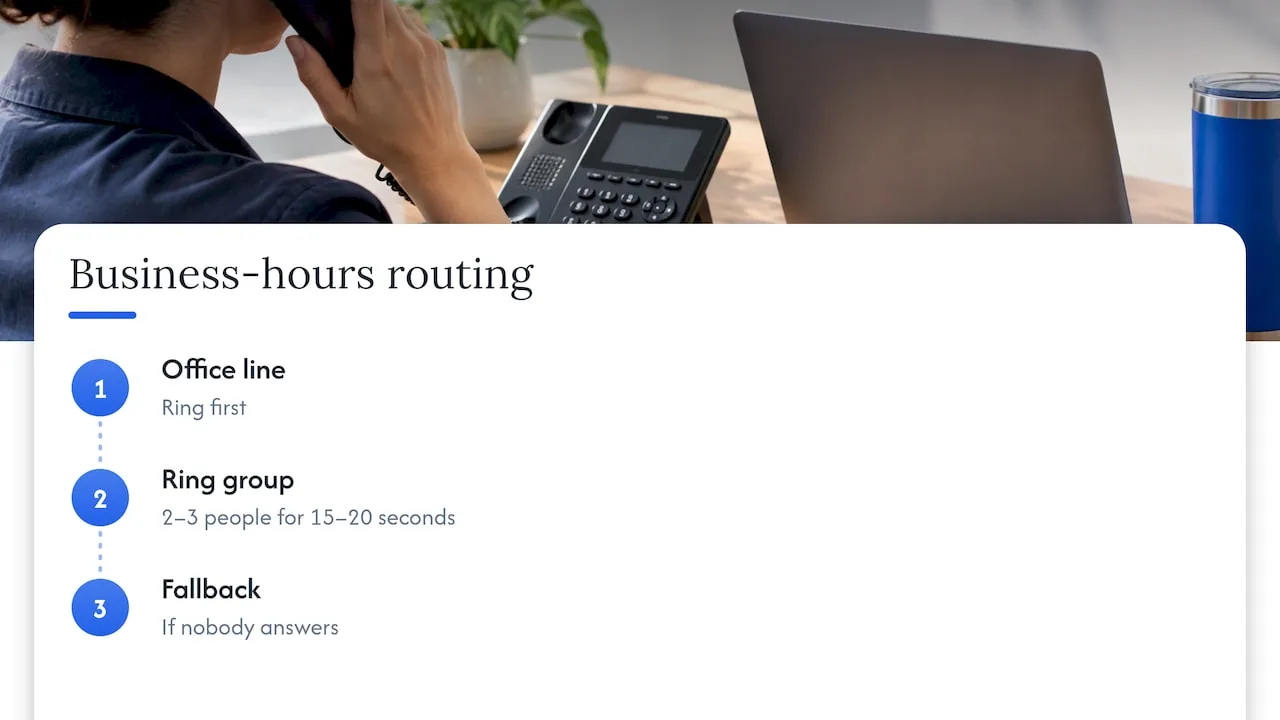
During the day, ring the person most likely to answer first, then widen. A common pattern is the office line first, then a ring group of two or three people for 15 to 20 seconds, then the fallback. Avoid long chains. Each extra hop is another few seconds where a caller can hang up.
If you run more than one trade, or both service and installation, a short menu can help. Keep it to a few options. Our guide to phone tree best practices for contractors covers how to keep menus short enough that callers do not bail out.
After hours
After hours is where most shops lose the most. Decide in advance which calls deserve a ring-through to a person at 10 p.m. and which can be handled by an automated path that captures details and promises a morning callback. Our walkthrough on keeping night leads with after-hours answering goes step by step through that decision.
A useful rule of thumb: let the caller declare urgency. One simple question, such as “Is this an emergency?”, can split the stream into an urgent path and a next-day path.
Emergencies and on-call staff
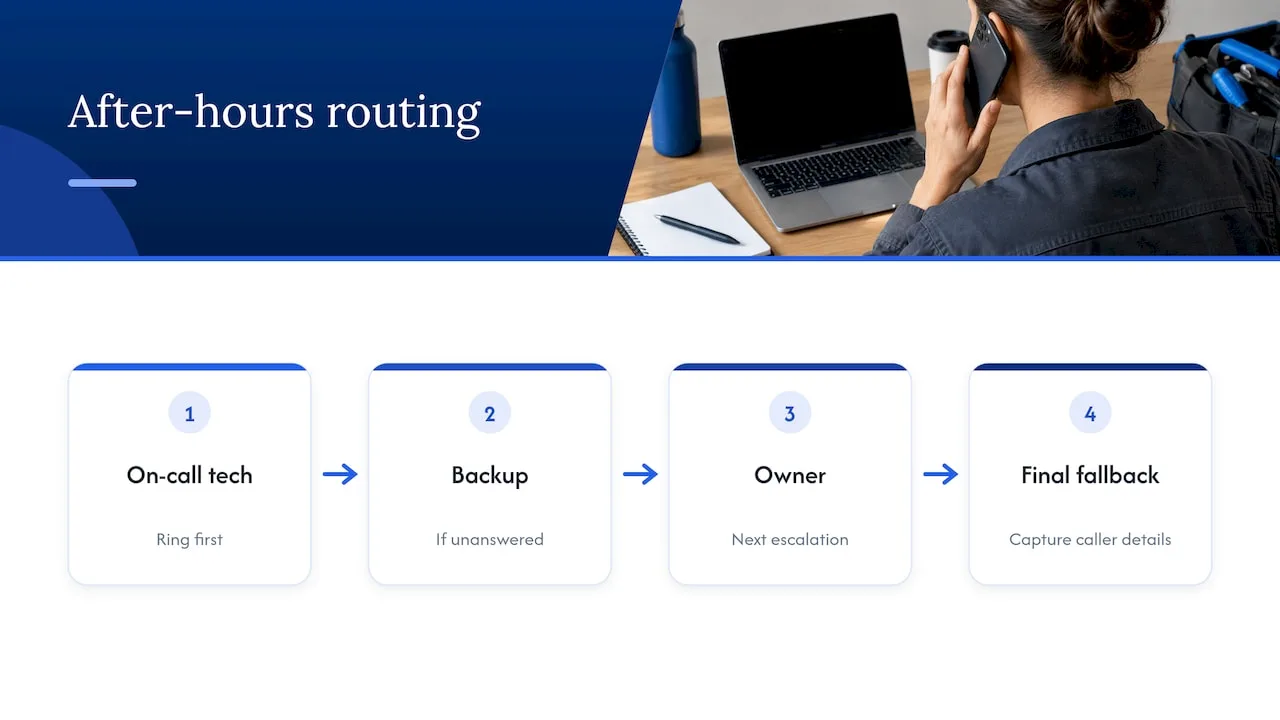
An on-call rotation is just a schedule the phone follows. The system should ring the tech on duty, and if they do not answer in a set time, ring the backup, then the owner. Automated dispatch tools describe this same logic, using rules like technician certification, location and schedule to route after-hours requests without a human relay. Whatever tool you use, the rule is the same: a rotation with a backup at every step, and a final fallback that still captures the caller’s name, number, address and problem.
Skill and trade rules
Once the basics work, add rules by skill. A plumbing and HVAC company might send boiler calls to the tech certified on boilers. A roofing company might send storm-damage calls to the estimator covering that territory. This is the skill-based routing Contractor Magazine describes, and it matters most once you have more than a handful of people.
Step by step: setting up automated call routing
1. Map your call types and hours
Write down the call types above, who handles each, and when. Include the real hours your techs and office are reachable, including weekends and storm season. Do this on paper before touching any settings.
2. Pick your front door
Decide what answers first: a person, a short greeting, or an AI voice agent. If your phone is the main way customers book, the front door should never be a ringing line that no one answers. Our AI voice agent provides 24/7 inbound call handling for contractors, which is how we cover the front door when your team is on a job.
3. Record clear greetings
Keep greetings under about ten seconds before the first useful instruction. State the business name, what you do, and the next step. Avoid a long list of options. If you plan to record calls, say so in the greeting. Massachusetts is an all-party consent state, meaning everyone on the call must agree before a call is recorded, so a recording notice is part of the setup for any shop taking calls there.
4. Build the call paths
Turn the table above into rules: if the time is within hours, ring this group; if after hours, play the urgent question; if urgent, ring on-call; if no answer, go to the fallback. Keep each path to three or four steps at most. Basic call screening and auto-attendant features are standard on business phone systems, and this call screening setup guide explains how the screening side works.
5. Set fallbacks for every path
This is the step most shops skip. Every path needs an answer to “what if no one picks up?” Good fallbacks are an AI agent that books or takes details, a missed-call text that goes out within seconds, and an alert to the owner. Plain voicemail is the weakest ending. Our missed-call text-back and CRM service is built for that moment: a caller who could not reach you gets a text and lands in your follow-up system.
6. Connect routing to your lead tools
A routed call that is not logged is half a job. Send each call into the same place as your web form leads: caller name, number, job type, source and outcome. From there, follow-up can run automatically. See our guide to contractor lead nurturing automation for what to send and when. If you use call tracking numbers, set them up so they do not damage your local rankings; six checks keep call tracking SEO-safe.
7. Test it like a customer
Call every path yourself, from a number the system does not know, at the times it is meant to work: mid-morning, 6:30 p.m., 2 a.m., and a Sunday. Press every menu option. Let calls ring out on purpose to see the fallback. Ask a friend to call in and say “emergency”. Fix anything that dead-ends, loops or takes more than a few rings to reach a human or agent.
If you want to try automated answering without rebuilding everything, our two-week AI call answering pilot outlines a short, structured way to start.
Where routing goes wrong
Most routing failures are design mistakes, not technology failures.
- Too many menu options. Callers in a hurry hang up. Three or four choices is plenty.
- Ring chains that never end. Five transfers in a row means the caller waits a minute. Set a hard stop with a fallback.
- Routing to someone who is not there. A rule that sends calls to a tech’s phone while they are on a roof, with no backup, is the same as no rule.
- Voicemail as the last step. Callers with a leak do not leave messages. Capture details another way.
- No after-hours plan. Evenings and weekends are when homeowners get home and notice problems.
- Outdated rules. Staff leave, hours change, seasons shift. Review rules each quarter.
- No consent notice. If you record calls, the greeting needs to say so.
Measuring whether routing works
Call volume tells you how many people called. It does not tell you whether routing helped. Track a few numbers weekly:
- Answer rate: calls answered by a person or agent divided by total inbound calls.
- Time to answer: how many seconds before someone or something picks up.
- After-hours capture rate: after-hours calls that ended with details captured, a booking, or a callback scheduled.
- Abandon rate: callers who hang up before reaching a destination, which points to menus that are too long.
- Calls to booked jobs: the share of answered calls that became appointments.
- Source and trade: which marketing channel the call came from and which service line it was for.
A worked example: say your shop receives 120 calls in a month and answers 70. That is a 58% answer rate. If routing and a fallback move that to 105 answered or captured, and your close rate on booked estimates stays the same, you have not spent a dollar more on advertising to get more jobs. You simply stopped dropping the ones you paid for. Use your own call log for the numbers, since every shop’s mix differs.
Perspective
Most contractors we talk to think they have a marketing problem, when the problem is that paid-for calls land in a void. You can have a strong website and a well-run Google Business Profile, and still lose the job in the first thirty seconds of the phone call.
We built our approach around that. We work only with contractors in Rhode Island and Massachusetts, so we know the trades and the towns, and we treat the website, the local SEO, the phone and the follow-up as one system. A call routed well, answered around the clock, followed by a text, then a review request after the job: that chain is what turns visibility into booked work.
Routing is not a gadget. It is the step where marketing becomes revenue, and it deserves the same care as the website that sends the calls in.
Tyson
How Coastal Connect fits in
If you would rather not build and maintain this yourself, we handle it as part of a contractor growth system. Our AI voice agent handles inbound calls 24/7, missed-call text-back and CRM covers the calls nobody could take, and our websites are built to turn visitors into calls. Our plans start with Foundation at $597 per month, Growth at $1,297 per month and Scale at $2,497 per month, with an AI employee available on Growth for $199 per month. See the full breakdown on our pricing page.
Connecting routing to the rest of your marketing
Routing sits in the middle of the customer path. Before it is search: your Google Business Profile, your local rankings and your website’s contact page. After it is follow-up and reviews.
A few connections worth making:
- Website: the phone number on every page should lead into the same routing, and chat can catch visitors who would rather type. Our AI website chat and chatbot scripts for contractors show how routine questions get handled before they reach your staff.
- Google Business Profile: calls from your profile should land on the same routing as everything else. A profile built for trades helps drive those calls; see our local SEO and Google Business Profile service.
- Reviews: after a job is complete, an automated request keeps your rating climbing. Our guide to compliance-first automated review requests walks through a contractor example.
- Scheduling and CRM: every call outcome should create or update a record, so a missed lead is never lost in someone’s pocket.
FAQ
What is automated call routing?
It is a phone setup that sends each incoming call to a destination based on rules you set, such as time of day, menu choice or who is available. No one has to transfer the call by hand. For a contractor, that means emergencies, estimates and billing questions each reach the right place.
How is call routing different from an IVR or phone tree?
A phone tree, also called an IVR, is one way to collect the caller’s choice, usually by pressing a number. Routing is the wider process of deciding where the call goes, and it can use menu answers, the time, the caller’s number or staff availability. Most contractors need a short menu plus a few good rules.
What should happen to a call nobody answers?
It should move to a fallback automatically: another person, an AI agent that takes the details or books the job, and a text to the caller. The owner or dispatcher should get an alert too. Plain voicemail should be the last resort.
Do I need to tell callers I am recording?
If you record calls, yes, say so in the greeting. Massachusetts requires consent from all parties to record a call, so a notice at the start of the call is the safe approach for shops that take calls there. If you have questions about your own recording setup, ask your attorney.
How long does it take to set up?
A basic setup with hours, an after-hours path and a fallback can be mapped in an afternoon. The testing and tuning over the first few weeks is what makes it reliable, so plan to review the call log weekly at the start.
Sources
- Use AI to Supercharge Your Contracting Success, Contractor Magazine
- Can I Record a Conversation in Massachusetts?
- How to Dispatch Emergency Jobs to On-Call Technicians
- Call Screening: How It Works and How to Set It Up