
A good contractor chatbot script does four things in order: it greets the visitor, sorts emergencies from planned work, collects only the details you need to schedule, and hands off to a person with the full conversation attached. Below are word-for-word scripts for each step, plus the branches that plumbers, HVAC techs, electricians and roofers each need.
We build these for contractors in Rhode Island and Massachusetts, so the examples lean toward how New England homeowners actually write: frozen pipes in January, a dead furnace on a Sunday, ice dams, a panel that trips every time the AC kicks on.
TL;DR
- Open with one question that separates “something is wrong right now” from “I’m planning a project.” Everything else branches from that answer.
- Put safety triage before lead capture. Gas smell, active flooding, sparking or burning smells get a call-now instruction, not a form.
- Ask for name, phone, address and the problem in that order, one question per message, and stop there. Details can wait for the human.
- Build a clear off-ramp. When the bot is stuck or the customer is stressed, it passes a transcript summary to your team so nobody repeats themselves.
- Never let the bot promise a price, an arrival time or a guarantee your office has not approved.
Table of Contents
- Why a script beats a blank chatbot
- The five-part structure every script needs
- Script 1: the opener and intent split
- Script 2: emergency triage by trade
- Script 3: qualifying the lead without an interrogation
- Script 4: the off-ramp and handoff
- Script 5: after-hours and follow-up
- Compliance details that belong in the script
- Mistakes that make contractor chatbots hurt more than help
- Our view: scripts are a service standard, not a copywriting exercise
- Getting these scripts live on your site
- Launch checklist
- FAQ
- Sources
Why a script beats a blank chatbot
Most contractor chatbots fail for one reason: they were switched on with a generic greeting and a contact form dressed up as a conversation. A visitor with a burst pipe does not want to be asked which service they are interested in.
Conversation designers describe a flow as an invisible map that links what the user wants to what the bot does. For a contractor, the map should follow the homeowner’s goal, such as emergency repair versus planned renovation, rather than march everyone through the same rigid question list. That is the whole idea behind the scripts below.
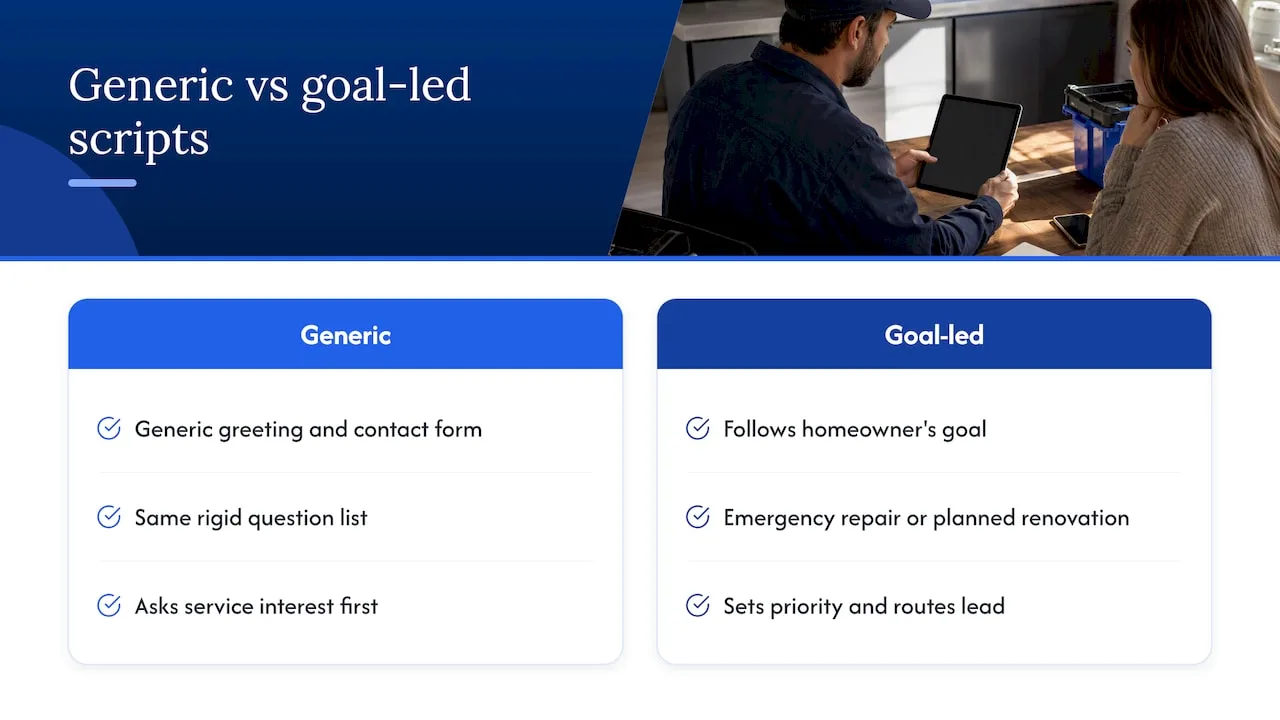
The bot is also not a replacement for your dispatcher. One contractor-focused guide describes it as a first responder that greets the homeowner, asks the questions that set job priority, and routes or queues the lead. Write it with that job description in mind.
The five-part structure every script needs
- Greeting and intent split. One message, two or three buttons.
- Safety triage. Only for trades where delay is dangerous.
- Qualification. The minimum facts needed to decide who goes and when.
- Contact capture and confirmation. Phone first, then address.
- Handoff. A summary to your team and a clear promise to the customer about what happens next.
Keep each message short. Chat is read on a phone, often one-handed, often in a stressful moment. One question per message, buttons wherever the answer is a choice, free text only where you need the customer’s own words.
Script 1: the opener and intent split
The greeting should name your company, say what the bot can do and give the visitor a fast path.
Bot: Hi, this is the [Company] team’s assistant. Are you dealing with something urgent right now, or planning some work?
[Something urgent] [Planning a job] [Just have a question]
Three things matter here.
- “Team’s assistant,” not a fake name. Do not pretend the bot is a person. The FTC has gone after companies for overstating what AI products can do, including claims about AI replacing human employees, so plain labeling protects your reputation as well as your customer’s trust.
- No pop-up on page load for emergency pages. If someone lands on your “no heat” page, let the widget wait quietly and show the urgent button first.
- Include a phone number in the widget header. Some people will always prefer to call, and the chat should never feel like a wall.
Script 2: emergency triage by trade
Safety-first logic is what separates a bot that builds trust from one that looks like a lead trap. A public set of contractor intake templates makes the same point: successful bots check for hazards like gas leaks or flooding near electrical panels before gathering lead details.
The rule is simple. If the visitor describes a danger, the first reply tells them what to do and how to reach a human. Capturing the lead comes second.
Plumbing
Bot: Sorry you’re dealing with that. Quick safety check: is water actively flowing and can you reach the main shutoff?
[Water is flowing, can’t stop it] [I shut it off] [No active water, it’s a slow leak or clog]
- If can’t stop it: “Please call us now at [phone]. If water is near outlets, an appliance or the electrical panel, stay away from it and call your electric utility or 911 if you feel unsafe. I’m also sending your details to our dispatcher.”
- If shut it off: move to qualification (what fixture, which floor, any ceiling damage).
- If slow leak or clog: treat as scheduled work with same-week priority.
HVAC
Bot: Is anyone in the home at risk right now, for example a gas smell, a carbon monoxide alarm going off, or no heat when it’s freezing out?
[Gas smell or CO alarm] [No heat or no cooling] [Noise, smell or other issue] [Maintenance or quote]
- Gas smell or CO alarm: “Leave the house now and call 911 or your gas utility from outside. Do not turn anything on or off. Once everyone is safe, call us at [phone] and we’ll help with next steps.”
- No heat or no cooling: ask for system type (furnace, heat pump, boiler, mini-split), age if known, and whether vulnerable people (infants, elderly, medical conditions) are at home. That last question lets your dispatcher prioritize honestly.
The gas and CO wording above should match what your local utility and fire department tell homeowners. Have your own licensed team review it before it goes live.
Electrical
Bot: Do you see sparks, smell burning, or feel heat coming from an outlet, panel or wire?
[Yes] [No, outlets or lights just stopped working] [No, I’m planning an upgrade]
- Yes: “Please don’t touch it. If you can do so safely, turn off the breaker for that area. If you see smoke or flames, call 911. Then call us at [phone] so we can get someone moving.”
- Outlets or lights stopped working: ask whether a breaker has tripped, whether it repeats, and what was running when it happened.
Roofing
Bot: Is water coming into the house right now?
[Yes, active leak] [Damage after a storm] [Old roof, want an estimate]
- Active leak: “Put a bucket under it and move valuables if you can. Don’t go onto the roof. Give me your address and number and our team will call you.” A bot should never encourage anyone to climb up.
- Storm damage: ask for photos, which is where chat beats a phone call, and ask whether they plan to file an insurance claim.
Script 3: qualifying the lead without an interrogation
Contractors often chase lead quantity and ignore quality. The bot’s job is to collect enough to answer “should we go, and how fast?” and nothing more. A contractor-focused guide to qualifying project leads lists the kinds of facts worth checking: trade, service type, location and project scope, customized to your business.
Here is a planned-work flow that works for most trades.
Bot: Happy to help. What kind of work are you thinking about? [buttons based on your top five services]
Bot: Got it. Is this a home or a business? [Home] [Rental or multifamily] [Business]
Bot: Which town is the property in?
Bot: How soon are you hoping to get started? [This week] [Within a month] [Just exploring]
Bot: Is there anything about the job you want our team to know? A sentence or two is plenty.
Only after those answers do you ask for contact details.
Bot: Thanks. What’s the best name and mobile number for our team to reach you?
Bot: And the property address, so we can confirm you’re in our service area?
Service-area check
If you cover Providence County and part of Worcester County but not Cape Cod, the town question lets the bot say so early and kindly:
Bot: Thanks. [Town] is a little outside the area we serve. If you’d like, leave your email and we’ll point you to someone closer if we can.
That is better than a lead your team spends ten minutes discovering is out of range.
Price questions
Visitors will ask “how much?” in the first thirty seconds. Decide on an honest answer in advance.
Bot: Pricing depends on the specifics, and I don’t want to guess. Many jobs start with a free or flat-fee visit, so our team can confirm what applies to yours. Can I take your number so they can call you with a real quote?
Only use “free estimate” or a flat-fee statement if that is actually your policy. The bot should never improvise a number.
Script 4: the off-ramp and handoff
Every script needs a way out. When the visitor types something unpredictable, the issue is complicated, or the customer is upset, the bot should escalate to a human with a complete transcript summary rather than make the customer start over.
Trigger the off-ramp when:
- The visitor asks to speak to a person, in any wording.
- The bot fails to understand the same question twice.
- The message contains words like “emergency,” “flooding,” “sparks,” “gas,” “dangerous” or “furious.”
- The question involves warranty disputes, insurance, legal issues or a past job.
The handoff message:
Bot: I’m passing this to our team now so you don’t have to repeat anything. They’ll have our whole conversation. During business hours you can expect a call from [name or “our office”] shortly. If it’s after hours, we’ll reach out first thing tomorrow, and for an emergency please call [phone].
The summary your team receives should read like a dispatcher’s note:
| Field | Example |
|---|---|
| Urgency | Emergency, active leak |
| Trade and service | Plumbing, water heater |
| Customer | First and last name, mobile |
| Address and town | Full address |
| What they said | Two-sentence summary in their words |
| Safety flags | Water near panel: yes |
| Source | Website chat, page visited |
Only promise what your office can deliver. If you say someone will call “within 15 minutes” and nobody does, the chatbot just made the bad impression faster.
Script 5: after-hours and follow-up
A lot of website chats start at 9 p.m. Make the after-hours branch honest.
Bot: Our office is closed right now, but I can still log your request. If this is an emergency, call [after-hours number]. Otherwise, tell me what’s going on and we’ll call you at [opening time].
Then add a follow-up text, sent automatically once the lead is captured:
Hi [First name], this is [Company]. We got your request about [issue] and a team member will contact you [timeframe]. Reply here if anything changes.
If a lead goes quiet, one gentle nudge a day later is enough:
Hi [First name], just checking that you still need help with [issue]. Want us to book a time?
After the job, the same system can ask for a review while the experience is fresh. Keep it to one tap and one sentence.
Compliance details that belong in the script
A few legal and trust details are easy to forget.
- Registration numbers in Massachusetts. The state’s consumer guidance says that by law any website or advertising must show the contractor’s registration number for home improvement work. Put your HIC number in the chat widget footer if you work on residential projects there, and confirm the specifics with the state’s contractor resources.
- Honest AI claims. The FTC’s complaint against an AI-services seller shows regulators looking hard at earnings promises and exaggerated product capabilities. That matters to you in two ways: be skeptical of vendors promising guaranteed results, and keep your own bot from making promises about timing, price or outcomes.
- Consent for texting. If the bot collects a mobile number and your system texts customers, say so in the flow (“We may text you about this request”) and honor opt-outs. Ask your attorney about the rules that apply to your messaging.
Mistakes that make contractor chatbots hurt more than help
Starting with a lead form. Asking for email and phone before the visitor has said a word looks like a trap. Let them describe the problem first.
Using one script for every trade. A roofer’s “how old is the roof?” is useless to an electrician. Build a branch per trade, even if the opener is shared.
Asking too much. Every extra question loses people. If your team can learn it on the phone, do not ask it in chat.
No human escalation. A bot that loops is worse than no bot.
Never testing it. Run ten fake conversations before launch: a burst pipe at midnight, a rude message, a typo-filled request, a question from outside your service area. Have someone who has never seen the script try to break it. Review real transcripts weekly for the first month and adjust.
Our view: scripts are a service standard, not a copywriting exercise
We work only with contractors in Rhode Island and Massachusetts, and the pattern we see is consistent: the missed lead rarely happens because a contractor lacks a website. It happens in the gap between a homeowner’s first message and a human’s first reply. A chatbot is useful only if it closes that gap without making the homeowner feel processed.
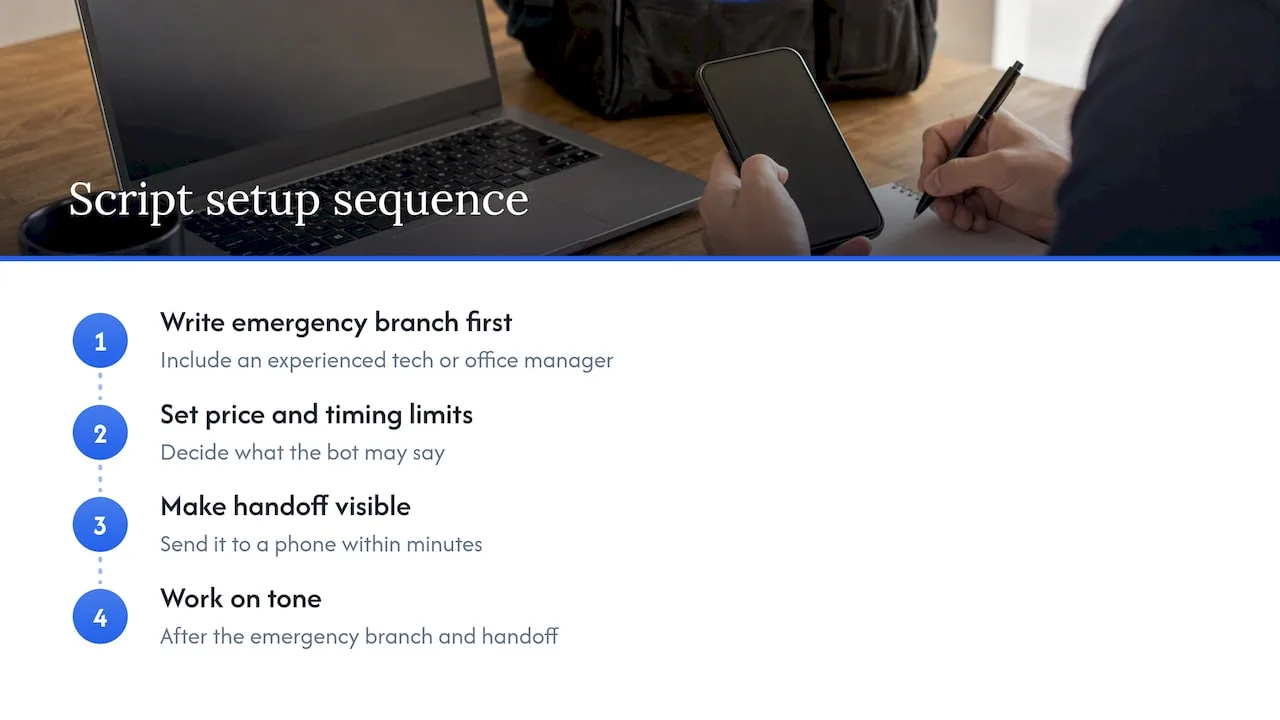
So we treat the script as a service standard. Write the emergency branch first, with your most experienced tech or office manager in the room. Decide what the bot is allowed to say about price and timing. Make sure the handoff arrives somewhere a real person will see it, on a phone, within minutes. Then work on tone.
We also push back on the idea that more automation is always better. If your chat, your missed-call text-back and your phone line each tell a different story, customers notice. The flows should feel like one company, which is why we build them alongside the website, local search presence and follow-up rather than as a separate gadget.
— Tyson
Getting these scripts live on your site
You can adapt the scripts above in any chat tool that supports buttons, branching and a notification to your phone. The harder part is connecting the bot to the rest of your lead flow: your CRM, your missed-call text-back, your calendar and your review requests.
If you would rather not build that yourself, our AI website chat is set up for contractors in Rhode Island and Massachusetts, with trade-specific flows and handoff to your team. It pairs with our missed-call text-back and CRM so a lead that starts in chat or on the phone lands in one place. You can also see our published plans and pricing, starting with Foundation at 597 USD per month.
If calls are your bigger leak, the same logic applies to the phone, and our AI voice agent handles inbound calls using the same triage rules.
Launch checklist
- Write the emergency branch for each trade you serve and have a licensed technician review the safety wording.
- Decide what the bot may say about price, arrival time and guarantees. Write it down.
- Draft the opener, intent buttons and qualification questions (five questions at most).
- Define the off-ramp triggers and the handoff summary fields.
- Add your phone number, service area and registration number to the widget.
- Connect notifications to the phone of the person who will actually respond.
- Test ten scenarios, including bad inputs.
- Review transcripts weekly for a month, then monthly.
FAQ
How long should a contractor chatbot script be?
Short. The opener, the intent split and four or five qualification questions cover most visits, with a separate emergency branch for each trade. If a conversation needs more than about eight bot messages before contact details are collected, trim it. Details your team can gather on the phone do not belong in chat.
Should the chatbot give price quotes?
No, unless you offer a fixed, published price for a specific service and your office stands behind it. Otherwise the bot should explain that pricing depends on the job and offer to set up a call or visit. An improvised number creates arguments later.
Can a chatbot handle emergencies on its own?
It should not try. The bot can recognize an emergency, give basic safety instructions and show your phone number, then pass the details to a human immediately. Treat gas, carbon monoxide, fire, sparking and active flooding as call-now situations, and have your own licensed team approve that wording.
What is the difference between a chatbot script and a conversation flow?
A script is the wording of each message. A flow is the map of which message comes next depending on the visitor’s answer. You need both: the flow decides the path, and the script makes each step sound like your company.
Do I need to tell visitors they are talking to a bot?
Yes, it is the safe and honest choice. Label the assistant clearly, offer a human option and avoid claims that the AI replaces your staff. Regulators have taken action against AI vendors for overstated claims, so plain language protects you.
Sources
- What Is a Chatbot Conversation Flow? (Rasa)
- Contractor AI Answering Service Intake Script Templates (GitHub)
- AI Chatbot for Roofing, HVAC & Plumbing Leads (Heeya)
- AI Chatbot for Contractors: Qualify Project Leads 24/7 (Heeya)
- FTC complaint: Air.ai (Federal Trade Commission)
- Avoiding Home Improvement and Contractor Scams (Mass.gov)