

A good phone tree gets callers to the right place in a small number of choices, uses plain language instead of department jargon, and always offers a fast path to a human. It also treats prompts as modular pieces that can be updated without a full rebuild. Guidance from NN/g, the Access Board, and cloud IVR architecture patterns all point the same direction. Start by testing your current top menu live with a short list of items and see how callers react.
TL;DR:
- Keep the first menu to five choices or fewer, order them by call volume, and name the caller’s task before stating the keypad number.
- Accept keypad input as soon as prompts begin, offer repeat or back options on every menu, and use the same key to reach a person.
- Store prompts and routing details outside the call flow, so edits avoid a rebuild; keep a default queue or voicemail for lookup failures.
- Track abandonment by stage, transfer rate, misroutes, and task completion time; review weekly after changes, then monthly or quarterly once the tree stabilizes.
- Test with TTY or assistive device users, allow more response time, and avoid back to back prompts so callers can complete the same selections.
Table of Contents
- 1. Top phone tree best practices to apply now
- 2. Designing a modular IVR or phone tree architecture
- 3. Accessibility and legal guidance for phone trees
- 4. Scripting prompts and recording guidance
- 5. Routing rules, human-exit paths, and reducing misroutes
- 6. Measuring and testing: metrics that keep a phone tree healthy
- 7. Implementation checklist: build or update a phone tree
- 8. Balancing automation with a human touch
- 9. Connecting phone trees to CRM and lead management systems
- 10. Customizing phone tree scripts by contractor service
- 11. Common errors that quietly reduce lead conversion
- 12. Using AI voice agents and automated follow-up to capture more leads
- Author’s perspective and quick recommendations
- FAQ
- Sources
1. Top phone tree best practices to apply now
Most phone trees fail for the same handful of reasons: too many choices, vague labels, and no quick way to reach a person. The fixes are not complicated, but they need to happen in the right order.
- Limit top-level options to no more than five. State compliance guidance on IVR design recommends capping menu items at five and keeping the overall menu depth shallow so callers do not have to remember earlier choices by the time they reach a later layer.
- Put the most requested task first. If many of your calls are about scheduling, scheduling should be option one, not buried under “general inquiries.”
- Use plain, distinct language for every choice. “For scheduling, press the relevant key” beats “For customer service options, press the relevant key” because it tells the caller exactly what they get.
- Say the task before the number. NN/g’s research on caller cognitive load found that people process the action first and the keypad digit second, so prompts should front-load the task and state the number last.
- Let callers enter their choice immediately. Do not force someone who already knows what they want to sit through the full prompt before the system accepts input.
- Build in repeat and undo options. A caller who mis-hears a menu should be able to press a key to hear it again rather than hanging up and calling back.
- Offer a human escape at every level, not just the main menu. This is a common gap in phone trees that otherwise follow other rules.
- Keep the voice and tone consistent. One voice actor, one pace, no marketing language mixed into navigation prompts.
- Build prompts as modular pieces, not a single hard-coded script, so updating one line does not mean re-recording the whole tree.
- Use time-based and conditional routing sparingly, and only where it actually cuts down on transfers rather than adding another branch for its own sake.
A few operational habits keep these practices from decaying over time:
- Review misroute and transfer-loop reports monthly during the first few months after any change.
- Track abandonment by menu stage so you know whether callers are leaving at the greeting, the first menu, or the queue.
- Re-record or update any prompt that staff flag as confusing more than once.
- Schedule a lightweight test periodically once the tree has stabilized.
- Document every prompt change so the next person editing the tree knows what changed and why.
The pattern across all of this is the same: fewer choices, clearer language, and a tree that is easy to maintain without breaking something else. Trees that follow the early steps may see more completed self-service calls, because those four steps directly address where most callers get lost. The rest of the list protects the gains once they are made.
2. Designing a modular IVR or phone tree architecture
A phone tree built as one long, hard-coded script works fine on day one and becomes a liability over time. Every new service, holiday schedule, or staffing change means someone has to dig through a single monolithic flow and hope they do not break something unrelated. AWS prescriptive guidance on IVR design addresses this directly: build a dynamic, modular structure where prompts and routing attributes live outside the call flow itself and get pulled in as variables.
The practical difference is where the content lives. A static design writes the greeting, the menu text, and the routing destination directly into the call flow. A modular design stores that same information in an external database or content system and has the flow reference it. Change the business hours or add a new service line, and you edit one record instead of opening the whole flow in an editor.
A few modules are worth building as reusable pieces from the start:
- Language selection, so a caller’s language choice persists through the rest of the call instead of resetting at each branch.
- Authentication or account lookup, isolated so changes to verification rules do not touch the rest of the tree.
- Payment or billing routing, since this module often changes independently of the main menu as billing systems get updated.
- CRM or customer lookup, pulling account or job history so a transferred call arrives with context already attached.
Integration points matter as much as the modules themselves. A CRM lookup module needs a clear handoff: what data it pulls, what it does when the lookup fails, and where the call goes next either way. API-driven prompt retrieval works the same way. When the flow calls out to an external data source for a prompt or a routing decision, that call can fail, and the architecture needs to account for it.
Pro Tip: Always keep a minimal static default branch that routes to a general queue or voicemail, so a failed API call or database lookup never leaves a caller stuck with no destination.
Treat the fallback branch as a permanent part of the design, not a temporary patch. External data sources go down, APIs time out, and a CRM lookup occasionally returns nothing useful. A tree with a built-in default path degrades gracefully; one without it strands callers mid-flow with no way forward.
3. Accessibility and legal guidance for phone trees
Accessibility in a phone tree is not a separate compliance checkbox, it is baked into the same choices that make a tree usable for everyone. The Access Board’s telecommunications guidance states that phone trees should avoid long pauses, clearly identify when a keypad entry is expected, and remain compatible with TTY devices and other assistive technology so callers using those tools can complete the same selections as anyone else.
The FCC adds a parallel requirement: telecommunications services should be accessible wherever that is readily achievable, and systems should be tested for compatibility with TTYs and other assistive devices rather than assumed to work.
A few settings translate that guidance into concrete build decisions:
- Give callers more time to respond before the system times out or repeats the prompt.
- Make repeat and “go back” options available on every menu, not just the first one.
- Offer adjustable playback speed where your phone system supports it, since a TechRepublic review of IVR best practices lists this among the practical accessibility features worth building in.
- State clearly when the system expects a keypad entry, rather than leaving the caller guessing whether to press a key or wait.
- Avoid stacking prompts back to back with no pause, since that removes the processing time TTY and assistive-device users need.
Testing matters more than any single setting. Include assistive-technology users in quality-assurance passes when you can, and run periodic spot checks using a TTY or a screen-reader-paired phone setup rather than assuming a prompt that sounds fine to a hearing caller works the same way for everyone. Keep the legal references factual and brief in any internal documentation. The operational goal, extra time, clear prompts, working repeat options, matters more day to day than reciting regulatory language, but the underlying standards are worth linking for anyone auditing the system.
4. Scripting prompts and recording guidance
The words in a phone tree matter as much as the structure behind it. A well-organized three-option menu still fails if the prompts are long, vague, or read in five different voices recorded over three years.
The core rule, backed by NN/g’s phone-tree research, is to state the task before the number: “For billing questions, press the relevant key” rather than “Press two for billing.” Callers process the action first, so burying it after the digit forces them to replay the prompt mentally. RingCentral’s call-tree guidance backs the same approach and recommends offering language selection early, before any task-specific menu, so the rest of the call plays in the caller’s preferred language.
A few scripting habits keep prompts tight:
- Keep each menu option brief where possible.
- Record every prompt with the same voice actor and the same pace, so the tree does not sound stitched together.
- Speak slightly slower than normal conversational pace, since callers are listening under pressure and often while multitasking.
- Confirm the selection out loud (“Transferring you to scheduling”) so callers know the system registered their input correctly.
- Leave a brief pause after each option for keypad entry instead of racing into the next line.
Pro Tip: Write every prompt as a script you would say to a person standing in front of you, then shorten it. If it still makes sense, use the shorter version.
A short set of sample scripts covers most of what a phone tree needs:
Greeting: “Thanks for calling. For scheduling, press the relevant key. For billing, press the relevant key. To speak with someone directly, use the operator option at any time.”
Transfer confirmation: “Got it. Connecting you with our scheduling team now.”
After-hours message: “Our office is currently closed. Leave your name, number, and a short message, and we’ll call you back during business hours. For urgent matters, press the relevant key to reach our after-hours line.”
5. Routing rules, human-exit paths, and reducing misroutes
Routing logic built around internal department names almost always confuses callers, because customers describe problems, not org charts. A caller who needs a part replaced does not know whether that falls under “service” or “support,” but they absolutely know they have a broken appliance. Routing on intent rather than department label cuts down on the guesswork that leads to misroutes.
A human-exit path belongs at every level of the tree, not only the main menu, and it should work the same way everywhere: press zero or say “operator.” State IVR guidance recommends exactly this, providing navigation instructions and a consistent way to reach a person rather than changing the escape key between menus.
A few routing rules keep the system predictable:
- Route by what the caller is trying to accomplish, not by internal team structure.
- Keep the human-exit key identical across every menu layer so callers never have to relearn it.
- Use time-based routing for business hours, holiday schedules, and after-hours overflow, but keep the logic visible in one place rather than scattered across the tree.
- Set a hard limit on transfers. If a caller gets bounced between two destinations more than once, auto-escalate to a supervisor queue or a callback offer instead of transferring again.
Transfer loops are the clearest sign a routing map needs revision. If the same pair of destinations keeps handing a caller back and forth, the underlying menu labels are probably ambiguous, not the staff on either end.
6. Measuring and testing: metrics that keep a phone tree healthy
A phone tree is never really finished. The ones that stay useful get checked against real call data on a regular basis, not just redesigned once and left alone.
Four metrics tell you most of what you need to know:
- Abandonment by stage, broken into greeting, menu, and queue, so you know exactly where callers give up.
- Transfer rate, which flags menus that are routing callers to the wrong place often enough to need a second hop.
- Misroute frequency, tracked by comparing where a call lands against what the caller actually needed.
- Average task completion time, which flags menus that take too many steps for a simple request.
Industry IVR guidance recommends keeping top-level menus to five items or fewer and placing the highest-volume requests first, a principle drawn directly from state compliance standards for interactive voice response systems. That single structural choice is usually the biggest lever for cutting abandonment at the menu stage.
Three quick tests catch most problems before they show up in a month of call data: run a live test of a short top menu with real staff pretending to be callers, repeat a selection twice in a row to confirm the repeat function works as expected, and walk through the tree using a TTY or assistive-device setup to confirm timing and prompts hold up.
Check metrics weekly while you are actively iterating on a new or recently changed tree. Once the structure stabilizes, move to a monthly or quarterly cadence and pair call analytics with CRM data to catch slower-building issues like a seasonal spike in misroutes.
7. Implementation checklist: build or update a phone tree
A phone tree redesign goes faster and breaks less when it follows a set order instead of jumping straight to recording new prompts.
- Map the customer contact journey first. List the main reasons people actually call before deciding on menu structure.
- Draft a top-level menu with no more than five items, ordered by call volume, and write short micro-scripts for each.
- Plan the modular prompt store before recording anything, so updates later do not require re-recording the whole tree.
- Configure routing by intent, add a human-escape option at every level, and build a fallback branch for any step that depends on external data.
- Connect CRM lookups where they add context for a transferred call, and confirm what happens if the lookup fails.
- Run a live test with staff acting as callers, then with a small group of outside testers who have never heard the tree before.
- Check abandonment and transfer metrics after launch, adjust the weakest menu first, and document every change for the next person who edits the tree.
8. Balancing automation with a human touch
The strongest phone trees are not the ones that automate the most, they are the ones that automate the right parts and get out of the way for everything else. Routine tasks like hours, appointment confirmation, or simple account lookups handle well through self-service. Anything emotionally charged, a billing dispute, an urgent repair, a complaint, needs a fast route to a person.
The transfer decision should depend on two signals: how complex the request is and how much the caller is repeating themselves. If someone has already pressed through several menus and still has not reached what they need, that is the moment to escalate automatically rather than offering another menu layer. A caller who presses zero immediately should get a person immediately, no follow-up prompt asking them to confirm.
Think of automation as handling predictable calls so staff can spend their time on the harder ones that actually need judgment; using quote follow-up templates and cadence can help streamline follow-ups after calls. A tree that tries to automate everything ends up frustrating the callers who most need a person, while a tree with no automation at all wastes staff time on requests that a menu could resolve quickly.
9. Connecting phone trees to CRM and lead management systems
For contractors, a phone tree that does not talk to the CRM is leaving information on the table every time it hangs up. A plumber fielding an emergency call needs that caller’s name, address, and job history available to whoever picks up, not re-collected from scratch.
A CRM-integrated phone tree can pull account history the moment a number matches an existing contact, route returning customers differently from new leads, and log every call automatically as a record tied to a job or opportunity. That last piece matters most for lead management: a missed call that never makes it into the CRM is a lead that quietly disappears.
Missed-call text-back is a practical extension of this same integration. When a call goes unanswered, an automatic text follow-up and CRM entry keeps that lead active instead of losing it to voicemail. Coastal Connect’s missed-call text-back and CRM automation is built around exactly this gap for contractors who cannot staff a phone line around the clock.
10. Customizing phone tree scripts by contractor service
A phone tree script written for a plumber and one written for a roofer should not sound the same, because the calls themselves are different. Plumbing calls skew toward urgent, same-day issues, so the top menu should put an emergency option first and route it to a live person or an answering service immediately rather than a voicemail box.
HVAC calls split more evenly between emergency repairs and seasonal maintenance scheduling, so a menu with “repair” and “maintenance appointment” as separate options cuts down on misroutes better than a single “service” catch-all. Electrical calls often involve safety concerns, so prompts should make clear that anything involving exposed wiring or power loss gets escalated immediately. Roofing calls tend to follow storm events, so having a seasonal or weather-triggered menu branch that surfaces an inspection or estimate option can reduce call volume to the main line during peak periods.
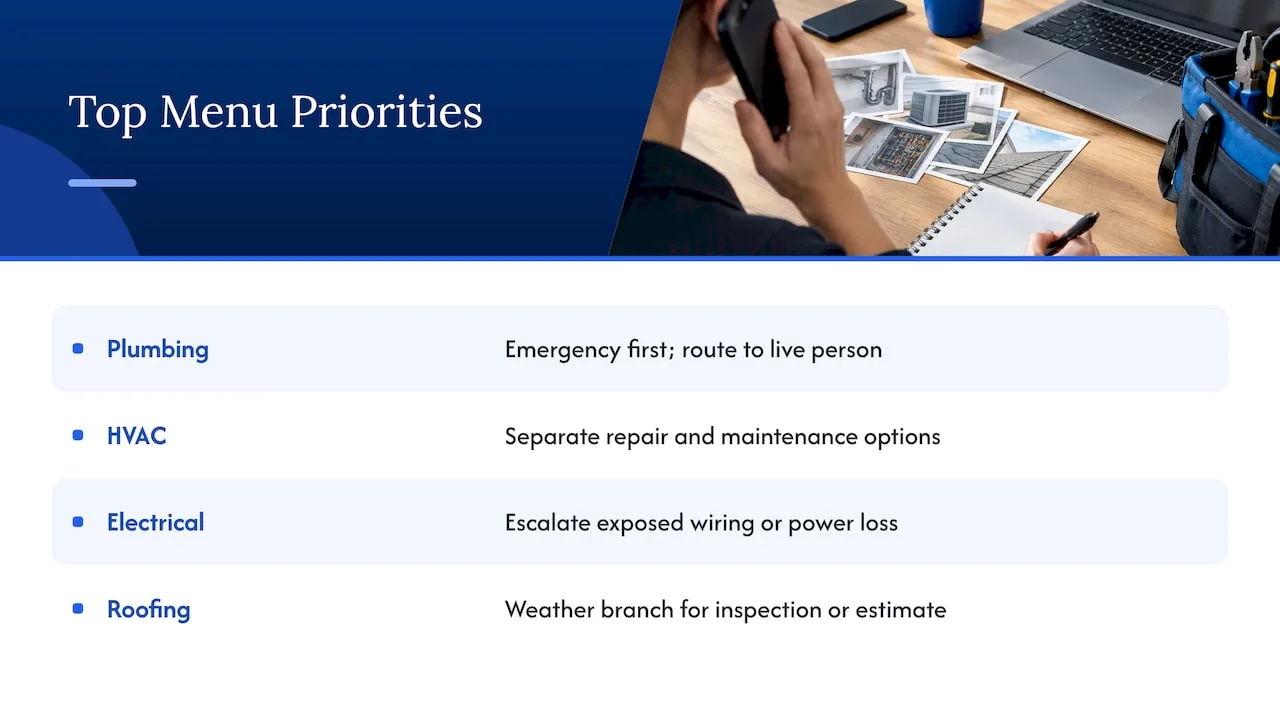
The common thread across all four trades: the top menu item should match what callers in that specific trade call about most, not a generic “customer service” structure borrowed from an unrelated industry.
11. Common errors that quietly reduce lead conversion
Costly phone tree mistakes rarely look dramatic. They show up as a slow leak in conversion that nobody notices until the booked-job numbers come in lower than expected.
Too many top-level options are a common problem, forcing callers to listen through six or seven choices before finding theirs. A missing or buried human-escape option is close behind, especially when a caller with an urgent need gets stuck in a self-service loop with no way out. Generic labels like “general inquiries” push too many callers into a catch-all bucket that then needs manual sorting, adding delay exactly where speed matters most. Recording changes without testing is another quiet killer, a single mis-recorded prompt can silently misroute every caller who selects that option until someone notices the pattern in call logs. Finally, treating the phone tree as a one-time setup rather than something to revisit means seasonal call patterns, like roofing calls after a storm, never get reflected in the menu structure.
Each of these errors is fixable without rebuilding the whole system, but they need someone checking call data regularly enough to catch them.
12. Using AI voice agents and automated follow-up to capture more leads
A phone tree hands off well-sorted calls, but it still relies on someone being available to answer. AI voice agents extend that same routing logic to calls that come in after hours, during a busy job site, or when every line is tied up. Instead of a caller hitting voicemail, an AI voice agent can answer, ask the same qualifying questions a dispatcher would, and either book an appointment directly or hand off a warm, detailed message to staff.
The conversion gap this closes is real for trades specifically: a missed call after hours for an HVAC outage often goes to the next contractor who picks up. Pairing a phone tree with an AI voice agent means that call gets answered and logged instead of lost, and automated text follow-up can confirm details or send a booking link the moment the call ends. The combination of a well-structured menu for live hours and an AI agent for everything outside those hours covers the gap that a traditional phone tree alone leaves open.
Author’s perspective and quick recommendations
If I had to boil this down to three things worth doing this week: shrink your top menu to no more than five options, make sure a caller can reach a person at every single level, and store your prompts somewhere you can edit without re-recording the whole tree. Those three fixes solve most of the frustration callers report. If building or auditing any of this feels like more than your team has time for, Coastal Connect works with contractors on exactly this kind of call and lead infrastructure, no pressure either way.
— Tyson
FAQ
What are the 5 P’s of telephone etiquette?
A set of P’s commonly cited in customer-service training is prompt, polite, professional, prepared, and personal, referring to how a person should answer and handle a call. Definitions vary by trainer, so treat this as a general framework rather than a fixed standard.
What are the 7 P’s of phone etiquette?
The “7 P’s” extend the same idea with additional qualities like patience, positivity, and precision added to the base list. As with the 5 P’s, this framework is not standardized, and different trainers list slightly different terms.
What are some tips for good telephone etiquette?
Common tips include answering promptly, identifying yourself clearly, speaking at a measured pace, listening actively, confirming details back to the caller, avoiding jargon, staying patient with frustrated callers, offering a clear next step, following up as promised, and ending the call politely. These overlap heavily with the scripting and routing practices covered above, since a phone tree’s prompts set the tone before a person ever picks up.
Can you provide an example of a call tree?
A simple call tree might greet the caller, then offer a few options: “For scheduling, press the relevant key. For billing, press the relevant key. To speak with someone directly, press zero.” Each option routes to its own short script, and every level repeats the option to reach a person directly, matching the structure recommended in state IVR guidance.
Sources
- The UX of Phone-Tree Systems: 16 Usability Guidelines - NN/G
- AWS Prescriptive Guidance - Designing the foundation of a dynamic and modular IVR experience on Connect Customer
- Accessible Telecommunications Product Design Tutorial
- Telecommunications Access for People with Disabilities | Federal Communications Commission
- COMPLIANCE COMPONENT