
A roofing website call to action (CTA) is the one clear next step you ask a visitor to take: call, book an inspection, or request an estimate. The CTAs that work are specific to the job, visible on every screen, repeated down the page and tied to a phone or form that actually gets answered. If you run a roofing company in Rhode Island or Massachusetts, the CTA is the cheapest place to win back jobs you are already paying to attract. We build websites that book jobs for contractors in those two states, and the rules below are the ones we apply.
TL;DR
- Pick one primary action per page, usually “Book a Roof Inspection” or “Get a Free Estimate,” and one phone number for emergencies.
- Put CTAs in the header, the first screen, after every proof point, and in a sticky mobile bar.
- Write the button as a promise of the outcome, not “Submit” or “Contact us.”
- Count calls, not just forms: a leaking ceiling gets a phone call, not a contact form.
- Test one change at a time, and judge it by booked inspections and signed roofs, not clicks.
Table of Contents
- What a CTA does on a roofing website
- The CTAs roofing companies actually use
- Where CTAs belong on the page
- How to write and design CTAs for mobile
- The follow-through decides whether the CTA pays
- How to measure whether your CTAs work
- How to test and improve your CTAs
- Common CTA mistakes on roofing sites
- What this looks like with Coastal Connect
- Our perspective
- FAQ
- Sources
What a CTA does on a roofing website
A CTA does one job: it removes the question “what do I do now?” A homeowner who lands on your site is usually in one of three situations. Something is leaking and needs attention today. Shingles are aging and they want a price. Or a storm passed and they want someone to look at the roof. Each of those visitors needs a different next step, and a page that offers six options offers none.
That is why focused pages convert better than busy ones. A landing page built around a single action, such as scheduling an inspection, has fewer ways for the visitor to drift off. Your homepage cannot be that narrow, but it can behave the same way: one dominant button, one supporting phone number, and everything else quieter.
Think of a CTA as three parts working together:
- The ask. The words on the button or link.
- The context. The proof and reassurance next to it, such as reviews, license information, and a plain statement of what happens after the click.
- The follow-through. What happens in the first five minutes after the visitor acts. A perfect button that leads to a voicemail box loses the job anyway.
Most roofing sites fix the first part and ignore the third. We come back to that below.
The CTAs roofing companies actually use
Roofing buyers are not all at the same stage, so a good site offers a short menu of actions and ranks them. Here are the ones that carry most of the weight, and when each fits.
| CTA | Best for | Where it belongs |
|---|---|---|
| Call Now (tap to call) | Leaks, storm damage, anyone in a hurry | Header, sticky mobile bar, emergency pages |
| Book a Roof Inspection | Aging roofs, post-storm checks, buyers wanting a first visit | Homepage hero, service pages, storm pages |
| Get a Free Estimate | Replacement and repair shoppers comparing prices | Service pages, city pages, end of every page |
| Request a Quote (short form) | People who will not call during work hours | Below proof sections, contact page |
| Text Us | Younger homeowners, after-hours visitors | Mobile bar, contact page |
| Chat with us | Visitors with a quick question about scope or timing | Corner widget on service pages |
You do not need all six. A small crew that answers its phone might run Call Now, Book an Inspection and a short estimate form. A company with a busy office and field crews often adds text and chat, because those channels catch visitors who would otherwise leave.
Match the wording to the visitor’s urgency
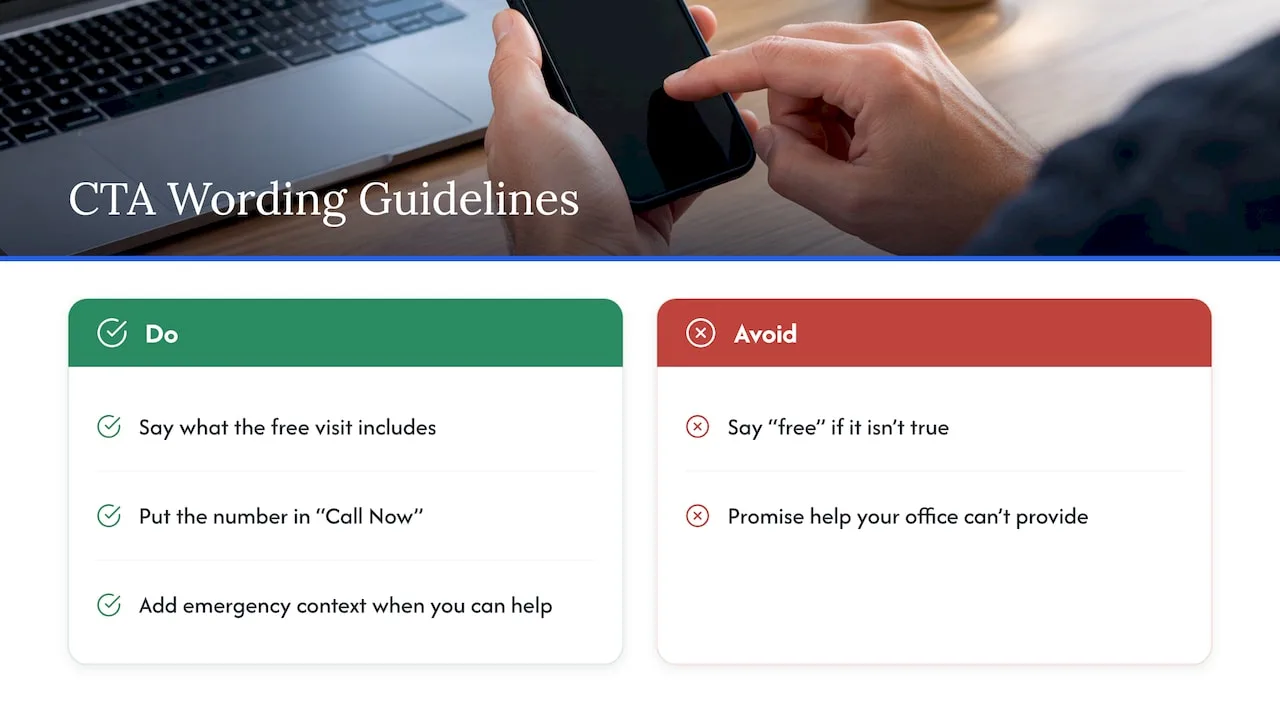
“Free” does heavy lifting. “Get a Free Roof Estimate” and “Book a Free Inspection” tell the homeowner that the first step costs nothing and commits them to nothing. Only use “free” if it is true for your company, and say what is included in one line beneath the button, for example how long the visit takes and what the homeowner receives afterward.
“Call Now” works best when it carries the number itself. On a phone, “Call (401) 555-0100” beats a generic “Contact Us” because it removes a tap and a page load. For emergencies, add a line of context: “Active leak? Call now and we will talk you through what to do until we arrive.” Only write that if your office will in fact answer and do that.
Where CTAs belong on the page
The rule is simple: a visitor should never have to scroll or hunt to act. In practice that means five placements.
- The header. Your phone number, tap-to-call on mobile, and one button on the right. This stays the same across the whole site so visitors learn where to look.
- The first screen. The headline names the service and town, such as roof replacement in Warwick or storm repair in Worcester, and the primary button sits right under it. Do not make people scroll to find the next step.
- After every proof point. When a visitor has just read a strong review, seen a before-and-after photo, or read your warranty terms, they are at peak confidence. Put a button there.
- The bottom of the page. People who read to the end are interested. Repeat the primary ask and the phone number, with a one-line reminder of what happens next.
- A sticky mobile bar. A slim bar pinned to the bottom of the phone screen with Call and Book buttons keeps the action in reach while the visitor scrolls. Keep it thin so it does not cover content.
Repetition is not pushiness. A long page with one button at the top forces the visitor to scroll back up. The same ask at the start and the end of a page, and in between at natural pauses, matches how people actually read on a phone.
Pages that need their own CTA logic
Not every page should push the same button.
- Emergency and storm repair pages: lead with the phone number. A form is secondary.
- Roof replacement pages: lead with the estimate, and support it with financing or warranty details if you offer them.
- Service area pages: put the town in the headline and the button copy where it reads naturally, and keep each page genuinely about that area. Our guide on service area pages that avoid doorway penalties covers how to do that without copy-pasting one page fifty times.
- The contact page: make it the easiest page on the site. See these contractor contact page examples for layouts that turn visitors into calls.
- About and gallery pages: a quieter button is enough, but it should still be there.
If you are not sure which pages deserve the most attention, start with the five pages we explain in roofing website content that wins leads, then add CTAs to those first.
How to write and design CTAs for mobile
Most homeowners looking for a roofer are on a phone, often standing in the house looking at a stain. Your CTAs have to work with one thumb.
Write the button like a promise
Start with a verb and finish with the result: “Book My Roof Inspection,” “Get My Free Estimate,” “Call a Roofer Now.” Avoid “Submit,” “Send,” and “Learn more” on any button that is meant to produce a lead. First-person phrasing (“my”) is a common pattern for estimate buttons, and it is easy to test against the second-person version on your own site.
Add one line of friction-reducer under the button. Good ones answer the unspoken worry: “Takes about 60 seconds,” “No obligation,” “We reply the same business day.” Only claim a response time your office can keep.
Make it visually obvious
Use one contrasting color for primary buttons and use it for nothing else. If your site is navy and gray, a bright orange or green button stands out. Secondary actions, like “See our projects,” should look quieter, such as an outlined button or a plain link. Keep the treatment consistent from page to page so visitors recognize a button without reading it.
Size matters on touch screens. Give each button generous padding and space it away from other tappable items so a thumb does not hit the wrong one. Keep the label short enough to fit on one line on a small phone.
Keep the form short
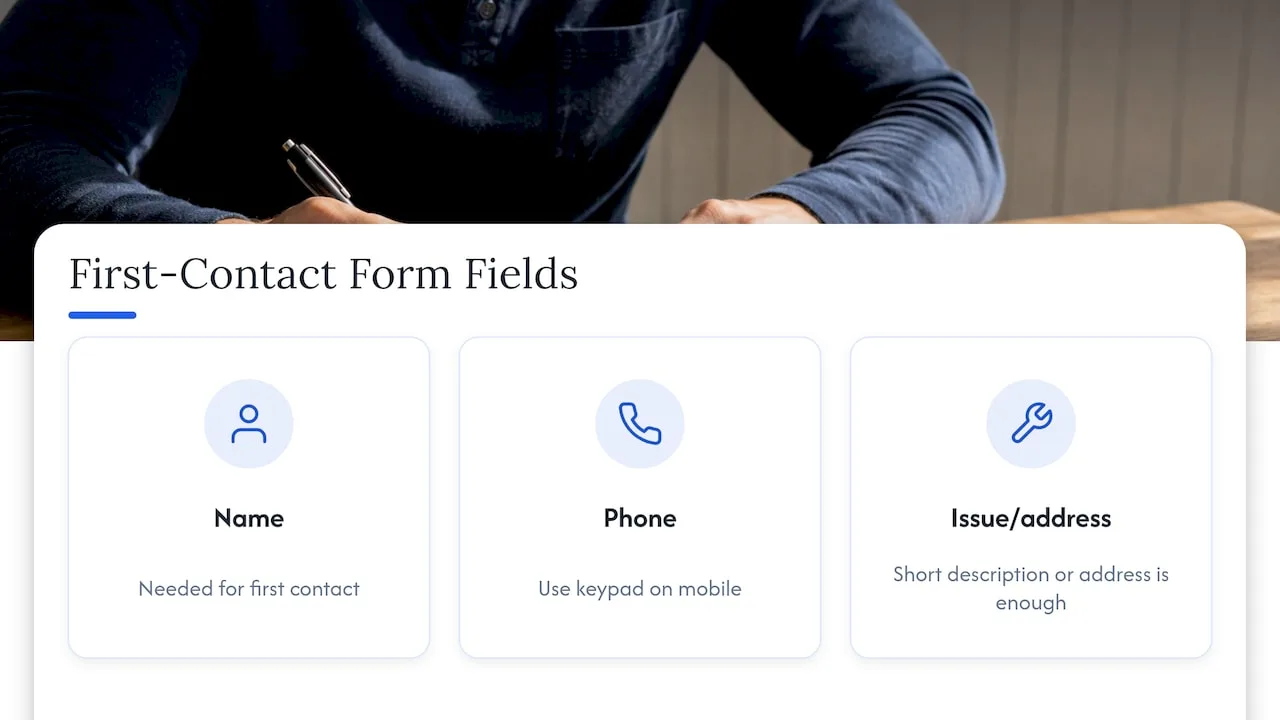
Every field is a reason to quit. For a first contact, name, phone number, and a short description of the problem or the address is enough. Anything else, such as roof age, insurance details, or material preference, can be collected on the phone. Use a phone keypad for the phone field on mobile and do not require an email address unless you need it.
Also check what happens after submission. A thank-you message that says when to expect a call, and a prompt that offers the phone number for urgent issues, keeps the homeowner from shopping around while they wait.
The follow-through decides whether the CTA pays
A homeowner who requests an estimate at 7 p.m. and hears nothing until noon the next day has often already booked someone else. The click was the easy part. The speed of the reply is what turns it into a job.
This is where most small roofing companies lose leads without noticing. The crew is on a roof, the office is closed, and the call rolls to voicemail. Many callers hang up and try the next company on the list.
We built our services around that gap. Missed-call text-back and CRM tools send an immediate response when you cannot pick up, and an AI voice agent and website chat can handle inbound conversations around the clock, according to what each service page describes. If you want your CTAs to feed something reliable, look at our missed-call text-back and CRM service and the AI voice agent. For visitors who prefer typing, AI website chat gives them a way to ask a question without a call.
Then close the loop on trust. A CTA sitting next to a rating and a handful of recent local reviews performs better than one sitting alone, and reviews that keep coming are what keep that proof fresh.
How to measure whether your CTAs work
A click on a button is not a lead, and a lead is not a job. Measure the full path in layers.
- Website leads. Form submissions and taps on the phone number or text link.
- Phone leads. Calls tracked and recorded through call reporting, so you know which page or campaign produced each one. Our call tracking checklist for contractors shows how to set it up without hurting your local SEO.
- Source capture. Store where each lead came from, including the ad click identifier where you run Google Ads, in your CRM.
- Offline outcomes. Mark each lead as qualified, estimate booked, or contract signed, and send those outcomes back to your ad platform.
That four-layer structure comes from a roofing conversion tracking guide that also makes a point worth taking seriously: serious roofing leads tend to call, so a tracking setup that ignores calls ignores much of your best business. If you want to see how revenue flows back to the ads that created it, this walkthrough on offline conversion tracking for roofers covers sending leads and then revenue to your reporting.
The numbers that matter in the end are inspections booked and roofs signed. A button that doubles clicks but books the same number of inspections has not improved anything. We go deeper on this in proving contractor marketing ROI and roofing lead generation and cost per booked job.
A simple scorecard
Review these monthly, by page where you can:
| Metric | What it tells you |
|---|---|
| Visits to the page | Whether traffic is arriving |
| Taps on call and text | Whether the CTA is seen and trusted |
| Form submissions | Whether the form is short enough |
| Calls answered vs. missed | Whether follow-through is working |
| Inspections booked | Whether leads are real |
| Roofs signed | Whether the whole system pays |
The gap between any two adjacent rows points at the problem. Many calls but few answered means a staffing or coverage problem, not a design one. Many form fills but few booked inspections means a follow-up problem. Many visits but few taps means the CTA itself needs work.
How to test and improve your CTAs
Testing does not require a lab. It requires patience and one change at a time.
- Pick the page with the most traffic. Usually the homepage or your main replacement page.
- Change one thing. Button wording, button color, form length, or the line under the button. Never several at once, or you will not know which one mattered.
- Run it long enough. Let it run through full weeks, so weekday and weekend behavior both appear, and until you have a meaningful number of conversions on each version. Small sites with a few dozen leads a month need to be patient and may only be able to compare month against month.
- Judge by the deepest metric you can. Compare booked inspections, not clicks.
- Keep a log. Write down what you changed, the date, and the result, so a year from now you are not repeating old experiments.
Good first tests for a roofing site:
- “Get a Free Estimate” versus “Book a Free Roof Inspection” in the hero.
- A three-field form versus a five-field form.
- A sticky mobile bar versus none.
- A phone number in the hero versus only in the header.
- A review quote next to the button versus no quote.
Seasonality matters in New England. Winter ice dams, spring storm damage and summer replacement season bring different visitors with different urgency, so compare like with like and avoid judging a test run in March against one run in July.
Common CTA mistakes on roofing sites
- Five different buttons fighting for attention. Choose one primary action per page.
- “Contact us” as the only option. It says nothing about what happens next.
- A phone number that is not tappable on mobile. This is a surprisingly common leak.
- Forms that ask for the whole project history. Save the detail for the call.
- Stock photos next to the button. Real crews, real roofs and real town names build trust faster.
- No plan for after-hours. If nobody answers, the CTA is only a promise you cannot keep.
- Measuring only form fills. You will undercount your best leads and cut the pages that are actually working.
What this looks like with Coastal Connect
We focus exclusively on contractors in Rhode Island and Massachusetts, and our local team knows the towns and trades we serve. For roofers, that means a website designed to function as a lead generation engine, with CTAs placed where visitors decide, backed by automated follow-up so a lead does not go cold while your crew is on a roof.
Our plans are published: Foundation is $597 per month, Growth is $1,297 per month and Scale is $2,497 per month, with add-ons such as an AI employee on Growth for $199 per month. You can see what each includes on the pricing page, or start from websites that book jobs.
If your site gets traffic but the phone is quiet, the CTA and the follow-through behind it are the first things we would look at together on coastalconnect.ai.
Our perspective
Most roofers we talk to think they have a traffic problem. Often they have a pickup problem. The website gets the visit, the button gets the tap, and then the call goes to voicemail because the crew is on a roof.
We design the CTA and the response as one system. The button promises something, and the follow-up keeps that promise within minutes: a text-back, a booked slot, a conversation that runs around the clock. That is why we build the website, the local SEO, the review requests and the call handling together for the trades in Rhode Island and Massachusetts, rather than treating them as separate projects.
A roofing CTA is not decoration. It is the front door to your schedule. Put one clear action on it, and make sure someone is always home.
Tyson
FAQ
What is the best CTA for a roofing website?
There is no single winner, but “Book a Roof Inspection” and “Get a Free Estimate” are the two most common primary actions, with a tap-to-call number alongside for urgent jobs. Pick the one that matches your sales process: if you do free inspections, lead with that. Then test it against the alternative on your own traffic.
How many CTAs should a roofing page have?
One primary action per page, repeated in several places, plus the phone number in the header. Repeating the same ask at the top, after proof sections and at the bottom is helpful. Offering many different actions at once is what hurts.
Should I use a form or a phone number?
Offer both. Visitors with an active leak or storm damage tend to want to call, while others prefer a short form after hours. Track both, so you do not judge the page on form fills alone.
How do I know if my CTA is working?
Look past clicks to inspections booked and roofs signed. Track calls and form submissions by page, record each lead’s outcome in a CRM, and compare month to month or between test versions of the same page.