You cut no-shows by confirming every booking in three touches (at booking, the evening before, and when the tech is on the way), making it easy to reschedule, and measuring the rate by job type so you know where the misses come from. Do it by hand and it falls apart the first busy week. Run it through automated follow-up and a CRM, and it happens on every job, including the ones booked at 9 p.m. from a phone. That is how we build it for plumbers, HVAC companies, electricians and roofers in Rhode Island and Massachusetts.
This guide covers the full routine: how to count a no-show, why customers miss visits, the confirmation cadence, what to do when nobody answers the door, and how to prove the system works. It applies to HVAC tune-ups and service calls as much as to roofing estimates.
TL;DR
- Count no-shows with one fixed definition and one formula (no-shows ÷ eligible scheduled appointments × 100), and split the result by job type, day, estimator and lead source.
- Most customers forget or lose interest, they rarely mean to stand you up. A confirmation they must answer works better than a reminder they can ignore.
- Use three touches: a confirmation at booking, a reply-to-confirm message the evening before, and an “on the way” text with an arrival time.
- Release unconfirmed slots the night before and refill them from a waitlist, so a no-show costs you an hour of planning instead of a lost half-day.
- Test the change for a month against the same season, and judge it by completed jobs, not by message opens.
Table of Contents
- What a no-show costs a contractor
- Count your no-shows before you try to fix them
- Why customers miss home-service appointments
- The three-touch confirmation system
- When the customer does not confirm
- When the customer is not home
- Fix the front end too: where no-shows start
- Test whether it is working
- A 30-day rollout plan
- Put the system on autopilot
- FAQ
- Sources
What a no-show costs a contractor
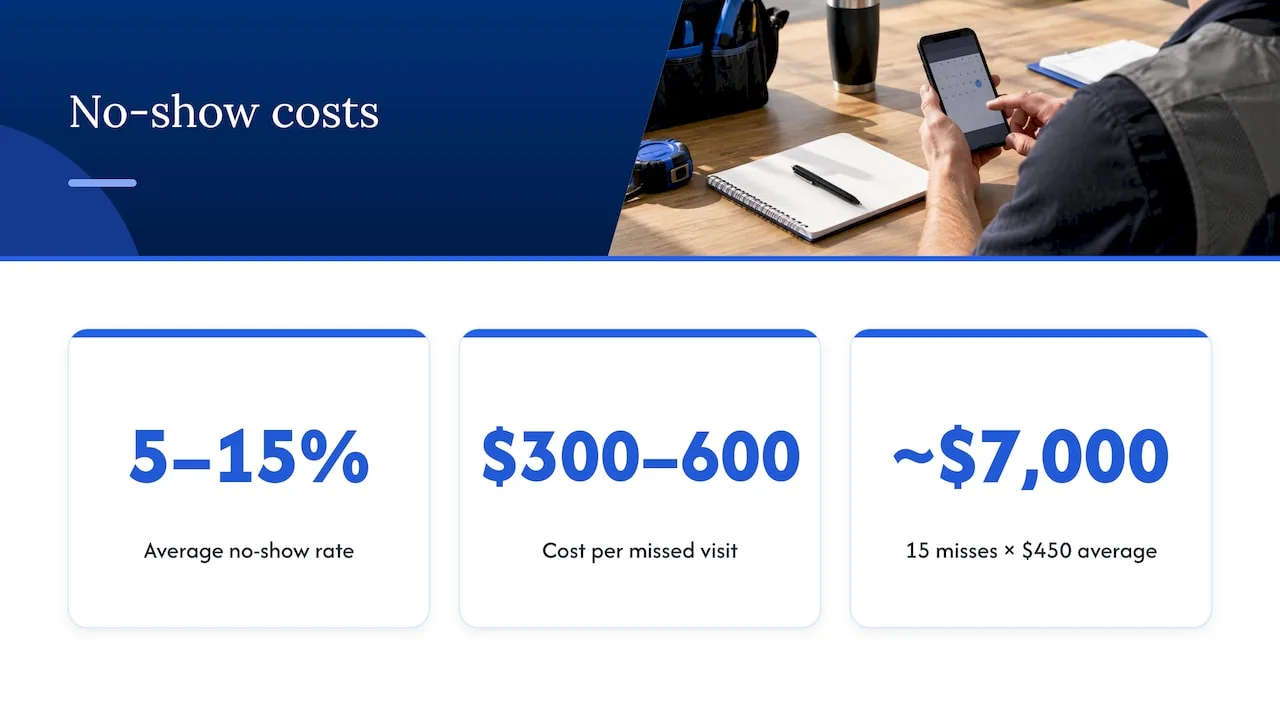
A missed appointment is not a free slot. The truck is rolling or the estimator is parked in a driveway, and a paid tech is on the clock. One industry estimate puts the average no-show rate for scheduled home service appointments at 5 to 15 percent, with each miss costing $300 to $600 once you count drive time, the unbilled hour and the lost job. On those numbers, 15 no-shows a month at a $450 average is close to $7,000. Treat those as ballpark figures from a vendor’s analysis, then replace them with your own, which the next section shows how to calculate.
For a two-truck plumbing shop in Warwick or an HVAC crew working Worcester County, that is a van payment or more, every month, lost to customers who simply did not answer the door.
Count your no-shows before you try to fix them
Most contractors know no-shows are “a problem” and few know the number. Without it you cannot tell whether a change worked. Set the rules once and never change them mid-year.
Define the event. A no-show is a scheduled estimate or service visit where you arrive (or are ready to) and the customer is not there, cannot give access, or cancelled too late to fill the slot. Keep these outcomes separate and mutually exclusive:
- Completed
- Cancelled in time
- Rescheduled in time
- Late cancellation (for example, same day after the schedule is set)
- Customer no-show
- Company-caused miss (your tech was late, the truck broke down)
Company-caused misses get reported next to the customer no-show rate, never inside it. Otherwise you blame customers for your own scheduling gaps.
Use one formula. No-show rate = customer no-shows ÷ eligible scheduled appointments × 100. If 6 of 80 estimates were no-shows, your rate is 7.5 percent. Write it as “6/80, 7.5%” so anyone reading the report sees the denominator.
Segment it. One blended number hides the problem. Break the rate down by:
- Appointment type (free estimate, diagnostic, maintenance visit)
- Estimator or tech
- Day of the week and time of day
- Lead source (Google Business Profile call, web form, Local Services Ads, referral)
- How many days ahead it was booked
You will often find the pain concentrated. Free estimates booked a week out from a web form may no-show at three times the rate of a same-day emergency call. That tells you where to add friction and where to leave things alone.
Price the loss. Stranded cost = no-shows × your average loaded cost per visit (wages, truck, fuel, overhead). Use your own numbers.
Why customers miss home-service appointments
The cause decides the fix, so it helps to know the usual suspects:
- They forgot. The visit was booked days ago and nothing since has reminded them.
- They shopped around. They called three companies, took the first one that showed up, and never told the others.
- The window was vague. “Between 8 and 12” with no update leaves people unable to plan around you, so they leave.
- The schedule changed and nobody told them. Or you ran late and went silent, so they assumed you had cancelled.
- Access fell through. Nobody home, a locked gate, a tenant who was never told, a landlord who booked the visit.
- Booking was too easy. Tapping a time slot at midnight takes no commitment, and neither does cancelling by ignoring you.
Notice that nearly every item is a communication gap on your side of the handoff. That is good news: it is fixable with process, not by lecturing customers.
The three-touch confirmation system
One reminder rarely does it. Research on text-message reminders across 21 randomized studies found patients who were notified were 23 percent more likely to attend and 25 percent less likely to miss, and that multiple notifications worked significantly better than a single one. Those were health appointments, not furnace repairs, but the behavior (people forget and respond to a nudge) is the same one you are fighting.
Build three touches, with text as the main channel and email as backup.
Touch 1: confirmation at booking
Send it within a minute of the booking, while the customer still has their phone in hand. Include:
- Company name and the tech’s name if assigned
- Date, address and arrival window
- Job type
- A simple way to confirm or reschedule
Example: “Thanks, Maria. This confirms Ocean State Heating will be at 42 Elm St on Thursday between 10 and 12 for your furnace tune-up. Reply C to confirm or R to reschedule.”
The reply is the point. A confirmation that asks the customer to answer turns passive awareness into a small commitment, and that commitment is what fights the “I’ll just ignore it” cancellation.
Touch 2: the evening before
Send this around 6 p.m. the day before (24 to 48 hours ahead works for long-lead jobs). Keep it factual: who, when, where, how to change it. Ask for one-tap confirmation, reschedule or cancel.
The goal is to have 85 percent or more of tomorrow’s jobs confirmed by the end of that evening. Rescheduling has to be as easy as confirming. A customer who can move the visit with one reply will often do that instead of vanishing, and a moved appointment is a recovered job.
Touch 3: the day of
When the tech is dispatched, send an “on the way” text with the tech’s name and an estimated arrival time, ideally 30 to 60 minutes out. This also fixes the silence problem: if you run late, tell them. Customers who hear nothing after the window passes assume you are not coming.
If your jobs run on a rolling schedule, narrow the arrival window as the day develops and keep customers informed when the plan shifts. Field scheduling software built for crew scheduling and keeping clients informed when times move helps the dispatch side stay accurate, so the messages you send match what the crew will do.
Keep texts compliant and short
Get the customer’s consent to text at booking (a line on the form such as “We’ll text you appointment reminders. Message and data rates may apply”), send only between 8 a.m. and 9 p.m. local time, and stop immediately when someone replies STOP. Business texting through major carriers also generally requires registering your sending number, which your messaging provider handles. If a customer gave you a landline, use a voice call instead. If you have questions about your specific consent wording, ask your attorney.
When the customer does not confirm
Silence at 6 p.m. is information. Have a fixed protocol so it does not depend on whoever is in the office:
- 6:00 p.m.: no reply? Call, do not text again. Use a 40-second script: who you are, tomorrow’s time, “can you confirm?”
- Conflict? Send a reschedule link and offer the slot to the waitlist.
- No answer: leave a voicemail and resend the text.
- 7:30 p.m.: still nothing? Release the slot and refill it.
For high-value or half-day jobs, such as a full roof estimate or a system replacement quote, consider holding the slot with a card on file or a deposit, disclosed clearly at booking.
Build a hot-fill waitlist
Keep a list of customers who asked for an earlier time. When a slot opens, text the top few, sorted by proximity, job match and flexibility, and give the slot to the first person who replies “Y.” Set a reschedule cutoff of at least 24 hours so you have time to backfill. If the slot is still open at noon, call a morning customer about add-ons or pull from your holding queue. A cancellation you can refill costs almost nothing.
When the customer is not home
Sometimes it happens anyway. Run the same steps every time:
- Wait 10 minutes and call the customer.
- Leave a door hanger with your number and how to rebook.
- Take a timestamped photo of the property.
- Log it as a no-show in your system right away, with the correct category (true no-show, failed access, late cancel).
That record feeds your measurement, supports any no-show fee you charge, and lets the office follow up the same day with a rebooking offer. If you charge a fee or deposit, state it at booking, never afterward.
Fix the front end too: where no-shows start
Some no-shows are decided before the reminder, at the moment of booking. Three things matter:
- Shorter lead time. The further out a visit is booked, the more time the customer has to forget or find another company. Offer the earliest slots first and send a confirmation immediately.
- Answer every call. A missed call goes to the next contractor, and a customer who got voicemail and booked later is less committed. Our AI voice agent handles inbound calls around the clock, and our missed-call text-back and CRM turns a lost call into a conversation with a booking attached.
- Make the booking path clear. A site that shows the arrival window, what happens next and how to reschedule sets expectations before the customer commits. Websites that book jobs are built around that path.
Test whether it is working
Do not judge the system by how many texts get opened. Track these before and after you switch it on:
| Metric | What it tells you |
|---|---|
| No-show rate (by segment) | Whether the core problem is shrinking |
| Confirmation rate | How many jobs are confirmed by the evening before |
| Reschedule lead time | Whether customers are moving visits early, not at the door |
| Completed-appointment rate | Jobs that actually happened |
| Stranded cost | Dollars lost to empty slots |
Give the change a full month and compare it with the same season last year, because HVAC and roofing demand swing hard with weather. If the numbers do not move, the culprit is usually bad phone data or nobody handling replies, not the reminder idea itself. Review weekly for anomalies, monthly for trends and quarterly for strategy.
Change one thing at a time. If you add a new confirmation text and a deposit in the same month, you will not know which one did the work.
A 30-day rollout plan
Week 1: Write your no-show definition, pull the last 90 days of appointments and calculate the baseline by job type and lead source.
Week 2: Add consent language to every booking form and phone script. Draft the three messages and the non-responder call script.
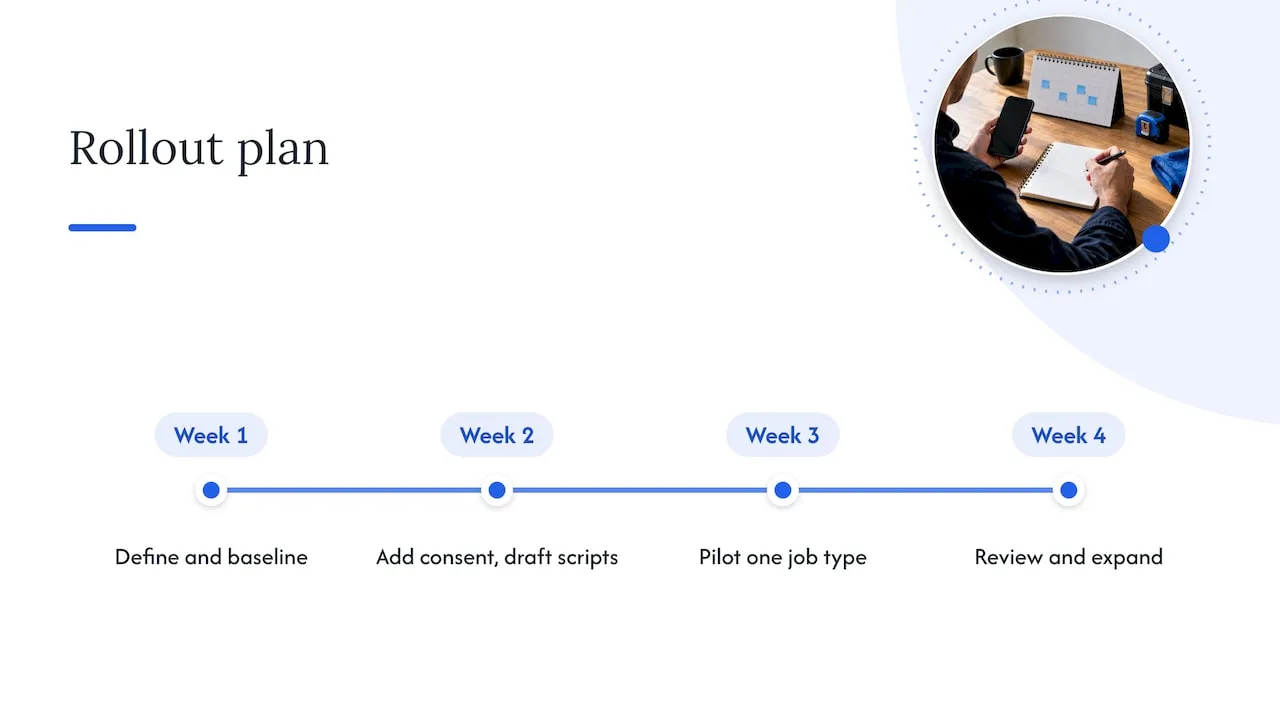
Week 3: Switch on the three touches for one job type, usually free estimates or maintenance visits, and start the waitlist.
Week 4: Review confirmations, reschedules and no-shows. Fix any wrong phone numbers or unanswered replies, then roll out to the rest of your jobs.
Why we automate this for contractors
Most of the contractors we talk to treat no-shows as bad luck. We see them as a handoff problem: the lead came in, the booking was made, and then nothing followed up until the truck showed up. The fix is a system that never gets busy.
We work only with contractors in Rhode Island and Massachusetts, in plumbing, HVAC, electrical, roofing and landscaping. That focus shapes how we set up automated follow-up: the messages, the CRM and the call handling are built around how trades actually book work, not around a generic appointment calendar. When a call is answered at 10 p.m., the text confirmation goes out that minute, and nobody has to remember to send it.
Our advice is to start simple. Measure your rate, put the three touches in place, and let the data show you which lead sources and job types need more attention.
Tyson
Put the system on autopilot
The routine above works, and it works best when nobody has to remember to run it. Coastal Connect builds the pieces that feed it: websites that book jobs, 24/7 inbound call handling, missed-call text-back, a CRM with automated follow-up, AI website chat and review requests, all for trades in Rhode Island and Massachusetts. Plans are published at coastalconnect.ai/pricing: Foundation is $597 per month, Growth is $1,297 per month and Scale is $2,497 per month.
If missed calls and empty driveways are costing you jobs, start with the pricing page and pick the plan that fits your crew.
FAQ
What is a normal no-show rate for HVAC and home-service companies?
Vendor estimates put it at 5 to 15 percent for scheduled home-service appointments, and some report ranges up to 30 percent across service industries. Your own number matters more. Calculate it with one formula and compare it by job type and lead source.
What is the best time to send an appointment reminder?
Send a confirmation right after booking, a reply-to-confirm reminder around 6 p.m. the day before, and an on-the-way text on the day. Send texts only between 8 a.m. and 9 p.m. local time. Multiple notifications outperform a single one in controlled studies.
Should I charge a no-show fee?
A fee or deposit can protect high-value slots such as roof estimates or half-day installs. Disclose it at booking, in writing, and apply it the same way every time. For the exact wording and your state’s rules, check with your attorney.
How long should I wait before calling a customer a no-show?
A common practice is 10 minutes. Call the customer, leave a door hanger, take a timestamped photo and log the visit right away. Then offer a rebooking the same day.
Does this work for estimates as well as service calls?
Yes. Estimates often have the highest no-show rates because the customer has nothing invested yet. Confirmation replies, shorter lead times and a waitlist matter most there.
Sources
- Using digital notifications to improve attendance in clinic and hospital outpatient settings (systematic review and meta-analysis, 2016)
- Electrical contractors field operations software