
Website trust signals are visible cues, independent reviews, clear contact information, and visual security markers, that lower a visitor’s perceived risk and push more of them to convert. The three fastest wins are linking out to independent review platforms, making a phone number or live chat impossible to miss, and placing simple security cues right next to payment or lead forms. Below is a research-backed playbook for making each of those changes correctly.
TL;DR:
- Linking to independent review platforms and displaying a clear phone number or live chat can significantly increase trust and conversions.
- Placing security seals inside the payment form boundary, near sensitive fields, enhances perceived safety more than generic footer badges.
- Disclosing any paid or incentivized reviews, along with verifying testimonials on independent sites, is essential to maintain legal compliance and trustworthiness.
- Testing trust signals on mobile devices ensures they display correctly and remain effective across all screen sizes.
- Trust signals alone cannot build reputation for new businesses; collecting genuine reviews and establishing an external track record remains crucial.
Table of Contents
- Types of Website Trust Signals and How to Use Each
- How Trust Signals Change Visitor Behavior
- Where and How to Place Trust Signals for Maximum Effect
- Authenticity, Reviews, and What the FTC Requires
- Measuring and Testing Trust Signals With Real Experiments
- Practical Implementation Checklist and Quick Wins
- Real-World Proof Points From Contractor Websites
- How Trust Signals Affect SEO and Search Rankings
- Common Mistakes That Make Trust Signals Backfire
- Trust Signals Look Different by Industry
- Mobile Trust Signals Need Their Own Rules
- Legal Compliance Beyond the FTC: GDPR, CCPA, and Data Trust
- When Trust Signals Are Not Enough
- How Coastal Connect Builds Trust Into Contractor Websites
- FAQ
- Sources
Types of Website Trust Signals and How to Use Each
Trust signals fall into a handful of practical categories, and each one works differently depending on where and how you use it.
Third-party reviews and review platforms. A testimonial you wrote yourself carries less weight than a review hosted on Google, a trade association directory, or an industry review site. Link to your profile on those platforms rather than only pasting quotes into your own page.
Security badges and SSL indicators. A padlock icon and an SSL certificate are technically about encryption, not about whether a business is honest. Visitors read them as a general safety signal anyway, so the badge’s job is persuasion, not just protection.
Social proof beyond reviews. Testimonials, case studies, client logos, and endorsements all work the same way: they borrow credibility from someone else. Any paid or incentivized relationship behind an endorsement needs a disclosure, which we cover in detail further down.
Contact signals. A visible phone number, a working email address, live chat, and an accessible Contact Us page tell a visitor a real business is behind the website. Nielsen Norman Group’s contact-page research finds that visitors expect real-time contact options and read hidden phone numbers or buried forms as evasive.
Design and UX quality. A clean layout, fast load times, and consistent visual treatment around sensitive fields all function as trust signals even though none of them explicitly claim to be one. A sloppy site reads as a risky one, regardless of what badges it displays.
A quick reference for implementation priority:
- Link your Google Business Profile or industry review platform directly from your homepage and footer.
- Place a recognizable security seal within the visual boundary of your payment or lead form, not just in the footer.
- Disclose any paid, free-product, or affiliate relationship behind a testimonial or endorsement.
- Put your phone number in the header and keep it clickable on mobile.
- Audit page speed and mobile layout before adding any new trust element, since a slow or broken page undermines every badge on it.
How Trust Signals Change Visitor Behavior
Trust signals work by closing the gap between perceived risk and actual risk, and visitors make that judgment fast, often before reading a word of copy.
Baymard’s checkout research found that users abandoned checkout a significant share of the time in the period before the study because they did not trust the site with their payment information. That single figure explains why a visible security cue near a payment field tends to move conversion more than almost any copy change.
The research also found something counterintuitive: a recognizable badge often raises perceived security more than the underlying technical protection does. A visitor cannot verify your encryption, but recognizes a familiar seal and reacts to it.
On the testimonial side, Nielsen Norman Group’s trustworthy design research found that visitors treat on-site testimonials with skepticism, since a business can write or select anything it wants to publish about itself. The fix is not to remove testimonials but to pair them with a visible presence on an independent platform the visitor can check without leaving your site.
Put together, these findings point to a simple mechanism: visitors rely on fast heuristics, familiar badges, visible contact details, independent verification, rather than reading your full privacy policy or terms of service. A single well-placed cue can shift that heuristic in seconds, which is why placement matters as much as the signal itself.
Where and How to Place Trust Signals for Maximum Effect
Placement determines whether a trust signal gets noticed at the moment it matters, which is almost always right before a visitor has to commit personal information.
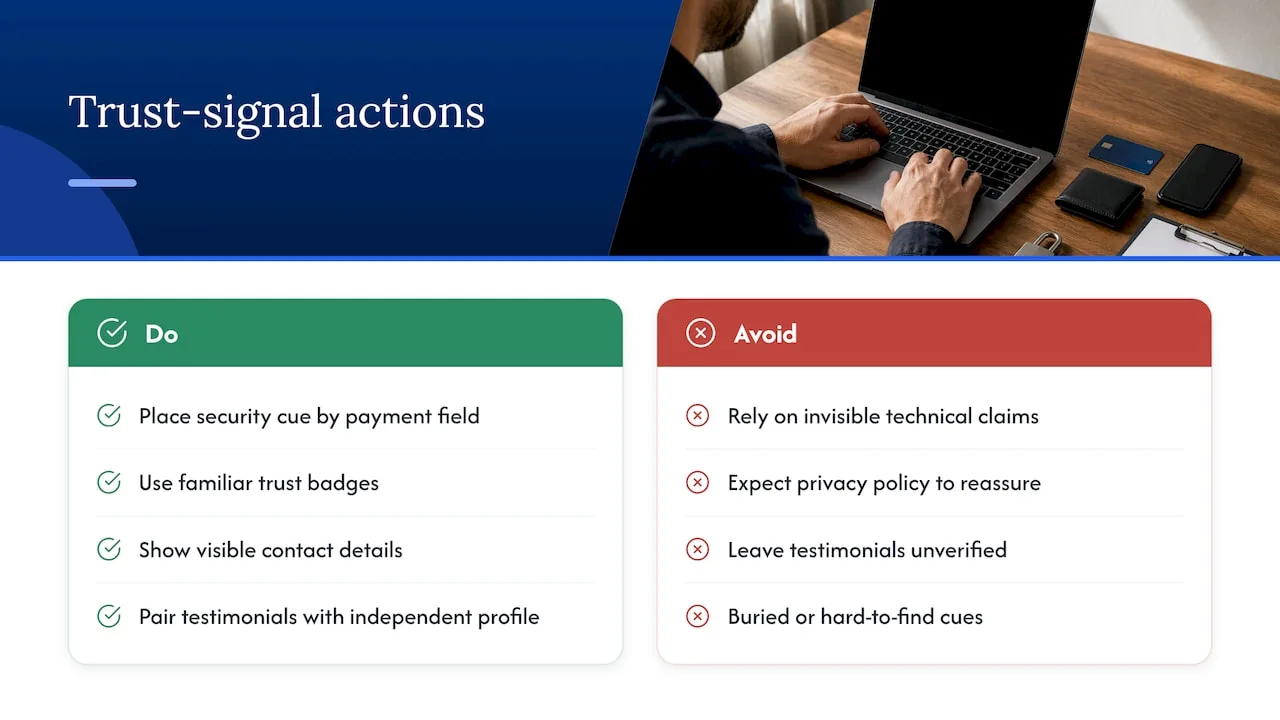
Baymard’s research recommends visually encapsulating the payment area with a background shade or border and placing one or two trusted seals inside that boundary, rather than scattering badges across the footer where no one looks during checkout. The same principle applies to lead forms on service and contractor sites: a seal or short reassurance line belongs next to the submit button, not three scrolls away.
Practical placement rules:
- Keep security seals inside the visual frame of the form, not in a separate footer section.
- Use short, specific microcopy near fields that ask for sensitive information, such as “We never share your phone number.”
- Show your phone number and a live chat option above the fold on both desktop and mobile.
- Test every new trust element on mobile first, since cramped layouts are where badges most often break or overlap.
- Keep visual treatment consistent across pages so a seal on your homepage looks the same on your contact and checkout pages.
Pro Tip: Add trust cues and layout changes in separate test rounds. A layout bug introduced alongside a new badge can mask or reverse the gain you were testing for.
Authenticity, Reviews, and What the FTC Requires
Reviews and testimonials only build trust when they are real, and regulators now treat fake or manipulated reviews as a legal liability, not just a marketing problem.
The FTC’s Consumer Reviews and Testimonials Rule requires clear and conspicuous disclosure of any material connection between a business and the person giving the endorsement, and violations can carry civil penalties. The rule also covers review suppression: hiding or burying negative reviews, or running a testimonial program that presents as independent when it is not, can create liability even if no review was outright fabricated.
A practical compliance checklist:
- Disclose any free product, payment, or affiliate relationship behind a review or endorsement, placed where the reader will actually see it.
- Never suppress or selectively publish only positive reviews from a collection program.
- Avoid paid ranking or review-boosting services that manipulate visibility rather than collect genuine feedback.
- Keep disclosures in plain language, not buried in a terms page or tiny footer text.
- Automate review requests through a neutral, independent platform rather than hand-picking which reviews appear on your own site.
Measuring and Testing Trust Signals With Real Experiments
You cannot know which trust signal is working until you test it against a baseline, and the right metrics make that test meaningful rather than anecdotal.
- Track checkout or form abandonment rate as your primary signal of perceived risk, since it moves fastest when trust changes.
- Track click-through rate to your contact page or phone number, since an increase often means visitors are seeking reassurance before committing.
- Run an A/B test with one variable at a time: add a security seal near the payment field in the test group and leave the control unchanged.
- Run the test long enough to reach a meaningful sample size for your traffic volume before reading results, rather than stopping at the first sign of a lift.
- Hold layout and page speed constant across both variants so a performance difference does not get credited to the trust signal.
- Repeat the test on mobile separately, since trust cues that work on desktop can clutter or disappear on a small screen.
Practical Implementation Checklist and Quick Wins
Some of these changes take an afternoon, others take a quarter, and separating the two keeps the project from stalling.
- Immediate: link your Google Business Profile or industry review platform from your homepage.
- Immediate: publish a real phone number in your header and footer, clickable on mobile.
- Immediate: add a visible security seal inside the payment or lead-form area, not just the footer.
- Medium-term: add structured data markup for reviews so search engines can display star ratings.
- Medium-term: set up an automated, independent review collection system rather than manually curating testimonials.
- Governance: write a short internal policy on how reviews are requested, published, and disclosed, and revisit it every time a regulation changes.
| Priority | Action | Typical timeline |
|---|---|---|
| Immediate | Link independent review profile and publish phone number | Same week |
| Immediate | Add security seal near payment or lead form | Same week |
| Medium-term | Add review structured data and automate collection | 1 to 2 months |
| Governance | Document disclosure policy and testing cadence | Ongoing |
Real-World Proof Points From Contractor Websites
Trust signals matter most for service businesses where a visitor has to commit to a call or a quote before seeing any work done. Our team at Coastal Connect builds websites and automation specifically for contractors in Rhode Island and Massachusetts, which gives us a direct view of how these signals perform in that category.
- Our focus is on contractors in trades such as plumbing, HVAC, electrical, and roofing, where missed calls or ignored forms often mean lost jobs.
- Some clients report significant ROI increases within the first 90 days based on tracked results.
- Our services include review automation, call handling, and conversion-focused website builds designed to collect independent reviews automatically, keep contact options available, and reduce friction in forms at key visitor decision points.
How Trust Signals Affect SEO and Search Rankings
Search engines do not have a single “trust signal” ranking factor, but several trust-related elements influence visibility indirectly. Structured data for reviews can produce star ratings in search results, which raises click-through rate even without a ranking change. A Google Business Profile populated with reviews and accurate contact information strengthens local search visibility, since that profile is itself part of how Google evaluates a local business.
Page experience factors, speed, mobile usability, secure connections, overlap heavily with what makes a site feel trustworthy to a human visitor, so the same fixes tend to help both perception and crawlability. A site with a broken contact page or inconsistent business information across directories can also hurt local search consistency, since search engines cross-reference that information. None of this means stacking badges improves rankings directly, but the underlying work, real reviews, consistent contact details, fast and secure pages, supports both goals at once.
Common Mistakes That Make Trust Signals Backfire
A badge that looks fake or unfamiliar can do more harm than no badge at all, since visitors notice when a seal looks generic or unrecognizable. Overloading a page with five or six seals in the footer reads as compensating for something, rather than reinforcing confidence.
Copying testimonials without any way to verify them, no name, no photo, no link to an independent profile, triggers the same skepticism NN/g’s research found around self-published reviews. Hiding a phone number behind a contact form, or routing every inquiry through a generic “info@” email, signals evasiveness rather than professionalism.
Running a review program that only publishes positive feedback, or paying for a service that artificially boosts visibility, creates legal exposure under the FTC’s rule in addition to damaging credibility once visitors notice the pattern. Finally, adding a security badge without actually having the certificate or protection it implies is both a compliance risk and a fast way to lose trust once discovered.
Trust Signals Look Different by Industry
An e-commerce store lives or dies by payment-page trust, so seals near the credit card field, a visible return policy, and shipping transparency matter more there than almost anywhere else. A SaaS company sells a recurring commitment, so uptime statistics, security certifications, and visible customer logos tend to carry more weight than product reviews alone.
Financial services face the highest bar, since visitors are handing over sensitive financial data, and regulatory badges, clear licensing information, and named human contacts matter more than generic seals. Local service businesses, contractors, clinics, salons, rely most heavily on third-party reviews and a real phone number, since the purchase decision is personal and local rather than transactional.
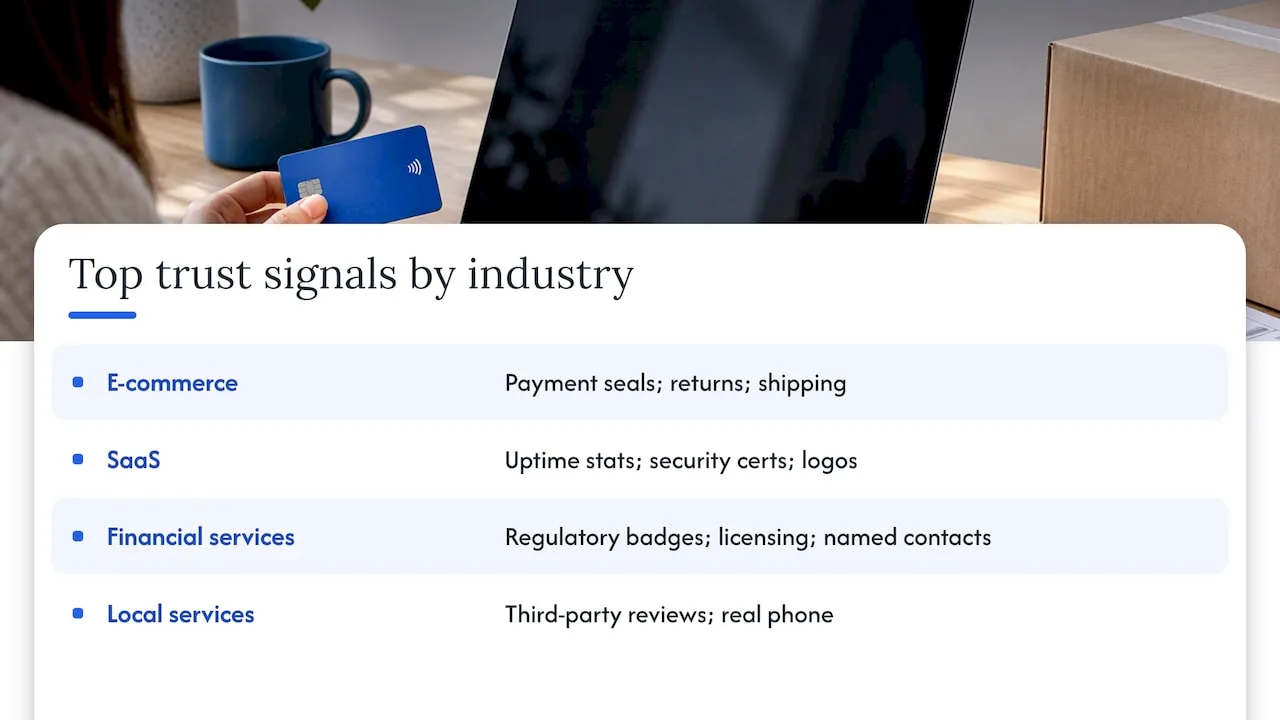
The common thread is that every industry needs the same foundation, independent verification and easy contact, but the specific signal that earns the most trust shifts with what the visitor is actually risking.
Mobile Trust Signals Need Their Own Rules
A badge that looks fine on a desktop screen can overlap text or disappear entirely on a phone, and a visitor who hits a broken layout loses trust faster than one who never saw a badge at all. Phone numbers need to be tap-to-call, not just visible text, since a visitor on mobile is often looking for an immediate way to talk to someone.
Forms on mobile should keep security cues inside the visible viewport without requiring a scroll, since a seal below the fold at the moment of submission does little good. Live chat widgets and sticky contact bars work well on mobile specifically because they stay visible as a visitor scrolls, which a static footer badge cannot do.
Testing every trust element on an actual mobile device, not just a resized browser window, catches the layout issues that quietly undo the trust gain you were trying to build.
Legal Compliance Beyond the FTC: GDPR, CCPA, and Data Trust
Trust signals extend beyond reviews and badges into how you handle visitor data, and privacy law now shapes what counts as trustworthy. The FTC’s Endorsement Guides require that endorsements reflect honest opinions and disclose material connections, which applies to review-based trust content specifically.
Beyond that, a visitor researching a European audience’s rights may expect a clear privacy notice and consent controls under GDPR, while a business serving California residents has disclosure obligations under the CCPA. Neither framework is about badges directly, but a visible, honest privacy policy and a working cookie consent tool function as trust signals in their own right, since visitors increasingly check for them before submitting personal information.
The safest approach is to treat legal compliance as a trust signal rather than a separate checkbox: a clear privacy policy, an honest cookie notice, and transparent data handling reduce the same perceived risk that a security badge addresses, just from a different angle.
When Trust Signals Are Not Enough
Trust signals reduce friction, but they do not manufacture a reputation that is not there yet. A badge or a review widget can only amplify credibility a business has actually earned.
For a new or small local business, the fastest path is often collecting a handful of genuine, independent reviews before investing heavily in design polish. For an established brand, the bigger lever is usually outside the website entirely: press coverage, independent case studies, or a visible track record that a badge can point to but never replace.
— Tyson
How Coastal Connect Builds Trust Into Contractor Websites
If you run a contracting business in Rhode Island or Massachusetts, the checklist above is close to what we build into every site we launch. We design websites that book jobs, with security cues, visible contact options, and independent review links built into the layout from the start rather than bolted on later.
Our review automation service keeps genuine, independently collected feedback flowing without the suppression risk the FTC rule warns against, and our local SEO and Google Business Profile work keeps that reputation visible where local customers actually search. If missed calls and ignored forms are costing you jobs, our pricing page outlines the Foundation, Growth, and Scale plans and what each one includes.
FAQ
What are website trust signals?
Website trust signals are visible elements, independent reviews, security badges, clear contact information, and professional design, that reduce a visitor’s perceived risk before they share personal or payment information. They work by giving visitors fast, recognizable cues rather than requiring them to research a business in depth.
How can you check if a website is trustworthy?
Look for a visible, working phone number or live chat, links to reviews on an independent platform rather than only testimonials on the site itself, and a clear privacy policy. A secure connection and a clean, functional layout around payment or contact forms are additional signs the business has invested in the visitor’s experience.
What are the trust symbols on websites?
Trust symbols typically include security seals near payment fields, SSL padlock icons, recognized payment logos, and third-party review platform badges. Baymard’s research found that a recognizable symbol placed near sensitive fields can raise perceived security even when it does not change the site’s actual technical protection.
What is a trust mark on a website?
A trust mark is a visual badge, often from a security provider or industry association, that signals a site meets a certain standard, such as encryption or verified business status. Its value comes from visitor recognition, so an unfamiliar or generic-looking mark can fail to build the confidence a well-known one would.