
Stop most contact form spam by enforcing server-side checks alongside a short set of defensive layers: a honeypot field, token verification, rate limits, and strict server-side validation. Route anything suspicious into a quarantine queue instead of deleting it outright. Monitoring and tuning those thresholds afterward is what keeps real customer inquiries from getting caught in the net.
TL;DR:
- Verify CAPTCHA or Turnstile tokens on your server, checking success, hostname, action, and timestamp; Turnstile tokens expire after 300 seconds and can be used once.
- Combine rate limits across IP address, session, and endpoint rather than relying on IP alone, which can block visitors on shared networks.
- Keep suspicious submissions in quarantine and review them daily for high traffic forms or weekly for low volume forms, especially during initial tuning.
- Use visible challenges only when friction is acceptable; image and text puzzles can exclude screen reader users, so offer audio or a contact fallback.
Table of Contents
- Quick Fixes You Can Apply in Minutes
- Layered Strategy: How Honeypots, CAPTCHAs, Rate Limiting, and Server Checks Work Together
- Implementation Checklist for Developers: Server-Side Token Verification, Sanitization, and Flow Examples
- Monitoring, Tuning, and Recovery: Keep Real Leads While Blocking Bots
- Security and Privacy Notes: Accessibility and Third-Party Trade-Offs
- Practitioner Perspective: What Seasoned Teams Get Wrong
- Coastal Connect: Managed Setup for Secure, High-Converting Forms
- FAQ
- Sources
Quick Fixes You Can Apply in Minutes
Before touching any code, a few changes can cut spam volume within the hour. Start by checking your server logs for direct POST requests hitting your form endpoint outside normal page views. That pattern usually means a bot found your submission URL and is posting to it directly, skipping your page entirely.
- Rename or obfuscate predictable form endpoints (avoid
/contact-submitor/form-handler) so automated scripts can’t guess the path. - Add a CSS-hidden honeypot field; real visitors never fill it in, but scripts that auto-fill every input will, flagging the submission instantly.
- Turn on a CAPTCHA or Turnstile widget if some friction for users is acceptable on that particular form.
- Enable any spam filtering already built into your platform, such as Akismet on WordPress or the built-in form filters on Netlify.
- Set short, aggressive rate limits for obvious bursts, such as multiple submissions from one source in a brief period, while you build out stronger rules.
These five steps won’t eliminate sophisticated bot traffic, but they typically knock out the bulk of low-effort spam scripts that scan the web for open forms.
Pro Tip: Check your spam folder’s “from” addresses before deleting anything. A sudden spike from one domain often means a single script, not a real surge in traffic, and blocking that domain is faster than rebuilding your whole form.
Layered Strategy: How Honeypots, CAPTCHAs, Rate Limiting, and Server Checks Work Together
No single control stops every bot, because bots operate at different layers of your stack. The OWASP Bot Management and Anti-Automation Cheat Sheet recommends combining edge filters, application-level checks, and backend review queues rather than relying on one tool to do all the work.
Edge controls sit in front of your application, things like Cloudflare’s managed rulesets or rate-limiting rules that block traffic before it ever reaches your server. Application controls live inside your form logic: honeypot fields, CAPTCHA widgets, and token validation. Backend controls are what happens after a submission lands, including quarantine queues and manual review.
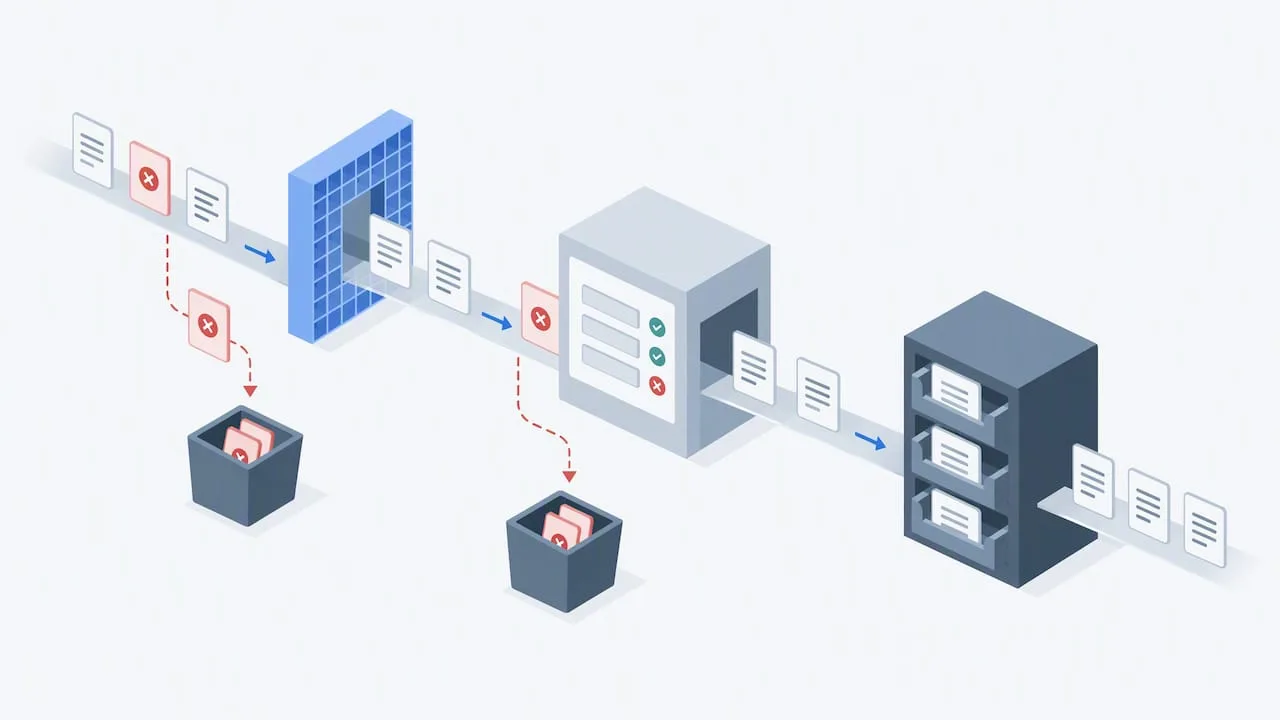
Honeypots work best as a first filter because they’re invisible to humans but catch scripts that fill every field they find. They’re cheap to implement and catch a large share of unsophisticated bots, though determined attackers that render JavaScript and respect display: none rules can sometimes avoid them.
CAPTCHA options vary in how much friction and data sharing they require:
- Visible CAPTCHAs (image or text puzzles) add friction for every user but catch bots that can’t solve them.
- Score-based solutions like reCAPTCHA v3 run invisibly and return a risk score rather than a challenge, which Google recommends treating as a signal with a graduated response rather than a hard block.
- Privacy-first alternatives like hCaptcha and Cloudflare Turnstile avoid some of the data-sharing concerns tied to reCAPTCHA while still requiring server-side token verification to be effective.
Rate limiting rounds out the layer. OWASP advises using token-bucket or sliding-window algorithms instead of fixed time windows, and applying limits across multiple keys, IP address, session cookie, and endpoint together, rather than IP alone, since shared IPs (offices, coffee shops, mobile carriers) can otherwise lock out real visitors.
Quarantine flagged submissions rather than deleting them automatically while you tune these layers. Netlify’s spam filtering documentation recommends exactly this: keep flagged submissions in a review list instead of discarding them, since false positives are common in the first few weeks of any new rule set.
Implementation Checklist for Developers: Server-Side Token Verification, Sanitization, and Flow Examples
Whatever client-side widget you choose, the enforcement has to happen on your server. A token sitting in the browser proves nothing until your backend confirms it with the provider.
- Receive the token from the client-side widget along with the rest of the form payload.
- Call the provider’s verification API (Turnstile’s Siteverify endpoint or Google’s verify endpoint) from your server, never from the browser.
- Check the response for success, the expected action name, a matching hostname, and a timestamp within the allowed window.
- Reject or quarantine the submission if any check fails, and log the reason.
- Only then run your business logic, like sending an email or creating a CRM record.
Token handling details matter here. Cloudflare’s Turnstile documentation states tokens expire after 300 seconds and are single-use, meaning a replayed token from a previous session should always fail verification. Google’s reCAPTCHA tokens follow a similar single-use pattern with their own expiry window, so check the exact values in Google’s verification docs rather than assuming they match Turnstile’s.
Store your secret keys as environment variables, never in client-side code or version control. Validate and sanitize every field on the server regardless of what client-side JavaScript already checked, since a direct POST request bypasses your frontend entirely.
For rate limiting, combine keys rather than relying on IP address alone: IP plus session identifier plus endpoint, and ASN when you have access to that data, follows OWASP’s guidance for avoiding both under-blocking and over-blocking shared networks.
Log every failed validation attempt with enough detail (timestamp, failure reason, submitted fields) to review later, and route flagged submissions into a quarantine table instead of your main inbox or CRM pipeline.
Pro Tip: Never trigger a notification email, Slack alert, or CRM entry until after server-side validation passes. Firing those actions earlier means bots get the same response time as real customers, which tells them your form is worth attacking again.
Monitoring, Tuning, and Recovery: Keep Real Leads While Blocking Bots
Launching your defenses isn’t the finish line. Track a handful of metrics weekly so you know whether your rules are working or quietly rejecting real customers.
- Failed validation counts: a sudden spike often means a new bot pattern, not a broken form.
- Challenge pass rates: if your CAPTCHA pass rate drops sharply, legitimate users may be struggling with it.
- Conversion rate after a challenge is shown: a steep drop suggests too much friction.
- Spam-queue ratio: the share of total submissions landing in quarantine versus your main inbox.
Start conservative. Set thresholds slightly looser than you think you need, and rely on the quarantine queue to catch what slips through rather than hard-blocking from day one. Review quarantined submissions on a regular schedule, daily for high-traffic forms, weekly for low-volume ones, and release anything that looks like a real inquiry.
| Signal | Healthy range | Action if abnormal |
|---|---|---|
| Failed validation spike | Stable week to week | Investigate new bot pattern, adjust token checks |
| Challenge pass rate | High and steady | Lower friction if real users are failing |
| Spam-queue ratio | Small share of total submissions | Tighten rate limits if ratio climbs fast |
Escalate your rules when you see sustained high-volume abuse from a consistent source, like repeated submissions from the same ASN over several days. Ease rules back when quarantine review shows mostly false positives and few actual spam entries, since overly aggressive rate limits can quietly cost you real leads.
Security and Privacy Notes: Accessibility and Third-Party Trade-Offs
CAPTCHA choices carry trade-offs beyond spam reduction. reCAPTCHA shares data with Google’s broader risk-analysis systems, which some privacy-conscious visitors and regulators flag as a concern. hCaptcha and Cloudflare Turnstile position themselves as privacy-first alternatives that still require the same server-side verification step to be effective.
Accessibility matters too. Visible image or text CAPTCHAs can be difficult or impossible for visitors using screen readers, and audio CAPTCHA alternatives should be offered alongside visual ones. Consider a support email or phone fallback for visitors who can’t complete any automated challenge.
- Always perform token verification over HTTPS, never over an unencrypted connection.
- Keep provider secret keys in environment variables or a secrets manager, never hardcoded.
- Favor quarantine over immediate deletion while tuning new rules, since a misconfigured threshold can silently drop real customer inquiries.
- Review accessibility options for any CAPTCHA before deploying it site-wide.
Practitioner Perspective: What Seasoned Teams Get Wrong
The most common mistake we see is treating one layer as the whole solution. A team adds a CAPTCHA, spam volume drops for a week, then bots adapt and submissions creep back up because there was no rate limiting or server-side token check backing it up.
The second mistake is deleting flagged submissions automatically from day one. A new rule set almost always catches a handful of real inquiries in its first few weeks, and without a quarantine queue, those leads are gone for good. Reviewing the queue for even a short period before tightening rules preserves leads while the system learns what normal traffic looks like.
Server-side enforcement is the piece that separates a form that merely looks protected from one that actually is.
— Tyson
Coastal Connect: Managed Setup for Secure, High-Converting Forms
Contractors lose more jobs to a missed or buried lead than to almost anything else in their marketing. We build websites that book jobs with server-side form enforcement, monitoring, and quarantine review already built in, so a flooded inbox never hides the estimate request that was actually worth answering.
Beyond the website itself, our missed-call text-back and CRM automation routes clean leads straight into a pipeline your team can act on, and our AI website chat handles visitor questions without adding another open door for bots. For teams that want quarantine review folded into their existing sales process, pairing this setup with a flexible intake tool like SoftEXIT’s no-code CRM platform can automate that review step further. Check our pricing and plans to see which tier fits a contracting business your size.
FAQ
Why should you never delete spam emails immediately?
Spam filters produce false positives, especially in the first few weeks after a new rule change, so a real customer inquiry can get flagged by mistake. Keeping a quarantine queue instead of deleting outright gives you a chance to recover those leads during review.
My WordPress contact form keeps getting spammed. How do I stop it?
Start with a hidden honeypot field and enable Akismet, which filters many WordPress form submissions automatically. Add server-side CAPTCHA or Turnstile verification and route flagged entries to a spam folder for review rather than your main inbox.
Should every website have a contact form?
Most service businesses benefit from having a contact form since it captures leads who aren’t ready to call, but it needs the same server-side protections as any other form. A poorly protected form can generate more spam noise than genuine inquiries if left unguarded.
How do I permanently stop getting spam emails?
No single fix is permanent, since bot tactics change over time, but combining server-side token verification, rate limiting, and ongoing monitoring keeps volume consistently low. Regularly reviewing your quarantine queue and adjusting thresholds is what keeps the reduction lasting.
Is CAPTCHA or Turnstile better for stopping form spam?
Both require server-side verification to work, so the choice often comes down to user experience and data-sharing preferences. Turnstile and hCaptcha are generally positioned as more privacy-first than traditional reCAPTCHA challenges.