Beat the 42 Hour Average: Speed to Lead SLA for Revenue Teams
Coastal Connect
Respond to a high-intent inbound lead in under five minutes and you dramatically improve your odds of qualifying it; wait even a half hour and that lead is already talking to someone else. This is speed to lead: the time between when someone raises their hand and when a real human or system engages them with something useful. Get it right and you convert leads you’re already paying to generate. Get it wrong and you’re funding your competitor’s pipeline.
TL;DR:
- Responding within five minutes significantly increases the likelihood of qualifying a high-intent lead, with studies showing a 21-fold advantage over waiting 30 minutes.
- Most companies take about 42 hours to send a meaningful response, leaving a large opportunity for improvement in speed-to-lead.
- Measurement should rely on the lead’s original action timestamp and the first actual outreach, not system delays or averages.
- Automating lead routing, notifications, scheduling, and after-hours engagement effectively reduces response time and prevents bottlenecks.
- Infrastructure upgrades, rather than sales training alone, are necessary to consistently achieve rapid response in high-volume or time-sensitive settings.
Table of Contents
- What Speed to Lead Really Means
- Benchmarks and Key Statistics You Can Cite to Get Buy-In
- How to Measure Your Current Speed to Lead
- Tactical Improvements: What Actually Moves the Number
- Operational Checklist and SLA Template by Lead Intent
- Common Blockers That Slow Response (and How to Fix Them)
- How Coastalconnect Implements Speed to Lead for Contractors
- Why Most Companies Get Speed to Lead Backwards
- A Faster Path to Faster Response: What Coastalconnect Offers
- Authoritative Studies and Operational Resources
- Sources
- FAQ
What Speed to Lead Really Means
Speed to lead measures the gap between two timestamps: the moment a lead takes action (a form submission, a chat initiation, a call placed to your office) and the moment they receive a genuinely useful response. Not an auto-reply that says “we got your message.” A response that moves the conversation forward.
That distinction matters because plenty of companies think they’re fast when they’re just prompt. An email that says “thanks, someone will call you soon” isn’t a meaningful response. It’s a placeholder. The clock should keep running until the lead gets something with actual value.
What counts as a meaningful first response:
- A booked meeting or a calendar link the lead can act on immediately
- An interactive demo or a personalized walkthrough of the product
- A live chat reply that answers the specific question the lead asked, not a canned script
- A phone call where a rep actually reaches the person, not a voicemail
Where you pull your timestamps from changes your numbers more than most teams realize. A form-fill timestamp from your website platform (Gravity Forms, HubSpot, Unbounce) often lags a few seconds to a few minutes behind when your CRM logs that same lead, depending on your integration and any queue delays in between. If you’re measuring from the CRM record instead of the raw form event, you’re probably underreporting your real response time.
One more measurement nuance: use median, not average. A single lead that sits untouched for three days because a rep was out sick will wreck your mean and hide the fact that your typical response is actually solid. Median tells you what a real prospect experiences on a normal day.
Benchmarks and Key Statistics You Can Cite to Get Buy-In
If you need to convince a VP of Sales or a stubborn ops team that response speed deserves budget, these numbers do the arguing for you.
The core stat: Responding within five minutes makes you roughly 21 times more likely to qualify a lead compared to waiting 30 minutes. That’s not a marginal edge. That’s the difference between a functioning pipeline and a leaky one.
The InsideSales.com and MIT Lead Response Management study is the foundational research behind that number, and it’s been replicated in enough industry audits since that it’s safe to treat as directional truth rather than a one-off finding. Separately, Harvard Business Review’s analysis of online sales leads found that firms contacting leads within an hour were substantially more likely to hold a meaningful qualifying conversation than firms that waited longer. Two different research efforts, two different eras, same conclusion: speed compounds.
Here’s the part that should make you uncomfortable. The median company takes about 42 hours to send a first response to a web lead. Some never respond at all. That gap between what’s possible (minutes) and what’s typical (nearly two days) is where most of the opportunity in speed-to-lead work actually lives.
Benchmarks shift depending on the channel and the intent behind the lead:
- Phone inquiries: Callers expect near-instant pickup. Anything beyond a ring or two reads as unavailability, and many will simply call the next name on their list.
- Live chat: Visitors expect a response within seconds. A delay of even a minute causes noticeable drop-off, since chat is inherently a real-time medium.
- Trial or demo signups: These are your highest-intent leads outside of a direct call. Embedding scheduling at the point of submission can make the effective response time close to zero, since the lead books their own next step without waiting on a human.
- Content downloads and newsletter opt-ins: Lower intent, longer acceptable window. An hour to a day is reasonable here without meaningfully hurting conversion.
Segmenting your benchmarks this way keeps you from wasting urgency on cold leads or, worse, keeping hot ones waiting because your process treats every form fill the same.
How to Measure Your Current Speed to Lead
You can’t fix what you haven’t measured, and most teams that think they know their numbers are actually estimating. Here’s a method that produces a real baseline.
- Capture the lead’s action timestamp at the source. Pull it from the form platform, chat widget, or call log itself, not from when the lead lands in your CRM.
- Log the first meaningful outreach timestamp. This is when a rep actually calls, texts, emails with substance, or a chat agent replies with content, not when a task gets created in your CRM.
- Calculate the gap for every lead over a fixed window (30 to 90 days gives you a stable sample).
- Segment by lead type and channel before you calculate anything else. Blending demo requests with newsletter signups into one number tells you nothing actionable.
- Report the median for each segment, not the mean, so a handful of outliers don’t distort what a typical lead experiences.
This approach lines up with the measurement guidance from RevOps benchmarking research, which recommends timing from the lead’s own action rather than any downstream system event.
KPIs worth putting on a dashboard:
- Median speed to lead, broken out by lead type
- Percentage of leads contacted within your SLA window
- Lead-to-meeting conversion rate, tracked alongside response time
- Meeting show rate (a fast response that leads to a no-show meeting isn’t actually a win)
- Response time by hour of day and day of week, to spot coverage gaps
A quick implementation note: most CRMs (Salesforce, HubSpot, Pipedrive) can timestamp both events automatically if you set up the right workflow triggers, but the form-submit timestamp usually has to be pulled from the form tool’s own reporting or passed through as a custom field. Skipping that step is the single most common reason companies think they’re faster than they actually are.
Tactical Improvements: What Actually Moves the Number
Fixing speed to lead isn’t one project. It’s a stack of smaller fixes, and most teams get meaningful gains by tackling three or four of these rather than chasing a single silver bullet.
Automated lead routing. Manual assignment, where a lead sits in a shared inbox until someone notices it, is the single biggest source of delay in most sales operations. Rules-based routing (round-robin, skills-based matching, or LIFO for time-sensitive leads) can cut assignment time from hours to seconds. Pair routing with an escalation rule: if the assigned rep hasn’t engaged within a set window, the lead automatically reassigns to the next available person.
Real-time alerts across every device a rep actually checks. A lead notification that only shows up as a CRM task badge is a notification nobody sees. Stack alerts across mobile push, Slack or Microsoft Teams, and browser notifications so there’s no single point of failure. Redundancy here isn’t overkill. It’s insurance against the ten minutes a rep spends away from their desk.
Embedded scheduling on every high-intent form. If a demo request form ends with “we’ll be in touch,” you’ve built in a delay. If it ends with a calendar the lead can book instantly, speed to lead for that segment approaches zero because scheduling at the point of submission removes the human bottleneck entirely.
Live chat with AI-assisted first replies. Chat visitors expect immediate engagement, and a well-configured chatbot can handle the first exchange, qualify basic intent, and either answer the question outright or hand off to a live rep with context already gathered. The goal isn’t to replace the human. It’s to make sure nobody waits in silence while one gets free.
After-hours automation that actually adds value. A generic “we’re closed, we’ll call you back” message does nothing for a lead who converted at 9 p.m. Interactive demos, curated resource hubs, or even a scheduling link on the confirmation page keep the lead engaged until a human can follow up, and recover a meaningful share of after-hours conversions that would otherwise go cold overnight.
An omnichannel first-touch cadence. Data on optimal outreach volume suggests that combining calls with well-timed emails across roughly six attempts captures most of the leads that were ever going to convert. A workable sequence for the first 48 hours:
- Touch 1 (within 5 minutes): Phone call
- Touch 2 (within 30 minutes): SMS if no answer
- Touch 3 (within 1 hour): Personalized email referencing what they filled out
- Touch 4 (day 1, afternoon): Second call attempt
- Touch 5 (day 2, morning): Email with a specific value point, not a generic check-in
- Touch 6 (day 2, afternoon): Final call plus a scheduling link
Pro Tip: Don’t automate your way into a wall of noise. If a lead replies to any touch in that sequence, pull them out of the automated cadence immediately and hand them to a human. Nothing kills trust faster than a personalized-sounding email followed by a robotic one that ignores what they just said.
For teams building out nurture sequences that don’t require an immediate human reply, a tool like the AI follow-up email generator from AmmarAI can help draft value-first follow-ups that nudge without feeling like nagging, which matters most in the lower-intent segments of your cadence.
Operational Checklist and SLA Template by Lead Intent
Put this in front of your team as a working document, not a one-time memo.
SLA targets by intent:
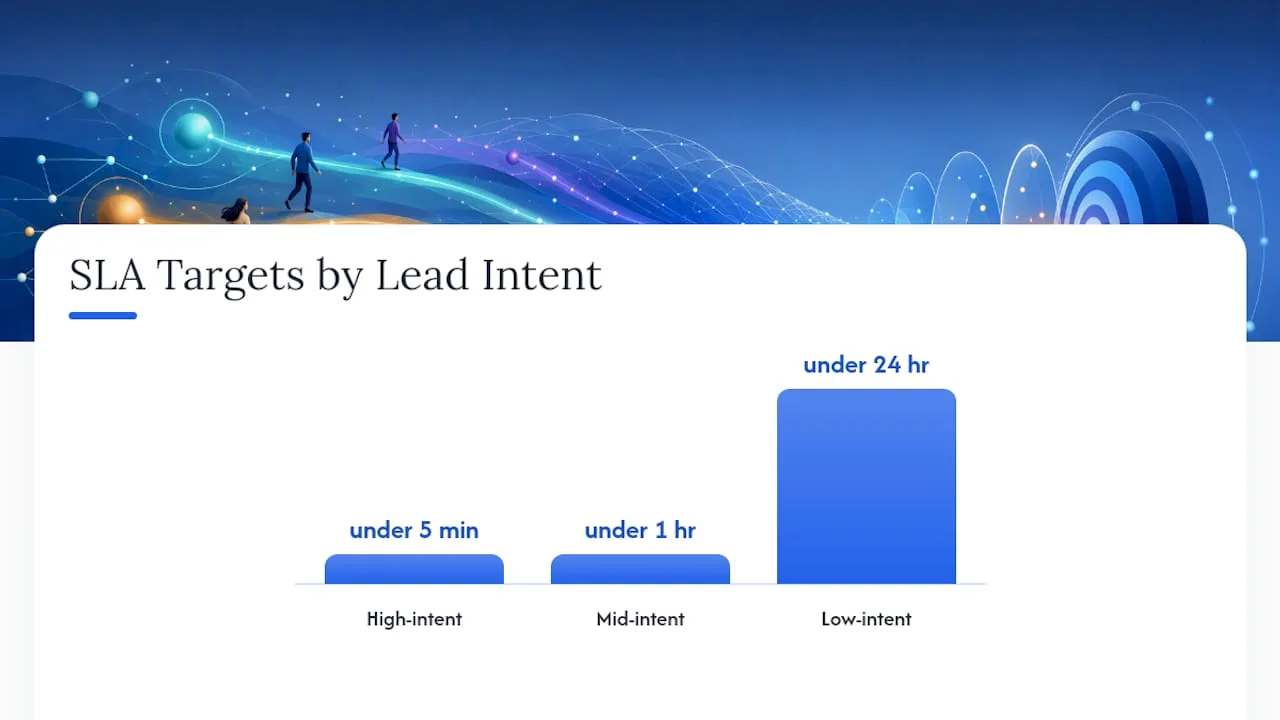
- High-intent leads (demo requests, pricing inquiries, phone calls): under 5 minutes, with 80%+ adherence as your target.
- Mid-intent leads (content downloads requiring a form, webinar registrations with a sales-touch component): under 1 hour.
- Low-intent leads (newsletter signups, gated ebook downloads with no direct sales signal): under 24 hours.
Escalation and coverage rules:
- If the assigned rep hasn’t engaged within the SLA window, auto-reassign to the next rep in rotation.
- Staff a rotating “duty rep” for peak hours so no single person is a bottleneck for every high-intent lead.
- For businesses with leads arriving outside standard hours, staggered shifts or after-hours automation should cover the gap, not silence.
- Review SLA adherence weekly, not quarterly. Speed-to-lead performance decays fast when nobody’s watching it.
Suggested first-6-touch sequence (mirrors the cadence above, worth repeating as a standalone reference for your SLA doc):
- Minutes 0 to 5: Call
- Minutes 5 to 30: SMS
- Hour 1: Personalized email
- Day 1 afternoon: Second call
- Day 2 morning: Value-focused email
- Day 2 afternoon: Final call and scheduling link
Post this where your SDR team can see it daily. A dashboard that tracks median response time against these targets in real time works better than a spreadsheet reviewed once a month, because by the time a monthly review flags a problem, you’ve already lost weeks of leads to slow response.
Common Blockers That Slow Response (and How to Fix Them)
Most companies don’t have a strategy problem. They have an operational one, and it usually traces back to one of four causes.
Manual routing and CRM sync delays. If a lead has to be manually reviewed and assigned before anyone can act, you’ve built a bottleneck into your fastest-moving asset. Automated assignment rules solve this in most CRMs without custom development.
Notification blind spots. A single-channel alert system (email only, or a CRM task that nobody checks) guarantees leads slip through during busy periods. Multi-channel alerts with escalation rules close that gap.
Coverage gaps and timezone blind spots. If your team works 9 to 5 but leads convert around the clock, every lead outside business hours sits cold until morning. A duty rep rotation or after-hours automation handles the overnight and weekend windows without requiring anyone to be on call constantly.

Autoresponders that add nothing. “Thanks for your submission, we’ll be in touch” wastes the one interaction you’re guaranteed to get. Replace it with something the lead can actually use: a scheduling link, a relevant case study, or an interactive resource that keeps them engaged instead of just acknowledged.
How Coastalconnect Implements Speed to Lead for Contractors
Most of the tactics above sound straightforward on paper and fall apart in practice because contractors, unlike SaaS sales teams, often don’t have a dedicated SDR sitting by the phone. A plumber running calls between job sites can’t manually route a lead in 90 seconds, and that’s exactly the gap Coastalconnect builds systems to close.
A leading approach for trades businesses centers on a few connected pieces:
- Conversion-first websites designed to function as lead-generation engines rather than static brochures, with forms and calls-to-action aimed at capturing intent promptly.
- 24/7 AI inbound call handling to answer calls outside normal business hours instead of sending them to voicemail.
- Automated follow-up systems that activate as soon as a lead comes in, bridging the time until a personal callback.
- AI-powered local SEO intended to generate a consistent flow of qualified leads.
- Automated review requests that help generate fresh reviews without adding tasks for the contractor.
Why Most Companies Get Speed to Lead Backwards
The conventional advice treats speed to lead as a sales training problem: hire more responsive reps, set better expectations, hold people accountable. That misses the point entirely. The data on this is remarkably consistent across a decade of research, and it says the same thing every time: this is an infrastructure problem wearing a sales problem’s clothes.
Nobody trains a rep into responding in 90 seconds at 11 p.m. on a Saturday. You build a system that doesn’t need them to be at their desk for that to happen. The companies winning on speed to lead aren’t the ones with the most motivated sales teams. They’re the ones who removed the human bottleneck from the first 5 minutes entirely and only bring a person in once the lead is warm and scheduled.
If you take one thing from this article, let it be this: stop measuring response time as a rep performance metric and start treating it as a systems design problem. The 42-hour average isn’t a training failure. It’s the predictable result of relying on manual processes for a task that speed actually requires automating.
— Tyson
A Faster Path to Faster Response: What Coastalconnect Offers
Building the routing rules, scheduling integrations, and after-hours automation described in this article from scratch takes real engineering time, and most contractors don’t have a team sitting around to build it. There are solutions that combine a conversion-focused website, automated follow-up, and 24/7 AI inbound call handling tailored for plumbing, HVAC, electrical, and roofing businesses.
Instead of losing after-hours calls to voicemail or watching web leads sit for hours before a callback, contractors can use infrastructure that responds immediately when a lead arrives, regardless of the time. The combination of automation and conversion-first design is built around the same principle this article covers: the first response wins the job, so the system has to be ready before the lead ever arrives.
If your current process depends on someone being at their desk to catch every lead, that’s the gap worth fixing first. Get a consult with Coastalconnect to see where your speed-to-lead process is losing jobs and what closing that gap would look like for your business.
Authoritative Studies and Operational Resources
- The InsideSales.com and MIT Lead Response Management study, the foundational research behind the “5 minutes, 21 times more likely” benchmark.
- Harvard Business Review’s analysis of online sales leads, showing how one-hour response windows affect qualification rates.
- Pipes, covering the 42-hour median response gap and optimal contact-attempt cadences.
- RevOps Report’s measurement and optimization guidance, the source for timestamp-based measurement methodology and intent-based SLA structuring.
Sources
- What is speed to lead and how to do it in 2026 - Guideflow Blog
- The short life of online sales leads — Harvard Business Review
- Pipes
- Speed to Lead Benchmarks and Optimization | RevOps Report
FAQ
What Does Speed to Lead Mean?
Speed to lead is the time between when a prospect takes an action, like submitting a form or starting a chat, and when they receive a genuinely useful first response, not just an automated acknowledgment.
How Important Is Speed to Lead?
It’s one of the highest-leverage levers in sales operations because it converts pipeline you’ve already paid to generate; responding within five minutes makes you roughly 21 times more likely to qualify a lead than waiting 30 minutes.
What’s a Good Speed-to-Lead Benchmark to Aim For?
Aim for under 5 minutes on high-intent leads like demo requests, under 1 hour for mid-intent content interactions, and under 24 hours for low-intent signups, since the median company currently takes about 42 hours to respond at all.
Should I Use Average or Median Response Time to Track Performance?
Use median. A handful of slow outliers, like a lead that sits untouched during a staffing gap, can skew your average and hide what a typical prospect actually experiences.
Can Automation Really Replace a Fast Sales Team?
Automation doesn’t replace the sales conversation, but it removes the delay before that conversation can start. Systems like automated routing, embedded scheduling, and 24/7 inbound call handling, the kind Coastalconnect builds for contractors, close the gap in the critical first minutes so a human can take over once the lead is already engaged.
Want this done for your business?
Get a free audit. We'll look at your site, your Google profile, and your phones, and send you a checklist of exactly what to fix.