A roofing Google Business Profile works when it is claimed and verified, set up as a service-area business, filled in completely, backed by a steady flow of genuine reviews and checked monthly against the calls and booked jobs it produces. Do those five things and you give homeowners in Rhode Island and Massachusetts a reason to pick you when they search “roof repair near me” with a leak overhead.
This guide walks through each step in the order you would do it, with the Google rules that matter for roofers and the mistakes that get profiles suspended.
TL;DR
- Claim and verify your profile first. Google decides which verification methods you get, and video verification is available to service-area businesses.
- Set up as a service-area business, hide your address if customers do not visit you, and use one profile for the whole area you serve.
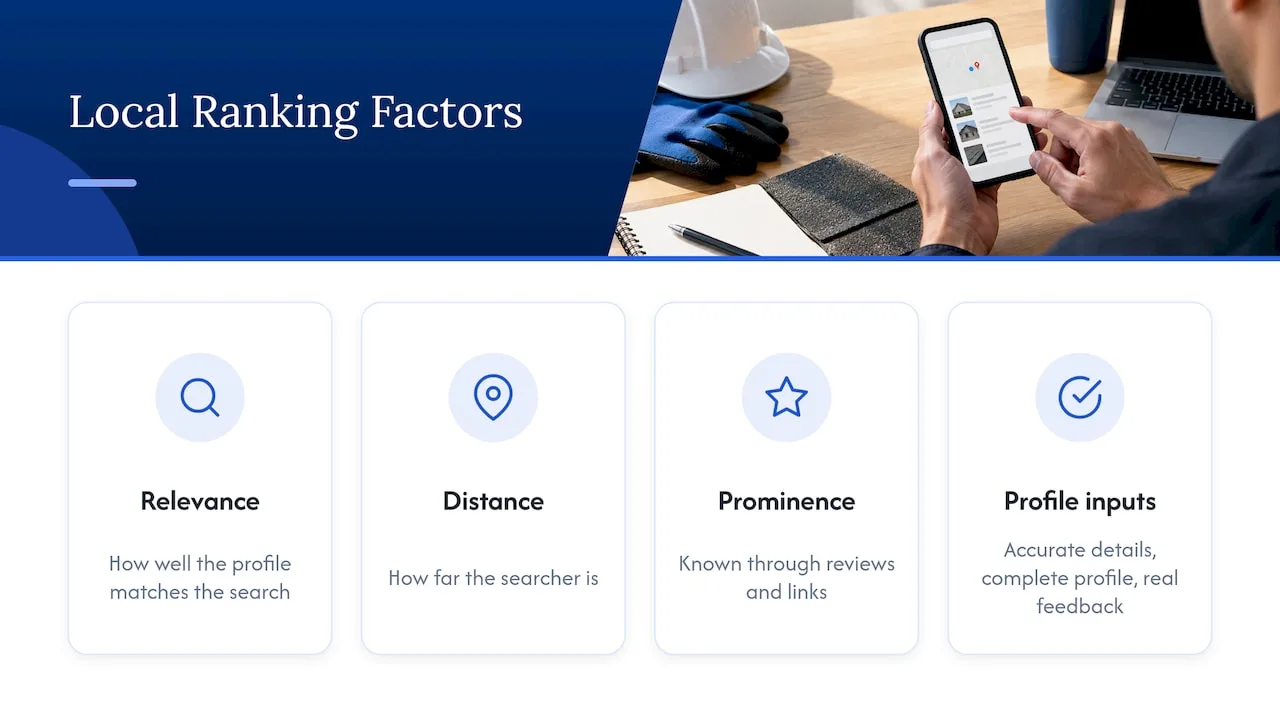
- Google ranks local results on relevance, distance and prominence. You cannot pay for a better local ranking, so completeness and reviews do the work.
- Ask every happy customer for a review, reply to all of them, and never offer incentives or screen out unhappy customers.
- Measure calls and website clicks monthly, then follow them to booked jobs and revenue.
Table of Contents
- Why your profile matters more than your website for emergency roof work
- Step 1: Claim and verify the profile
- Step 2: Set up as a service-area business
- Step 3: Choose the right category and fill in the details
- Step 4: Earn reviews the right way
- Step 5: Answer the phone, or the profile wastes its work
- Step 6: Measure what the profile actually delivers
- Common roofing profile mistakes to avoid
- Perspective: how we think about roofing profiles
- Get help building the whole system
- FAQ
- Sources
Why your profile matters more than your website for emergency roof work
When a storm pulls shingles off a roof or water shows up on a ceiling, the homeowner rarely reads a long website. They search, see the map results, glance at the star ratings and tap a call button. Your Google Business Profile is the listing that shows up in that moment, often before your website does.
That is why the profile deserves the same care as a truck wrap or a yard sign. It carries your name, phone number, service area, photos, reviews and a direct line to your website. If any of those are missing or inconsistent, the homeowner calls the next roofer on the list.
Google describes the factors behind local results in its guide to improving your local ranking: relevance (how well your profile matches the search), distance (how far you are from the searcher) and prominence (how well known you are, including reviews and links). Google also states there is no way to request or pay for a better local ranking. So the work is in what you control: accurate details, a complete profile and real customer feedback.
Step 1: Claim and verify the profile
Search for your business on Google first. Many roofing companies already have a profile created from public data, and creating a second one causes trouble. If yours exists, claim it. If not, add it.
According to Google’s verification guide, you add or claim the profile, choose Get verified, and Google determines which methods are available to you. Depending on the business, that can be a phone call or text, email, a live video call, or a postcard by mail.
Verifying a roofing company without a shop
Most roofers work from a truck, a home office or a yard with no walk-in counter. That does not block verification. Google’s video verification guide says video verification can apply to service-area businesses. The recording must be unedited, continuous, at least 30 seconds long and uploaded from a mobile device.
Google asks the video to show three things: where you are located, that the business really exists and that you manage it. If you have a storefront, it needs permanent signage. For a roofer, a good recording usually includes:
- The outside of your base location or yard, with the street visible.
- Your branded trucks, equipment and materials.
- Proof you run the business, such as tools, work orders or a business license on hand.
Record it in one take. Edited clips are the most common reason video verification fails.
Step 2: Set up as a service-area business
Roofers go to the customer. Google’s sign-up guidance says that if you do not receive customers at a storefront, you should hide your address and list the areas you serve instead.
Key rules from that guidance:
- You can add up to 20 service areas, such as cities, ZIP codes or other areas.
- Keep the boundary within roughly two hours’ driving time of your base, though larger areas may be appropriate for some businesses.
- Use one profile for the whole metropolitan area you serve. Multiple profiles for the same business in the same metro area can lead to suspension.
That last rule matters for roofers who want to “own” every town. A profile for Warwick, another for Providence and another for Cranston, all for the same company, is the quickest route to a suspension. One profile, with the right service areas, is the compliant way.
How to add your service areas
Per Google’s service area instructions, open your Business Profile, choose Edit profile, choose Location, select Edit beside Service area, add the cities, ZIP codes or other areas you actually serve and save. Approved edits can take up to 48 hours to appear.
Be honest here. List the towns where you really send crews. A Massachusetts roofer who covers Bristol County and the South Shore should list those towns, not every community in the state.
When a hybrid profile applies
If customers genuinely visit a staffed, signed location, say a showroom or supply office, and you also travel to jobs, Google permits a hybrid profile that shows both the address and the service area. If customers never visit the address, show only the service area.
Addresses Google will not accept
Google’s representation guidelines prohibit using a virtual office, remote mailbox or P.O. box as your business location. A coworking space qualifies only if you have clear signage, receive customers there during stated hours and it is staffed by your own employees. A mailbox address might look tidy, but it puts the whole profile at risk.
Step 3: Choose the right category and fill in the details
Your primary category tells Google what you are. For a company that mainly installs and repairs roofs, choose “Roofing contractor” as the primary category rather than a broad label like “General contractor.” Add secondary categories only for work you genuinely do, such as siding or gutter services.
Then fill in everything else. Google’s local ranking tips say complete and accurate information improves the likelihood of appearing in local results. For a roofer, that means:
| Profile field | What to enter | Common mistake |
|---|---|---|
| Business name | Your real, legal or signed name | Adding keywords or towns to the name |
| Primary category | Roofing contractor | A vague category such as general contractor |
| Phone | A local number that rings to a person or a system that answers | A number that goes to voicemail |
| Service areas | The towns you actually serve, up to 20 | Listing the entire state |
| Hours | Real hours, including emergency availability | Leaving hours blank |
| Services | Roof repair, replacement, inspection, storm damage, flat roofing and so on | Only one generic service |
| Photos | Real crew, truck and job photos | Stock images |
| Website link | A page built to turn visits into calls | The homepage with no clear call to action |
Keep your name, address and phone consistent
Search Engine Land’s roofing SEO guide recommends keeping your name, address and phone number accurate and consistent across listings, because conflicting information can confuse both search engines and customers. If your phone number changed two years ago, check old directories, your website footer and your social pages.
Write a description and add photos that sell
Use the description to say what you do, where and how long you have done it. Stay factual: the trades you cover, the towns you serve, the types of roofs you handle. Skip promises you cannot document.
For photos, upload before-and-after shots of finished roofs, your crew in branded gear, your trucks and close-ups of materials. New England roofs have their own look, from cedar shingle homes on the coast to triple-deckers with flat sections in the cities, so show the work homeowners in your towns recognize.
Step 4: Earn reviews the right way
Reviews are a visibility signal and a conversion tool at once. Google’s ranking guidance says review quantity, ratings and broader prominence can contribute to local visibility, and it notes that responding to reviews shows you value customer feedback. Search Engine Land’s Google Business Profile guide recommends earning genuine reviews steadily, answering both positive and negative ones, and not assuming that a particular review count guarantees an extra ranking boost.
Steady beats a burst. Ten reviews in one week after a storm, then nothing for six months, looks less natural than two or three a week all year.
A simple review routine for roofers
- Ask at the moment of peak satisfaction: the final walkthrough, or when the customer says the new roof looks great.
- Send a text with a direct link to your Google review form the same day.
- Follow up once if there is no response, then leave it.
- Reply to every review within a day or two, by name, and mention the type of job without sharing private details.
What Google does not allow
As summarized by Search Engine Roundtable’s report on the updated review policies, Google prohibits offering incentives such as payment, discounts, free goods or services in exchange for a review, or for changing or removing a negative one. The rules also bar discouraging negative reviews, soliciting only positive reviews, pressuring people to review while they are on the premises, and requesting specific review content.
For a roofer, that rules out “$100 off your gutter cleaning if you leave five stars” and “only text the customers who seemed happy.” Ask everyone, in the same way, and let the reviews say what they say.
Answering a bad review
A negative review on a roof job is often about scheduling, weather delays or a misunderstanding over scope. Reply calmly, state what you will do and invite the customer to call you directly. Future homeowners reading the exchange judge you by the reply as much as by the complaint.
If you want reminders and follow-ups to run on their own after every job, our review system for contractors is built for that.
Step 5: Answer the phone, or the profile wastes its work
A profile that generates a call at 7 p.m. during a rainstorm only pays off if someone picks up. Roofing leads are urgent and homeowners call several companies in a row. The first one to answer usually wins the estimate.
There are a few practical fixes:
- Route calls to a person on a rotation, not to a desk phone nobody checks after 5 p.m.
- Set up an automatic text to anyone you miss, so the homeowner hears from you within a minute. Our missed-call text-back and CRM setup does this for contractors.
- Consider round-the-clock call answering. Our AI voice agent handles inbound calls at any hour and passes the job details to your team.
This is also where your website link matters. A homeowner who taps through should land on a page with a phone number, a short estimate form and photos of your work, not a general homepage.
Step 6: Measure what the profile actually delivers
Once a month, open the Performance section of your verified profile and note views, search terms, call button clicks and website clicks. Google’s performance documentation defines call clicks as the number of times the call button was clicked and website clicks as the number of times the website link was clicked.
A click is not a lead, and a lead is not a job. Build a simple scorecard with three layers:
| Layer | What to record | Where it comes from |
|---|---|---|
| Discovery | Profile views, search terms | Performance report |
| Google actions | Call clicks, website clicks | Performance report |
| Business results | Qualified calls, estimates given, jobs booked, revenue | Your phone log, CRM and invoices |
Two habits make this reliable. First, add UTM parameters to the website link on your profile so your analytics can separate profile visits from other traffic. Second, ask every new caller how they found you and log the answer in the same place every time.
When the numbers move, check the calendar before crediting or blaming the profile. A snowy February, a hail storm, a holiday week, a crew shortage or a paid ad campaign can all change call volume on their own.
Common roofing profile mistakes to avoid
- Duplicate profiles. Two listings for one company confuse customers and can trigger a suspension.
- Multiple profiles for one service area. One profile covers the metro area you serve.
- Fake or borrowed addresses. Virtual offices, mailboxes and P.O. boxes are prohibited.
- Stuffing the business name. Use the name on your truck and invoices.
- Ignoring reviews. Unanswered feedback tells shoppers nobody is watching.
- Buying reviews or offering discounts for them. This breaks Google’s policy.
- Inconsistent contact details. Old phone numbers on directories dilute trust.
- Set and forget. Hours, services and photos should change with the seasons.
Perspective: how we think about roofing profiles
We work only with contractors in Rhode Island and Massachusetts, and one pattern shows up again and again with roofers. The profile gets plenty of attention at setup, then the calls it generates are missed, the reviews dry up after the first dozen, and nobody checks whether any of it turned into jobs.
Our view is that the profile is one piece of a lead system, not a standalone listing. The ranking comes from a complete profile and genuine reviews. The revenue comes from what happens next: a website that gives the homeowner an easy way to book, a missed call that turns into a text within seconds, and a review request that goes out after every finished job without anyone having to remember.
That is how we build it for the trades. Local SEO and profile work, automated follow-up, review requests and call handling run together, operated by a team that knows the towns and the trades we serve.
If you take one thing from this guide, make it this: do not measure the profile by views. Measure it by booked roofs.
Tyson
Get help building the whole system
If you would rather spend your days on roofs than on profile settings, we set this up for contractors. Our local SEO and Google Business Profile service covers the profile itself, and our websites that book jobs give the clicks somewhere to land.
Our published plans start with Foundation at $597 per month, Growth at $1,297 per month and Scale at $2,497 per month. You can compare them on our pricing page.
FAQ
How do I get my roofing company on Google Maps?
Search for your business on Google, then add or claim the profile and choose Get verified. Google decides which verification method is offered, such as phone, text, email, video or mail. If you work from a truck or home office, set the profile up as a service-area business and hide your address.
Can I show my home address on my roofing profile?
If customers do not visit that address, Google’s guidance is to hide it and show only your service area. Show the address only if you receive customers there at a staffed, signed location during stated hours. Virtual offices, mailboxes and P.O. boxes are not allowed as locations.
How many service areas can I list?
You can add up to 20 service areas, such as cities or ZIP codes. Google generally suggests keeping the boundary within about two hours’ driving time of your base. List only towns you really serve, and use one profile for your whole metro area.
Can I give customers a discount for leaving a review?
No. Google’s review policies prohibit incentives such as payment, discounts, free goods or services in exchange for a review. They also bar selectively asking only happy customers and requesting specific wording. Ask every customer the same way and reply to each review.
How do I know if my profile is bringing in jobs?
Check the Performance report monthly for call clicks and website clicks, then log each call and enquiry by source. Follow them through estimates, booked jobs and revenue. Clicks alone are not leads, so tie the numbers to your phone log or CRM.
Sources
- Verify your business on Google
- Verify your business with a video recording
- Sign up for Business Profile
- Manage your service areas for service-area and hybrid businesses
- Guidelines for representing your business on Google
- Tips to improve your local ranking on Google
- SEO for roofers: 6-step guide to attract more leads
- How to set up and optimize your Google Business Profile
- Google Updates Google Business Profile Review Policies
- Package google.mybusiness.performance.v1