
A Google Business Profile service area tells Google, and the homeowners searching on it, which cities and postal codes you will drive to for a job. You can list up to 20 of them, and if you work out of a truck, a shop customers never visit or your own home, you should hide your street address and show the service area instead. This guide covers how to set it up, how to pick towns that bring jobs rather than empty phone lines, and what we see go wrong for Rhode Island and Massachusetts trades.
TL;DR
- A service area is a list of up to 20 cities, postal codes or other areas you serve. Google sets that cap, and the whole area should stay within roughly 2 hours of driving from your base.
- If customers don’t come to your address, hide it. The profile then shows only your service area.
- You can’t define the area as a radius around your business. Pick cities or postal codes.
- Choose towns by where you actually win profitable jobs, not by how many you can squeeze in.
- Edits can take up to 48 hours to be approved, so change things in one pass and leave them alone.
Table of Contents
- What a service area is and who it is for
- Should you hide your address?
- How to set up or change your service areas
- Choosing which towns to list
- What a service area does and doesn’t do for visibility
- Fill out the services section
- Mistakes we see on contractor profiles
- Our perspective: the profile is a lead engine, not a directory entry
- Turn the profile into booked jobs
- A simple checklist before you hit save
- FAQ
- Sources
What a service area is and who it is for
Google splits businesses into types. A service-area business visits or delivers to customers and doesn’t serve them at its own address. Google’s own examples include plumbers and cleaning services, and the same logic covers HVAC technicians, electricians, roofers and landscapers.
A hybrid business does both: it has a place where customers can come, and it also travels. Think of an HVAC company with a staffed showroom and a service fleet. Google treats a hybrid as a storefront plus a service area, but hybrids without permanent on-site signage aren’t eligible to show as a storefront.
So the first decision is honest classification:
| Your situation | How to list it |
|---|---|
| Work from a truck and home office, customers never visit | Service-area business, address hidden |
| Shop with signage, staffed during posted hours, customers walk in | Hybrid: show address and add service areas |
| Warehouse or yard, appointment only, no sign | Service-area business, address hidden |
The service area is what you set once you know which of these you are. It does not replace a real, verified location. Google still needs to verify where your business is based, even when the public profile doesn’t show it.
Should you hide your address?
For most contractors, yes. Google’s guidance is that businesses that don’t serve customers at their location must hide the address, and the profile then shows only the service area. If you leave the service area empty, Google may assign a default local area, which is rarely the one you would have chosen.
This matters for a practical reason. A lot of Rhode Island and Massachusetts contractors run the business from a house in a residential neighborhood. Publishing that address invites drive-up visitors, mail, and the kind of mismatch that gets listings flagged. Hiding it protects your family’s privacy and keeps the profile compliant.
Two cautions where you act:
- If you sell products requiring age verification, such as alcohol or weapons, Google requires a storefront listing, not a service-area one. That rarely applies to trades, but a supply-and-install business should check.
- Use a local phone number that reaches your team, not a remote call center. Google recommends an individual number for the specific location to keep the profile credible.
How to set up or change your service areas
The steps are short. Google’s help page lays them out:
- Go to your Business Profile (search your business name while signed in to the managing account).
- Select Edit profile, then Location.
- Next to “Service area,” select the edit icon.
- Pick a suggested area or type in your own. Add cities, postal codes or other areas, up to 20.
- Save, then wait. Changes can take up to 48 hours to be approved.
Two details trip people up. First, you can’t set a radius distance around your business. If you set one years ago, you can’t edit it, so you have to replace it with named cities or postal codes. Second, the 20-area cap and the roughly 2-hour drive-time boundary are the limits, not targets. A plumber in Warwick gains nothing by claiming Worcester.
If you’re doing this for several trades or crews, keep a simple sheet of the towns you list and why, so the next person who edits the profile doesn’t wipe out your reasoning.
Choosing which towns to list
This is the part the help pages don’t cover, and it is where contractors win or waste their 20 slots. Treat the list as a business decision, not a map exercise.
Start from your job history
Pull your last 12 months of completed jobs from your CRM, invoicing tool or even a spreadsheet. Sort by town and by revenue. The towns at the top are your core. Anything where you have won steady work, have a crew nearby and make your target margin belongs on the list.
Weigh drive time against job value
A water heater swap in a town 45 minutes away might lose money once you count windshield time. A full roof replacement in the same town might be worth it. Your list should reflect this by trade and ticket size. Emergency services such as burst pipes or no-heat calls suit a tight list near your base. Planned projects such as roofing, re-pipes and panel upgrades can justify a wider one.
Don’t pad the list
Every town you list should be one you will answer the phone for and send a truck to. Listing places you hope to reach someday just generates calls you decline, which can hurt your reviews and your team’s patience. If you want a town, serve it first, then add it.
Think in clusters
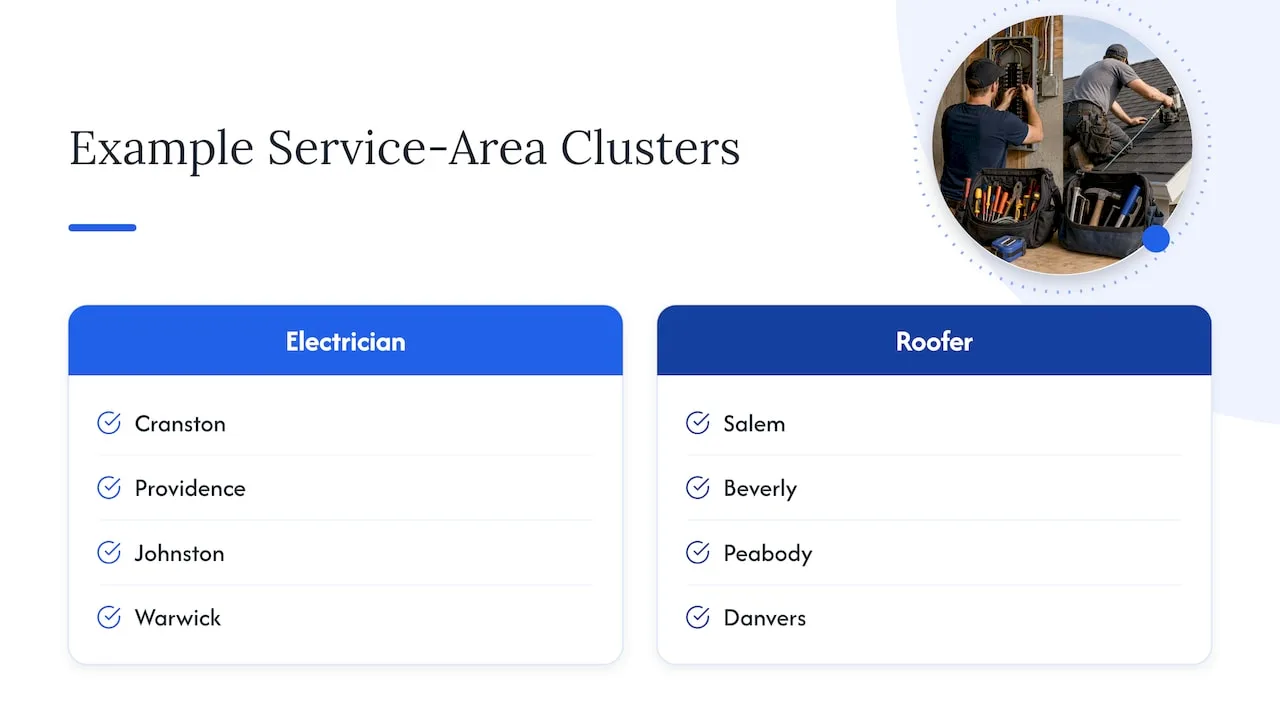
In Rhode Island and southeastern Massachusetts, towns sit close together. A Cranston electrician can reasonably cover Providence, Johnston, Warwick and Cranston itself, plus a few neighbors. A North Shore roofer might cover Salem, Beverly, Peabody and Danvers. Cluster the 20 around your crews’ real routes rather than spreading thin across the state line.
Be careful with big-city names
Boston and Providence are competitive, and listing them doesn’t mean you’ll show up there. Google also weighs how close the searcher is to your verified location, so a service area is a signal, not a guarantee. Support it with the rest of the profile: services, photos, reviews and a website that mentions those towns with real content.
What a service area does and doesn’t do for visibility
Google says that setting a service area helps people find your Business Profile. That is as far as the official page goes, and it’s wise to stay within it. A service area won’t push you to the top of the map pack in a town by itself.
In our experience, it works as one input among several. Your categories, your reviews, your website, your consistency of name, phone and details across the web, and your activity on the profile all feed into who gets the call. The service area makes you eligible and relevant for those places; the rest of the profile earns the ranking.
This is also why a profile with a hidden address and a thin service list underperforms. The next section fixes that.
Fill out the services section
A service area answers “where.” The services section answers “what.” In the profile editor, select Edit services, then choose suggested services or add custom ones. Custom service names can’t include profanity, gibberish, personal information, prices or phone numbers.
Good service names are plain and match how homeowners talk:
- Plumber: drain cleaning, water heater replacement, sump pump installation, leak repair
- HVAC: furnace repair, heat pump installation, AC tune-up, ductless mini-split installation
- Electrician: panel upgrade, EV charger installation, outlet repair, whole-home rewiring
- Roofer: roof replacement, leak repair, storm damage inspection, gutter installation
Add a short description to each where the editor allows it. Mention the towns you serve naturally, without stuffing a list of 20 names into every line.
The profile is only half of the picture, because the profile links to your website, and that is where the call gets won or lost. If your site is thin, people tap through and bounce. Strong business website design services can help you give each service a proper page that matches the services you list on Google.
Mistakes we see on contractor profiles
- Showing a home address. It can cause suspensions and invites unwanted visitors. Hide it if you don’t receive customers there.
- Listing a virtual office or P.O. box as your location. Verification needs a real base.
- Claiming 20 towns when you serve five. You’ll get calls you can’t take.
- Leaving the service area blank. Google may assign a default one.
- Editing constantly. Changes can take up to 48 hours to approve, and repeated tinkering makes it hard to know what worked.
- Creating a second listing for every town. A service-area business shouldn’t fake offices in each town. Additional locations should be real places where you operate.
- A call center number. Use a local number your crew or office answers.
Our perspective: the profile is a lead engine, not a directory entry
We work only with contractors in Rhode Island and Massachusetts, and the same pattern shows up again and again. The owner sets up the profile once, picks a handful of towns, and never touches it again. Meanwhile calls go to voicemail, reviews pile up unanswered, and the website doesn’t say anything about the towns on the profile.
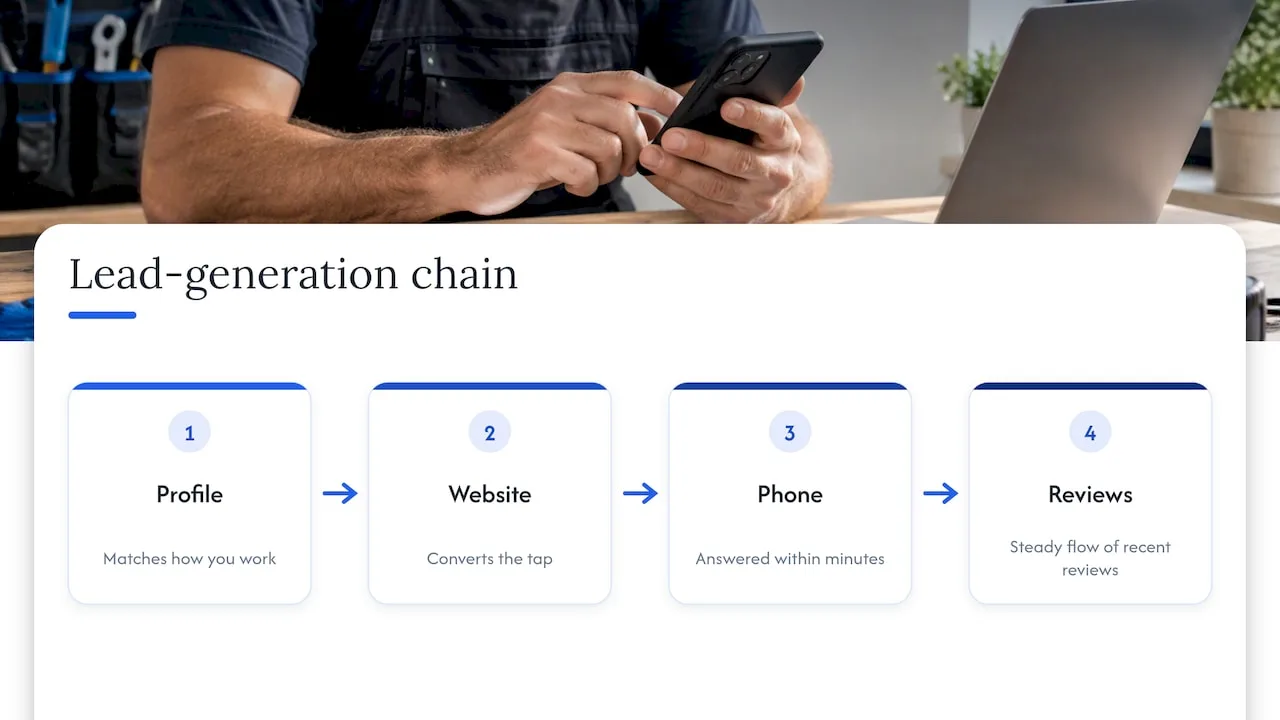
Our view is that the service area is the cheapest part of the fix and the least important on its own. What turns a profile into booked jobs is the chain behind it: a profile that matches how you actually work, a site built to convert the tap, a phone that gets answered or texted back within minutes, and a steady flow of recent reviews. If any link is weak, the profile just sends more people into a gap.
We also think local knowledge matters here. Knowing that a Cranston customer and a Newton customer search differently, that some Massachusetts towns are an easy drive and others are a traffic trap, is what lets you choose 20 areas sensibly. Do that homework before you click save.
— Tyson
Turn the profile into booked jobs
If you’d rather not manage all of this between service calls, our local SEO and Google Business Profile service covers the setup: service areas chosen from your real job data, services written the way customers search, and the profile tied to a website built to book work. Because every call you miss is a lost job, we pair it with missed-call text-back and a CRM and a system for steady review requests.
Our published plans start with Foundation at $597 per month, then Growth at $1,297 per month and Scale at $2,497 per month. You can compare them on the pricing page.
A simple checklist before you hit save
- Confirm your business type: service-area or hybrid.
- Hide your address if customers don’t visit it.
- Rank your towns by revenue and margin from the last 12 months.
- Keep to the towns within a realistic drive of your crews, and under Google’s 20-area cap and 2-hour guideline.
- Enter cities or postal codes, not a radius.
- Fill in the services section with plain, specific names.
- Check that your phone number reaches a real person or an automated text-back.
- Make sure your website has pages for your main services and towns.
- Review in a few weeks, then adjust once.
FAQ
How many service areas can you have on Google Business Profile?
You can add up to 20 service areas, each defined by a city, postal code or other area. Google also advises keeping the overall region within about 2 hours of driving from where your business is based.
How do I set my Google Business Profile to a service area?
Open your profile, choose Edit profile, then Location, and edit the Service area field. If customers don’t visit your address, hide it so only the area shows. Approval can take up to 48 hours.
How do I list services on my Google Business Profile?
Use Edit services in your profile to pick suggested services or add custom ones. Keep names plain, and leave out prices, phone numbers and personal information, which Google doesn’t allow in service names.
Can I set a radius around my business?
No. Google doesn’t let you define the service area as a distance around your business, so you have to name cities, postal codes or other areas. If an old radius is still on your profile, you can’t edit it and must replace it.