
A contractor website converts well when a steady share of visitors call, submit a form or book an estimate. Published benchmarks for service sites run from roughly 2% to 6%, but those numbers describe other companies’ definitions of “conversion.” The rate that matters is your own: leads divided by sessions, measured the same way every month. This guide shows how to calculate it, what the benchmarks do and don’t tell you, and which site changes move it.
TL;DR
- Contractor conversion rate is leads divided by website sessions, times 100. Count calls, forms and bookings as separate actions.
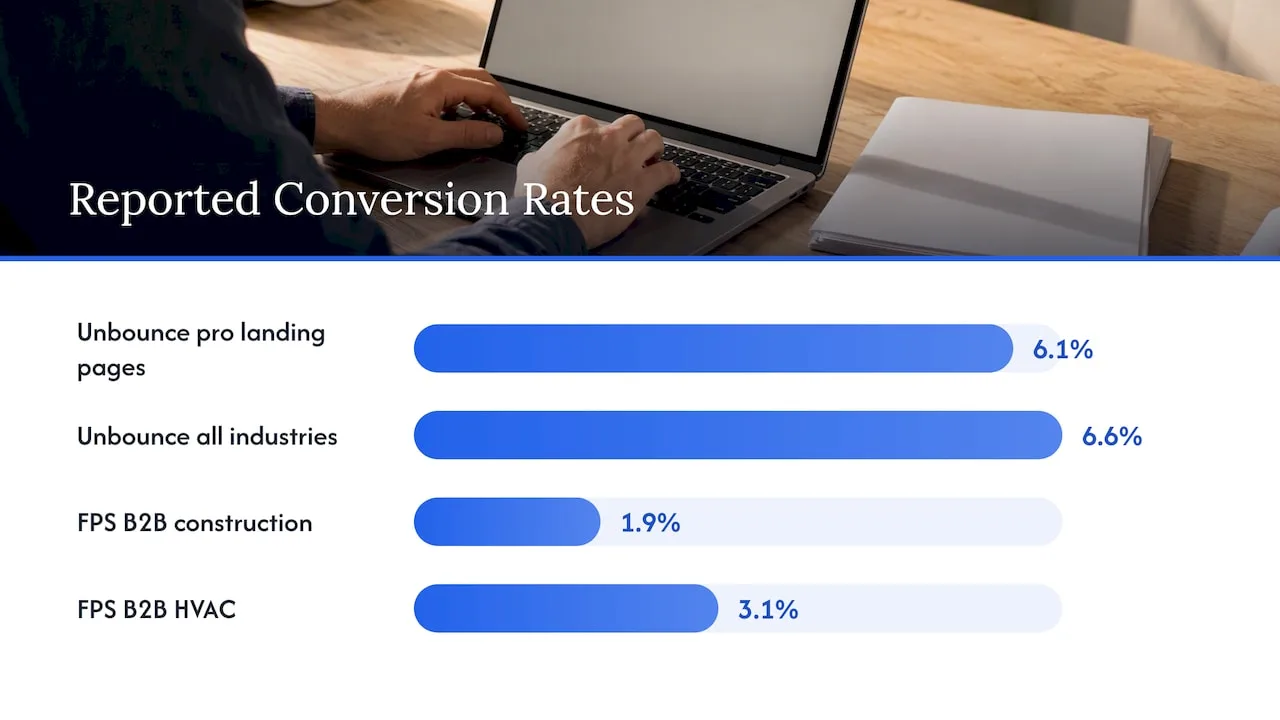
- Benchmarks vary wildly: about 1.9% for B2B construction sites and 3.1% for B2B HVAC in one report, 6.1% for professional-services landing pages in another. Use them as direction only.
- Your own GA4 and CRM data is the only baseline that reflects your trade, your towns and your season.
- The biggest gains usually come from speed, a visible phone number, short forms and answering every lead quickly.
- Track the whole chain: visitor to lead, lead to estimate, estimate to signed job.
Table of Contents
- What a contractor website conversion rate actually measures
- What to count as a conversion
- Benchmarks: what’s a good rate for a contractor site?
- Why your rate differs from the next contractor’s
- How to build your own baseline
- Perspective: where we see contractor sites lose jobs
- Changes that raise contractor website conversion
- How we can help
- A simple 30-day plan
- FAQ
- Sources
What a contractor website conversion rate actually measures
A conversion is one action you want a visitor to take. For a plumber, that is usually a phone call. For a roofer, it might be a request for an inspection. For a landscaper, a quote form. The conversion rate is the share of visitors who take that action.
One home-improvement contractor guide separates three rates that people often blur together: website visitor-to-lead rate, ad click-to-lead rate, and lead-to-sale close rate. Its website formula is leads divided by sessions, times 100.
So if your site had 1,200 sessions in a month and produced 36 calls, forms and bookings, your website conversion rate is 3%. That says nothing yet about how many of those 36 became paying jobs. That is a different number, and it is the one that pays the bills.
Keep the three stages apart:
| Stage | What you measure | Formula |
|---|---|---|
| Website | Visitors who become leads | Leads ÷ sessions × 100 |
| Ads | Paid clicks that become leads | Leads ÷ ad clicks × 100 |
| Sales | Leads that become signed jobs | Jobs won ÷ leads × 100 |
A site can have a strong visitor-to-lead rate and still lose money if nobody answers the phone. Many contractors who think they have a website problem have a follow-up problem.
What to count as a conversion
The most common mistake is counting everything. Page views, time on site and button clicks are engagement signals. They tell you people are looking, not that anyone wants to hire you.
Guidance from a service-business measurement guide lists form submissions, phone-number taps and completed bookings as the lead actions worth tracking. Track each as its own action so you can see which one brings the most work. A site that gets 40 form fills and 5 calls in a month is a very different business from one that gets 5 forms and 40 calls.
A workable setup for most trades:
- Phone taps on mobile, from the header, the sticky bar and the contact page.
- Quote or estimate forms, counted once per successful submission.
- Online bookings, if you let people pick an appointment slot.
- Chat or text leads, if you run website chat.
Emergency trades should weigh calls heavily. Someone with a burst pipe or a dead furnace in January is not filling out a six-field form. Planned work, like a kitchen remodel or a new roof, leans more toward forms and bookings, because people compare before they commit.
Avoid counting the same lead twice
Duplicate conversions inflate your rate. A visitor who submits a form and lands on a thank-you page can be counted twice if both the click and the page view fire a conversion. The Attribuly guide recommends clean conversion events, tracking call outcomes and removing duplicates. Test every form yourself and check that one submission creates exactly one event.
Set it up in GA4
In Google Analytics 4, a custom action such as a form submission or phone call is a key event, and when your account is linked to Google Ads, key events can be imported as conversions. A step-by-step form tracking walkthrough explains that GA4’s enhanced measurement can pick up form submissions automatically in some cases, and that you mark the event as a key event under Admin and Events. If your forms are custom-built, ask whoever built the site to confirm the event fires once per real submission.
Once the lead arrives, what happens next matters just as much. A clear contractor quote template helps you send a professional estimate the same day, and a defined quote approval process keeps estimates from stalling between your office and the customer.
Benchmarks: what’s a good rate for a contractor site?
Here is the honest answer: nobody publishes a clean, audited number for plumbers in Providence or roofers in Worcester. What exists is a patchwork of reports with different definitions.
| Source | Segment | Reported rate |
|---|---|---|
| Unbounce | Commercial and professional-services landing pages | 6.1% median |
| Same report | All industries | 6.6% median |
| First Page Sage | B2B construction sites | 1.9% |
| Same report | B2B HVAC services | 3.1% |
Two details matter. First, Unbounce found that repair-and-maintenance pages convert almost three times better than home-and-renovation pages. That fits how people buy: a broken water heater is urgent and a bathroom remodel is not. Second, First Page Sage’s B2B figures count marketing-qualified leads, a stricter definition than “anyone who called.”
Unbounce also notes in its benchmark report that its figures are medians or averages depending on the data, and that they measure conversion events, not the dollar value of those conversions. A high rate does not prove high-quality leads or revenue.
The Attribuly guide makes the same point from the contractor side: benchmarks for the trades are scarce, so use outside ranges only directionally and rely mainly on your GA4 and CRM data.
How to use a benchmark without being misled
Use a benchmark as a smell test. If your rate is 0.4% and similar service sites report 2% to 6%, something is likely broken: slow pages, a hidden phone number, a form that fails on phones. If you sit at 3%, comparing yourself to a 6% landing-page median does not tell you much, because a landing page built around one offer is not a full website with blog posts and about pages mixed in.
Why your rate differs from the next contractor’s
The same guide lists the factors that push rates up or down: the conversion metric you use, visitor intent, traffic mix, user experience, brand strength, seasonality, lead-handling speed, and how urgent or discretionary the service is.
In practice that means:
- Trade. Emergency repair converts faster than planned installs. A drain-cleaning page and a deck-building page should not share a target.
- Traffic source. Someone who searches “emergency plumber Warwick RI” is ready to call. Someone who lands on a blog post about water heater lifespans is researching. Blend them and your site-wide rate drops, even if nothing is wrong.
- Device. Most local service searches happen on phones. A site that looks fine on a desktop but buries the call button on mobile loses the people most likely to dial.
- Season. Heating calls spike in the first cold snap, roofing after a storm, landscaping in spring. A rate that rises in October is not proof your redesign worked.
- Brand. A homeowner who already knows your trucks from around town converts more easily than a stranger from search.
- Definition. Count calls and your rate rises. Count only qualified estimates and it falls. Pick one definition and keep it.
Because of seasonality, compare month to the same month last year, or at least compare four-week windows against the previous four, and watch the trend rather than any single month.
How to build your own baseline
A reliable baseline takes about a month of clean data. Here is the process.
- Define your conversion events. Calls, forms and bookings, each tracked separately.
- Check each event fires once. Submit test forms, tap the number from a phone, confirm GA4 shows one event each.
- Separate branded from non-branded traffic where you can. People searching your company name will convert at a much higher rate than strangers.
- Log call outcomes. A call that went to voicemail, a wrong number and a booked estimate are three different outcomes. Record them in your CRM.
- Calculate three numbers monthly: visitor-to-lead rate, lead-to-estimate rate and estimate-to-job rate.
- Write down what you changed and when. Without a change log you cannot tell what helped.
The third and fourth steps are where most contractors learn something uncomfortable. It is common to find that a meaningful share of inbound calls go unanswered during jobs, after hours, or while the owner is on a roof. Those are leads your site already paid to generate.
Perspective: where we see contractor sites lose jobs
We work only with contractors in Rhode Island and Massachusetts, in plumbing, HVAC, electrical, roofing and landscaping. That narrow focus shapes how we think about conversion.
First, we treat the website as one part of a lead-capture system rather than a brochure. A page that ranks and loads fast still fails if the call goes to voicemail, the form email lands in a spam folder, or nobody follows up with a quote. That is why our work pairs websites with missed-call text-back, automated follow-up and review requests.
Second, we think local specifics beat generic advice. A homeowner in Cranston wants to see that you serve Cranston, with the neighborhoods and town names they recognize, not a vague “serving the greater area” line. Local pages, a well-kept Google Business Profile and real reviews from nearby customers do work that no design trick can replace.
Third, we would rather you measure honestly than chase a headline number. A 2% rate where every lead is answered within minutes can outperform a 5% rate where leads sit for a day. Fix response time before you fix button colors.
— Tyson
Changes that raise contractor website conversion
There is no single trick. The changes below address the usual leaks, roughly in the order we would check them. Test one or two at a time so you can see what moved the number.
1. Make the site fast on a phone
Speed is the cheapest win. Slow pages lose people before they read a word. Run your site through Google’s PageSpeed Insights on a mobile connection and fix the largest items first: oversized photos of finished jobs, heavy plugins and auto-playing video. If your site is built on a bloated template, a rebuild may cost less than endless patching.
2. Put the phone number where thumbs are
The number should be tappable, in the header, and in a sticky bar on mobile. State your hours or say you offer emergency service if you do. Track taps as their own event.
3. Shorten the form
Ask for name, phone, and what the job is. An address and email can come later. Every extra field costs submissions. If a longer form helps you qualify leads, add a dropdown for service type rather than a free-text essay.
4. Write each service page for one job
One page for water heater replacement, another for drain cleaning, another for panel upgrades. Each should name the town or towns it serves, show real photos of your work, list what the visit includes, and end with one clear next step. Generic “our services” pages convert poorly because they do not match what the visitor typed into Google.
5. Show proof near the action
Put review stars, license information and a few real customer comments beside the call button and the form, not buried on a testimonials page. Make sure any license or insurance claim you display is accurate and current for your state.
6. Offer a faster way to reach you
Some visitors will not call during the workday and will not wait for an email reply. Website chat and text can catch them. An AI website chat can answer common questions, collect job details and offer an appointment slot while you are on a job.
7. Answer every call and text
Speed of response is a conversion factor in its own right. Missed-call text-back sends an instant message when you cannot pick up, and an AI voice agent can handle inbound calls around the clock, taking the job details and booking the visit. Either one protects the leads your website just earned.
8. Keep reviews flowing
Fresh reviews lift trust on your site and in the map results. Ask every satisfied customer within a day of finishing the job, by text, with a direct link. Automating the request means it happens even in your busiest week.
How we can help
If you want this handled for you, our websites that book jobs are built around the conversion actions above: fast mobile pages, tappable calls, short forms and one service page per job. We pair them with local SEO and Google Business Profile work so the right visitors arrive in the first place.
Our plans are published on the pricing page: Foundation is $597 per month, Growth is $1,297 per month and Scale is $2,497 per month. An AI employee on Growth is an additional $199 per month. We serve contractors across Rhode Island and Massachusetts.
A simple 30-day plan
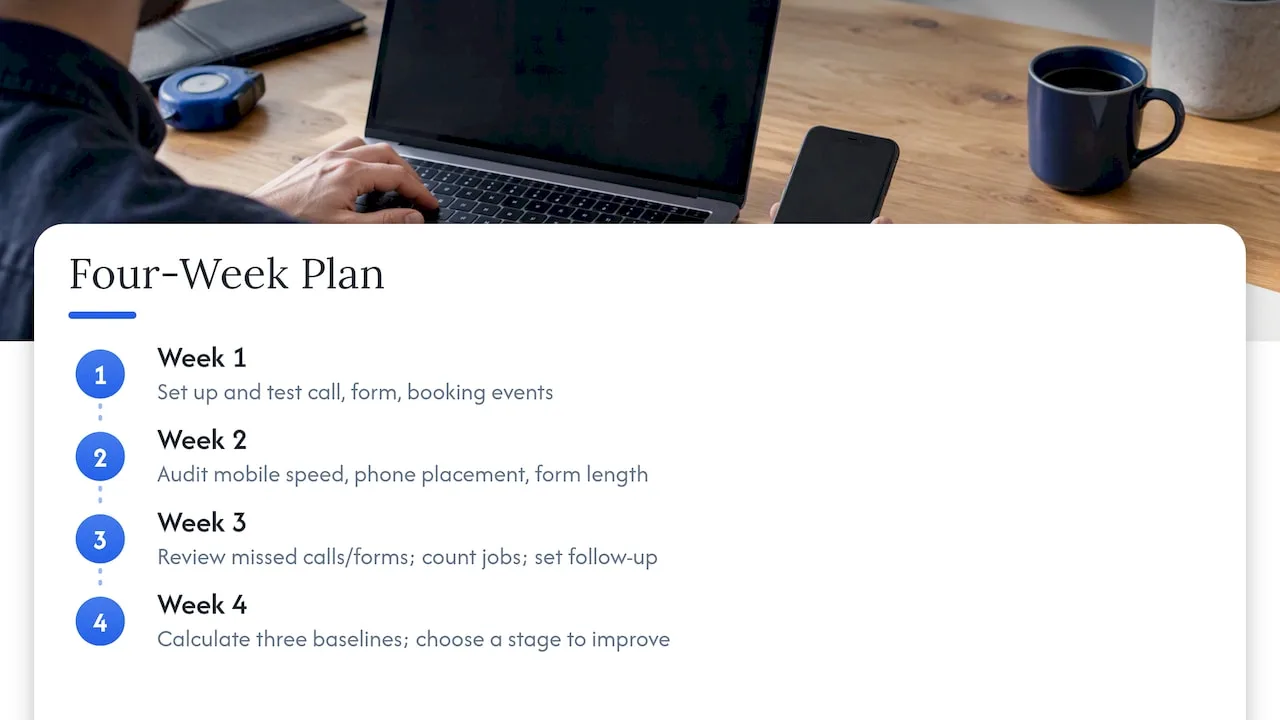
Week 1. Set up and test your call, form and booking events. Pull last year’s monthly sessions and leads if you have them.
Week 2. Audit mobile speed, the phone number placement and the form length. Fix the obvious problems.
Week 3. Review every missed call and unanswered form from the last 30 days. Count how many became jobs. Put a text-back or answering process in place.
Week 4. Calculate your baseline across the three stages: visitor to lead, lead to estimate, estimate to job. Choose one stage to improve next month.
At the end you have a real number for your own business, and it will serve you better than any benchmark table.
FAQ
What is a good conversion rate for a contractor website?
Published figures for service sites range from about 2% to 6%, depending on the report and how it defines a conversion. One report puts B2B construction sites at 1.9% and B2B HVAC at 3.1%. Treat these as direction only, and judge your site against your own trend.
How do I calculate my website conversion rate?
Divide the number of leads (calls, form submissions and bookings) by the number of sessions in the same period, then multiply by 100. Thirty-six leads from 1,200 sessions is 3%. Use GA4 for sessions and key events, and your CRM to confirm how many leads were real.
Should I count phone calls as conversions?
Yes, for most trades calls are the main conversion, especially for emergency work. Track phone taps separately from form submissions so you can see which one drives the most jobs. Record call outcomes in your CRM so a missed call or wrong number does not look like a win.
Why did my conversion rate drop even though my site did not change?
Traffic mix and season are the usual causes. More blog readers or more researchers dilute the rate, and demand for heating, roofing or landscaping shifts through the year. Compare against the same period last year and check traffic sources before changing the site.
Sources
- Average Conversion Rate for Home Improvement Contractors, Attribuly
- How to Measure Website Conversion Rate (Service Business)
- Commercial & Professional Services conversion rate, Unbounce
- Average conversion rate by industry benchmark report, Unbounce
- Average Website Conversion Rate by Industry, First Page Sage
- GA4 Tracking Guide: Complete Implementation for Marketers
- How to Track Form Submissions in Google Analytics 4