
A good contractor pricing page does not post one fixed number. It shows honest price ranges, explains what moves the cost, says what is included, and gives the visitor an easy next step: request an estimate, call, or book a visit. This guide covers what to put on the page, how to word it, how to handle financing, and which advertising rules to keep in mind.
TL;DR
- Publish a range with stated bounds, not a single price. Put the factors that move the job up or down right beside it.
- Show what the price includes (permits, disposal, warranty, licensing, insurance) so the number reads as value, not as a bid to beat.
- Put one clear action next to every price: call, book, or request an estimate. Add a financing explainer for big jobs.
- Any price or financing term you advertise should be accurate, dated, and qualified. Review the rules with your attorney before the page goes live.
- Treat the page as a lead capture tool, and track how many visitors take that action.
Table of Contents
- Why a pricing page earns its place on a contractor site
- What a contractor pricing page should tell customers when costs vary
- Page elements and calls to action that get estimate requests
- Explaining financing so big jobs feel affordable
- Advertising rules to keep in mind
- Our perspective
- Put the system behind your pricing page
- A quick checklist before you publish
- FAQ
- Sources
Why a pricing page earns its place on a contractor site
Homeowners search for cost before they search for a contractor. If your site stays silent on price, the visitor goes to the next tab, and the next tab is usually a directory, a cost guide, or a competitor who gave them at least a ballpark.
The opposite mistake is just as common: a bare number with no context. The visitor sees $350 for a water heater swap, then discovers on site that their house needs a new venting run, a permit, and haul-away. Now the first price looks like bait.
The fix sits between those two. A pricing page tells people what they can expect, why jobs differ, and what to do next. It filters out visitors who can never afford the work and warms up the ones who can.
That is also why the search results for this topic are so mixed. Many pages ranking are about how a contractor should calculate prices internally (labor, materials, overhead, profit). That matters for your estimating, but your customer needs something different: a page that makes the cost understandable and the next step obvious.
What a contractor pricing page should tell customers when costs vary
Most trade work varies by house, access, age of equipment and local code. Your page should say so plainly, then give structure to the variation. Four building blocks do most of the work.
Show a range, with its bounds
One company-published guide on pricing transparency argues that a range with stated bounds invites a conversation about what sits inside it, while a single posted number invites a rival to undercut it by a dollar. That matches how most owners already quote in person: “Most panel upgrades for a home like yours land between X and Y.”
Keep the range honest. If 80% of your jobs fall between two figures, publish those two figures, not a floor that almost nobody gets.
Name the cost factors
Under each range, list the three to six things that move the price. For example:
- Plumbing, water heater replacement: tank or tankless, fuel type, venting changes, location in the home, permit needs.
- HVAC, system replacement: home size and load, ductwork condition, equipment efficiency tier, indoor unit location.
- Roofing: square footage, pitch, number of layers to tear off, decking repair, material choice.
- Electrical, panel upgrade: amperage, service line condition, meter location, permit and inspection.
- Landscaping, patio or retaining wall: area, grade, materials, drainage, access for equipment.
Plain language beats trade jargon. “How hard it is to reach” works better than “access constraints.”
Say what is included
The same guide recommends putting the basis of your value next to the number: licensing, insurance, warranty, workmanship, included scope, permits, disposal, and service support. This is where you stop competing on price alone. Two quotes that look $400 apart often differ by exactly these items.
A short “Every job includes” list under your ranges does this work. Only list things you actually do on every job.
Label every reference number
If you cite a national average, a manufacturer’s suggested price, or a figure from a cost tool, the same source advises labeling it as what it is and never presenting it as your quote. Visitors should never confuse “typical in the U.S.” with “what we will charge you.”
A simple layout you can copy
The table below shows the structure for one service. The figures are placeholders: fill in your own real numbers.
| Service | Typical range | What moves the price | Included | Next step |
|---|---|---|---|---|
| Water heater replacement | $X to $Y | Tank vs. tankless, venting, permit | Haul-away, permit, labor warranty | Book a free estimate |
| Drain cleaning | $X to $Y | Line location, severity, camera inspection | Cleanup, written findings | Call now |
| Panel upgrade | $X to $Y | Amperage, service line, inspection | Permit, inspection, labor warranty | Request a quote |
Three columns matter most: range, what moves it, and next step. Everything else is optional.
Quote-based services still need a page
Some work, like a full remodel or a large roof, cannot be priced from a table. Do not skip the page. Explain how you price (fixed bid, time and materials, or per square), what an estimate visit involves, how long it takes to receive a written quote, and what affects the final number. Visitors will accept “it depends” when you show exactly what it depends on.
Page elements and calls to action that get estimate requests
A range with no action beside it is a dead end. Put the action where the visitor’s question gets answered.
- A call button and a short form beside every price block. On a phone, the tap-to-call button should be visible without scrolling.
- A specific button label. “Get my estimate” or “Book a visit” beats “Submit.”
- A short form. Name, phone, address or ZIP, and a one-line description of the job. Each extra field costs you leads.
- A promise about response time. Say how fast you will reply, and make sure the system behind it can keep that promise, including after hours.
- Proof near the price. Review count, license number, and a few job photos reduce the fear that a published range is a trap.
- A financing prompt on big-ticket pages. More on that below.
The phone matters as much as the page. If someone calls from the pricing page and no one picks up, the page did its job and the business did not. A missed-call text-back or an after-hours answering system closes that gap.
What conversion numbers look like
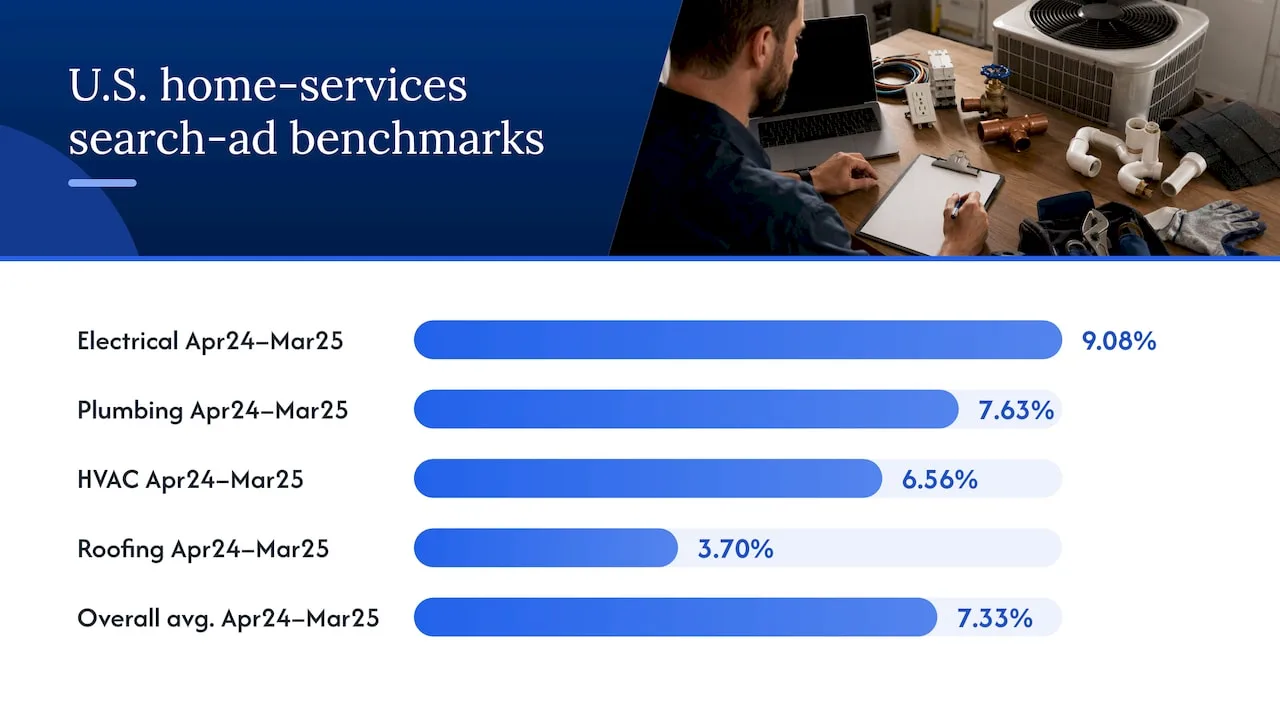
It helps to know what normal is before judging your own page. A benchmark report on home services search advertising, covering 3,211 U.S. campaigns, found an average conversion rate of 7.33%, with electrical at 9.08%, plumbing at 7.63%, HVAC at 6.56% and roofing at 3.70%. Those figures describe paid search campaigns between April 2024 and March 2025, not organic visitors on a pricing page, so use them as a rough yardstick rather than a target.
Trade-specific marketing numbers are useful for the same reason. Roofers can compare their own results against these roofing marketing KPIs, and HVAC owners who rely on map results will find useful context in this piece on local SEO for HVAC companies.
To measure your own page, track three things monthly: visits to the pricing page, calls and form submissions that start there, and how many of those turn into booked estimates.
Explaining financing so big jobs feel affordable
People who balk at $12,000 often say yes to a monthly payment they can picture. That is why the financing question belongs on your pricing page, especially for HVAC replacements, roofs, and electrical upgrades.
One financing provider reports that offering terms of up to 10 years can lift conversion by 13%, even when the customer ends up choosing a different option. The takeaway is that the presence of a payment path calms the price conversation.
A financing section that works usually does five things:
- Opens with the idea in one line: “Spread the cost of larger projects into monthly payments.”
- Shows which services it applies to.
- Explains the steps: apply online, get a decision, schedule the work.
- Links to the lender’s own terms page rather than restating terms you do not control.
- Ends with a button: “See my payment options” or “Request an estimate.”
Be careful with the numbers. A line such as “as low as $89 a month” is a payment amount, and the lender’s terms behind it matter (see the next section). Use the figure only if the lender confirms it and the qualifying terms sit beside it.
Another useful move: pair a payment note with the range. “Most heat pump installs run $X to $Y, or about $Z a month with approved credit” gives a visitor a way to picture the commitment.
Advertising rules to keep in mind
Price and financing statements on your site are advertising. This is general information, not legal advice. Have an attorney or your trade association review the finished page, and check the rules in Rhode Island and Massachusetts, since states add their own requirements.
Financing terms trigger disclosures. Under Regulation Z, which implements the Truth in Lending Act, a trigger term in advertising, such as the repayment period, the finance charge, the payment amount or the down payment, requires a clear and conspicuous disclosure of the full terms. The practical rule: if you quote a monthly payment, make sure the lender’s required disclosures appear with it, and let the lender’s compliance team approve the wording.
Prices should say what they cover. Maryland’s home improvement advertising rule is one example of a state spelling this out: if a stated price leaves out costs needed for the product to work and look right, the ad must qualify it clearly, and say so when installation costs extra. That is a Maryland rule, not a Rhode Island or Massachusetts one, but it shows the direction regulators take, and the habit is a good one anywhere.
Industry standards add detail. The remodeling association NARI’s standards say an advertised price should state the size and specifications of the product or area featured, make clear whether installation or delivery is included, and keep savings claims factual and tied to prices previously offered regularly.
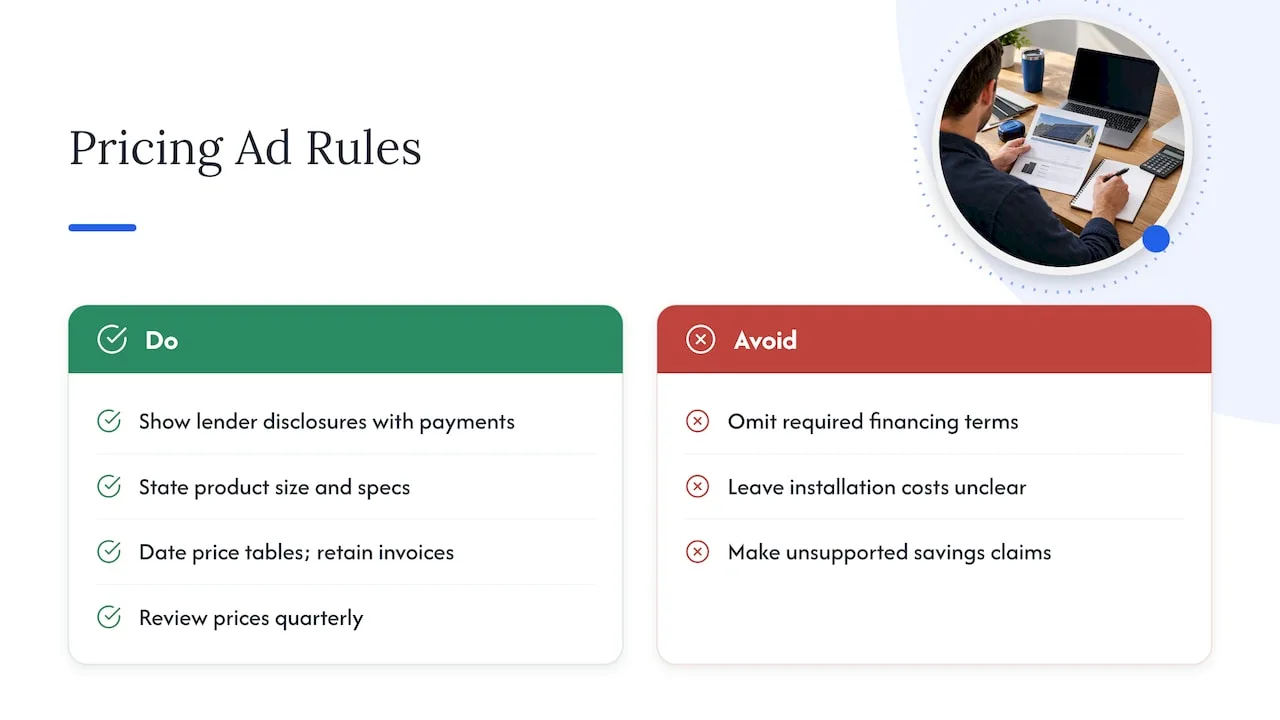
Keep prices current. If you publish a table, put a date under it and keep the invoices that support the figures. Review it on a set schedule, for example every quarter, so an old range never sits online after your costs change.
Our perspective
We build websites and follow-up systems for contractors in Rhode Island and Massachusetts, and we see the same pattern again and again: the page is rarely the problem on its own. The problem is what happens after the visitor decides to act.
A pricing page earns its keep when it does two jobs. First, it answers the cost question honestly enough that the visitor stops comparing. Second, it hands them a next step that works at 8 p.m. on a Sunday, when a burst pipe or a dead furnace sends someone searching. If the form goes into a black hole, or the call rings out, the range you wrote with such care does nothing.
That is why we treat the website, local search presence, call handling, text-back, reviews and follow-up as one system. Our approach is designed to capture the lead the moment it appears and keep it warm until the estimate is booked. And because we work only with trades in this region, we write for the towns, the seasons and the jobs our clients actually run.
Our advice: publish ranges, name the cost factors, show what is included, put a financing path on the big jobs, and make sure every button leads to a person or a system that responds quickly.
Tyson
Put the system behind your pricing page
If you want the pricing page, the call handling and the follow-up built together, that is what we do for plumbers, HVAC companies, electricians, roofers and landscapers in Rhode Island and Massachusetts. Our websites that book jobs are built to turn visits into calls and estimate requests, and our missed-call text-back and CRM keeps the leads from slipping away.
Our plans are published: Foundation is $597 per month, Growth is $1,297 per month, and Scale is $2,497 per month. Extra locations start from $299 per month, and an AI employee on Growth is $199 per month. See what each plan includes on our pricing page, or start from our home page.
A quick checklist before you publish
- Every price is a range with a lower and upper bound, or a clearly explained starting point.
- Each range lists the factors that move it.
- An “included in every job” list matches what your crews really do.
- Reference figures from outside sources are labeled and not presented as your quote.
- Financing wording has been checked against the lender’s terms and required disclosures.
- The page shows a date or review note, and someone owns updating it.
- Every price block has a call button and a short form.
- Calls and forms are answered fast, including nights and weekends.
- Reviews, license details and photos sit near the numbers.
- You can see how many pricing-page visits become calls, forms and booked estimates.
FAQ
Should a contractor list exact prices on the website?
For standard, repeatable jobs, a tight range works better than a single number. It sets expectations without binding you to a price before you have seen the site. For custom work, explain how you price and what drives the final figure instead.
What if my prices change often?
Publish ranges that you can stand behind for a few months, date the table, and review it on a regular schedule. Keep the supporting invoices on file. When material costs move sharply, update the page rather than leaving old figures online.
How do I explain financing without making promises I cannot keep?
Describe the process, name which services it covers, and link to the lender’s own terms. If you mention a payment amount, include the lender’s required terms alongside it, and have the lender or an attorney approve the wording. Avoid promising approval, since that depends on the customer’s credit.
What conversion rate should I expect from a pricing page?
There is no single answer, because it depends on traffic source, trade and offer. Paid search benchmarks for home services put average conversion at 7.33%, with roofing lower than electrical and plumbing, so use trade-level figures as a loose reference and then track your own baseline.
Does the pricing page need its own calls to action?
Yes. Visitors reach it when they are weighing cost, which is close to the decision. Put a call button, a short form and a financing prompt on the page itself rather than sending people back to a general contact page.
Sources
- The TrueQuote Guide to Pricing Transparency for Contractors
- Home Services Benchmarks: Quote Speed and Close Rates
- How to sell big jobs with low monthly payments (Wisetack)
- Compliance guidelines for consumer protection (Regions)
- Md. Code Regs. 09.08.01.09, Advertising
- NARI Standards of Practice
- Roofing Marketing KPIs for Contractors
- Local SEO for HVAC Companies