Claim and verify your Apple Business place card now so iPhone users can find and book your services through Apple Maps, Siri, and CarPlay. Sign in to Apple Business at business.apple.com, go to Brands > Locations, and add or claim your listing. Choose phone verification when it’s offered since it clears far faster than document review.
TL;DR:
- Phone verification generally completes within five business days if the listed number answers during office hours, speeding up setup.
- Listing accuracy relies heavily on pin placement, correct phone number matching, and using the most specific category available to improve visibility and relevance.
- Showcasing real photos of trucks, crews, and recent work enhances customer trust and increases the likelihood of conversion from views to calls or bookings.
- Connecting Apple Maps action links to your website booking forms or CRM ensures leads are captured efficiently, compensating for gaps in Apple’s native integrations.
- Managing reviews promptly and building review volume through automated requests boosts local trust and ranking, especially on connected review sources.
Table of Contents
- What Is Apple Maps for Contractors, and How Do You Set It Up?
- How Long Does Apple Business Verification Take?
- How Do You Optimize a Contractor’s Apple Maps Place Card?
- Which Apple Business Features Actually Drive Bookings?
- Can I Let My Marketing Agency Manage My Apple Business Listing?
- What Should Contractors Track in Apple Business Insights?
- Integration of Apple Maps With Contractor-Specific Tools
- Using Apple Maps for Service Area Mapping and Route Optimization
- Tips to Enhance Local SEO Through Apple Maps
- How Contractors Should Manage Reviews on Apple Maps
- Apple Maps vs. Other Mapping Platforms: What Contractors Should Know
- Coastal Connect’s Perspective on Apple Maps for Contractor Growth
- How Coastal Connect Turns Your Apple Maps Listing Into Booked Jobs
- Where to Verify These Steps Directly
- Sources
- FAQ
What Is Apple Maps for Contractors, and How Do You Set It Up?
“Apple Maps for contractors” isn’t a special product. It’s the practical result of claiming your business inside Apple Business, the free dashboard Apple uses to push your place card into Maps, Siri, and CarPlay. Setup runs through the same portal whether you’re a two-truck plumbing outfit or a regional roofing company, and the sequence rarely changes.
Here’s the exact path:
- Create or sign in with an Apple Account, then set up your organization inside Apple Business.
- Open the dashboard and go to Brands > Locations. Search for your business first. If a listing already exists, claim it. If not, select “Add a new location.”
- Enter your address and drag the map marker until it sits on the correct building, not just the correct block.
- Fill in the display name, primary category, phone number, website, and business hours.
- Upload your logo and at least a handful of photos before you submit for verification.
A few fields deserve extra attention before you hit submit:
- Double-check the pin placement. Apple’s own guidance stresses dragging the marker to the exact building, since a misplaced pin sends customers to the wrong driveway.
- Match your phone number to the line your office (or you) actually answers.
- Pick the most specific category available. “Plumber” beats “Contractor” every time.
This whole process takes maybe 20 minutes if you have your business details ready. The bottleneck isn’t the form. It’s verification.
How Long Does Apple Business Verification Take?
Apple gives you 60 days to verify your organization once you start the process, and most listings clear review in up to five business days, though it can stretch longer during busy stretches. Two verification paths exist, and picking the right one saves you a week of waiting.
- Phone verification. Apple calls the number listed on your account and reads a four-digit PIN. Someone needs to answer that specific line, so if your listed number forwards to voicemail after hours, verify during business hours.
- Document verification. When phone verification isn’t offered, Apple accepts a business license, a utility bill, a lease agreement, or a trade license tied to your business name and address.
The trap that catches contractors more than any other: Apple has no service-area toggle and no option to hide your address from the public listing. If you run a home-based operation and can’t publish your street address, Apple Maps may not be the right channel for you, at least not for the location-based listing. Compare that to platforms built around service-area businesses, and the gap becomes obvious fast.
Pro Tip: If you work from home, consider a low-cost commercial mailbox or shared office address specifically for your Apple Business listing. It keeps your family’s address private while still giving Apple a verifiable street location.
How Do You Optimize a Contractor’s Apple Maps Place Card?
Photos do more work than any other field on your place card. Skip the stock imagery and post trucks with your logo visible, your crew mid-job, and real before-and-after shots from recent work. A clear photo of your storefront or a marked jobsite helps too, since it confirms to a nervous homeowner that you’re a real, findable business.
Beyond photos, a few fields separate a place card that converts from one that just sits there:
- Showcases. Use these to spotlight a free estimate offer or a seasonal push, like gutter clearing before winter, and attach an action link so the offer isn’t just decorative.
- Description. Keep it short and service-specific. “Licensed electrician serving [region], specializing in panel upgrades and EV charger installs” beats a paragraph of vague marketing language.
- Primary category. Choose the most precise option Apple offers. A roofer listed under “Contractor” loses ranking relevance against a roofer listed under “Roofing Contractor.”
- Hours. Set your regular hours and update holiday hours every season. A missed call on a Saturday because your hours said “open” when you weren’t is a lost job, not just an inconvenience.
None of this takes long to update, but it’s also the section contractors neglect once the initial listing goes live. Revisit it every quarter.
Which Apple Business Features Actually Drive Bookings?
Three features turn a static listing into something closer to a lead-generation tool, and they’re worth setting up in this order:
- Custom Actions. Add a “Request a Quote” or “Book Appointment” button that links straight to your booking page or contact form, not your homepage. Every extra click between a tap and a conversion costs you leads.
- Tap to Pay. For contractors closing jobs in the field, in-person payment through Tap to Pay removes the “I’ll mail a check” delay that stalls cash flow.
- Showcases with action links. Pair a seasonal promotion with a direct action link so the offer and the next step live in the same tap.
Apple’s own insights panel shows profile views, action clicks, and direction requests, which tells you what’s actually getting attention. More than half of U.S. smartphones run iOS, according to industry reporting on Apple Maps for contractors, so a well-configured action link isn’t a nice extra. It’s reaching a majority of the mobile market by default.
Watch which action gets clicked most before you invest more time elsewhere. If direction requests dominate over quote requests, your service area or hours might need clarifying, not your booking page.
Can I Let My Marketing Agency Manage My Apple Business Listing?
Yes, and Apple built a system for exactly that. Inside the dashboard, you can invite an agency or a team member through Partner Access or Shared Access using their Organization ID, without ever sharing your Apple Account password.
- Grant only the permission level someone actually needs. Location-level read/write access is enough for most day-to-day updates; reserve brand-level admin rights for whoever oversees the whole account.
- Approve only Organization IDs you recognize, and audit who has access every few months.
- Keep management internal if you’re only running one location and updating it yourself takes ten minutes a month. Bring in an agency once you’re managing multiple locations, running Showcases regularly, or tying the listing into a broader booking and follow-up system.
Pro Tip: Revoke access immediately when you end a contract with an agency. Orphaned partner access is one of the more common ways old vendors keep visibility into a business relationship that’s already over.
What Should Contractors Track in Apple Business Insights?
Four numbers matter more than the rest: profile views, action clicks (calls and bookings), direction requests, and website visits from your listing. Track them monthly, not just once after setup.
- Alternate your Showcase creative every few weeks and watch whether action clicks move.
- Swap where your “Request a Quote” button points, your homepage versus a dedicated landing page, and compare results.
- Try changing your primary category if you’re listed under something broad, then check whether profile views shift.
- Hold off on paid Apple Maps ads until you have a baseline of organic performance to measure against.
The real value shows up when you connect place-card behavior to what happens after someone leaves Apple Maps. If action clicks are climbing but your phone isn’t ringing more, the gap is on your website or your follow-up process, not your listing.
Integration of Apple Maps With Contractor-Specific Tools
Apple Business doesn’t plug directly into most CRM platforms or field service software the way Google Business Profile increasingly does. That’s a real limitation, and it’s worth planning around rather than ignoring.
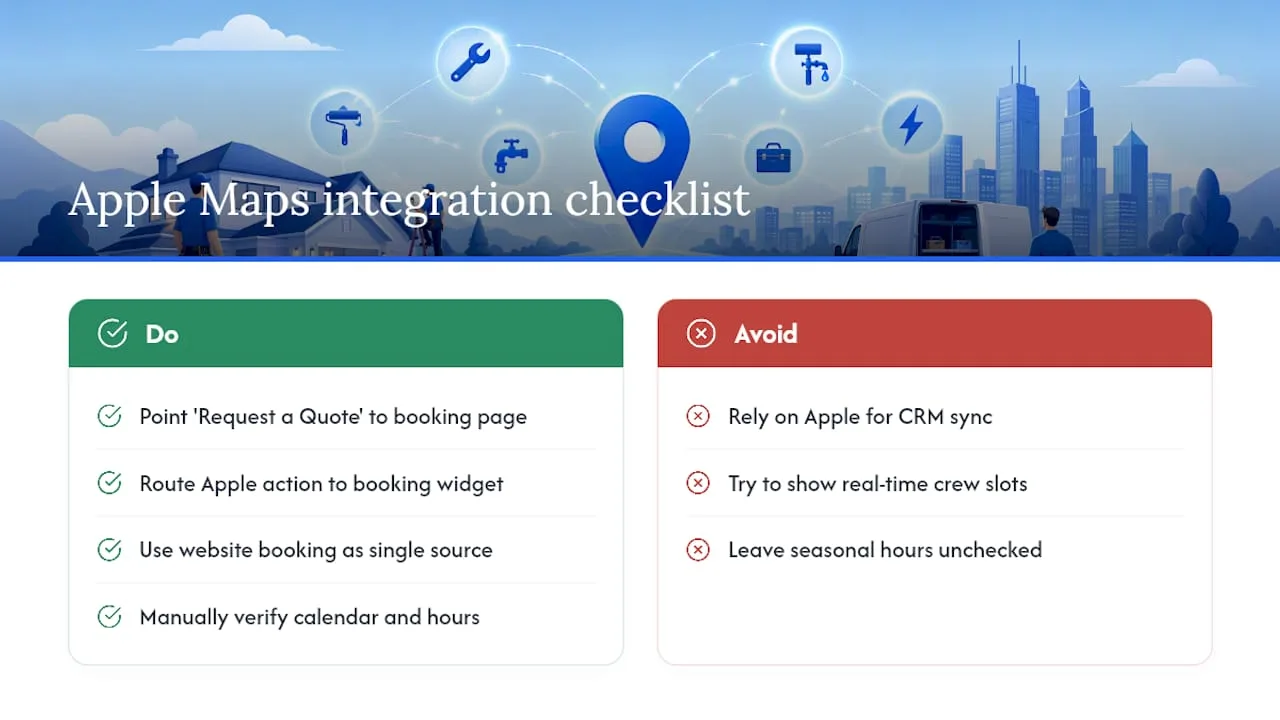
What you can do is treat your Apple Business action links as the bridge. Point your “Request a Quote” Custom Action at the same booking form your website and Google listing use, so every lead lands in one intake system regardless of which map sent them. If you run field service software like Jobber, Housecall Pro, or ServiceTitan, route your Apple Maps action link to whatever booking widget that platform already generates. That keeps your dispatch and scheduling data unified even though Apple itself isn’t feeding data into it directly.
Calendar and hours sync is worth double-checking manually. Apple Business doesn’t automatically pull live availability from scheduling tools, so if your team’s hours shift seasonally, someone needs to update the listing by hand. Contractors running multiple trucks with staggered schedules sometimes list general business hours and handle actual appointment slots through the booking page linked from the action button instead of trying to reflect real-time crew availability inside Apple Maps itself.
The workaround that saves the most friction: make your website booking page the single source of truth. Every map platform, Apple included, links out to it. Update availability in one place, and every discovery channel stays accurate without extra manual work on your end.
Using Apple Maps for Service Area Mapping and Route Optimization
Apple Maps doesn’t have a contractor-specific “service area” field the way some platforms do. Your place card sits at a fixed address, which works fine for a shop with a storefront but creates a real gap for a roofer or landscaper who covers a 30-mile radius and never wants customers showing up at a warehouse.
The practical fix is describing your coverage area explicitly in your business description, since that’s the field customers actually read before deciding to call. “Serving Providence, Warwick, Cranston, and surrounding communities” tells a homeowner what they need to know even though Apple isn’t rendering a service polygon on the map itself.
For day-to-day routing between jobs, Apple Maps performs well as a driving tool. CarPlay integration means a crew leader can pull up the next job address hands-free, and Apple’s routing generally handles traffic and road closures competently. Contractors managing multiple trucks often use Apple Maps for turn-by-turn navigation between job sites while relying on separate field service software (rather than Apple Maps itself) to actually sequence the day’s stops for efficiency. Apple Maps gets you there; it doesn’t plan your route order for you the way dedicated dispatch software does.
Tips to Enhance Local SEO Through Apple Maps
Apple Maps ranking factors overlap with local search fundamentals more than most contractors expect, even though Apple runs a separate index from Google.
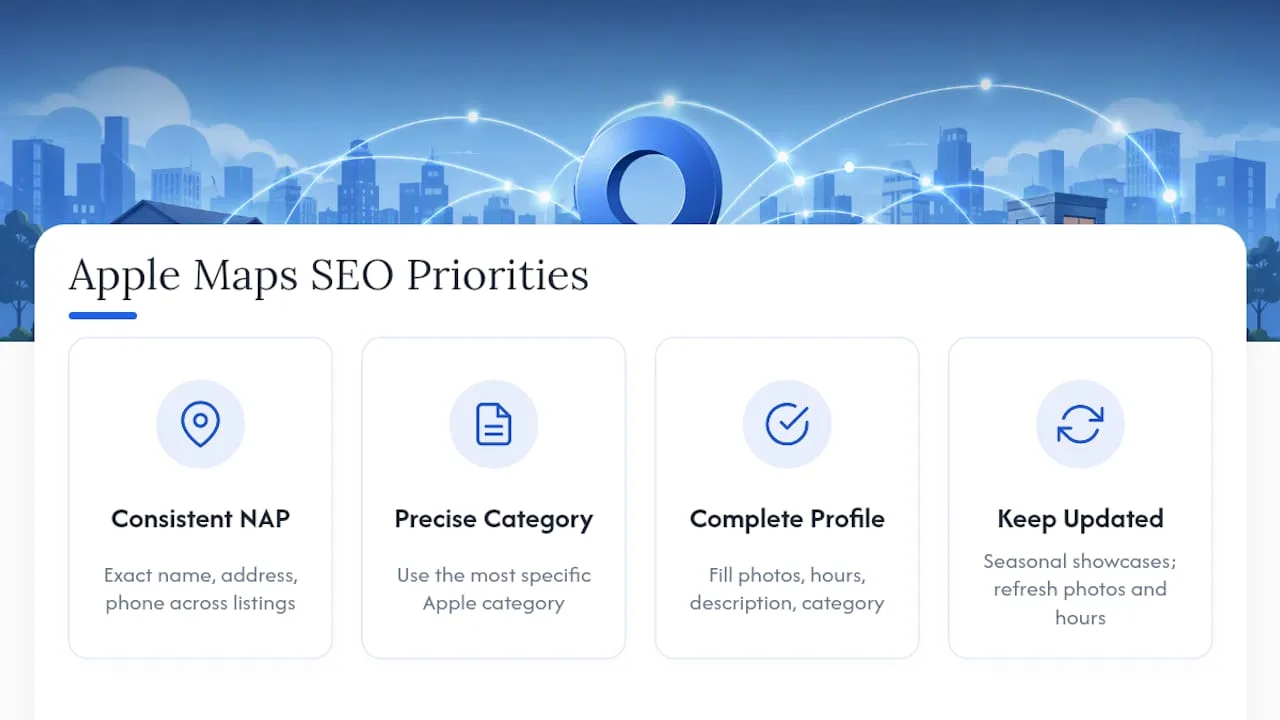
Consistency matters first. Your business name, address, and phone number on Apple Business should match what appears on your website and every other directory exactly, down to abbreviations like “St.” versus “Street.” Mismatches confuse Apple’s matching algorithm and can suppress your listing in relevant searches.
Category precision is the second lever. A utility-bill-verified listing tagged as “HVAC Contractor” surfaces for HVAC-specific queries far more reliably than one tagged generically as “Home Services.” Go as specific as Apple’s category list allows.
Completeness is the third, and the most overlooked. Apple Business guides for retailers and service businesses note that fully filled-out profiles, photos, hours, description, and category all present, tend to get more views than partial ones. An incomplete listing doesn’t just look unfinished to a customer; it likely ranks worse in Apple’s own results too.
Finally, keep your listing active. Update Showcases seasonally, refresh photos after major jobs, and adjust hours around holidays. A stale, unedited listing signals to both Apple and customers that the business behind it might be equally inactive.
How Contractors Should Manage Reviews on Apple Maps
Apple Maps pulls reviews from connected sources rather than running its own fully independent review engine the way Google does, which makes your response strategy slightly different from what you’d do on a Google Business Profile.
Respond to every review you can, positive and negative, and respond quickly. A same-week response to a critical review shows prospective customers you’re engaged, even when the review itself stings. Keep responses short, specific, and free of defensiveness. Thank the reviewer, address the specific issue mentioned, and if it’s a legitimate complaint, state plainly what you’re doing to fix it.
Volume matters as much as tone. A contractor with three reviews looks less established than one with forty, regardless of how glowing those three are. Building volume takes a deliberate ask after every completed job. Waiting for reviews to happen organically almost never produces enough of them to matter for ranking or trust.
The review flow works best when it’s automated rather than manual. Sending a text or email request the same day a job wraps, while the work is still fresh in a customer’s mind, produces dramatically higher response rates than a request sent a week later or not at all. Contractors who build this into their process consistently outpace competitors who only ask for reviews sporadically.
Apple Maps vs. Other Mapping Platforms: What Contractors Should Know
Apple Maps earns its place in a contractor’s marketing stack because of reach, not because it out-features every competitor. Apple positions the platform’s Place Cards, Showcases, and Actions as a way to reach customers across Maps, Siri, Wallet, and CarPlay, and that multi-surface reach is genuinely hard to replicate elsewhere.
Where Apple Maps falls short is depth. There’s no service-area radius tool, no direct CRM integrations, and a review system that leans on connected sources rather than running a fully native review engine. Contractors who need granular service-area targeting or deep third-party integrations will find those features better developed on other platforms.
The practical answer isn’t choosing one platform over another. It’s running Apple Business alongside your other local listings, since a contractor’s ideal customer might search by voice through Siri, by map through CarPlay, or by browser through a completely different search engine, often within the same week. Treat Apple Maps as one input feeding your website and follow-up system, and treat the other platforms the same way. The listing that actually converts is whichever one connects to a booking page that works and a follow-up process that doesn’t drop the lead.
Coastal Connect’s Perspective on Apple Maps for Contractor Growth
Claiming your Apple Business listing is table stakes, not a growth strategy on its own. What actually moves revenue is what happens after someone taps “Request a Quote”: whether that click lands on a form that converts, and whether your business calls back before a competitor does. Coastal Connect builds websites and automation for contractors across Rhode Island and Massachusetts specifically to close that gap.
— Tyson
How Coastal Connect Turns Your Apple Maps Listing Into Booked Jobs
Coastal Connect is the alternative to hiring a general marketing agency for contractors trying to turn Apple Maps clicks into booked jobs across Rhode Island and Massachusetts. A generic agency will happily claim your listing and call it done. Coastal Connect wires the whole path: the listing, the website that actually books the job, and the automated follow-up that catches every call your crew misses on a jobsite.
That means your “Request a Quote” action doesn’t just point somewhere. It points to a page built to convert, backed by local SEO and Google Business Profile management that keeps your visibility consistent across every platform, and supported by missed-call text-back and CRM automation so no lead goes cold while your team is on a roof or under a sink. Coastal Connect specializes exclusively in trades: plumbing, HVAC, electrical, roofing, and landscaping, with a local team that knows RI and MA towns by name.
Plans start with Foundation at $597 per month, scaling up through Growth and Scale as your booking volume grows. Check current pricing and book a free audit of your existing setup to see exactly where leads are slipping through.
Where to Verify These Steps Directly
Every setup and verification detail in this guide traces back to Apple’s own documentation, not secondhand summaries. Start with Apple’s guide to adding a single location for the exact Brands > Locations workflow, and review Apple’s sign-up and verification guidance for the 60-day window and document requirements. The Apple Business product page covers Showcases, Actions, and insights in more depth. For broader context on why Apple Maps matters for home-service businesses specifically, trade coverage from Roofing Contractor is worth a read.
Sources
- Add a single location in Apple Business - Apple Support
- Apple Business
- Dear Anna: How Do I Create More Business with Apple Maps? | Roofing Contractor
FAQ
Can I hide my home address on Apple Maps if I run a home-based business?
No. Apple Business has no service-area toggle or address-hiding option, so your verified address publishes as-is. Home-based contractors who need privacy should consider a commercial mailing address or evaluate whether Apple Maps fits their situation at all.
How long does Apple Business verification actually take?
Most listings clear in up to five business days, and you have 60 days total to complete verification once you start. Phone verification is typically the fastest path when Apple offers it.
Will claiming my Apple Maps listing increase calls?
A complete, verified listing with accurate hours, photos, and a working action link tends to convert more views into calls than an incomplete one, though results depend on your category, service area, and competition. Pairing your listing with a booking-ready website and missed-call automation typically has a bigger impact on actual booked jobs than the listing alone.
Can I let my marketing agency manage my Apple Business account for me?
Yes, through Apple’s Partner Access or Shared Access system using an Organization ID, without sharing your Apple Account password. Grant only the permission level a partner needs and audit that access periodically.
What does it cost to get professional help setting up and managing Apple Maps for my contracting business?
Coastal Connect’s plans start at $597 per month for Foundation, with Growth and Scale tiers available as your lead volume and automation needs grow. Current pricing and full plan details are on the pricing page.